
swissbuechi
Migrated from DVLS Auth to Entra ID, now I have to login every hour.
We recently migrated from AD Domain to Entra ID and experience the same reauthentication every 1h.
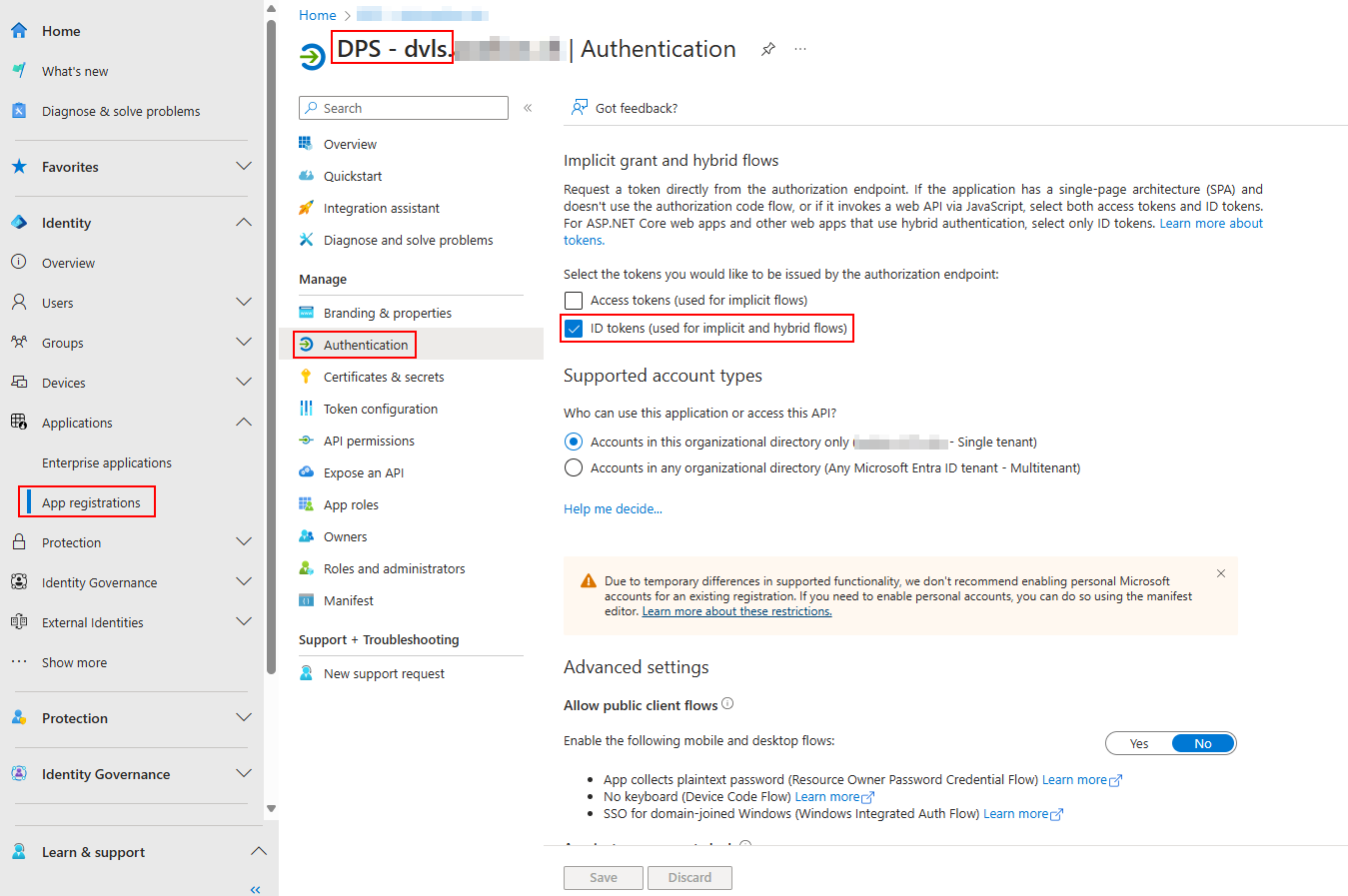
I just switched to ID Tokens in the DPS Server.
Make sure you also enable "ID Tokens" in the Authentication section of your Enter App Registration for it to work.
RemoteDesktopManager.cfg for all users
Hello @David
Sorry for replying to such an old thread, but I could not find anything newer related to this topic.
I would too like to centrally manage some settings of RDM for all our users.
Is the FAQ you mentioned already finished?
Bitwarden entry sync TOTP / Browser extension
Hi @Hubert Mireault
The 2024.2.19.0 release fixed the sync issue.
Thank you very much.
Bitwarden entry sync TOTP / Browser extension
Hello, @Hubert Mireault
Thank you very much for implementing this feature so quickly.
We now eventually moved from 2024.1 to 2024.2, and I was able to test your work:
After adding a global website template and reconfiguring the synchronizer, the OTP and URL fields from Bitwarden were populated in RDM and everything worked just fine.
Awesome work!
New issue: No new credentials found
To finalize the configuration, I moved the whole Bitwarden synchronizer entry to a different folder (same vault) and also reconfigured the destination folder path.
Apparently, this reconfiguration broke the whole synchronization for us. Every time we now hit "Synchronize", a message pops up saying "No new credentials found", even when I create a new entry in Bitwarden. The user configured in the synchronizer is fine, I can still list all folders/collections and select them in the filter. In the Bitwarden web Vault, the entries are also listed when using the account configured in the synchronizer.
What I've already tried:
Moving the synchronizer to a different vault -> No success
Deleting the "old" Created entries -> No success
Deleting the synchronizer and creating a new one with the same config -> No Success
Could you maybe assist us in this case? I could also create a new post, since this issue is not directly related to this thread.
Thank you
Regards,
Raphi
auto type action: Configure delay / Shortcut for Domain missing
Hello @David Hervieux
Domain shortcut issue:
Thank you, looking forward to the fix.
Auto-type delay feature request:
My request is not limited to a specific type of entry. It would affect every entry that supports the new "auto-type" feature for username, password or domain.
I will now try to describe my issue in more detail:
Currently, there is a delay of less than 1 second until the auto-type feature starts simulating your keyboard strokes after you initiated the "auto typing" via the right-click context menu on the entry. Often, this delay is not long enough to move your mouse and focus on the correct input field. It would be very nice if we could configure a delay of about 2-3 seconds until the auto-typing starts, after you click on the "type username" button in RDM. This would give the user enough time to switch the application or screen and select the correct input window where the credentials should be entered by simulating the keyboard strokes.
I hope this explains my feature request in enough detail enough to be implemented.
Thank you very much, and have a nice day.
Kind regards,
Raphi
Sealed entries: Add support for website type / Linked entries
Thank you very much!
Regards,
Raphi
Sealed entries: Add support for website type / Linked entries
We're using the new sealed entries feature introduced in 2024.2 to protect our break glass and recovery accounts, and it's working very well.
Currently, only username/password type entries are supported. Additionally, a username/password, which is linked to a website, can't be sealed.
Would it be possible to extend this feature and also support website entry types? And being able to seal a linked entry would also be nice to have.
Thank you in advance.
Regards,
Raphi
Sealed entries
Got implemented in 2024.2.
Inside 2024.2: Layered protection with sealed entries - Devolutions Blog
auto type action: Configure delay / Shortcut for Domain missing
We're currently testing the new auto type feature introduced in 2024.2.8.0. (Currently using 2024.2.16.0 64-bit)
It comes in quite handy when using TeamViewer or other remote access tools that do not support copy/paste.
auto type delay (feature request)
Would it be possible to extend the delay before the auto-type kicks in? Currently, it's nearly impossible to switch the focus before the auto typing starts.
It would also be nice if this delay could be centrally configured.
auto type keyboard shortcut (bug?)
Currently, there is no option to configure a shortcut for the auto typing of the domain. If you configure a shortcut for the username, it's displaying the same shortcut for the domain, and both are not working.
Thank you very much for your feedback.


CultureNotFoundException - Culture is not supported - Remote Desktop Manager
Today we upgraded to RDM 2024.2.16 and the issue is gone.
Thank you a lot!
Bitwarden entry sync TOTP / Browser extension
Awesome, thank you a lot for the fast implementation. Looking forward to updating our RDM in the near future.
Take note the URL will only be synchronized if you are using a template of type Website to import the entries as a website
Since the entries get auto created in RDM when using the synchronizer, I'm assuming you changed the default entry template from "Username/Password" to "Website"?
Or did you implement an option to manually configure the type of entry which the synchronizer should create?
Thanks for clarification.
Bitwarden entry sync TOTP / Browser extension
Hello,
Changing the entry type from username/password to website (to allow the sync of all the configured URLs) and supporting the TOTP field again would be awesome!
Looking forward to further updates.
Thank you
Regards
Bitwarden Synchronizer TOTP Import
Hallo Gabriel,
Ist dieses Feature in der Version 2024.1.28 noch vorhanden?
Wir möchten gerade die Bitwarden Integration aktivieren, jedoch hat der TOTP sync bei unserem Test ebenfalls nicht funktioniert.
Hier noch ein neuer Post dazu:
Bitwarden entry sync TOTP / Browser extension (devolutions.net)
Besten Dank für die Antwort.
Bitwarden entry sync TOTP / Browser extension
Hello Hubert
Thank you for the fast answer.
We're looking forward to the 2024.2 release to utilize the improved synchronizer with the ID matching.
I've just found a 2y old post about Bitwarden Synchronizer TOTP in version 2022.2.
Bitwarden Synchronizer TOTP Import (devolutions.net)
catchall asked: (translated from german to english)
Can't import a TOTP key with the Bitwarden Synchronizer?
Gabriel Degrandpré answered: (translated from german to english)
The problem you reported has been fixed by our technical department. The fix should be available in the latest version of RDM, 2022.2.24.0.
So it seems to me that this feature for the synchronizer was already implemented? Was this removed later on, or does it not work again?
Bitwarden entry sync TOTP / Browser extension
Hello
We needed to move a few website credentials from RMD to Bitwarden.
Now we're looking for the most simple way to allow the RDM users to still use the website credentials from Bitwarden with RDM through the Devolutions Workspace Browser Extension.
We've tested both options, documented here: Configure a Bitwarden entry in Remote Desktop Manager - Devolutions Documentation
Synchronizer:
Positive:
Less effort, since a whole collection can be synced
Negative:
URLs are not synced, so the browser extension is basically useless
Does not sync TOTP
When linking the credentials to a standalone website entry, every time a change is made to the synced entry, the linked credentials are removed, since the entry is being recreated instead of updated. This would allow us to use the browser extension...
Due to all the drawbacks of the synchronizer, we've decided to give the Bitwarden Credential Management a try.
Credential Management:
Positive:
Linked credentials work as expected, since the entry is never being recreated
Browser extension can be used with linked credentials
Negative:
TOTP from Bitwarden is not synced to RDM
URLs from Bitwarden are not synced to RDM
Is there any better way to achieve the best possible user experience with the least administrative effort?
If the Credential Management with static linking would also sync TOTP, we would almost be happy...
Manually configuring the credential linking and URLs is not a big deal, but not having the TOTP synced is kind of a dealbreaker.
Thank you very much for your reply.
RDM: 2024.1.28
CultureNotFoundException - Culture is not supported - Remote Desktop Manager
Thank you very much.
I will upgrade to 2024.1.30 as soon as it's available.
CultureNotFoundException - Culture is not supported - Remote Desktop Manager
Thank you very much for the fast reply.
I've configured the system env variable to false and rebooted my system.
Sadly, the error still persists.
Env:
PowerShell 7.4.2
Loading personal and system profiles took 2950ms.
PS C:\Users\user> $Env:DOTNET_SYSTEM_GLOBALIZATION_PREDEFINED_CULTURES_ONLY
falseThe system uses a Swiss German keyboard layout.
KLID: 00000807
Everything else is set to en-US.
PS C:\Users\user> Add-Type -AssemblyName System.Windows.Forms
PS C:\Users\user> [System.Windows.Forms.InputLanguage]::CurrentInputLanguage
Culture   Handle LayoutName
-------   ------ ----------
en-US   67699721 US

PS C:\Users\user> Get-Culture

LCID             Name             DisplayName
----             ----             -----------
1033             en-US            English (United States)

PS C:\Users\user> Get-UICulture

LCID             Name             DisplayName
----             ----             -----------
1033 en-US English (United States)CultureNotFoundException - Culture is not supported - Remote Desktop Manager
Thank you for the reply.
The issue started for me about 6 months ago, I think. Can't remember exactly.
I will try the workaround.
Looks like everything is default en-US in my case.
Checking my initial setup language:
PS C:\Users\user> Get-ItemPropertyValue -Path "HKLM:\System\CurrentControlSet\Control\Nls\Language" -Name "InstallLanguage"
0409
PS C:\Users\user> [CultureInfo]::InstalledUICulture | fl
Parent : en
LCID : 1033
KeyboardLayoutId : 1033
Name : en-US
IetfLanguageTag : en-US
DisplayName : English (United States)
NativeName : English (United States)
EnglishName : English (United States)
TwoLetterISOLanguageName : en
ThreeLetterISOLanguageName : eng
ThreeLetterWindowsLanguageName : ENU
CompareInfo : CompareInfo - en-US
TextInfo : TextInfo - en-US
IsNeutralCulture : False
CultureTypes : SpecificCultures, InstalledWin32Cultures
NumberFormat : System.Globalization.NumberFormatInfo
DateTimeFormat : System.Globalization.DateTimeFormatInfo
Calendar : System.Globalization.GregorianCalendar
OptionalCalendars : {System.Globalization.GregorianCalendar}
UseUserOverride : True
IsReadOnly : TrueHex: 0409
Dec: 1033
Country Code: en-US
Source:
CultureNotFoundException - Culture is not supported - Remote Desktop Manager
When I try to set a password on a new or existing entry, I always receive the CultureNotFoundException.
I already tried changing my culture to English (UK) for my current user, new users and system.
.NET Desktop 8 and RDM 2024.1 were reinstalled.
Local Devulutions appdata folder was also deleted.
No success so far...
Version: 2024.1.28.0 64-bit
Culture: English (United States)
CultureNotFoundException - Culture is not supported. (Parameter 'culture')
4096 (0x1000) is an invalid culture identifier.

   at System.Globalization.CultureInfo.GetCultureInfo(Int32 culture)
   at System.Windows.Forms.InputLanguage.get_LanguageTag()
   at System.Windows.Forms.InputLanguage.get_Culture()
   at DevExpress.XtraEditors.TextEditController.InputHandler.InputHandler.get_AllowUpdateRightToLeft()
   at DevExpress.XtraEditors.TextEditController.InputHandler.InputHandler.CheckTextDirection(Keys key, Boolean keyUp)
   at DevExpress.XtraEditors.TextEditController.TextEditController.OnKeyDown(KeyEventArgs e)
   at DevExpress.XtraEditors.TextEdit.AdvTextEditWorkingStrategy.OnKeyDown(KeyEventArgs keyEventArgs)
   at DevExpress.XtraEditors.TextEdit.OnKeyDown(KeyEventArgs e)
   at Devolutions.RemoteDesktopManager.Controls.PasswordTextBox.OnKeyDown(KeyEventArgs e)
   at System.Windows.Forms.Control.ProcessKeyEventArgs(Message& m)
   at System.Windows.Forms.Control.WmKeyChar(Message& m)
   at System.Windows.Forms.Control.WndProc(Message& m)
   at DevExpress.Utils.Controls.ControlBase.BaseWndProc(Message& m)
   at DevExpress.XtraEditors.TextEdit.BaseEditWndProc(Message& msg)
   at DevExpress.XtraEditors.TextEdit.WndProc(Message& msg)
   at System.Windows.Forms.NativeWindow.Callback(HWND hWnd, MessageId msg, WPARAM wparam, LPARAM lparam)
------------------------ extended stack ------------------------
   at Devolutions.RemoteDesktopManager.Forms.FrmErrorMessage.ShowErrorMessage(Exception exception, String message, String title)
   at Devolutions.RemoteDesktopManager.Forms.FrmErrorMessage.ShowErrorMessage(Exception exception, String title)
   at Devolutions.RemoteDesktopManager.Managers.LogManager.OnThreadException(Object sender, ThreadExceptionEventArgs t)
   at System.Windows.Forms.Application.ThreadContext.OnThreadException(Exception ex)
   at System.Windows.Forms.NativeWindow.Callback(HWND hWnd, MessageId msg, WPARAM wparam, LPARAM lparam)
   at Windows.Win32.PInvoke.DispatchMessage(MSG* lpMsg)
   at System.Windows.Forms.Application.ComponentManager.Microsoft.Office.IMsoComponentManager.FPushMessageLoop(UIntPtr dwComponentID, msoloop uReason, Void* pvLoopData)
   at System.Windows.Forms.Application.ThreadContext.RunMessageLoopInner(msoloop reason, ApplicationContext context)
   at System.Windows.Forms.Application.ThreadContext.RunMessageLoop(msoloop reason, ApplicationContext context)
   at System.Windows.Forms.Form.ShowDialog(IWin32Window owner)
   at DevExpress.XtraEditors.XtraForm.ShowDialog(IWin32Window owner)
   at Devolutions.RemoteDesktopManager.Managers.ActionManager.EditConnection(IConnectionSource source)
   at Devolutions.RemoteDesktopManager.Managers.SessionMenuManager.MnuEditConnection_Click(Object sender, EventArgs e)
   at Devolutions.RemoteDesktopManager.Controls.EnhancedBarButtonItem.OnClick(BarItemLink link)
   at DevExpress.XtraBars.BarItemLink.OnLinkClick()
   at DevExpress.XtraBars.BarButtonItemLink.OnLinkAction(BarLinkAction action, Object actionArgs)
   at DevExpress.XtraBars.ViewInfo.BarSelectionInfo.ClickLink(BarItemLink link)
   at DevExpress.XtraBars.ViewInfo.BarSelectionInfo.UnPressLink(BarItemLink link)
   at DevExpress.XtraBars.Controls.CustomLinksControl.OnMouseUp(MouseEventArgs e)
   at DevExpress.XtraBars.Controls.CustomPopupBarControl.OnMouseUp(MouseEventArgs e)
   at System.Windows.Forms.Control.WmMouseUp(Message& m, MouseButtons button, Int32 clicks)
   at System.Windows.Forms.Control.WndProc(Message& m)
   at DevExpress.XtraBars.Controls.CustomControl.WndProc(Message& msg)
   at System.Windows.Forms.NativeWindow.Callback(HWND hWnd, MessageId msg, WPARAM wparam, LPARAM lparam)
   at Windows.Win32.PInvoke.DispatchMessage(MSG* lpMsg)
   at System.Windows.Forms.Application.ComponentManager.Microsoft.Office.IMsoComponentManager.FPushMessageLoop(UIntPtr dwComponentID, msoloop uReason, Void* pvLoopData)
   at System.Windows.Forms.Application.ThreadContext.RunMessageLoopInner(msoloop reason, ApplicationContext context)
   at System.Windows.Forms.Application.ThreadContext.RunMessageLoop(msoloop reason, ApplicationContext context)
   at Devolutions.RemoteDesktopManager.Program.Main(String[] args)