Migrated from DVLS Auth to Entra ID, now I have to login every hour.
Migrated from DVLS Auth to Entra ID, now I have to login every hour.

Hi
DVLS: 2024.2.9.0 / RDM 2024.2.20.0 / Workspace for Firefox / Workspace for Windows 2024.2.4 /Workspace for iOS 2024.2.4
After I changed from Devolutions Authentication to Entra ID I constantly have to login, and it's the same for all of above, maybe except for RDM, which only needs auth at startup.
But mostly for the Workspace apps, which saved the credentials forever, it's really frustrating having to login all the time, especially when the app shows that it has passwords, and first on access they "UPS, I log off".
Is there a way to make Workspace save the credentials like with Devolutions authentication?
My, I think, relevant settings is configured like this: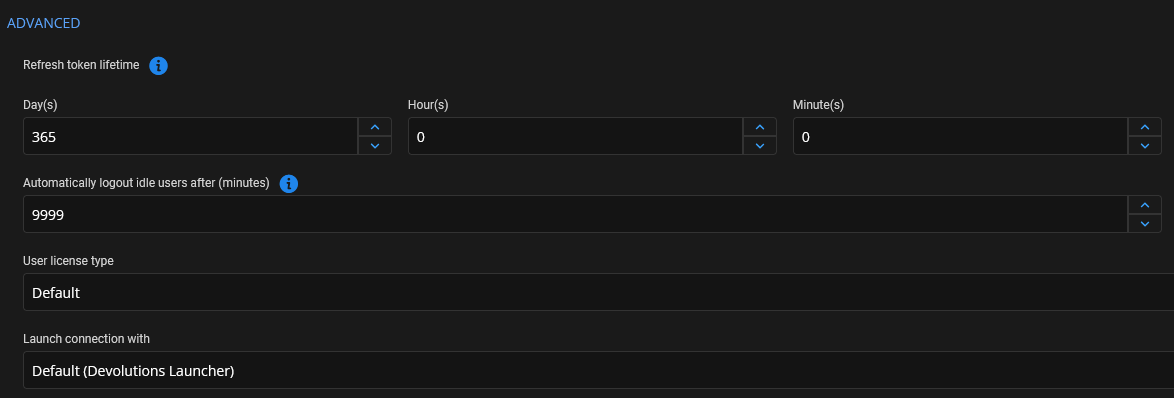
Regards Lars
Remote Desktop Manager connected with Devolutions Server running newest versions.
------------------------Signature------------------------
Sorry if any of above sounds harsh or provoking, it is NOT meant as such, but I have Asperger's and don't always know.
My intentions is always to be friendly.
-------------------------------------------------------------
aae5bda4-cd59-4c4a-8654-e2a4e937e379.png
All Comments (25)
Hello,
Thank you for contacting us on that matter!
We have successfully received your post, and a technician will be assigned to your post as soon as possible.
In the meantime, did the problem started after an update/upgrade? Thank you for letting us know. If you have any other questions, feel free to let us know.
Best regards,
Maxim Robert
Hi
No, I just converted. I could try and upgrade to the latest that came was it yesterday'ish.
Regards Lars
Remote Desktop Manager connected with Devolutions Server running newest versions.
------------------------Signature------------------------
Sorry if any of above sounds harsh or provoking, it is NOT meant as such, but I have Asperger's and don't always know.
My intentions is always to be friendly.
-------------------------------------------------------------
My Firefox extension always show this error, if that is an indication for something
Remote Desktop Manager connected with Devolutions Server running newest versions.
------------------------Signature------------------------
Sorry if any of above sounds harsh or provoking, it is NOT meant as such, but I have Asperger's and don't always know.
My intentions is always to be friendly.
-------------------------------------------------------------
ff49b9af-8cb8-4af0-b724-7bf330cb1911.png
Hello,
Thank you for the error message screenshot. I'll need to talk to our development team about this.
Have you verified the data source logs or the Login attempts to see if there were any logs related to the error message you are receiving?
Best regards,
Hello,
Are you also disconnected from the web interface every hour?
Best regards,
Hello,
Are you also disconnected from the web interface every hour?
Best regards,
I will double check, but a question back, should there be any difference, whether I get logged out or not, if the DVLS web tab is kept open or is closed?
Note: NOT the whole browser, it is kept open, its "just" the tab, in question.
Remote Desktop Manager connected with Devolutions Server running newest versions.
------------------------Signature------------------------
Sorry if any of above sounds harsh or provoking, it is NOT meant as such, but I have Asperger's and don't always know.
My intentions is always to be friendly.
-------------------------------------------------------------
And I don't think RDM does it as well, but to begin with I hadn't changed my username in Data source.
Could that be a culprit? - Since you don't specify your username in Web extension, but is it still cached? - I will see if I can check a bit on this.
Remote Desktop Manager connected with Devolutions Server running newest versions.
------------------------Signature------------------------
Sorry if any of above sounds harsh or provoking, it is NOT meant as such, but I have Asperger's and don't always know.
My intentions is always to be friendly.
-------------------------------------------------------------
Hello,
The Devolutions Server web interface shouldn't log you out unless you configured a logout on idle timer, which I see that you've set to 9999 (note that you can set it to 0 to deactivate the option).
The Devolutions Server web interface should not affect the Workspace application unless you are also disconnected from the web interface, in which case there might be a more general issue.
RDM having the username specified shouldn't change the behavior. Either the issue is with the Workspace applications or it is with the Devolutions Server token.
Best regards,
Its the Wrokspace application.I have been connected to RDM an Web all day.
Must have been some startup issues I had to begin with on those 2 platforms.
But it still seams to affect Workspace for Windows, Firefox and iOS.
Should I create a new thead in Workspace forum, or can you move it?
/Lars
Remote Desktop Manager connected with Devolutions Server running newest versions.
------------------------Signature------------------------
Sorry if any of above sounds harsh or provoking, it is NOT meant as such, but I have Asperger's and don't always know.
My intentions is always to be friendly.
-------------------------------------------------------------
Hello,
I've moved the thread to the Workspace support forum. I will verify with our development team for the error message that you shared. Have you found any logs under the data source logs or the Login attempts?
Also are you getting the same error message in other workspace application other than on Firefox?
Best regards,
I have this from the Windows version:
 -----------------
 2024.2.4: 2024-08-22 19:12:49.165737Z | Error altering table.
 -----------------
 2024.2.4: 2024-08-22 19:12:49.164736Z | Error altering table.
 -----------------
 2024.2.4: 2024-08-22 19:13:05.689346Z | Error getting user access,
 -----------------
 2024.2.4: 2024-08-22 19:13:15.251944Z | Error getting partial connection,
 -----------------
 2024.2.4: 2024-08-24 17:02:45.190588Z | Error getting user access,
 -----------------
 2024.2.4: 2024-08-24 17:02:55.885693Z | Error getting partial connection,
 -----------------
 2024.2.4: 2024-08-27 14:38:35.861401Z | Error getting user access,
 -----------------
 2024.2.4: 2024-08-27 14:38:47.982776Z | Error getting partial connection,
 -----------------
 2024.2.4: 2024-08-27 19:12:02.294843Z | Error getting partial connection,
 -----------------
 2024.2.4: 2024-08-27 19:12:04.382937Z | Error getting partial connection,
But I think this is more of a symptom than a hint.
iOS Didn't seam to have anything. Now I have cleared the app log, then I will check tomorrow, as it's midnight for me now, if there is anything.
I don't know how to get logs from the FF Extension, I can see that there is a "Log debug information" checkbox but it doesn't save that setting.
Just as I was writing this message, I wanted to add an entry in RDM, and for RDM to save, it had to do a reauthorize. (Where it opens a webpage, which then automatically logged in with Entra ID).
The website still works fine.
RDM had been sitting still for a while, so maybe it's HAProxy which interferes and for some reason breaks the TCP re-connection towards the DVLS server?
The only thing talking against this, is that with Devolution Authentication, I have/had no issues, and that was also through HAProxy, which is why I didn't mentions HAProxy in my original post.
Because it also strikes me that I initially has issues getting RDM/Workspace to see that there were a server at the end of the URI, but the web interface were working fine.
The reason I write as if this is something I have just setup, is because I have setup my OPNsense firewall from the ground again.
I'm actually not sure what made the RDM/workspace "see" the DVLS server, but I believe that it first began working after I disabled HTTP/2 for the DVLS server in HAProxy. It apparently wasn't enough to enable the x-forwarded-for (or what it's called :) )
I have disabled stick-tabel, as I only have one server in my back-end pool, but is that needed still? (if you know of cause :))
I'm sorry if above is unclear, I'm kinda just thinking out loud, and needs to go to bed :D
Regards Lars
Remote Desktop Manager connected with Devolutions Server running newest versions.
------------------------Signature------------------------
Sorry if any of above sounds harsh or provoking, it is NOT meant as such, but I have Asperger's and don't always know.
My intentions is always to be friendly.
-------------------------------------------------------------
Hi,
We are still investigating your issue.
To gather logs from the Firefox extension, you can follow these steps:
- In your Firefox browser, go to
about:debugging#/runtime/this-firefox - Under the “Extensions” section, find Devolutions Workspace and click “Inspect” next to it.
A new window will open. Keep this window open, and when the logout occurs:
- In the opened window, navigate to the “Network” tab.
- Look for a call labeled “token” in red.
- Click on this call and take screenshots of the “Headers”, "Request" and “Response” tabs.
You can send these screenshots to me via private message.
Best regards,
Olivier Désalliers
Hi
I had the error, then I disabled "always on top", which apparently relauches the dev console an clears it.

But on both launches of the dev console the following error is shown, I don't know if it's relevant, but posting it so you can decide :)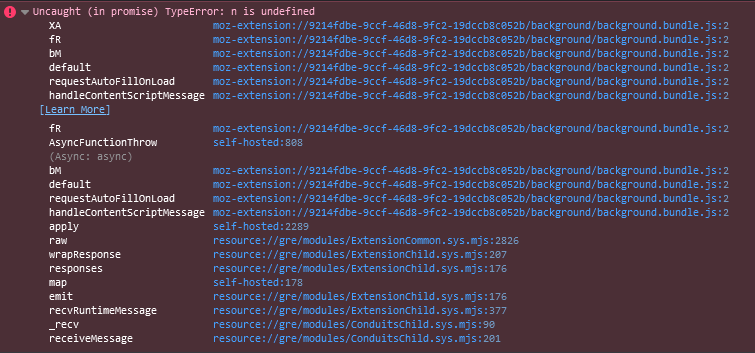
And I will return, once the error occurs again.
/Lars
Remote Desktop Manager connected with Devolutions Server running newest versions.
------------------------Signature------------------------
Sorry if any of above sounds harsh or provoking, it is NOT meant as such, but I have Asperger's and don't always know.
My intentions is always to be friendly.
-------------------------------------------------------------
3b80bee5-1ee0-426a-91f8-791023c4f368.png
Just a quick update from my side, I have tested the behavior on a server, where I could set it to connect directly to DVLS, instead of through HAProxy, and it behaves the same.
So I believe that HAProxy is not at fault here.I also see that I haven't returned with the error yet, that is an mistake from my side. I will capture it and send it as soon as possible.
EDIT: I have sent the debug log to Olivier Desalliers in a PM.
Remote Desktop Manager connected with Devolutions Server running newest versions.
------------------------Signature------------------------
Sorry if any of above sounds harsh or provoking, it is NOT meant as such, but I have Asperger's and don't always know.
My intentions is always to be friendly.
-------------------------------------------------------------
Hi,
The error is not related, but we will still investigate it to see if it could create side effects.
We have received the debug logs and will analyze them.
Thank you,
Olivier Désalliers
Hi, did you manage to log into your DVLS on iOS using Entra ID? We are trying to reproduce the behavior you described internally.
Best regards,
Sébastien Aubin
Product manager - Password Management
Hi
Yes, I have been logged into both Workspace and RDM with Entra ID as login method.
/Lars
Remote Desktop Manager connected with Devolutions Server running newest versions.
------------------------Signature------------------------
Sorry if any of above sounds harsh or provoking, it is NOT meant as such, but I have Asperger's and don't always know.
My intentions is always to be friendly.
-------------------------------------------------------------
Hi,
Do you also have the same issue with the iOS app as with the extension? Do you have to log in repeatedly?
Thanks
Sébastien Aubin
Product manager - Password Management
Yes, and we have to move the issue back to a DVLS issue. RDM, both for Windows and iOS as well as DVLS web disconnects.
What I got confused about originally was that DVLS web and RDM's auth survive a computer reboot.
So here is mu guess as to what might happen:
Workspace connect to DVLS
DVLS responds, you are not authenticated, go here to get a use login.
Workspace spawns the login url and the user completes login.
Workspace returns to DVLS authentication should now be in order
DVLS responds approved here is your token and it is valid for a very long time.
Workspace retrieve entries, and works fine.
Then some hours pass, I go to Workspace.
Workspace says, oh hello, I just need to reconnect with DVLS and I have my valid token, 1 sec.
Workspace contacts DVLS, saying here is my valid token.
DVLS say what a fine and valid token you got there. Ill just check with Entra ID to see if you are disabled or deleted or revoked.
Entra ID the says that token it is expired long ago.
And Workspace gets weird error as this isn't an expeced response.
I have NO clue it this is in anyway hov it technically work, by I figure it along those lines.
So maybe I should look en Entra ID?
Could their be an overruling setting saing that a token must only be x hours old or?
Regards Lars
Remote Desktop Manager connected with Devolutions Server running newest versions.
------------------------Signature------------------------
Sorry if any of above sounds harsh or provoking, it is NOT meant as such, but I have Asperger's and don't always know.
My intentions is always to be friendly.
-------------------------------------------------------------
Hi,
Workspace connect to DVLS
DVLS responds, you are not authenticated, go here to get a use login.
Workspace spawns the login url and the user completes login.
Workspace returns to DVLS authentication should now be in order
DVLS responds approved here is your token and it is valid for a very long time.
Workspace retrieve entries, and works fine.
Then some hours pass, I go to Workspace.
Workspace says, oh hello, I just need to reconnect with DVLS and I have my valid token, 1 sec.
Workspace contacts DVLS, saying here is my valid token.
DVLS say what a fine and valid token you got there. Ill just check with Entra ID to see if you are disabled or deleted or revoked.
Entra ID the says that token it is expired long ago.
And Workspace gets weird error as this isn't an expeced response.
Aside from the Entra ID part which i personally don't know much about, you are very close to the reality 😅. The problem really seems to be on the Entra ID's configuration especially if you now have these problems on RDM and the web. We'll continue to test it on our side with our configured DVLS to help you figure out what's going on.
Best regards,
Sébastien Aubin
Product manager - Password Management
Too soon for final judgement, but it look very promising!
I was able to change the lifetime i Azure, and it seams like it's working.
I followed: https://learn.microsoft.com/en-us/entra/identity-platform/configure-token-lifetimes
And found that it is important to have this complete line:
Connect-MgGraph -Scopes "Policy.ReadWrite.ApplicationConfiguration","Policy.Read.All","Application.ReadWrite.All"
Else you will get access denied.
Afterwards I ran
$params = @{
  Definition = @('{"TokenLifetimePolicy":{"Version":1,"AccessTokenLifetime":"10:00:00"}}')
    DisplayName = "WebPolicyScenario"
  IsOrganizationDefault = $true
}
$tokenLifetimePolicyId=(New-MgPolicyTokenLifetimePolicy -BodyParameter $params).Id
WARNING: I set this as a default!!! This might not be desirable for all!
After running this and logging in, I haven't has a disconnect yet.
One thing to note is, I started a trail on Entra ID P1 - So I can't verify if P1 is really required.
But for future reference I recommend setting DVLS identical to the Azure Lifetime token. Not sure if DVLS will be able to get this token and and send the token lifetime to other products as Devolutions' token lifetime.
Regards Lars
Remote Desktop Manager connected with Devolutions Server running newest versions.
------------------------Signature------------------------
Sorry if any of above sounds harsh or provoking, it is NOT meant as such, but I have Asperger's and don't always know.
My intentions is always to be friendly.
-------------------------------------------------------------
Hi, thanks for your recommendation and the DVLS team will look at it. In the meantime, if you want to try, there is a setting that you can enable in the Microsoft Authentication section of the Server setting that 'force' your users to use only the DVLS token. This setting will 'override' the Microsoft token to use the DVLS one..png)
Best regards,
Sébastien Aubin
Product manager - Password Management
image (9).png
Hi
So sorry for the late reply, I thought I had created an update that it looked better, but I can see that I have not.
But yes, in my case, "Use only the TokenID for authentication" kind of revert back to the login experience I had, so thank you very much for that!
A suggestion would be to separate "Secret value" and this tickbox, as I expected that I had to fill out a secret value for the tickbox to work, or if the two are connected, the an "i" with information.
/Lars
Remote Desktop Manager connected with Devolutions Server running newest versions.
------------------------Signature------------------------
Sorry if any of above sounds harsh or provoking, it is NOT meant as such, but I have Asperger's and don't always know.
My intentions is always to be friendly.
-------------------------------------------------------------
We recently migrated from AD Domain to Entra ID and experience the same reauthentication every 1h.
I just switched to ID Tokens in the DPS Server.
Make sure you also enable "ID Tokens" in the Authentication section of your Enter App Registration for it to work.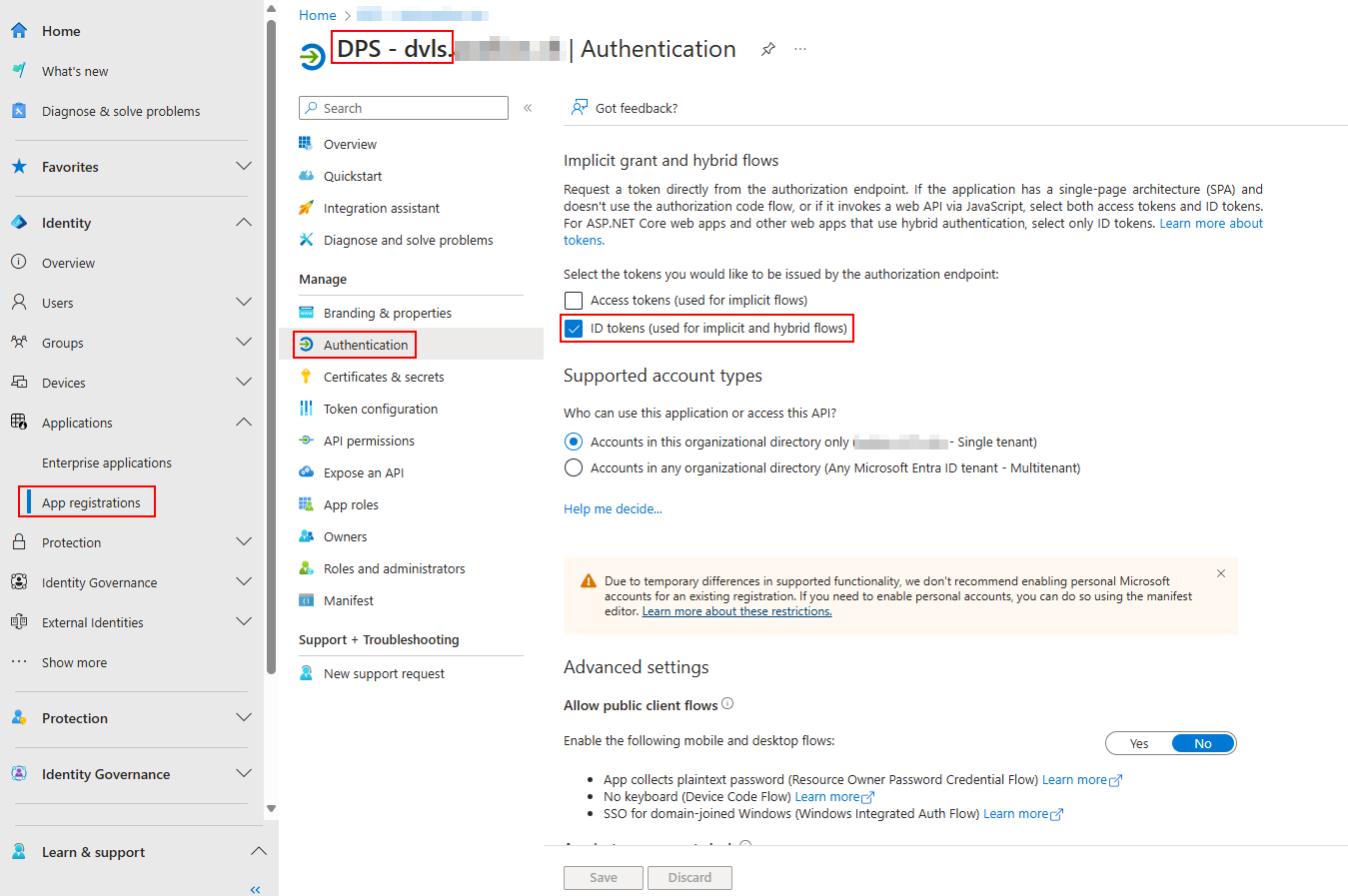
c478fb42-63aa-4108-a1aa-f3fa823e2aad.png
Hello,
Thank you for this feedback.
With the latest version, the Token ID has been removed from the Devolutions Server configuration; instead, the one from the Azure configuration will be used.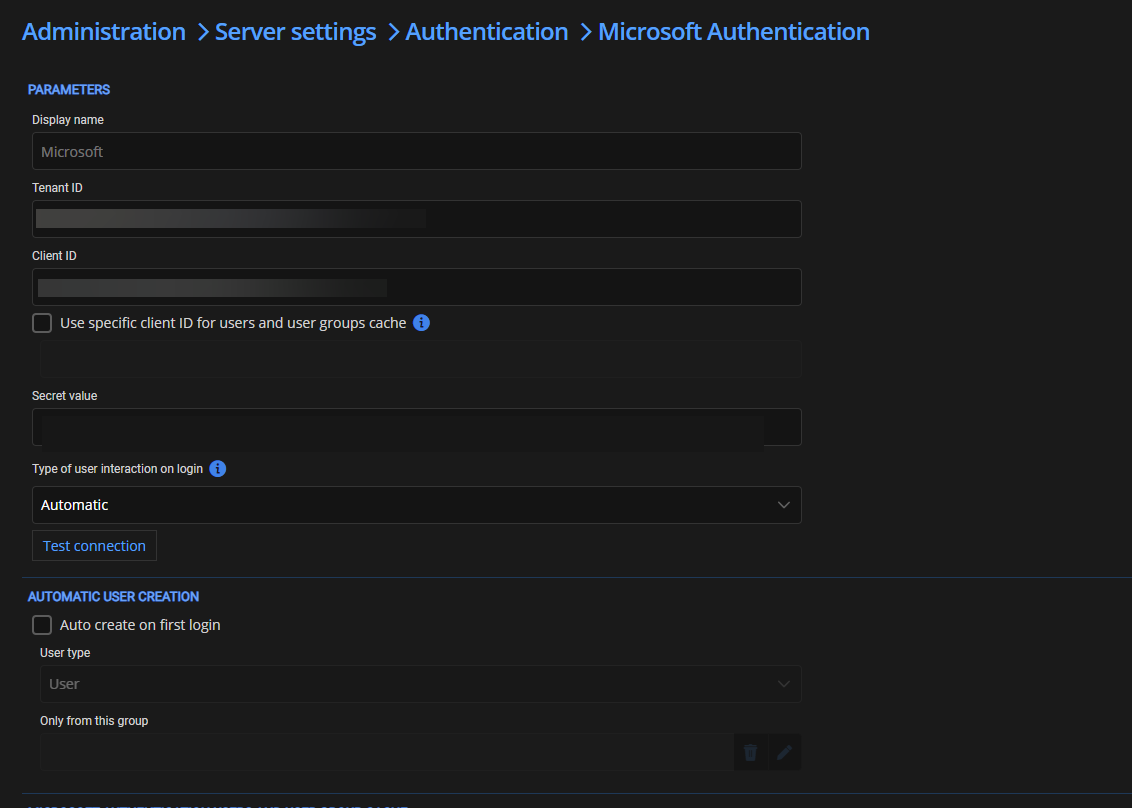
Best regards,
Patrick Ouimet
2025-01-21_07-50-40.png