Bitwarden entry sync TOTP / Browser extension

Hello
We needed to move a few website credentials from RMD to Bitwarden.
Now we're looking for the most simple way to allow the RDM users to still use the website credentials from Bitwarden with RDM through the Devolutions Workspace Browser Extension.
We've tested both options, documented here: Configure a Bitwarden entry in Remote Desktop Manager - Devolutions Documentation
Synchronizer:
Positive:
- Less effort, since a whole collection can be synced
Negative:
- URLs are not synced, so the browser extension is basically useless
- Does not sync TOTP
- When linking the credentials to a standalone website entry, every time a change is made to the synced entry, the linked credentials are removed, since the entry is being recreated instead of updated. This would allow us to use the browser extension...
Due to all the drawbacks of the synchronizer, we've decided to give the Bitwarden Credential Management a try.
Credential Management:
Positive:
- Linked credentials work as expected, since the entry is never being recreated
- Browser extension can be used with linked credentials
Negative:
- TOTP from Bitwarden is not synced to RDM
- URLs from Bitwarden are not synced to RDM
Is there any better way to achieve the best possible user experience with the least administrative effort?
If the Credential Management with static linking would also sync TOTP, we would almost be happy...
Manually configuring the credential linking and URLs is not a big deal, but not having the TOTP synced is kind of a dealbreaker.
Thank you very much for your reply.
RDM: 2024.1.28
All Comments (18)
Hello,
At the moment the OTP and URL are not fetched or synchronized from the Bitwarden integrations. We have a ticket opened for this already, so we will see about increasing the priority.
As a note, the Bitwarden synchronizer will be synchronizing by ID matching starting with our 2024.2 release (beta should be next week, full release in a few weeks). This should resolve your third negative point about the synchronizer, as entries will be updated instead of recreated when their credentials change.
Regards,
Hubert Mireault
Hello Hubert
Thank you for the fast answer.
We're looking forward to the 2024.2 release to utilize the improved synchronizer with the ID matching.
I've just found a 2y old post about Bitwarden Synchronizer TOTP in version 2022.2.
Bitwarden Synchronizer TOTP Import (devolutions.net)
catchall asked: (translated from german to english)
Can't import a TOTP key with the Bitwarden Synchronizer?
Gabriel Degrandpré answered: (translated from german to english)
The problem you reported has been fixed by our technical department. The fix should be available in the latest version of RDM, 2022.2.24.0.
So it seems to me that this feature for the synchronizer was already implemented? Was this removed later on, or does it not work again?
Hello,
You're right, it looks like it was once supported with the synchronizer. I don't think it was intentional that the support was removed, so we will check to add it back in.
As a note, to add support for the URL, and especially so that this works well with the Workspace browser extension, I think the solution would be for us to allow synchronizing as a Website entry rather than Username/Password. The Website entry supports the URL, credentials (username and password) as well as OTP, so we could simply add a configuration in the bitwarden synchronizer for this.
Regards,
Hubert Mireault
Hello,
Changing the entry type from username/password to website (to allow the sync of all the configured URLs) and supporting the TOTP field again would be awesome!
Looking forward to further updates.
Thank you
Regards
Hello,
Just letting you know, the Bitwarden synchronizer will now have a configuration to synchronize the OTP and the URL starting with version 2024.2.5.0. Take note the URL will only be synchronized if you are using a template of type Website to import the entries as a website. The username/password credential entry has no field for the URL.
I hope these changes will simplify your workflow. Let us know if you have any additional feedback.
Regards,
Hubert Mireault
Awesome, thank you a lot for the fast implementation. Looking forward to updating our RDM in the near future.
Take note the URL will only be synchronized if you are using a template of type Website to import the entries as a website
Since the entries get auto created in RDM when using the synchronizer, I'm assuming you changed the default entry template from "Username/Password" to "Website"?
Or did you implement an option to manually configure the type of entry which the synchronizer should create?
Thanks for clarification.
Hello,
In your Bitwarden entry, you will need to select a template, and that template must be a Website: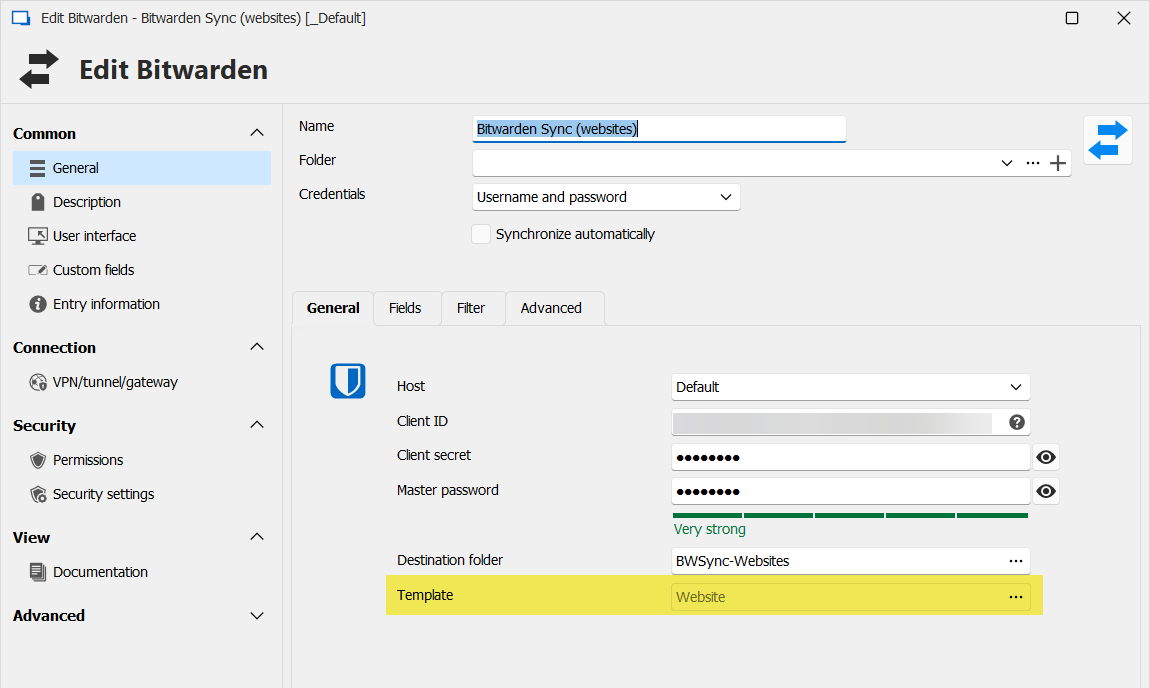
Then, make sure to check the URL box.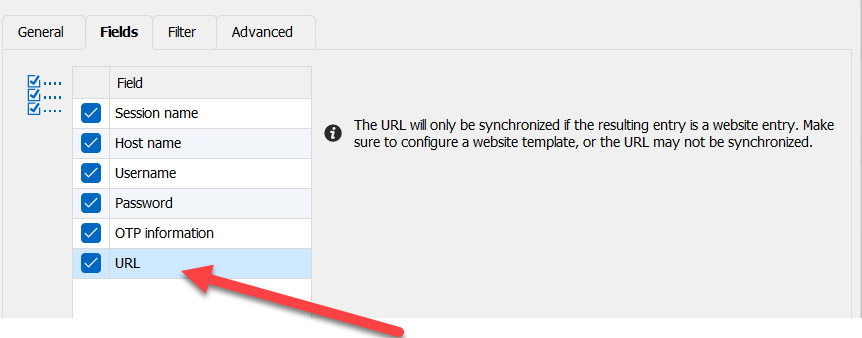
When both of these are done, RDM will import the entries as the type of your template, and synchronize the URLs.
Regards,
Hubert Mireault
cd2a37f4-839f-400e-8c59-a274d4c0c81f.png
8d9c523f-756c-43fd-8383-a82501285982.png
Hi,
Is it possible to do this but for a RDP session?
Like your example, I created the template but for RDP. After syncing, the host/URI isn't passing through.
Thanks
Hello,
Is the information for this host stored in the same field as the URL normally is on the Bitwarden side?
Regards,
Hubert Mireault
Hi,
Yes. Just like shown here: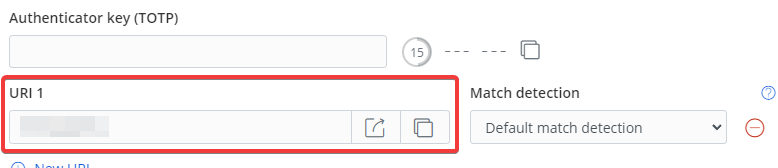
7b6ad488-46fc-4cf3-bbba-e4de343dc9e5.png
Thank you. It should be possible to add this relatively easily. I didn't think this was a common use case, which is why we didn't do it originally. I will open a ticket so we can support this.
As a note, the change we will make should allow this to work not only with RDP and Website entries, but other "session" type entries like SSH, etc.
Regards,
Hubert Mireault
And good news, this should be available starting with RDM 2024.2.12.0. Chances are this version will release next week.
Regards,
Hubert Mireault
Now that you mention it, actually SSH should be useful too. Awesome!
Thanks
Hello, @Hubert Mireault
Thank you very much for implementing this feature so quickly.
We now eventually moved from 2024.1 to 2024.2, and I was able to test your work:
After adding a global website template and reconfiguring the synchronizer, the OTP and URL fields from Bitwarden were populated in RDM and everything worked just fine.
Awesome work!
New issue: No new credentials found
To finalize the configuration, I moved the whole Bitwarden synchronizer entry to a different folder (same vault) and also reconfigured the destination folder path.
Apparently, this reconfiguration broke the whole synchronization for us. Every time we now hit "Synchronize", a message pops up saying "No new credentials found", even when I create a new entry in Bitwarden. The user configured in the synchronizer is fine, I can still list all folders/collections and select them in the filter. In the Bitwarden web Vault, the entries are also listed when using the account configured in the synchronizer.
What I've already tried:
- Moving the synchronizer to a different vault -> No success
- Deleting the "old" Created entries -> No success
- Deleting the synchronizer and creating a new one with the same config -> No Success
Could you maybe assist us in this case? I could also create a new post, since this issue is not directly related to this thread.
Thank you
Regards,
Raphi
Hello Raphi,
Thanks for the feedback! I'm glad the OTP and URL fields work well for you.
For your other issue, there is currently an issue with our Bitwarden integration as reported in the thread here: https://forum.devolutions.net/topics/42575/rdm-only-shows-a-small-subset-of-bitwarden-credentials#195819
Bitwarden changed something with their encryption, so any modified or new Bitwarden accounts will not be listed. This affects the Bitwarden credential but also the synchronizer, as the two use the same library. We have a fix for this that will be available in our next minor update, 2024.2.19.0. We are hoping to release it tomorrow or early next week.
On my end, with the fix, I don't reproduce the issue you're describing: when I change the destination folder, the entries that were synchronized with it originally will be moved to the destination folder successfully. Because of that, I think this fix should resolve your issue.
Once 2024.2.19.0 is available, if you still encounter this issue, let us know and we will go more in depth to try and reproduce this.
Regards,
Hubert Mireault
Hello,
Version 2024.2.19.0 should now be available, can you update to this version and see if the issue still occurs?
Regards,
Hubert Mireault
Hi @Hubert Mireault
The 2024.2.19.0 release fixed the sync issue.
Thank you very much.
Thanks for the feedback, I'm glad this now works for you! Don't hesitate to ask if there's anything else.
Regards,
Hubert Mireault