
jchilds
Active DIrectory Dashboard - multi-select functionality?
we're still running 2024.3.3 as we're awaiting a fix for a bug that was introduced that impacts our environment.
Looking forward to the new functionality!
RDM 2025 .net 9 Installer - Same issue from 2024 .net 8 installer
Is the .NET installer packaged in the msi, or does it make a call to download it? Asking as we limit the outbound connections our PAW workstations can connect to.
Thanks!
Active DIrectory Dashboard - multi-select functionality?
One of the things that the AD Dashboard does really well that ADUC doesn't do at all is to highlight Disabled devices. We have a utility that disables devices that haven't connected for >90 days, but we've never had a good clean-up routine to follow up on that.
On the face of it, this feature of the AD Dashboard this would appear to be very valuable. Except for one problem: you can't multi-select. This screen shot shows how potentially valuable this would be, but it all falls apart if we have to deal with the deletions one at a time. This functionality would be incredibly useful for both this and many other potential use-cases.
.png)
PAM - Approval process only when using JiT Elevation, or choose between PAM accounts on RDP Connections.
Hello Jchilds,
Thank you for adding your interest. I just want to be sure that I understand correctly. When you said
or at minimum, a Ticket ID, would be great.
Do you mean that it could be useful to have the Ticket ID mandatory only if a user requests JIT elevation? If the user doesn't request a JIT elevation, the ticket would not be mandatory. Am I right?
Best regards,
Correct. In full, only requiring a mandatory field AND possibly approval when a user requests JIT elevation. Withough elevation neither would be required.
Thanks,
J
Macros/Scripts/Tools - launch with 'My Privileged Account' or other PAM vault entry
Those are the tools I was referring to, however what isn't shown in your screenshot specificaly is some of the Windows-specific tools:
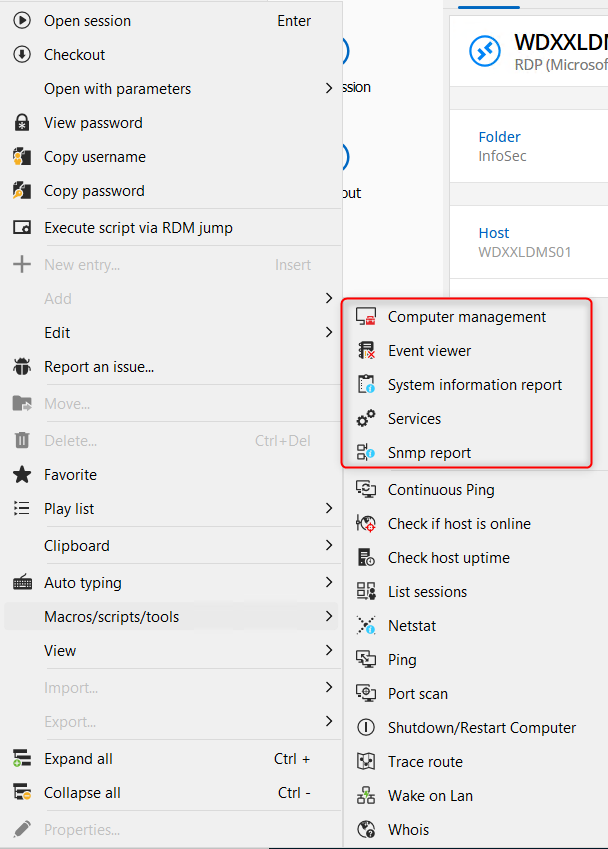
As you suggested, updating the session configuration under the 'Management Tools->Tools' does provide access, thanks!
One further question, it opens a CMD window and prompts for the PAM account password. Is there any way to have that passed through upon checkout, or from the existing check-out?
PAM - Approval process only when using JiT Elevation, or choose between PAM accounts on RDP Connections.
As well, I would love to see this functionality. We have a similar configuration to Freddy1, where named accounts with 'some' privilege are managed in our PAM vault. Giving them the disticnt ability to JIT elevate but requiring approval, or at miniumum, a Ticket ID, would be great.
Macros/Scripts/Tools - launch with 'My Privileged Account' or other PAM vault entry
In my organization our admins log into RDM/DVLS with standard user accounts without privilege.
We then leverage 'My Privileged Account' to launch RDP, SSH, Powershell and other customized sessions as each users named Privileged Account that is stored in our PAM Vault.
Unfortunately, since we're logged into RDM with standard accounts, none of the nice tools available in the Macros/Scripts/Tools avaiable to RDP sessions work. It would be great if these could leverage the credential specified in the session configuration, similar to the option to 'Open with Parameters' that is available.
Microsoft Azure synchronizer
Would be great if there was a synchronizer for Azure, similar to VMWare, Hyper-V and EC2 synchronizers.
'My Privileged Account' - if not configured, present the option to configure rather than show an error.
As mentioned in the Subject. If a connection/folder/etc has the credentials configured as 'My Privileged Account' it would be great if instead of just presenting an error message, it opened the dialogue to configure this property in the client.
Enable access to other types of entries in browser extension
We're in the process of migrating our IT org from LastPass to Devolutions Web Login/Workspace and DVLS.
It would be great if it was possible to expose other types of entries via the browser extension aside from Website entries. Payment Cards, Secure Notes, etc, as we leverage these types of entries extensively in LP.
Thanks!