
kschweiger
RDM Hashicorp Vault Domain Prefix/Suffix
Hi,
totally understand that our path structure is very unique and it would not make much sense to implement this into your product. Nevertheless, adding this information to the metadata instead looks like a good idea. I'll run a few tests and get back to you as soon as possible.
Apart from that, I would like to thank you for your super-fast support!
RDM Hashicorp Vault Domain Prefix/Suffix
Hi,
the domain is stored within the path: XXXXX/CustomerID/ad (test.local)/Administrator/Administrator
RDM Hashicorp Vault Domain Prefix/Suffix
Hi,
before I dive into my question I want to explain our current situation to provide a better understanding about our issue:
We use RDM RDP objects to connect to our Windows servers. The credentials are provided within each RDP object. We would like to get rid of these credentials in RDM and utilize our Hashicorp vault instead. So far so good. The problem is, that our vault structure does not include the domain suffix/prefix. Therefore, the login to a domain joined server won't work.
Our current test scenario:
RDP object with linked credentials to Hashicorp vault
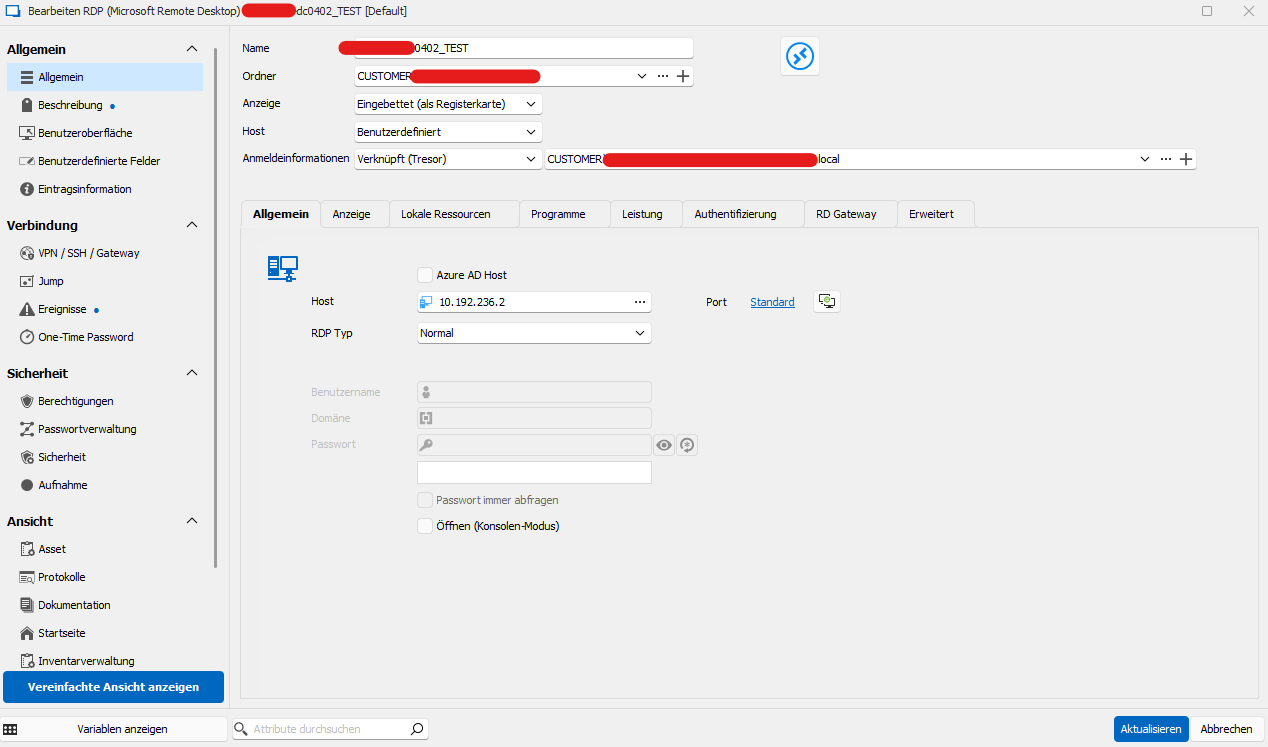
The credential object in Hashicorp looks like:
Path: XXXXX/CustomerID/ad (test.local)/Administrator/Administrator
As you can see, the user name itself does not contain any domain information. To make it work we would need to change the object to something like:
Path: XXXXX/CustomerID/ad (test.local)/Administrator/Administrator@test.local
Is there another way to tell RDM to use a specific domain without modifying the Hashicorp vault object? Any additional attribute or something like that? We want to avoid adding the domain suffix to all Hashicorp credentials as we have dependencies on certain automations.
RDM Hashicorp Secret Path wrong
Our test looks quite good. Thank you for fixing this issue!
RDM Hashicorp Secret Path wrong
Great news, looking forward to test it.
RDM Hashicorp Secret Path wrong
Hello,
do you have any news regarding this issue?
RDM Hashicorp Secret Path wrong
Hi Jonathan,
I've installed the newest update (v 2023.3.28.0) and tried to implement Vault secrets but unfortunately, it does not work.
Steps to reproduce this issue:
Create a new HashiCorp Vault RDM entry and specify the Host (URL)
Click on "Secret" (in German "Geheimnis") and browse to the corresponding credentials
After specifying the secret, the "Mount-Path" gets populated automatically

If I try to specify the "Secret" again (by clicking on the three dots), I receive the following error message: There was an error verifying the vault status. Please check the application logs for more information. It's the same error message I receive if I try to use this HashiCorp Vault entry while connecting via RDP to a Windows machine. Application logs states the same error message as in the initial issue request: "permission denied".
Do you have any idea what's wrong?
RDM Hashicorp Secret Path wrong
Hi,
thank you! I'll test it as soon as the patch has been released and let you know.
RDM Hashicorp with OIDC (ADFS)
Hi,
any news regarding this issue?
RDM Hashicorp Secret Path wrong
Looking forward to test it after the update has been released.
I'll keep you posted.
RDM Hashicorp with OIDC (ADFS)
Great news, thank you!
RDM Hashicorp Secret Path wrong
Great, thank you for your effort!
RDM Hashicorp Secret Path wrong
Hi Carl,
thank you!
Sure - what information (or access to which services/servers/applications) do you need for it?
RDM Hashicorp Secret Path wrong
Hi,
we experience a strange issue with the Hashicorp Vault integration in RDM.
Our secret-engine (KV-v2) is mapped to the path "so/secret" and therefore, we define as Hashicorp Vault entry in RDM the following values:
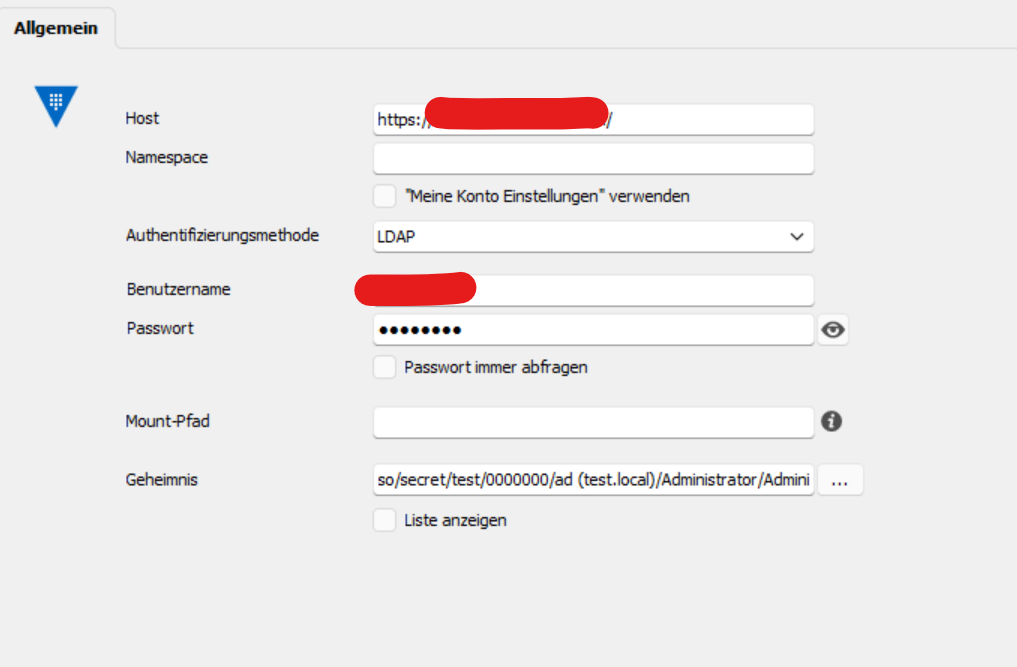
The secret path is set to "so/secret/test/0000000/ad (test.local)/Administrator/Administrator"
If I try to use this entry I get the error message "permission denied". While analysing the access logs for Hashicorp Vault I can clearly see, that RDM tries to access the path "so/data/secret/test/0000000/ad (test.local)/Administrator/Administrator". In our case, this is wrong because the "data" keyword should be placed after the secret engine "so/secret" and not in between. The correct path should look like "so/secret/data/test/0000000/ad (test.local)/Administrator/Administrator".
Have you an idea how to fix this issue?
RDM Hashicorp with OIDC (ADFS)
Okay, but thank you anyway!
Would be great to see this feature in an upcoming changelog.
RDM Hashicorp with OIDC (ADFS)
Thank you, appreciate it!
RDM Hashicorp with OIDC (ADFS)
Hi,
we are currently evaluating the Hashicorp Vault integration for RDM. While creating a new Hashicorp Vault object you have to define an authentication method:

But there is not the option to choose a SSO IdP like OIDC. How am I supposed to login if our enterprise Hashicorp Vault only offers SSO over OIDC?
Any ideas? Thank you in advance!