RDM Hashicorp Secret Path wrong

Hi,
we experience a strange issue with the Hashicorp Vault integration in RDM.
Our secret-engine (KV-v2) is mapped to the path "so/secret" and therefore, we define as Hashicorp Vault entry in RDM the following values: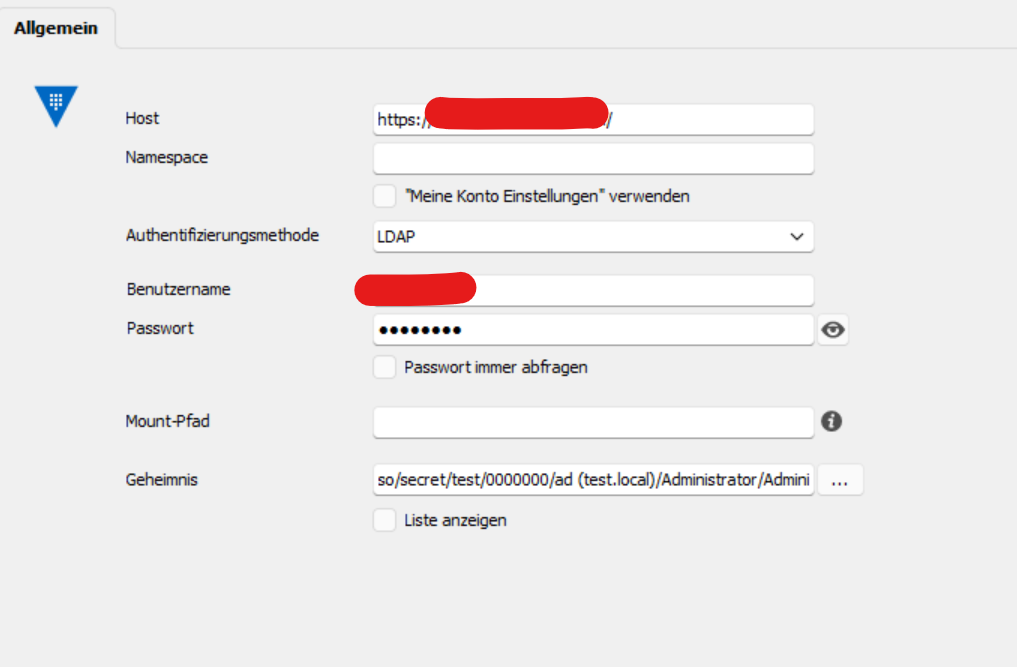
The secret path is set to "so/secret/test/0000000/ad (test.local)/Administrator/Administrator"
If I try to use this entry I get the error message "permission denied". While analysing the access logs for Hashicorp Vault I can clearly see, that RDM tries to access the path "so/data/secret/test/0000000/ad (test.local)/Administrator/Administrator". In our case, this is wrong because the "data" keyword should be placed after the secret engine "so/secret" and not in between. The correct path should look like "so/secret/data/test/0000000/ad (test.local)/Administrator/Administrator".
Have you an idea how to fix this issue?
1c83f027-fb00-40fa-89bd-ae0073c723f1.png
All Comments (16)
Hello,
I have created an internal ticket to address your case.
In the meantime, would you be open to scheduling a remote session to further discuss the issue?
Best regards,
Carl Marien
Hi Carl,
thank you!
Sure - what information (or access to which services/servers/applications) do you need for it?
Hello,
We typically use remote sessions for troubleshooting; however, our developers have identified the root cause of the issue you are experiencing. They are actively working on a solution to resolve it.
We will keep you updated as we make progress.
Best regards,
Carl Marien
Great, thank you for your effort!
Looking forward to test it after the update has been released.
I'll keep you posted.
Hello,
I apologize for the inconvenience. Our developers are still working on the issue you reported. I'll keep you updated on our progress.
Best regards,
Carl Marien
Hello kschweiger,
A quick adjustment there was a miscommunication on our end. A fix should not be implemented in RDM 2023.3, but we plan on tackling that issue once this major release is out.
We will keep you updated on any new developments on that matter.
Best regards,
James Lafleur
Hello,
A fix for this issue will be included in version 2023.3.26. You'll simply need to specify the mount point (in your case "so/secret") in the entry settings.
Selecting a secret will now also populate this field automatically if the mount point contains more than one element.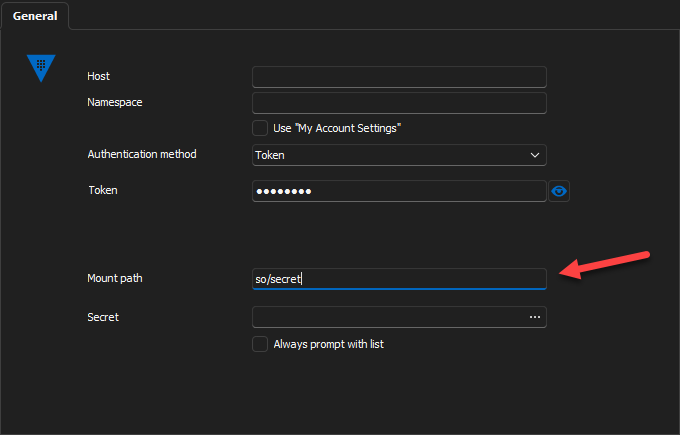
Regards
Jonathan Del Signore
68f9c206-7117-4f06-a1ff-3458f955c34d.png
Hi,
thank you! I'll test it as soon as the patch has been released and let you know.
Hi Jonathan,
I've installed the newest update (v 2023.3.28.0) and tried to implement Vault secrets but unfortunately, it does not work.
Steps to reproduce this issue:
- Create a new HashiCorp Vault RDM entry and specify the Host (URL)
- Click on "Secret" (in German "Geheimnis") and browse to the corresponding credentials
- After specifying the secret, the "Mount-Path" gets populated automatically

If I try to specify the "Secret" again (by clicking on the three dots), I receive the following error message: There was an error verifying the vault status. Please check the application logs for more information. It's the same error message I receive if I try to use this HashiCorp Vault entry while connecting via RDP to a Windows machine. Application logs states the same error message as in the initial issue request: "permission denied".
Do you have any idea what's wrong?
f5fb596a-e619-41c1-bd21-d246816fc4c5.png
Screenshot 2023-11-28 075450.jpg
Hello,
I've reached out to the developer and informed them that the issue is still occurring even after the latest update.
Thank you for your patience.
Best regards,
Carl Marien
Hello,
do you have any news regarding this issue?
Hello,
Our developers are actively working on resolving your issue. Rest assured, I will keep you informed about any progress.
Best regards,
Carl Marien
Hello,
We've implemented a fix that will be included in our 2024.1 release, which should have a beta available in the next 2 weeks.
From now on, the mount path you see in the settings will strictly be used for the login (which is not required in your case), so you'll be able to clear it and use the entry normally.
Thank you for your patience.
Regards
Jonathan Del Signore
Great news, looking forward to test it.
Our test looks quite good. Thank you for fixing this issue!