
baptisterivard-ext
Search filter not show empty folder
Just installed the 2026.3.16 update this morning.
It's much better now ! Issue is completly solved for me.
Thank you !
Search filter not show empty folder
Thank you, before reading your answer I've tried few things :
Uninstall / Reinstall 2026-3-15, without moving/deleting the "%appdata%\local\Devolutions\RemoteDesktopManager" => same bug
Uninstall / Reinstall 2026-2-20, without moving/deleting the "%appdata% folder => same bug
Uninstall / Reinstall 2026-3-15, with moving/deleting the %appdata% folder and copy back the "Connections.db" after first launch => still the bug, but better performance when searching
Uninstall / Reinstall 2026-2-20, with moving/deleting the %appdata% folder and copy back the "Connections.db" after first launch => no bug
I'll use the 2026-2-20 for now, until the new update come up.
Search filter not show empty folder
Issue related that I just discovered :
1- Filter on a folder that is not empty ;
2- opened a SSH session stored in this folder ;
3- at the connection to the SSH session, the search is empty ;
4- to show again the result, I have to delete my search entry, and type it again
Search filter not show empty folder
Hello
Remote Desktop Manager 2026.3.15.0 64-bit (JIT)
Runtime: .NET 10.0.3
Platform: Microsoft Windows 10.0.26200
Workspace: Local Data Source
Allocated memory: 1889 MB
Issue is : the search bar on the bottom not showing me empty folder anymore. No issue if there are at least one entry (an sub-folder won't work too) in the folder.
The checkbox "Show empty folders in results" is checked, I've uncheck/check it again, but no progress.
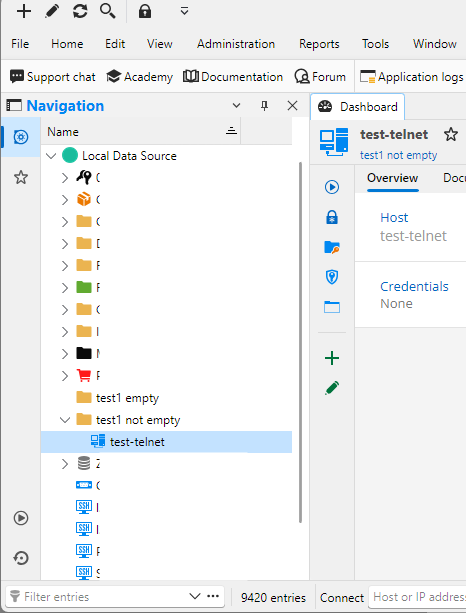
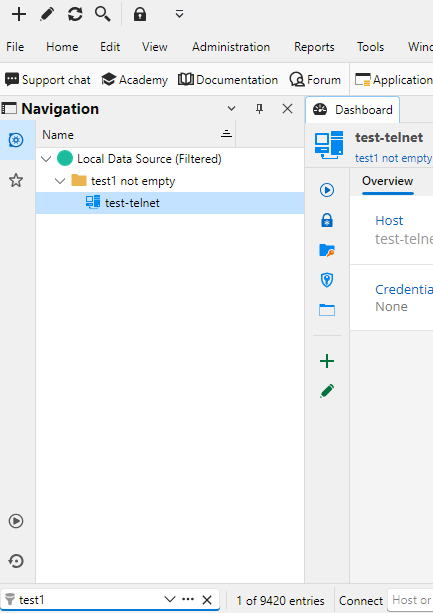
My update history :
<UpdateHistoryItem>
<Date>2026-10-16T12:18:44+02:00</Date>
<Version>2026.3.15.0</Version>
</UpdateHistoryItem>
<UpdateHistoryItem>
<Date>2026-10-14T13:32:10+02:00</Date>
<Version>2026.3.13.0</Version>
</UpdateHistoryItem>
<UpdateHistoryItem>
<Date>2026-09-28T14:29:20+02:00</Date>
<Version>2026.2.19.0</Version>
</UpdateHistoryItem>
In the 2026.2.19.0 version, no issue.
Don't know if the issue was here in the 2026.3.13.0, I upgraded before having to search an empty folder ^^'
SSH - Shift+Tab don't work
Hello,
I updated to the new 2023.2.30.0 : the issue has been solved:)
Thank you !
SSH - Shift+Tab don't work
Hi,
Yes, you can send me an invitation :)
Today, i tried to update to the 2023.2.28.0 version, still the issue.
SSH - Shift+Tab don't work
Hi,
It's a SQLite datasource file.
I tried to disable all keyboard shortcut under this menu (and restart RDM) :
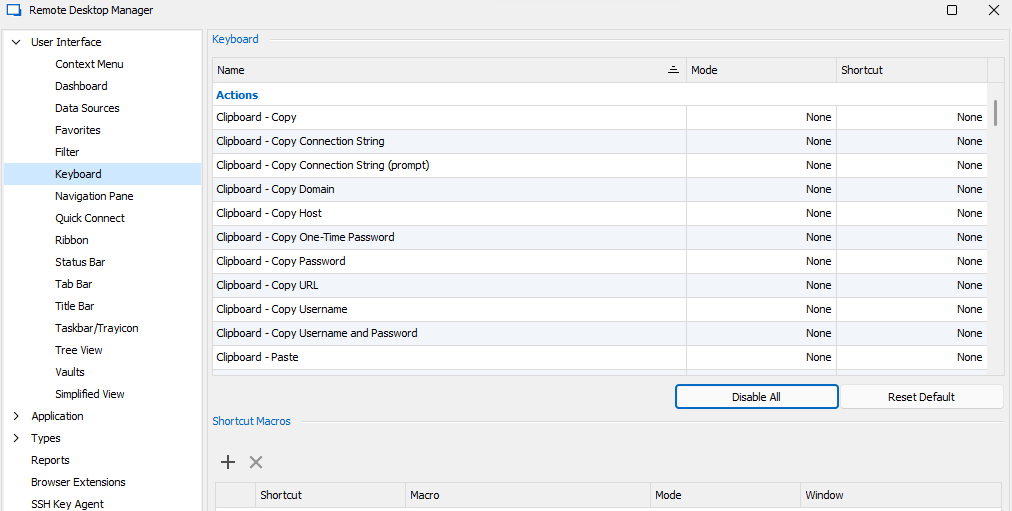
But my issue is still there.
Tryed "Reset Default" too, it do the same.
SSH - Shift+Tab don't work
Hello,
I don't fully understand what you mean "what's data source", but the database has the version v1.147.
My connection is a standard SSH connection, no custom options are configured (except "TCP keepalives", don't think it's relatable)
My friend have the same.
My options are like your screen. I tried every options in this "keyboard" menu, one at once, but no change.
BUT, I tried the "Key Mapping" option, like this :
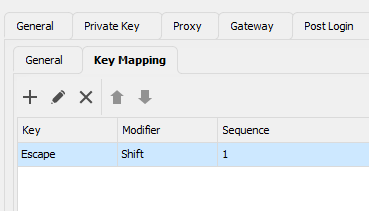
And... it works with that (new) combination.
The original combination (Shift-Tab) still don't work in RDM.
SSH - Shift+Tab don't work
Hello, thx for your answer.
I tried with your zip file, it does the same :/
SSH - Shift+Tab don't work
Hi there,
Since a month (or maybe more), when i'm in a SSH session, the Shift+Tab don't work, it move like i'm only press the Tab key.
Others applications work well with that combination.
A friend of mine is still in the build 2023-1-29 and don't have any issue.
I'm on the last 2023-2-27.
Already check the keyboard shortcuts in the configuration menu, but found nothing.
Tried to change Putty to Kitty in the Types/PuTTY options, nothing change.