Search filter not show empty folder

Hello
Remote Desktop Manager 2026.3.15.0 64-bit (JIT)
Runtime: .NET 10.0.3
Platform: Microsoft Windows 10.0.26200
Workspace: Local Data Source
Allocated memory: 1889 MB
Issue is : the search bar on the bottom not showing me empty folder anymore. No issue if there are at least one entry (an sub-folder won't work too) in the folder.
The checkbox "Show empty folders in results" is checked, I've uncheck/check it again, but no progress.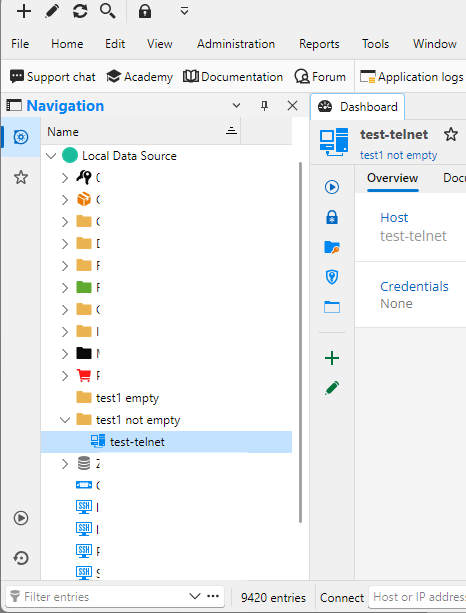
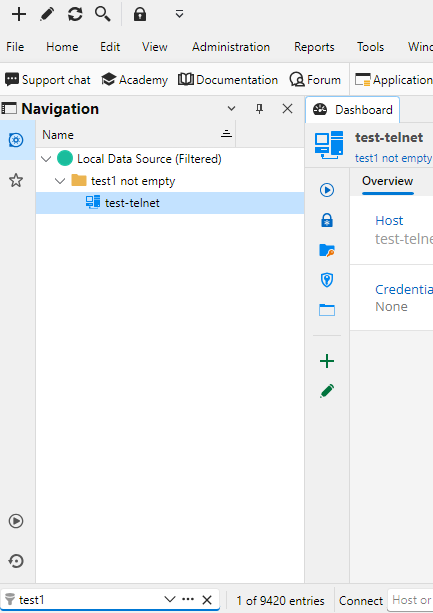
My update history :
<UpdateHistoryItem>
<Date>2026-10-16T12:18:44+02:00</Date>
<Version>2026.3.15.0</Version>
</UpdateHistoryItem>
<UpdateHistoryItem>
<Date>2026-10-14T13:32:10+02:00</Date>
<Version>2026.3.13.0</Version>
</UpdateHistoryItem>
<UpdateHistoryItem>
<Date>2026-09-28T14:29:20+02:00</Date>
<Version>2026.2.19.0</Version>
</UpdateHistoryItem>
In the 2026.2.19.0 version, no issue.
Don't know if the issue was here in the 2026.3.13.0, I upgraded before having to search an empty folder ^^'
Capture d'écran 2026-10-16 125334.png
Capture d'écran 2026-10-16 125512.png
All Comments (5)
Issue related that I just discovered :
1- Filter on a folder that is not empty ;
2- opened a SSH session stored in this folder ;
3- at the connection to the SSH session, the search is empty ;
4- to show again the result, I have to delete my search entry, and type it again
@baptisterivard-ext
Hello,
Thank you for contacting us about this!
We are aware of this issue and the development team is currently working to resolve it. It is a regression that appeared in 2026.3.8.0.
In the meantime, you can use the search bar at the top of Remote Desktop Manager. It still shows empty folders unlike the navigation pane search filter.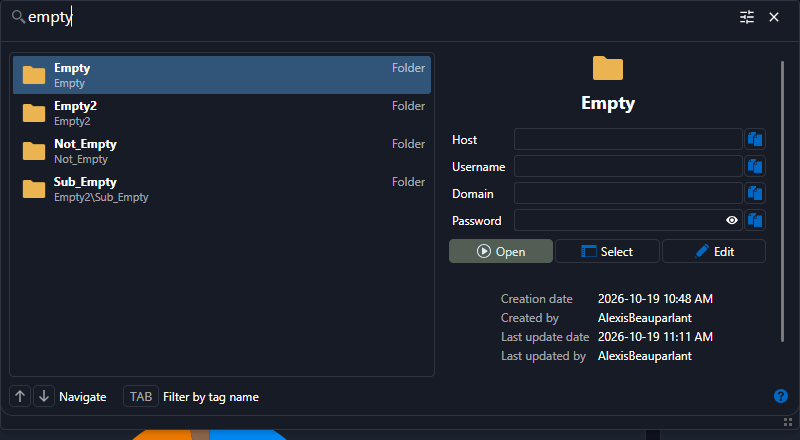
I’ll also make sure you’re notified when a new version with the fix is available.
If you have any other questions, please feel free to contact us.
Best regards,
Alexis Beauparlant
57e27f62-c8d2-4da1-857c-3d8a6204afd6.png
Thank you, before reading your answer I've tried few things :
- Uninstall / Reinstall 2026-3-15, without moving/deleting the "%appdata%\local\Devolutions\RemoteDesktopManager" => same bug
- Uninstall / Reinstall 2026-2-20, without moving/deleting the "%appdata% folder => same bug
- Uninstall / Reinstall 2026-3-15, with moving/deleting the %appdata% folder and copy back the "Connections.db" after first launch => still the bug, but better performance when searching
- Uninstall / Reinstall 2026-2-20, with moving/deleting the %appdata% folder and copy back the "Connections.db" after first launch => no bug
I'll use the 2026-2-20 for now, until the new update come up.
Hello @baptisterivard-ext,
Thank you for being so patient!
If possible, could you update your RDM to 2026.3.16.0 and see if the problem persists? This version should resolve your issue.
Latest Version: https://devolutions.net/remote-desktop-manager/download/
If the problem persists after the update, please let us know so we can inform our development team.
Best regards,
Alexis Beauparlant
8a5b0adc-712d-45d3-96cd-90cb8bba5261.png
Hello,
Thank you for your patience while our team looked into the issue you reported.
I'm happy to let you know that the latest version of Remote Desktop Manager (2026.3.16.0) includes a fix for this problem. You can download it from our website here:
https://devolutions.net/remote-desktop-manager/download/
Once you have installed the update, could you please test it in your environment and confirm that everything now works as expected? If the issue persists or if you notice anything unusual related to the same original problem, just reply to this message with a few details, and we will be glad to look into it further.
Thank you for your collaboration.
Best regards,
Maxim Robert