
bellocarico
Clipboard for images is now broken
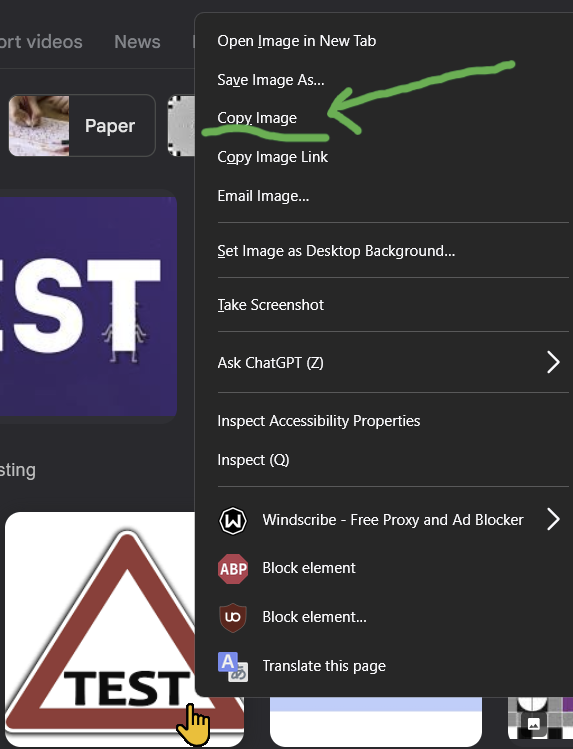
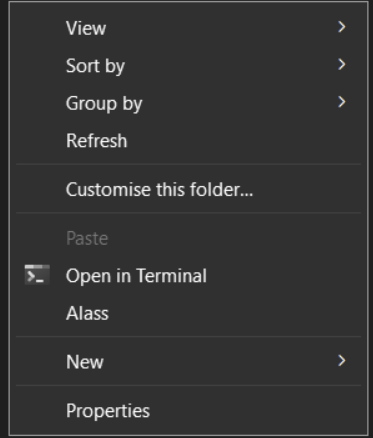
I can't identify precisely from what update this started but doing my "usual" activity of right click+copy image on a browser image (any browser any image!) and right-click on a folder within the RDP session looking to paste it there, the paste is always greyed/not available.
Copying an image as a file though, traditional copy+paste so filesystem to filesystem, works just fine.
I can confirm that this is not a specific browser issue as I tried 3 different ones, and they all suffer from the same issue.
Local:
Rdp session:
Is there a maximum amount of buffer that can be pasted into SSH?
As per title it seems like my pasting capability (right click into ssh terminal) are limited to something like 1046 characters.
Am I doing anything wrong or can this be customized/extended?
Thanks
ssh buffer doesn't satisfy buffer lines settings
I think you're spot-on. I pressed CTRL+ENTER it opened a new session and now it behaves as expected.
Thank you so much!
ssh buffer doesn't satisfy buffer lines settings
I have the default 2000 scroll lines set my ssh terminal settings:

However when I run a command with long output and I then "scroll up", as soon as it moves away from the last displayed lines I see output from very old commands I run yesterday, and not the top initial lines of the command I just run. It seems like the lines buffer handling might be broken somewhere.
Please allow reconnection from "disconnected warning window"
Thank appreciated.
What I noticed so far is:
the popup window is a system window so it interferes if you get disconnected e.g. while using word. IMO this should be a popup within RDM only so visible when I maximize the program via the taskbar icon.
I might have misunderstood something here but the disconnection popup doesn't provide the reconnect button, it just performs it on my behalf. Let me better explain: I have set the disconnection action (ssh) to reconnect however because of the point above it was disconnected because a wifi issue. This results into a series of popups as reconnecting is technically and temporarily not possible. I would suggest you add another option to that Disconnection Action to "prompt" which would add a button to trigger the re-connection upon user interaction manually. Still this should happen/be-visible only when RDM is maximized.
Thanks
Please allow reconnection from "disconnected warning window"
Thanks this really helps.
I have to say I'm impressed with RDM it seems like nothing is left behind.
If I can help with making the product even better I would say that from a UI point of view there's a margin of improvement in having the same option (reconnect in this case but it can be any) aligned for every type of connection, e.g. somehow I would expect the keep disconnection open to be the same regardless of the protocol and displayed in the very same place. Then of course ssh has different options from rdp and those perhaps have sense to be displayed under advanced.
On the "advanced" terminology side it's perhaps a bit confusing to have the "General - connection advanced" and "Menu - advanced".
Please allow reconnection from "disconnected warning window"
Thanks for the quick answer and the information. Indeed that setting will help my case.
Two more points please:
I noticed that this is RDP only? Can this be extended to SSH as well?
Could we (users) have global setting to have this on as a default?
Thanks
Please allow reconnection from "disconnected warning window"
Currently if my sloppy LTE connection disconnects me I do get a pop up with the disconnection error.
Fair enough.
Clicking OK it closes the connection completely. Would you please consider adding the "Reconnect" butto non that very same popup window to make the the reconnection quicker and more practical?
Thanks