Clipboard for images is now broken

I can't identify precisely from what update this started but doing my "usual" activity of right click+copy image on a browser image (any browser any image!) and right-click on a folder within the RDP session looking to paste it there, the paste is always greyed/not available.
Copying an image as a file though, traditional copy+paste so filesystem to filesystem, works just fine.
I can confirm that this is not a specific browser issue as I tried 3 different ones, and they all suffer from the same issue.
Local: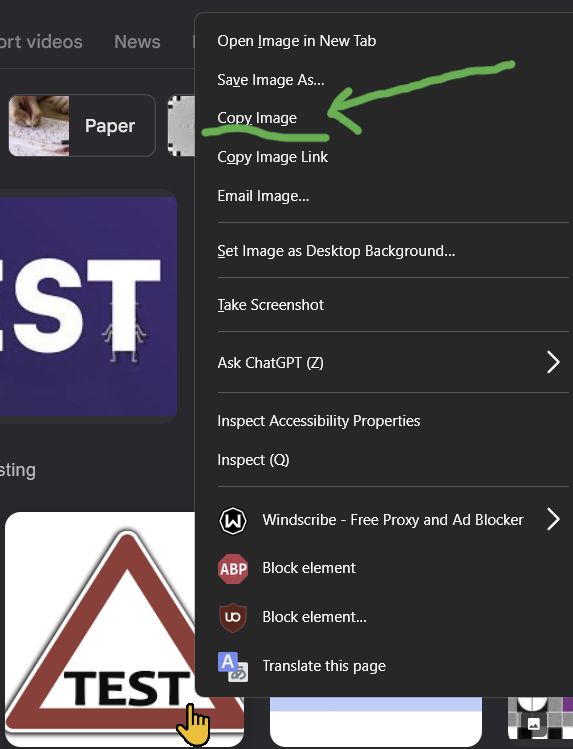
Rdp session: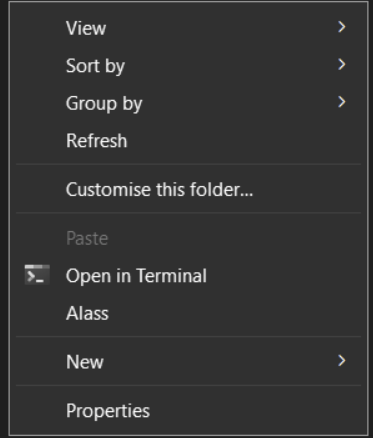
34b8541f-78c1-4170-8aaf-53b87570b620.png
bcaac81f-5342-4ab0-899f-00132ff835ee.png
All Comments (1)
Hello,
Thank you for your Post!
Based on your description, this behaviour does not appear to be related to the browser or to RDM/PRD specifically. In fact, the workflow you described is not supported by Windows in general, even when working directly on a local machine.
When you use Right-click → “Copy image” in a browser, Windows places the image data (bitmap/HTML/URL) on the clipboard, but not a file object. File Explorer can only enable Paste when the clipboard contains actual file items. Since the clipboard only holds the image data and not a file, the Paste option is expected to remain greyed out.
Microsoft also confirms that clipboard images cannot be pasted directly into a folder. Instead, the image must first be pasted into an application such as Paint, and then saved as a file.
For reference, here is a related Microsoft discussion:
https://learn.microsoft.com/en-us/answers/questions/4028646/can-i-copy-or-transfer-photos-from-my-clipboard-to
If you have any additional questions or if there is another workflow you’re trying to achieve, please let us know — we’re happy to help!
Thanks,
Stephan