
ocbarts
Detailed per-connection logging for Gateway Tunnels with dynamic targets (socks/http proxy listener)
I think that the best choice would be to leave the choice for the user :) You cannot know whether this is http/https just based on ports, because it is very common to have http on ports like 8000, 8080 etc. the same for https. 8443 being one of the most often used ones.
If you could however decide per filter entry to either do not log details at all, or log individual connections or just aggregate logging data on session close this would be the most universal and fit all solution. That way you could for exampe log every individual connection to port 22, and just aggregate targets for port 8443 and maybe not even try to log for something that is not needed...
And having (together with user name and maybe client IP) target IP, port, protocol(tcp/udp) time started/ended and number of bytes sent/received would be just awesome. For aggregated connections just add number of connections within this time frame. And keep default ad do not log details.
It is also great news to have this implemented pretty soon, as we need this for compliance reasons and until this feature is not there we cannot allow proxy tunnel type entries at all.
Best Regards,
Bart
Detailed per-connection logging for Gateway Tunnels with dynamic targets (socks/http proxy listener)
For auditing purposes it is fully sufficient to protocol just the protocol as TCP or UDP and port used. I did not mean actual L7 protocol that was used.
Of course HTTP/HTTPS Connections are another beast, but as there is a native way of logging those via Web Session entry that just logs start and end of the session being used i rather doubt someone would get the idea to log each single http request via socks/http listener.
However, threre are external tools like terraform that use indeed http/https traffic. I do not think it is reasonable to protocol each single request in such case.
I guess the best implementation would be if the logging would be done on a filter entry level. Therefore it could be individually enabled for some targets and disabled for some other ones...
Or at least aggregate the informations and log on session close just for each target protocol(udp/tcp), ip and port the number of connections, total data sent and total data received. That way you do not run into flooding logs with extensive amount of entrirs yet still being able to proove that someone did make a connetion to a given target system...
Detailed per-connection logging for Gateway Tunnels with dynamic targets (socks/http proxy listener)
Hi,
We recently noticed, that the logging feature of RDM+RDGW is not sufficient, when it comes to Devolutions Gateway Tunnel with dynamic targets (SOCKS/HTTP Proxy listener). What is logged is only who and when started/stopped the tunnel, but not what connections went over it. This is a major security gap, as because it is possible to define a filter that would wildcard the target host it is then not possible to know what connections were made over this type of tunnels.
In the diagnostic logs of the Gateway itself, there are some jmux lines containing target IP/port/protocol informations, but to corelate them with a particular open session, user information of who opened it etc. is very cumbersome and I am not even sure if the retention of this diagnostic informations is sufficiently long.
In order to provide non-repudiality and a complex end-to-end secure connection logging, in my opinion this feature is a must. Especially that the gateway has all the informations needed.
In addition to the minimal log informations like who, when started and when finished and of course target host/port/protocol it would be also a nice to have feature to get as well some basic statistics as number of bytes in/out. This should be really trivial to implement and would close a very important security gap, that currently allows to pass *not audited* connections over devolutions gateway that will be really hard to proof.
Problems with TLS enabled HTTP Proxy for Proxy Tunnel entries
I am using currently RDM on Windows (version 2025.1.25.0 64-bit) but plan also to use it with the version for Mac in near future.
Problems with TLS enabled HTTP Proxy for Proxy Tunnel entries
Hi. I tried protecting my HTTP proxy with TLS in order not to send Baisc Auth data over plaintext between client (RDM) and the proxy server.
In RDM I use entries of Type "Proxy Tunnel (HTTP, SOCKS4, SOCKS4A, SOCKS5).
When setting Usage to Port Forward, there is a field named Proxy Type which I can set to HTTPS. It does not work as expected.
When setting to HTTP it tries plaintext connection against the proxy server which fails obviously.
I tried entering https://xxxx as Host (worked for web session entries in proxy tab), but with no luck - it seems to try to resolve the whole field as an hostname.
Is it currently supported in RDM to connect to a typical http (connect) proxy over TLS? If not, when will it be?
Because this type of proxies currently ONLY support Basic Auth, it is really not usable. At least adding Kerberos/Negotiate support would allow to skip the TLS layer, but in my opinion TLS layer should be supported regardless authentication protocol used.
Best Regards,
Bart
Problems with Proxy Tunnel (HTTP) authentication when called from SSH Session / SSH Tunnel
Hi. Just checking up - do you have some news on this topic?
Best Regards,
Bart
Problems with Proxy Tunnel (HTTP) authentication when called from SSH Session / SSH Tunnel
Thank you very much for addressing this issue. This is the last blocking point for implementing connections to windows hosts over plain HTTP Connect proxy tunnel, as possibility of freezing entire RDM in produciton environment was a strong no-go for this scenario. Until now we had to use SecugeGateway (ssh forwarding) but not all environments with windows VMs have a linux server that may act as a tunnel server...
Please inform me once this deadlock issue gets fixed and in which verison, so we will test it internally.
Best Regards,
Bart
Problems with Proxy Tunnel (HTTP) authentication when called from SSH Session / SSH Tunnel
I posted it to the link provided. I named the document as in my previous post. Just to be sure I just re-uploaded it again.
Problems with Proxy Tunnel (HTTP) authentication when called from SSH Session / SSH Tunnel
Uploaded as topic_39985_RemoteDesktopManager.dmp
This is the dump from the situation where I close the Tunnel session while RDP connection over it is still active. In such situation RDM freezes completely and has to be killed via task manager.
Should I also attach a dump from second scenario, where RDM hangs while closing one of multiple RDP sessions, that go over Tunnel type VPN sessions? It might be related, or it might be just the case of order of closing connections - first close RDP, then the Tunnel, not otherwise.
Problems with Proxy Tunnel (HTTP) authentication when called from SSH Session / SSH Tunnel
Sure I can post - it is 17MB big... Please provide a way to upload should this help.
Problems with Proxy Tunnel (HTTP) authentication when called from SSH Session / SSH Tunnel
Thanks for the possible hint. I have checked this, but no. Setting Disable UDP Transport to Yes does not change the behaviour. If you close the tunnel session while RDP session is open RDM freezes completely as well. Should be easy to reproduce and check.
Problems with Proxy Tunnel (HTTP) authentication when called from SSH Session / SSH Tunnel
If this might help, I have also found out, that when during connected to RDP if I close the RDP-Tunnel session, instead of tearing down the RDP session RDP Manager also freezes and has to be terminated from task manager... This might be the same issue that is hit.
Problems with Proxy Tunnel (HTTP) authentication when called from SSH Session / SSH Tunnel
There is however one issue I still struggle with. Let me describe the scenario in detail:
I have a session named "RDP-Tunnel" of Type "Proxy Tunnel (HTTP, SOCKS4, SOCKS4A, SOCKS5)" configured in following way:
Host: Host configured
Credentials: None
and in General Tab:
Usage: Port Forward
Host/Port - my proxy IP/port
Proxy Type: HTTP
Local host: 127.0.0.1, Port 9999
Remote Host: $PARENT_HOST$, Port 3389
VPN Tab left:
Connect: Not enabled
Events tab left:
Before Open - Command Line with curl described above
Wait for exit: false
Wait timeout 120s
Post Execution pause: 1s
Advanced tab left:
Allow open multiple connections: Yes
Then I have a folder with multiple RDP Sessions. The folder is configured in this way:
VPN/Tunnel/Gateway Tab left:
Connect: Always Connect
Type: Proxy Tunnel (existing)
Close: On session close
VPN group: (empty)
Settings Tab:
Session: Linked (Vault) -> points to session described above
Use dynamic port: checked
Force "localhost": Yes
Override parent ($PARENT_HOST$): checked
Force "allow multiple instances" of VPN: checked
Now my RDP sessions are just simple RDP type entries with Host IP entered and name. The only additional setting is - in VPN/Tunnel/Gateway Connect is set to "Inherited"
Now at first look everything works like a charm. I can open an RDP session, can even get authenticated with credential looked up in user vault. Great.
Problem starts when I open more than 1 such RDP session. Everything opens normally. But for example when I open Host A, then Host B and after a while i just log off from Host A, well... then Remote Desktop Manager stops responding and I have to kill it from task manager. I can imagine, that it may get confused as it finds now 2 open sessions for the "RDP Tunnel" and somehow does not know which one to close after the RDP connection got closed. But this makes the pretty complex solution useless :( Too bad also, that there is no possiblity to open multiple proxy tunnels over a single proxy tunnel session (similar as with SSH Tunnel).
Please look if you can re-produce this issue. I wonder what might be the reason for it.
Best Regards,
Bart
Problems with Proxy Tunnel (HTTP) authentication when called from SSH Session / SSH Tunnel
Hi. Thanks for powershell snipplet. I already tried that and due to group policy I am not allowed to run such script. I used a bit simpler one that worked from powershell prompt, but was denied when started from RDM:
# Define the URL to connect to
$url = "http://example.com"

# Define the proxy settings
$proxyUrl = "http://proxyserver:port"

# Create and configure the WebRequest
$request = [System.Net.HttpWebRequest]::Create($url)
$request.Proxy = New-Object System.Net.WebProxy($proxyUrl, $true)
$request.Proxy.Credentials = [System.Net.CredentialCache]::DefaultNetworkCredentials
$request.KeepAlive = $true

# Get the response to establish the connection
$response = $request.GetResponse()

# Keep the connection open for at least 10 seconds
Start-Sleep -Seconds 10

# Close the response to release the connection
$response.Close()
I have as I already stated another alternative that works, instead of running PowerShell Event - now I can run following "Command line" command:
curl -s -o NUL --proxy http://proxyserver:port --proxy-user : --proxy-negotiate --rate 4/m http://example.com http://example.comThis does effectively exactly the same - ":" as proxy user means use OS credentials, rate limit with 2 URLs causes curl to wait with connection open given time between both requests. Configuring this as "Before open" event with Post execution pause of 1s and without waiting for command to exit does the job. But as stated before - it opens black terminal window for around 15s which causes questions from users... At the time being this is my only alternative and as you see this is already a nasty workaround...
I would really appreciate if you could manage to implement negotiate/ntlm authentication at places where http connect proxy may be used. And always try first to send the request without auth, just in case there is already a connection open and no additional authentication is needed.
And to answer your first question - yes, indeed WinGate works like that, that if there is at least 1 authenticated connection open there is no need to authenticate any further connections.
Best Regards,
Bart
Problems with Proxy Tunnel (HTTP) authentication when called from SSH Session / SSH Tunnel
Thanks for such in-depth analysis. Indeed, NTLM Negotiate challenge response authentication requires several round trips and that is why it always first check whether authentication is needed at all (as many proxies require only the first connection from a given IP to be authenticated, and as long as at least one session is open allow new assuming same authentication/credentials. Otherwise so many roundtrips would make the connection extremaly slow, especially for plain http requests without connection: keep-alive header. Nevertheless thank you very much for opening ticket in order to implement it.
Currently i try to use event mechanism (pre connect) and curl to provide this initial pre-authentication but it is a bit cumbersome as black window pops up and causes questions from users. Another way is to set "VPN" on the connection to trigger a web page session as a pre-loading mechanism which also works but again not all users would like that for opening only SSH always a web session has to be started. Would you be able to implement NTLM for Proxy Tunnel this would be great and i would not need all this workarounds.
By the way, for proxying simple SSH session over http connect proxy - which method do you recomment, as both work?
Proxy tab on the connection with either Custom/Link proxy mode
VPN section of the connection and there VPN of the type SSH Link (requires SSH VPN, SSH Tunnel or SSH Port Forward connection type - which one works the best?)
VPN section of the connection and there VPN of the type Proxy Tunnel (is this effectively the same as 1. ? as the same connection as for Link mode can be selected)
Problems with Proxy Tunnel (HTTP) authentication when called from SSH Session / SSH Tunnel
Hi.
Maybe I should give a bit more context. I understand that Devolutions Gateway looks really promising, but the problem is - target hosts we connect to are not under our control. We go over ipsec s2s tunnel and have only their IP and RDP or SSH available. We cannot force parties responsible for those hosts to install Devolutions Gateway product.
What we however have is http connect proxy server through we just literally have to go in order to be able to reach them.
And due to policy requirements, this proxy server does not allow unencrypted authentication methods like basic/digest auth. Only NTLM and Negotiate are allowed. SOCKS protocol was also a potential option, but it showed up that the server is not able to handle anything other than basic auth and it got disabled.
There is currently one sesion type in RDM that handles authentication according to the requirements - this is Web Session with either Chrome or Edge backend. It is the only one being able to authenticate properly.
There is another thing also - having at least 1 properly authenticated connection open from a client host, all following connections are assumed the same user and do not need authentication. This means, that if I open this web session as a "VPN Session" before the main connection, I am able to have the main connection without authentcation. But then we face another problem - Having Web Session configured as VPN I cannot use Proxy Tunnel type VPN session to go with RDP over HTTP Connect proxy. I solved this partially by using Events and opening curl (which is also able to authenticate properly) as an ecent before opening session, and by that pre-authenticating client. This everything is however extremaly complex to manage and error prone.
Would you just implement the possibility to connect via plain http connect proxy for RDP connection - this would improve my scenario extremally.
I guess to implement NTLM/Negotiate to all places where HTTP Proxy can be used seems to be way more complex topic...
Problems with Proxy Tunnel (HTTP) authentication when called from SSH Session / SSH Tunnel
That might be a problem - I use WinGate and am not sure whether it supports any other authentication than Basic. Therefore SOCKS seem to be no option anyway... For me a bigger problem is however, the support of http connect proxy for non-website type connections. SSH can do only basic auth and in order to get RDP over HTTP Connect proxy one has to experiment with VPN/Tunnel settings on a connection. Too bad, there is no tab Proxy, with an option to use personal credential or user vault lookup that would do more than basic (ideally negotiate/ntlm). I would perosnally also very welcome the option to use OS credentials of the currently logged in user since windows might be able to delegate the credential object without revealing actual password.
Nonetheless thanks for such fast answer!
Problems with Proxy Tunnel (HTTP) authentication when called from SSH Session / SSH Tunnel
Recently I have stumbled upon other proxy related problems. It seems, that currently only a proxy in a 'Website' Session of Chrome/Edge supports http proxy with NTLM/Negotiate authentication.
Sadly, all 'Proxy Tunnel (HTTP, Socks4...)', 'SSH Tunnel' entries can do ONLY Basic authentification (which is not allowed on our proxy), as it is effective plaintext.
The same problem cause SOCKS5 type Proxy Tunnels - only Basic Auth is supported, and therefore cannot be used.
Furthermore - when connecting to Windows via RDP with a VPN/Tunnel/Gateway set to http connect proxy there are multiple problems:
When not using "Force allow multiple instances of VPN", second RDP Connection does not get redirected via localhost and tries to connect directly (which obviously fails)
When setting "Force allow multiple instances of VPN" for each RDP Connection a new connection helper listening on localhost gets started, but when I close ANY of the RDP sessions, RDM freezez totally and the only thing that can be done is to kill it with task manager.
I have also found weird behaviour of cascaded settings like:
SSH or RDP Connection set with VPN using pre-defined session of type "Proxy Tunnel"
this pre-defined session of type Proxy Tunnel has itself VPN set to "Session" causing it to open a web session in separate tab
when calling primary SSH/RDP Entry, the VPN from the pre-defined Proxy Tunel session is ignored
(interestingly, Events of the pre-defined session do not get ignored. I wonder what would happen if there were events for the primary ssh/rdp session configured)
Currently used RDM Verison is 2024.1.28.0 64-bit
I can at least confirm, that setting VPN to 'SSH Tunnel / SSH-link' for ssh sessions works now (does not support ntlm/negotiate though). This is for sure an improvement.
I would really appreciate if there was an easy way to use http connect / socks 5 proxy with secure authentification (ntlm/negotiate), ideally with OS credentials as an option, for typical SSH and RDP connections. This is not so complex setup and there should be an easy way to achieve it.
Thanks for your support so far!
Problems with Proxy Tunnel (HTTP) authentication when called from SSH Session / SSH Tunnel
Great news! Thank you very much!
Problems with Proxy Tunnel (HTTP) authentication when called from SSH Session / SSH Tunnel
Hi. I just wanted to ask - is there an estimated timeline known when this might get implemented?
I need to plan rollout of a solution that would require this feature to be present and want to know if this is matter of months or half year or even more...
Would appreciate any details regarding the timeline.
Problems with Proxy Tunnel (HTTP) authentication when called from SSH Session / SSH Tunnel
Great news! Thank you very much!
You may also want to have a look why proxy credentials are not used when using Linked Proxy session (proxy mode = link). The referred session alone can authenticate without problems.
I very much appreciate your help.
Problems with Proxy Tunnel (HTTP) authentication when called from SSH Session / SSH Tunnel
Hi,
I am afraid this is not a viable solution. First of all, each user would need to add user specific settings to the entry, and we have many of them.
Getting them to just create a credential inside their user vault is way easier, and when the entries are configured to lookup user vault searching for a particular named credential (great idea btw) is the easiest, as we support multiple customers, and each user would need to provide his credential just once. With user specific settings, each user would have to modify several entries for several customers, which is organizational a no go.
And second and most important - user specific settings allow to override main credentials on the entry (ssh host credentials) but do not provide a way to override the proxy credentials. Having an entry like this:
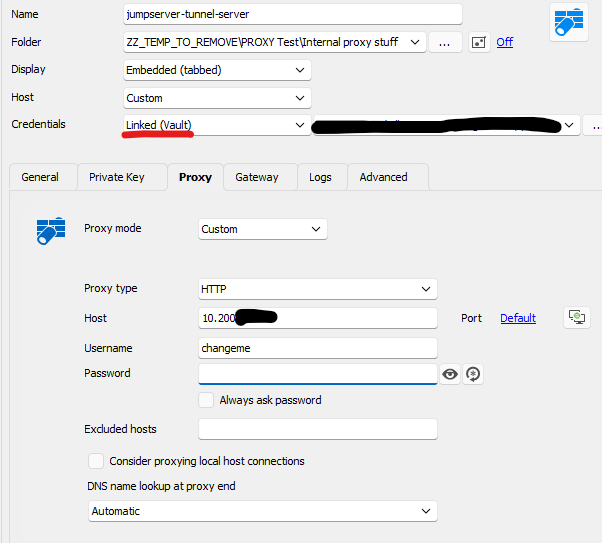
With user specific settings I can perform those overrides:
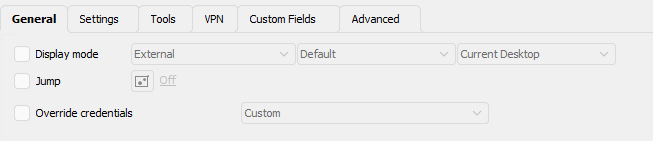
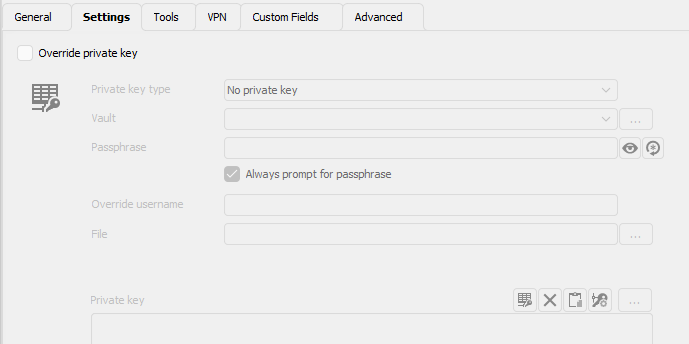


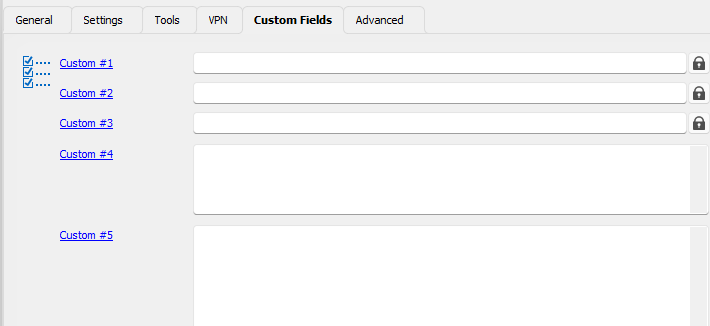

There is no place to override just the proxy credentials.
Problems with Proxy Tunnel (HTTP) authentication when called from SSH Session / SSH Tunnel
Hi,
where
This is RDM 2023.1.26.0 64-bit with Data Source based on Microsoft SQL Server.
As for screenshots, this is the Proxy Tunnel entry:
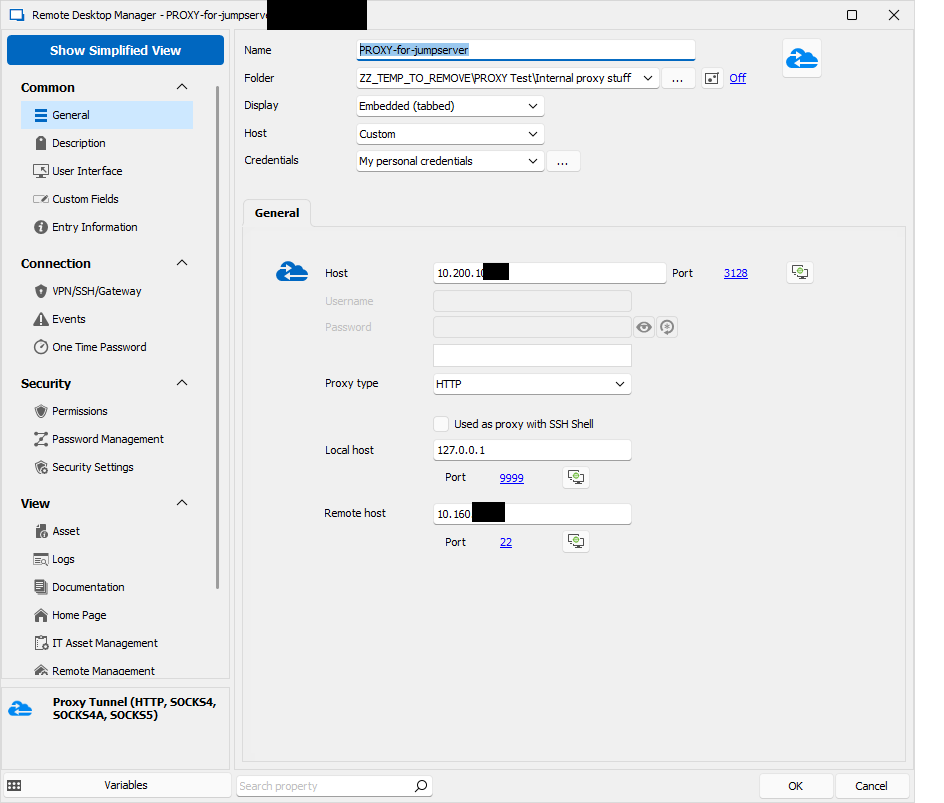
where 10.200 is the Proxy IP, and 10.160 is the jumpserver IP where I connect via SSH to. When clicked directly, Authentication happens without problems using my personal credentials:
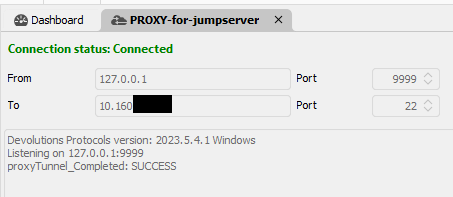
Now this is the SSH Tunnel entry (it shows more verbose error messages as SSH Session):
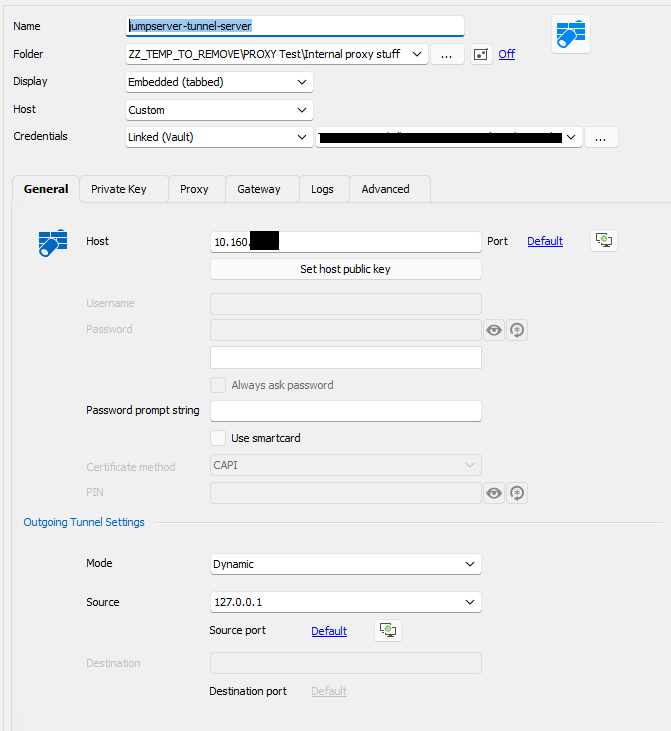
and its proxy card:
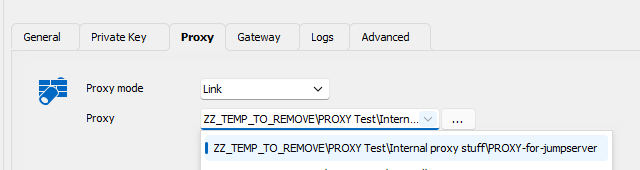
When I try this connection i get following error:
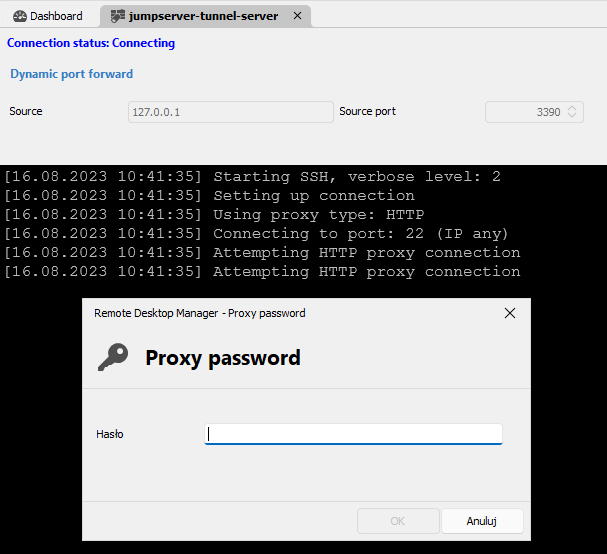
I should not be asked for proxy password, and regardless what I enter it does not authenticate. Probably it not only cannot find the password, but also the username and therefore It cannot properly authenticate despite the fact, that the linked proxy entry works and has correct credentials specified.
As I have just the one jumpserver I would even prefer not to use an additional Proxy Tunnel entry, but fill the proxy details directly on the SSH Tunnel entry in Proxy card, but there is no option to use per-user changable credentials (like my personal credentials or personal vault lookup for specified text):
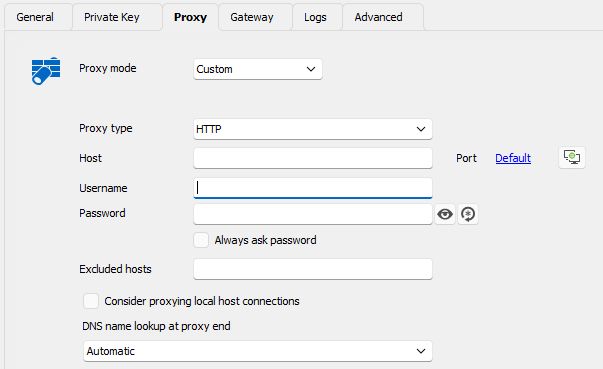
As you see - the credentials above are used to SSH Authentification, not Proxy authentification and the only way to pass credentials to proxy is to hardcode it in the entry meaning that every logged in user will use the same credentials which is not acceptable. If there were an option to use logged-in OS Credentials, ideally ober NTLM this would be great. Whatever I enter here is used correctly via Basic Auth but this does not match our use case, where proxy authentification has to be done with personal user of currently logged in user. I tried to use Custom as on above screenshot with diverse $xxx_USERNAME$ / $xx_PASSWORD$ but none of them worked either.
I hope this explains the situation a bit more precise.
Problems with Proxy Tunnel (HTTP) authentication when called from SSH Session / SSH Tunnel
Hi All,
We need to connect over a HTTP Connect proxy in order to access remote hosts by ssh.
As far as I understood this correct, I need to create a Proxy Tunnel, set it for Proxy Type HTTP and either mark as being used with SSH Shell, or enter some dummy data in Local Host / Remote host part.
Then, when creating the SSH Session / SSH Tunnel, In Proxy tab I choose Link and point to the Proxy Tunnel created.
There is however a problem with authentication - it seems, that despite setting the Proxy Tunnel to use "My personal credentials" it is not being used when called from SSH Session / SSH Tunnel. When I start the Proxy Tunnel directly (after removing mark for it to be used by SSH and entering some meaningful data for remote / local host) it starts and authenticates correctly. I can confirm that in proxy logs. When it is called by the SSH Session however, no authentication is performed, and my HTTP Proxy rejects this request.
Even more interesting is, that when I set proxy mode in SSH Session / SSH Tunnel not to Link but to Custom, there is no option to lookup credentials in user vaults or use "my personal credentials" but I have to enter a particular user/password that is saved and used for all users. Those entered credentials are used for auth correctly. It would be enough could I choose there to get the credentials from somewhere not need to enter them directly, as each user has to use his own credentials. I tried with $TOOL_PASSWORD$ and similar, but this did not work (even after marking to allow password in variables).
And last but not least - Web sessions (using builtin Chrome) not even support HTTP proxy out of the box, with the possibility to authenticate from chosen source of credentials, but also do NTLM based Proxy Authentification.
I have found out, that HTTP Proxy Tunnel can only perform Basic Authentification which is not very safe nowadays. Do you plan to add support for NTLM there as well?