Problems with Proxy Tunnel (HTTP) authentication when called from SSH Session / SSH Tunnel
Problems with Proxy Tunnel (HTTP) authentication when called from SSH Session / SSH Tunnel

Hi All,
We need to connect over a HTTP Connect proxy in order to access remote hosts by ssh.
As far as I understood this correct, I need to create a Proxy Tunnel, set it for Proxy Type HTTP and either mark as being used with SSH Shell, or enter some dummy data in Local Host / Remote host part.
Then, when creating the SSH Session / SSH Tunnel, In Proxy tab I choose Link and point to the Proxy Tunnel created.
There is however a problem with authentication - it seems, that despite setting the Proxy Tunnel to use "My personal credentials" it is not being used when called from SSH Session / SSH Tunnel. When I start the Proxy Tunnel directly (after removing mark for it to be used by SSH and entering some meaningful data for remote / local host) it starts and authenticates correctly. I can confirm that in proxy logs. When it is called by the SSH Session however, no authentication is performed, and my HTTP Proxy rejects this request.
Even more interesting is, that when I set proxy mode in SSH Session / SSH Tunnel not to Link but to Custom, there is no option to lookup credentials in user vaults or use "my personal credentials" but I have to enter a particular user/password that is saved and used for all users. Those entered credentials are used for auth correctly. It would be enough could I choose there to get the credentials from somewhere not need to enter them directly, as each user has to use his own credentials. I tried with $TOOL_PASSWORD$ and similar, but this did not work (even after marking to allow password in variables).
And last but not least - Web sessions (using builtin Chrome) not even support HTTP proxy out of the box, with the possibility to authenticate from chosen source of credentials, but also do NTLM based Proxy Authentification.
I have found out, that HTTP Proxy Tunnel can only perform Basic Authentification which is not very safe nowadays. Do you plan to add support for NTLM there as well?
All Comments (32)
Hello,
Thank you for reaching out to us regarding this,
I have a few questions which you can hopefully answer.
- Which version of RDM are you using?
- Which type of data source are you using?
I'm wondering if you could provide me with some screenshots of your current configuration? Feel free to blur out any sensitive information.
Regarding your last point, I would need to discuss this with our engineering department to confirm if that is something that is planned.
Best regards,
Samuel Dery
Hi,
where
This is RDM 2023.1.26.0 64-bit with Data Source based on Microsoft SQL Server.
As for screenshots, this is the Proxy Tunnel entry: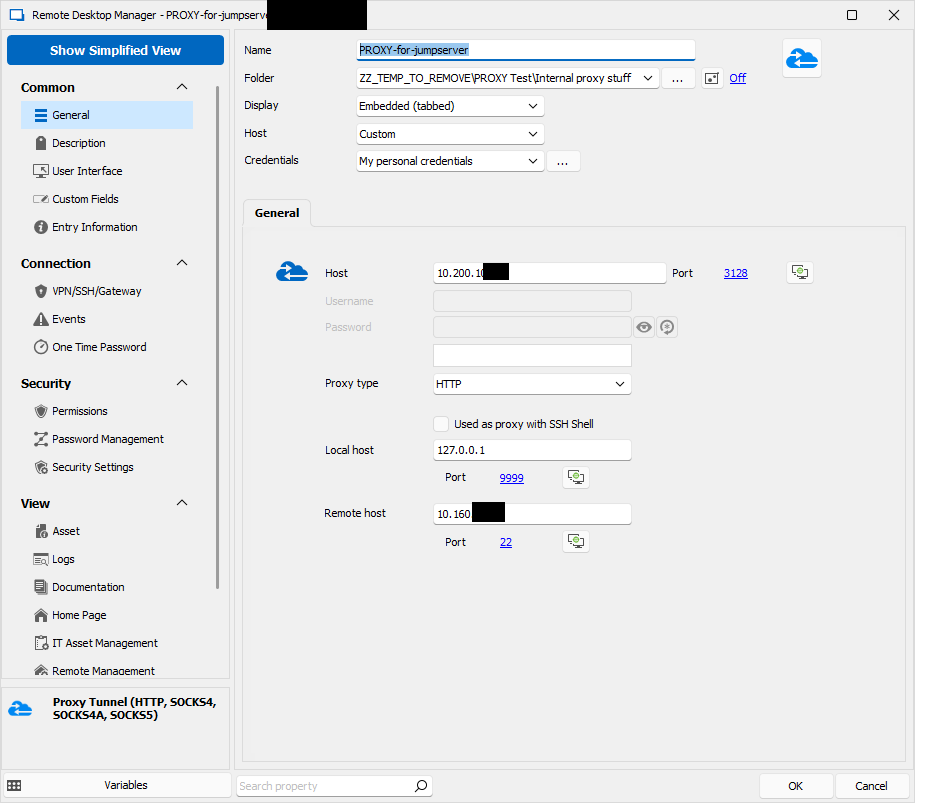 where 10.200 is the Proxy IP, and 10.160 is the jumpserver IP where I connect via SSH to. When clicked directly, Authentication happens without problems using my personal credentials: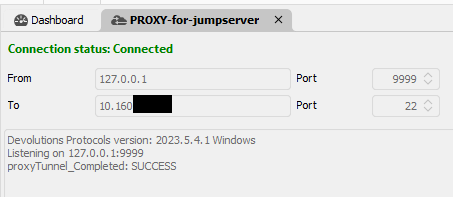
Now this is the SSH Tunnel entry (it shows more verbose error messages as SSH Session):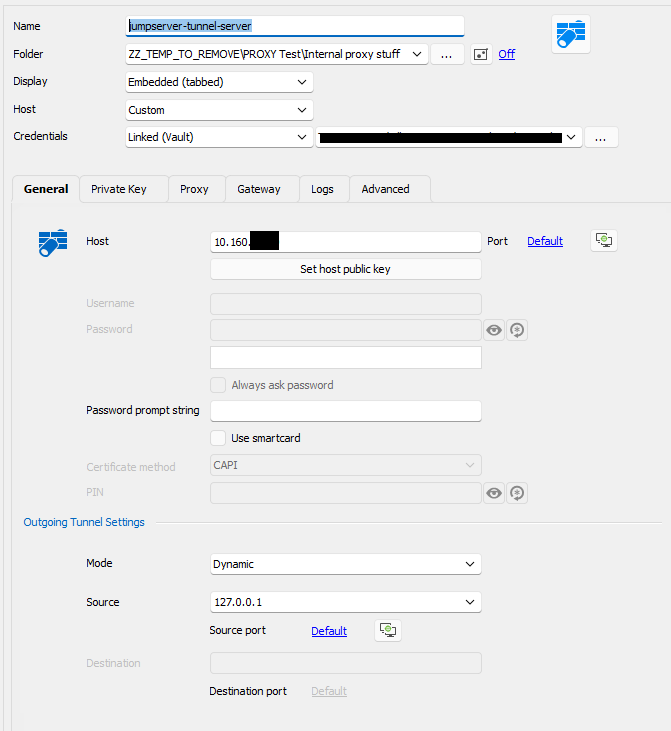
and its proxy card: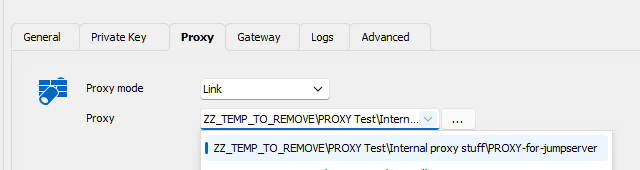
When I try this connection i get following error: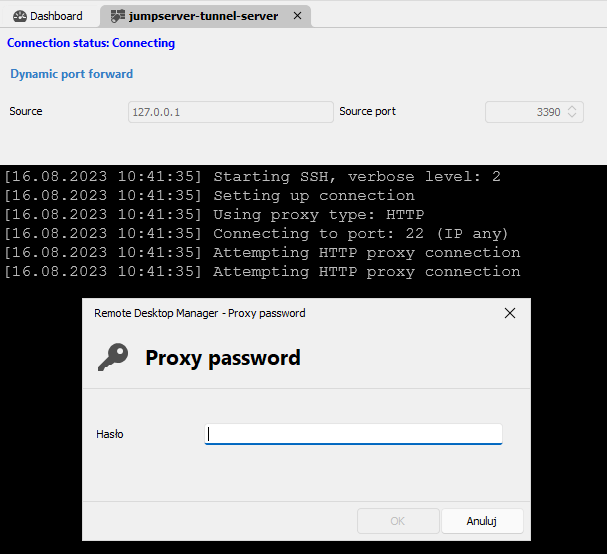
I should not be asked for proxy password, and regardless what I enter it does not authenticate. Probably it not only cannot find the password, but also the username and therefore It cannot properly authenticate despite the fact, that the linked proxy entry works and has correct credentials specified.
As I have just the one jumpserver I would even prefer not to use an additional Proxy Tunnel entry, but fill the proxy details directly on the SSH Tunnel entry in Proxy card, but there is no option to use per-user changable credentials (like my personal credentials or personal vault lookup for specified text):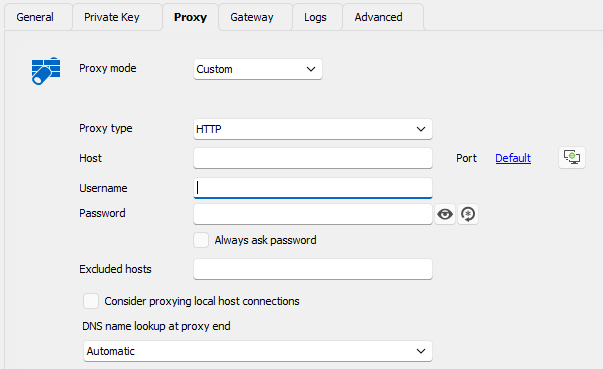
As you see - the credentials above are used to SSH Authentification, not Proxy authentification and the only way to pass credentials to proxy is to hardcode it in the entry meaning that every logged in user will use the same credentials which is not acceptable. If there were an option to use logged-in OS Credentials, ideally ober NTLM this would be great. Whatever I enter here is used correctly via Basic Auth but this does not match our use case, where proxy authentification has to be done with personal user of currently logged in user. I tried to use Custom as on above screenshot with diverse $xxx_USERNAME$ / $xx_PASSWORD$ but none of them worked either.
I hope this explains the situation a bit more precise.
4a216b48-66fa-48f4-b6fe-6e0f291232ea.png
6ecf4f6b-77c7-4cd6-940a-063478229807.png
929272ad-696f-4782-a48a-c0f2c59a7aeb.png
dcee91ea-d2ce-466f-9ae6-7e5d3bb4db88.png
c11d0a12-9871-4c06-9f3a-0bab2a40aa71.png
f1c9d5a1-28c1-436f-80d8-5e29a80ff826.png
Hello,
Thank you for your reply and for the screenshots,
I see, in that case, I believe using User specific settings would solve this issue, we have the following knowledge base article regarding this:
https://docs.devolutions.net/rdm/windows/commands/edit/setting-overrides/specific-settings/
This would allow each user to have their own custom credentials set on the entry directly without impacting others, could you try this and let me know if it works as expected?
Best regards,
Samuel Dery
Hi,
I am afraid this is not a viable solution. First of all, each user would need to add user specific settings to the entry, and we have many of them.
Getting them to just create a credential inside their user vault is way easier, and when the entries are configured to lookup user vault searching for a particular named credential (great idea btw) is the easiest, as we support multiple customers, and each user would need to provide his credential just once. With user specific settings, each user would have to modify several entries for several customers, which is organizational a no go.
And second and most important - user specific settings allow to override main credentials on the entry (ssh host credentials) but do not provide a way to override the proxy credentials. Having an entry like this: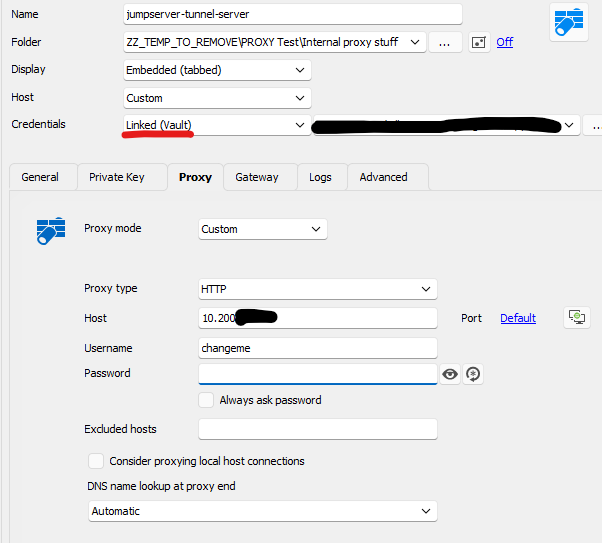
With user specific settings I can perform those overrides:
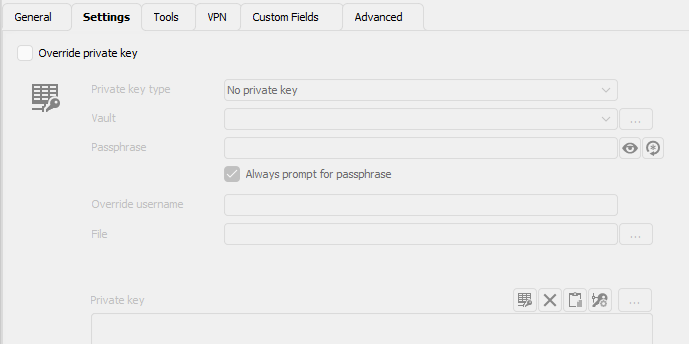


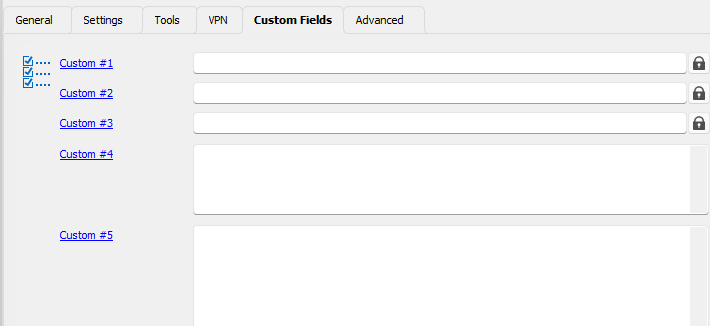

There is no place to override just the proxy credentials.
452e8c33-fa1f-4401-985c-43bf633a4fb3.png
ca4c3736-e4d2-49c7-95a5-208f270c4421.png
ee9d8b67-ca9d-4c5a-9083-f6132be0753e.png
7b6f299f-f6a2-4a05-920b-e77caf45493f.png
474516fe-fc22-4a38-83ca-3d19ee5b3465.png
67d0f44a-d178-45e6-8297-aa3601d5df25.png
ccbf2221-6313-4cf5-a5f7-443c55af906f.png
download.png
Hello,
Thank you for your reply,
I see, after discussing your case with our engineering department, we've linked this thread with an engineering ticket regarding adding additional options to the "Proxy" section for credentials, including "Find by name (User vault)" which should help with your issue.
I will keep you updated with any news I receive regarding this,
Best regards,
Samuel Dery
Great news! Thank you very much!
You may also want to have a look why proxy credentials are not used when using Linked Proxy session (proxy mode = link). The referred session alone can authenticate without problems.
I very much appreciate your help.
Hi. I just wanted to ask - is there an estimated timeline known when this might get implemented?
I need to plan rollout of a solution that would require this feature to be present and want to know if this is matter of months or half year or even more...
Would appreciate any details regarding the timeline.
Hello,
We will raise the priority on this. I can't give you an estimate but it's currently assigned to a developper.
Regards,
Hubert Mireault
Great news! Thank you very much!
Recently I have stumbled upon other proxy related problems. It seems, that currently only a proxy in a 'Website' Session of Chrome/Edge supports http proxy with NTLM/Negotiate authentication.
Sadly, all 'Proxy Tunnel (HTTP, Socks4...)', 'SSH Tunnel' entries can do ONLY Basic authentification (which is not allowed on our proxy), as it is effective plaintext.
The same problem cause SOCKS5 type Proxy Tunnels - only Basic Auth is supported, and therefore cannot be used.
Furthermore - when connecting to Windows via RDP with a VPN/Tunnel/Gateway set to http connect proxy there are multiple problems:
- When not using "Force allow multiple instances of VPN", second RDP Connection does not get redirected via localhost and tries to connect directly (which obviously fails)
- When setting "Force allow multiple instances of VPN" for each RDP Connection a new connection helper listening on localhost gets started, but when I close ANY of the RDP sessions, RDM freezez totally and the only thing that can be done is to kill it with task manager.
I have also found weird behaviour of cascaded settings like:
- SSH or RDP Connection set with VPN using pre-defined session of type "Proxy Tunnel"
- this pre-defined session of type Proxy Tunnel has itself VPN set to "Session" causing it to open a web session in separate tab
- when calling primary SSH/RDP Entry, the VPN from the pre-defined Proxy Tunel session is ignored
- (interestingly, Events of the pre-defined session do not get ignored. I wonder what would happen if there were events for the primary ssh/rdp session configured)
Currently used RDM Verison is 2024.1.28.0 64-bit
I can at least confirm, that setting VPN to 'SSH Tunnel / SSH-link' for ssh sessions works now (does not support ntlm/negotiate though). This is for sure an improvement.
I would really appreciate if there was an easy way to use http connect / socks 5 proxy with secure authentification (ntlm/negotiate), ideally with OS credentials as an option, for typical SSH and RDP connections. This is not so complex setup and there should be an easy way to achieve it.
Thanks for your support so far!
Hi,
Regarding SOCKS5 proxy support for the GSSAPI (Windows SSPI) authentication type, I am aware that there is an RFC for it, but I don't know of a SOCKS5 proxy that supports it, and a SOCKS5 client that also supports it. This is a non-trivial feature request, most SOCKS5 proxy usage we see is not authenticated. This being said, I would be interested in confirming what the SOCKS5 GSSAPI authentication looks like in Wireshark. What proxy server are you using, and what test client application can I use that correctly supports SOCKS5 GSSAPI authentication?
Best regards,
Marc-André Moreau
That might be a problem - I use WinGate and am not sure whether it supports any other authentication than Basic. Therefore SOCKS seem to be no option anyway... For me a bigger problem is however, the support of http connect proxy for non-website type connections. SSH can do only basic auth and in order to get RDP over HTTP Connect proxy one has to experiment with VPN/Tunnel settings on a connection. Too bad, there is no tab Proxy, with an option to use personal credential or user vault lookup that would do more than basic (ideally negotiate/ntlm). I would perosnally also very welcome the option to use OS credentials of the currently logged in user since windows might be able to delegate the credential object without revealing actual password.
Nonetheless thanks for such fast answer!
Hi,
HTTP proxying is usually still in plain text for the connection initiation - it's an HTTP CONNECT request, after which the TLS handshake begins. Some proxy servers inspect TLS traffic, some others just filter the destination servers. In any case, HTTP proxying is only suitable to proxy HTTP traffic and wouldn't work for RDP like SOCKS5 could. AFAIK, there is no good solution for authenticating proxy connections that isn't in plain text, which is why proxies are most frequently used with no authentication.
This being said, if your use case is RDP, we have one of the most advanced just-in-time RDP solution on the market with Devolutions Gateway, which includes just-in-time KDC proxying alongside the RDP connection to make Kerberos work at all times (this means even members of the Protected Users group in Active Directory will work!).
I would have recommended not bothering with HTTP and SOCKS proxying to just use an SSH tunnel for RDP connections, but there is currently no way to make that work properly with Kerberos, which can be a problem if deprecating NTLM is on your roadmap.
I am not familiar with WinGate, but if your primary use case is to proxy RDP connections, there are various other methods to secure RDP traffic you can use that don't use HTTP or SOCKS proxying. If I haven't understood what you're trying to achieve, please elaborate more.
Best regards,
Marc-André Moreau
Hi.
Maybe I should give a bit more context. I understand that Devolutions Gateway looks really promising, but the problem is - target hosts we connect to are not under our control. We go over ipsec s2s tunnel and have only their IP and RDP or SSH available. We cannot force parties responsible for those hosts to install Devolutions Gateway product.
What we however have is http connect proxy server through we just literally have to go in order to be able to reach them.
And due to policy requirements, this proxy server does not allow unencrypted authentication methods like basic/digest auth. Only NTLM and Negotiate are allowed. SOCKS protocol was also a potential option, but it showed up that the server is not able to handle anything other than basic auth and it got disabled.
There is currently one sesion type in RDM that handles authentication according to the requirements - this is Web Session with either Chrome or Edge backend. It is the only one being able to authenticate properly.
There is another thing also - having at least 1 properly authenticated connection open from a client host, all following connections are assumed the same user and do not need authentication. This means, that if I open this web session as a "VPN Session" before the main connection, I am able to have the main connection without authentcation. But then we face another problem - Having Web Session configured as VPN I cannot use Proxy Tunnel type VPN session to go with RDP over HTTP Connect proxy. I solved this partially by using Events and opening curl (which is also able to authenticate properly) as an ecent before opening session, and by that pre-authenticating client. This everything is however extremaly complex to manage and error prone.
Would you just implement the possibility to connect via plain http connect proxy for RDP connection - this would improve my scenario extremally.
I guess to implement NTLM/Negotiate to all places where HTTP Proxy can be used seems to be way more complex topic...
Hi,
I think I understand now, but the resulting feature request is not a trivial thing to implement on our side. There is a big difference between unauthenticated or basic authentication over HTTP and Window authentication over HTTP during the HTTP CONNECT call which is normally just a single request/response, and now becomes a series of request/responses of sequence that can vary in length, from our SSH library which implements it directly. This being said, I have researched what it looks like at the protocol level and opened a ticket on our side, just don't expect a quick resolution.
I have used CCProxy and a PowerShell code snippet to try HTTP CONNECT + NTLM, here's what it looks like in Wireshark: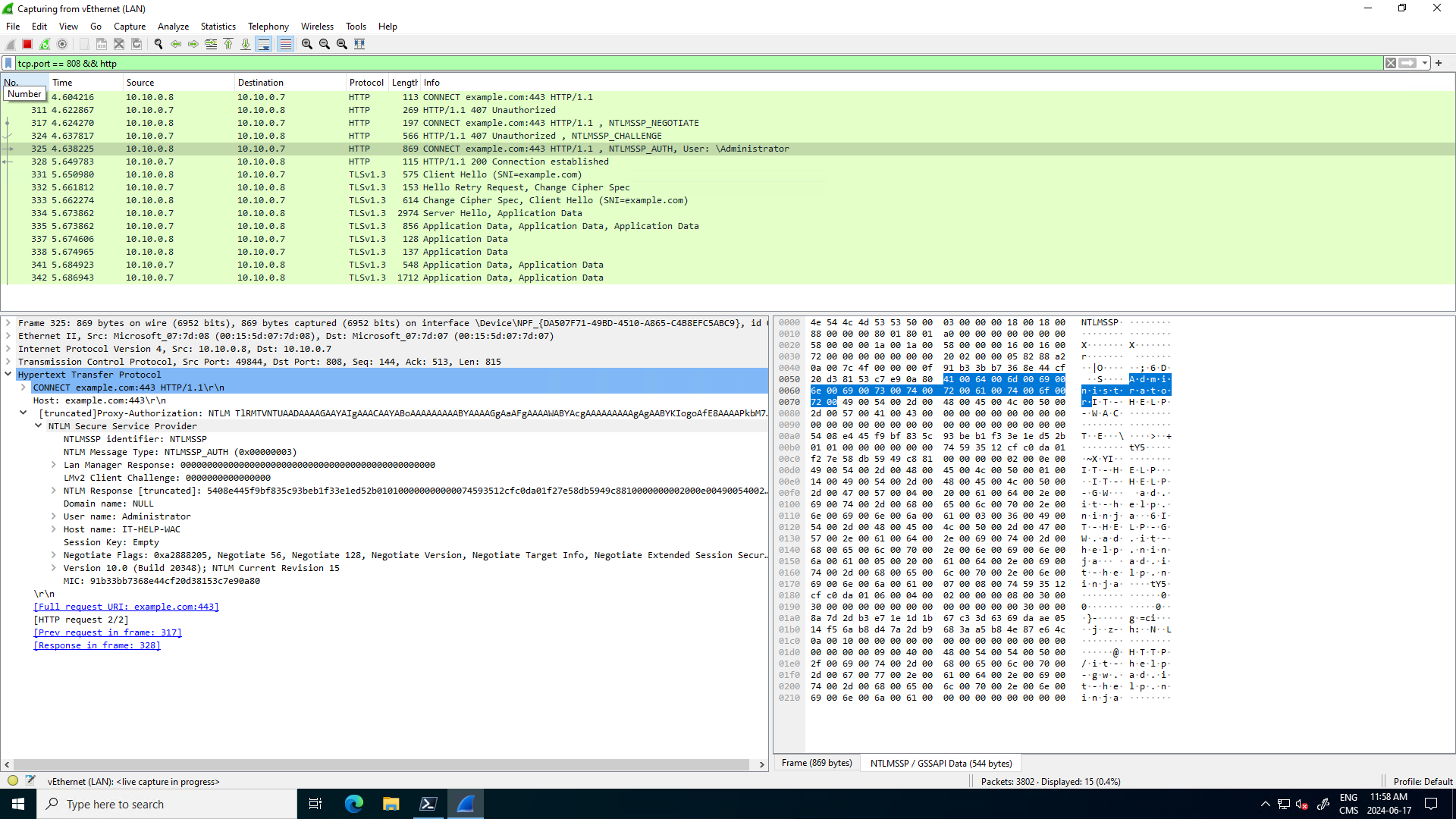
Now as long as WinGate doesn't try to inspect the traffic after the final HTTP 200 response, and doesn't put a timeout on the connection (HTTP requests/responses aren't normally long-lived), then it *should* work for SSH. If WinGate is configured to inspect the traffic after that HTTP 200 response, it wouldn't work, as it's not even HTTP(S) for SSH. For the screenshot above I have just queried example.com through the proxy, we can see the TLS handshake for the HTTPS traffic after the proxy connection setup is done in clear text.
For the short term, I would recommend asking if it's possible to use a dedicated SSH jump host that doesn't go through the HTTP proxy, which should solve your issue. I've done a quick search for tools that support this kind of proxying in the client, and there aren't many. I'm not even sure OpenSSH, the most common SSH client, even supports this.
Best regards,
Marc-André Moreau
1e6df0fc-c2ac-4489-bced-81580cd66b61.png
Thanks for such in-depth analysis. Indeed, NTLM Negotiate challenge response authentication requires several round trips and that is why it always first check whether authentication is needed at all (as many proxies require only the first connection from a given IP to be authenticated, and as long as at least one session is open allow new assuming same authentication/credentials. Otherwise so many roundtrips would make the connection extremaly slow, especially for plain http requests without connection: keep-alive header. Nevertheless thank you very much for opening ticket in order to implement it.
Currently i try to use event mechanism (pre connect) and curl to provide this initial pre-authentication but it is a bit cumbersome as black window pops up and causes questions from users. Another way is to set "VPN" on the connection to trigger a web page session as a pre-loading mechanism which also works but again not all users would like that for opening only SSH always a web session has to be started. Would you be able to implement NTLM for Proxy Tunnel this would be great and i would not need all this workarounds.
By the way, for proxying simple SSH session over http connect proxy - which method do you recomment, as both work?
- Proxy tab on the connection with either Custom/Link proxy mode
- VPN section of the connection and there VPN of the type SSH Link (requires SSH VPN, SSH Tunnel or SSH Port Forward connection type - which one works the best?)
- VPN section of the connection and there VPN of the type Proxy Tunnel (is this effectively the same as 1. ? as the same connection as for Link mode can be selected)
many proxies require only the first connection from a given IP to be authenticated, and as long as at least one session is open allow new assuming same authentication/credentials
Is this the case with WinGate in your environment? Because if it's possible to pre-authenticate *before* opening the SSH tunnel, we could just write a PowerShell script to do it and set it on the connection entry, which would save us a lot of work, but also work in the short term for you. Have you confirmed what actually happens in Wireshark, and that you can do NTLM authentication once, followed by unauthenticated HTTP CONNECT requests through the proxy, assuming the proxy server will have added the IP address to an allow list for a certain amount of time? My understanding so far is that HTTP proxies just require all connections to go through the authentication process, but your proxy may just require authentication once every X intervals of time.
Here's a PowerShell code snippet I used to query example.com through CCProxy with NTLM authentication and explicit credentials. Can you adapt it for your real proxy settings and valid credentials, and manually run it before launching a SSH tunnel through the HTTP proxy, but without authentication, just to test if this can potentially work as a solution?
$proxyAddress = "http://IT-HELP-GW.ad.it-help.ninja:808"
$proxy = New-Object System.Net.WebProxy($proxyAddress)
$username = "ProxyUser"
$password = "Test123!"
$credentials = New-Object System.Net.NetworkCredential($username, $password)
$proxy.Credentials = $credentials
$request = [System.Net.HttpWebRequest]::Create($url)
$request.Proxy = $proxy
$request.Method = "GET"
$request.Credentials = $credentials
$response = $request.GetResponse()
$stream = $response.GetResponseStream()
$reader = New-Object System.IO.StreamReader($stream)
$content = $reader.ReadToEnd()
Use Wireshark to confirm what actually happens over the wire, and see if the SSH tunnel can really skip HTTP authentication if you've just done NTLM authentication from the same IP address using that script.
Best regards,
Marc-André Moreau
Hi. Thanks for powershell snipplet. I already tried that and due to group policy I am not allowed to run such script. I used a bit simpler one that worked from powershell prompt, but was denied when started from RDM:
# Define the URL to connect to
$url = "http://example.com"

# Define the proxy settings
$proxyUrl = "http://proxyserver:port"

# Create and configure the WebRequest
$request = [System.Net.HttpWebRequest]::Create($url)
$request.Proxy = New-Object System.Net.WebProxy($proxyUrl, $true)
$request.Proxy.Credentials = [System.Net.CredentialCache]::DefaultNetworkCredentials
$request.KeepAlive = $true

# Get the response to establish the connection
$response = $request.GetResponse()

# Keep the connection open for at least 10 seconds
Start-Sleep -Seconds 10

# Close the response to release the connection
$response.Close()
I have as I already stated another alternative that works, instead of running PowerShell Event - now I can run following "Command line" command:
curl -s -o NUL --proxy http://proxyserver:port --proxy-user : --proxy-negotiate --rate 4/m http://example.com http://example.com
This does effectively exactly the same - ":" as proxy user means use OS credentials, rate limit with 2 URLs causes curl to wait with connection open given time between both requests. Configuring this as "Before open" event with Post execution pause of 1s and without waiting for command to exit does the job. But as stated before - it opens black terminal window for around 15s which causes questions from users... At the time being this is my only alternative and as you see this is already a nasty workaround...
I would really appreciate if you could manage to implement negotiate/ntlm authentication at places where http connect proxy may be used. And always try first to send the request without auth, just in case there is already a connection open and no additional authentication is needed.
And to answer your first question - yes, indeed WinGate works like that, that if there is at least 1 authenticated connection open there is no need to authenticate any further connections.
Best Regards,
Bart
There is however one issue I still struggle with. Let me describe the scenario in detail:
I have a session named "RDP-Tunnel" of Type "Proxy Tunnel (HTTP, SOCKS4, SOCKS4A, SOCKS5)" configured in following way:
- Host: Host configured
- Credentials: None
and in General Tab:
- Usage: Port Forward
- Host/Port - my proxy IP/port
- Proxy Type: HTTP
- Local host: 127.0.0.1, Port 9999
- Remote Host: $PARENT_HOST$, Port 3389
VPN Tab left:
- Connect: Not enabled
Events tab left:
- Before Open - Command Line with curl described above
- Wait for exit: false
- Wait timeout 120s
- Post Execution pause: 1s
Advanced tab left:
- Allow open multiple connections: Yes
Then I have a folder with multiple RDP Sessions. The folder is configured in this way:
VPN/Tunnel/Gateway Tab left:
- Connect: Always Connect
- Type: Proxy Tunnel (existing)
- Close: On session close
- VPN group: (empty)
Settings Tab:
- Session: Linked (Vault) -> points to session described above
- Use dynamic port: checked
- Force "localhost": Yes
- Override parent ($PARENT_HOST$): checked
- Force "allow multiple instances" of VPN: checked
Now my RDP sessions are just simple RDP type entries with Host IP entered and name. The only additional setting is - in VPN/Tunnel/Gateway Connect is set to "Inherited"
Now at first look everything works like a charm. I can open an RDP session, can even get authenticated with credential looked up in user vault. Great.
Problem starts when I open more than 1 such RDP session. Everything opens normally. But for example when I open Host A, then Host B and after a while i just log off from Host A, well... then Remote Desktop Manager stops responding and I have to kill it from task manager. I can imagine, that it may get confused as it finds now 2 open sessions for the "RDP Tunnel" and somehow does not know which one to close after the RDP connection got closed. But this makes the pretty complex solution useless :( Too bad also, that there is no possiblity to open multiple proxy tunnels over a single proxy tunnel session (similar as with SSH Tunnel).
Please look if you can re-produce this issue. I wonder what might be the reason for it.
Best Regards,
Bart
If this might help, I have also found out, that when during connected to RDP if I close the RDP-Tunnel session, instead of tearing down the RDP session RDP Manager also freezes and has to be terminated from task manager... This might be the same issue that is hit.
Hello
If I can interject here, this might relate to a known issue with integrated RDP and UDP transport over gateways / tunnels.
First you should try disabling UDP transport for RDP. This knowledge base article has a solution for that using the registry; but we've also recently added this as an option at the session level (in the RDP session - "Advanced" - change "Disable UDP Transport" to "Yes").
Please give that a try first and let me know if things work better.
Thanks and kind regards,
Richard Markievicz
Thanks for the possible hint. I have checked this, but no. Setting Disable UDP Transport to Yes does not change the behaviour. If you close the tunnel session while RDP session is open RDM freezes completely as well. Should be easy to reproduce and check.
Hello
I don't have a setup matching yours to test with (the proxy tunnel configurations in the lab I have available are for websites). There will be a bit of inertia before trying to reproduce your problem.
It could make things proceed a bit more quickly if you can produce a process mini dump of RDM once it's in a frozen state. My colleague's post here gives details on one way to do that. If you're able to produce a mini dump, let me know and I can provide a secure URL for you to provide the file to us.
Thanks and kind regards,
Richard Markievicz
Sure I can post - it is 17MB big... Please provide a way to upload should this help.
Hello
I will PM you with a link; thank you.
Kind regards,
Richard Markievicz
Uploaded as topic_39985_RemoteDesktopManager.dmp
This is the dump from the situation where I close the Tunnel session while RDP connection over it is still active. In such situation RDM freezes completely and has to be killed via task manager.
Should I also attach a dump from second scenario, where RDM hangs while closing one of multiple RDP sessions, that go over Tunnel type VPN sessions? It might be related, or it might be just the case of order of closing connections - first close RDP, then the Tunnel, not otherwise.
Hello
Thanks for the update, but I don't see the file (the attach didn't work - likely because of the file type). A mini dump may contain segments of your computer memory and shouldn't be posted publicly. Did you get the file share link I sent you via private message?
Thanks and kind regards,
Richard Markievicz
I posted it to the link provided. I named the document as in my previous post. Just to be sure I just re-uploaded it again.
Hello
Great, thanks for clarification. I did receive the dmp file and it gives some clues. Could you also send over the dmp of the second case? I'd like to compare. You can use the same link and just let me know again what the file is called.
Thanks and kind regards,
Richard Markievicz
Hello again
Thanks for sending over all the files.
I took a good look and the hang is happening inside our native proxy tunnel implementation, a deadlock can occur. I can't pinpoint the exact reason myself as I don't have access to the debug information for that library.
However with the dump files and the other information you've provided, I was able to make a reproduction of the problem on our side and I've sent all that information to the right developer. An internal ticket for the freezing issue has been created, and I'll link it back to this forum post so we'll update you once that is fixed.
In the meantime, thank you for your patience, and don't hesitate if you have further questions or comments
Kind regards,
Richard Markievicz
Thank you very much for addressing this issue. This is the last blocking point for implementing connections to windows hosts over plain HTTP Connect proxy tunnel, as possibility of freezing entire RDM in produciton environment was a strong no-go for this scenario. Until now we had to use SecugeGateway (ssh forwarding) but not all environments with windows VMs have a linux server that may act as a tunnel server...
Please inform me once this deadlock issue gets fixed and in which verison, so we will test it internally.
Best Regards,
Bart
Hi. Just checking up - do you have some news on this topic?
Best Regards,
Bart