
justin_mack
In latest version - can no longer drag/drop tabs to reorder them once connected
I have the issue and from what I can tell it breaks very shortly after opening it up. If i remove the tab from the group and then slot it back in.. I can place it at the first position but unable to move them around
Delinea OTP Error after latest update
Awesome, I will give this update a go and report back if there are any issues. Thank you for the quick resolution
Edit.. so far so good.. no more Delinea OTP entries.
Delinea OTP Error after latest update
Awesome, thank you!
Delinea OTP Error after latest update
ok ill look forward to the next update.. Thank you for the detailed response
Delinea OTP Error after latest update
Before i updated today, i was on version 2026.1.23 so only one or two versions back
I have reverted back to this version for the time being and it is back to working.. SO something is up with the latest release.
Delinea OTP Error after latest update
Good Morning.. I just updated to version 2026.2.5 and now when I try to OTP auth with my Delinea connection (that has worked for years just fine) i now get an error that i have uploaded below.
the error reads
"-1159624692 is not a valid value for Interval. Interval must be greater than one."
This is occurring on every secret entry that I have, and at the moment none on my secret entries work.

AD Sync oddity
Yes they are, i have two users in the same domian, vlan, and same RDM setup that are seeing two different results.
Like I said, the affected user, we can preview the sync, and it shows all the expected servers.. yet when we go to run it properly it imports nothing at all.
AD Sync oddity
So to be clear, this is an issue with the AD Synchronizer Object Entry in RDM. The entry is 100% setup correctly as when we preview the results we see the expected servers however when we perform the sync nothing shows up in the destination folder.
I have rebooted the laptop, restarted RDM, and removed the AD Sync object and set it up again, i have the exact same setup on my RDM and it works as intended so not sure why this instance is any different.
We are NOT doing a static import/export but an AD Sync to a folder in RDM that on my setup works as expected.
AD Sync oddity
I have passed this along to the user having the issue..
I can say they are just using a local data source "connections.db"
Question though, how do we perform the troubleshooting steps detailed above?
AD Sync oddity
Ok so I have a user setup with AD Sync. I have mirrored the same setup i have used countless other times, I can test and preview the connection and filters and it shows the expected servers.. However when we complete or run the sync nothing populates in the desired destination folder. They are running on version 2025.3.28 (same as me) yet for the life of me I cannot get the sync to trigger at all. Any guidance would be great.
Web Page Autologin
Yes. thank you. That seemed to make a difference today. Thank you for your time.
Web Page Autologin
Got it and picked a time slot. Thank you
Web Page Autologin
Yes that is the current/correct email.
I also just stood up the portable version of RDM and I can go to the same entry.. one works just fine on the old version, however on the new version, if I have it set to auto submit it fails for bad password, BUT if i disable that.. let it fill the password field and then I hit login, it logs in, so it clearly is entering in the correct information into the password field.
Web Page Autologin
Yes that is the current/correct email.
Web Page Autologin
Not shared data. Just the canned local data source Connection.db
I also as a test yesterday reverted back to that version by uninstalling, and reinstalling and loading my config and the web paged all worked as the did.
However on the new version they are broken.
Web Page Autologin
Ok so to put it into perspective.. this is happening on all 6 of my website entries, and none, let alone all of them, were changed yesterday at the exact time I updated RDM.
I was on version V2024.2.21.0
and it worked on every version of RMD before that, that i have had installed.
I use this feature daily and multiple times a day, and it has always worked with out issues.
Web Page Autologin
I am curious why it worked before this update then? What changed with this release to stop that.. It was working on my previous RDM versions for the last year+
Web Page Autologin
I can assure you that nothing has changed on these pages, it worked before the latest update and broke with the newest version. RDM even fills out the correct password that if I manually his enter it accepts.. However if i let it automate it, it fails for bad password.
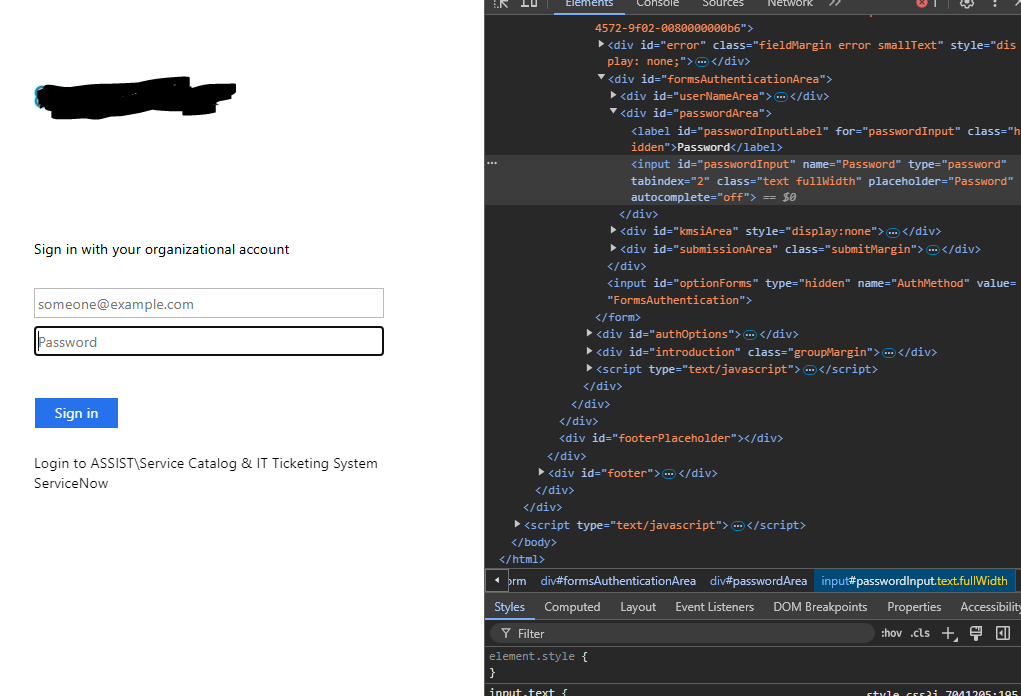
Web Page Autologin
They are mainly internal sites, but nothing home brewed.. Exchange On Prem, VCenter, etc.
They all worked on the old version I had running, it was only a few versions back (August 2024). I 100% can replicate the behavir with the bad password, and as I mentioned if I break the submit button and then press enter, or click the log in button I get logged in perfectly fine. However the automated process is not working
Web Page Autologin
Even stranger, is if I remove the Login Button ID to stop the auto submit (unchecking Auto Submit does not actually prevent auto submit), I wait for the credentials to be populated, and if I click submit/login/hit enter i get logged in.. So it seems as if enter is being pressed BEFORE the creds are fully loaded.
Web Page Autologin
So I recently updated to the latest build of RDM, 2024.3.27.0 64-bit. However I noticed on my web pages that I have had setup and working perfectly fine before. Now when I load them up, I get a bad password notice however it is using the same linked credential entry, and if I manually take the password from that entry and copy/paste it into the field I get logged in.
I have tried this on a few web page entries and they all experience this behavior.. I know that 100% the passwords are not incorrect.
Website Auto Login
Looks like both modifying the delay and/or using the Key icon would actually load the credentials
Website Auto Login
I grabbed the ZIP version.. but upon launch it acts like it is not setup. Is there a way to import my current config into this without affecting my installed version?
Website Auto Login
thank you!
Website Auto Login
Just did that test.. setting to Edge works as intended as well.