Web Page Autologin

So I recently updated to the latest build of RDM, 2024.3.27.0 64-bit. However I noticed on my web pages that I have had setup and working perfectly fine before. Now when I load them up, I get a bad password notice however it is using the same linked credential entry, and if I manually take the password from that entry and copy/paste it into the field I get logged in.
I have tried this on a few web page entries and they all experience this behavior.. I know that 100% the passwords are not incorrect.
All Comments (21)
Even stranger, is if I remove the Login Button ID to stop the auto submit (unchecking Auto Submit does not actually prevent auto submit), I wait for the credentials to be populated, and if I click submit/login/hit enter i get logged in.. So it seems as if enter is being pressed BEFORE the creds are fully loaded.
Hello Justin,
Thank you for reaching out to us regarding this,
I see; that is indeed odd. Are any of the websites where you are encountering this issue public? If so, would you be able to provide me with the URL?
Let me know,
Best regards,
Samuel Dery
They are mainly internal sites, but nothing home brewed.. Exchange On Prem, VCenter, etc.
They all worked on the old version I had running, it was only a few versions back (August 2024). I 100% can replicate the behavir with the bad password, and as I mentioned if I break the submit button and then press enter, or click the log in button I get logged in perfectly fine. However the automated process is not working
Hello Justin,
Thank you for your reply,
I suspect something has changed on the Websites themselves to prevent the autofill, could you follow the method mentioned in this knowledge base article and provide me with a screenshot of the resulting HTML for the Password Field:
https://docs.devolutions.net/rdm/kb/knowledge-base/website-authentication/#troubleshoot-missing-fields
Let me know,
Best regards,
Samuel Dery
I can assure you that nothing has changed on these pages, it worked before the latest update and broke with the newest version. RDM even fills out the correct password that if I manually his enter it accepts.. However if i let it automate it, it fails for bad password. 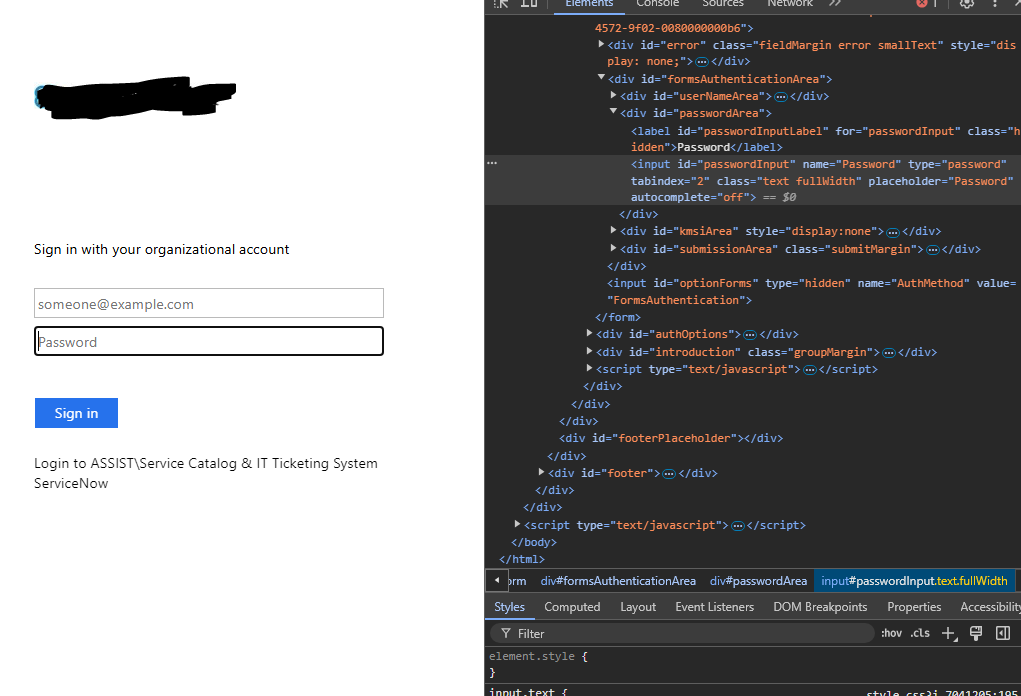
2d5df09d-13d3-402e-835a-71d5fe7df15d.png
Hello Justin,
Thank you for your reply,
This is most likely due to the "Autocomplete=off" you can find in the HTML code of the website; I'm afraid the only workaround for this would be to launch the session externally and use the Workspace browser extension to autofill the credentials.
Let me know if this helps,
Best regards,
Samuel Dery
I am curious why it worked before this update then? What changed with this release to stop that.. It was working on my previous RDM versions for the last year+
Hello Justin,
Thank you for your reply,
I have to assume it was the website that changed, but we can confirm this by doing a test, Which version of RDM were you using before your update?
Let me know,
Best regards,
Samuel Dery
Ok so to put it into perspective.. this is happening on all 6 of my website entries, and none, let alone all of them, were changed yesterday at the exact time I updated RDM.
I was on version V2024.2.21.0
and it worked on every version of RMD before that, that i have had installed.
I use this feature daily and multiple times a day, and it has always worked with out issues.
Hello Justin,
Thank you for your reply,
I should have asked in my previous message, what type of data source are you using with RDM? Is it a shared data source SQL Server for example or a SQLite?
You can follow this knowledge base article to create a portable version of RDM 2024.2.21.0:
https://docs.devolutions.net/rdm/kb/how-to-articles/portable-rdm-installation/
You can download that version from here:
https://cdn.devolutions.net/download/Devolutions.RemoteDesktopManager.Bin.2024.2.21.0.zip?_gl=1*tcz6ua*_ga*NTI1MjMyNzQwLjE3MzE5Njg0MTM.*_ga_P11646PR82*MTczODMzNTc2OS4xODMuMS4xNzM4MzQzMjgzLjQwLjAuMA..
If you are using a Shared data source, simply use a SQLite for the tests to avoid any compatibility issues.
Let me know the results,
Best regards,
Samuel Dery
Not shared data. Just the canned local data source Connection.db
I also as a test yesterday reverted back to that version by uninstalling, and reinstalling and loading my config and the web paged all worked as the did.
However on the new version they are broken.
Hello Justin,
I see, I would like to have a session with you to have a look at this,
To do so, I will need to create a case, would the email used in your account be the correct one to use?
If not, I can send you a private message so that you can provide me with the correct email.
Let me know,
Best regards,
Samuel Dery
Yes that is the current/correct email.
Yes that is the current/correct email.
I also just stood up the portable version of RDM and I can go to the same entry.. one works just fine on the old version, however on the new version, if I have it set to auto submit it fails for bad password, BUT if i disable that.. let it fill the password field and then I hit login, it logs in, so it clearly is entering in the correct information into the password field.
Hello Justin,
Thank you for your reply,
Perfect, I've just opened the case and sent you a scheduling link.
Best regards,
Samuel Dery
Got it and picked a time slot. Thank you
Hello Justin,
Thank you for your reply,
Perfect, I will see you at the scheduled time!
Best regards,
Samuel Dery
Hello,
For those who may be encountering similar issues and stumble upon this topic,
During our session, we adjusted the Autofill delay value, which you can find in the entry Properties under the "Login" -> "Autofill" section, and that seemed to resolve the problem.
Best regards,
Samuel Dery
Yes. thank you. That seemed to make a difference today. Thank you for your time.
I want to add my experience with the HPE Aruba InstantOn Switch (newer firmware > rebranded from Aruba to HPE): I fought hardly with the autologin RDM feature and the only way to have it working is:
- adding delay of 15000 ms (a lot, but something lower doesn't work);
- manually input form, username, password and login button ID (after analyze them with browser developer tools).
Automatic, auto discover, [SUBMIT] and [ENTER] doesn't work: sometimes nothing happens, sometimes I get "wrong username/password", sometime another invalid access message.
Hello Nicola,
Thank you for sharing this!
Best regards,
Samuel Dery