
aleskomarek
RDP v2026.3.15.0 - keyboard shortcuts for tab navigion (previous, next) sometimes are not functional
Hello,
Thank you for your patience while our team looked into the issue you reported.
I'm happy to let you know that the latest version of Remote Desktop Manager (2026.3.17.0) includes a fix for this problem. You can download it from our website here:
https://devolutions.net/remote-desktop-manager/download/
Once you have installed the update, could you please test it in your environment and confirm that everything now works as expected? If the issue persists or if you notice anything unusual related to the same original problem, just reply to this message with a few details, and we will be glad to look into it further.
Thank you for your collaboration.
Best regards,
@Maxim Robert
Hello Robert.
Great news.
I tested new version of RDM and I can't simulate previous problems.
Now it seems that the troubles are fixed.
Thank you very much.
Best regards,
Ales
RDP v2026.3.15.0 - inactive focus to SSH terminal window when switching tabs
Hello,
Thank you for your patience while our team looked into the issue you reported.
I'm happy to let you know that the latest version of Remote Desktop Manager (2026.3.17.0) includes a fix for this problem. You can download it from our website here:
https://devolutions.net/remote-desktop-manager/download/
Once you have installed the update, could you please test it in your environment and confirm that everything now works as expected? If the issue persists or if you notice anything unusual related to the same original problem, just reply to this message with a few details, and we will be glad to look into it further.
Thank you for your collaboration.
Best regards,
@Maxim Robert
Hello Robert.
Great news.
I tested new version of RDM and I can't simulate previous problems.
Now it seems that the troubles are fixed.
Thank you very much.
Best regards,
Ales
RDP v2026.3.15.0 - keyboard shortcuts for tab navigion (previous, next) sometimes are not functional
Hello Ales,
Thank you for the additional details.
Our team reproduced the issue you described: when sessions are opened together with Ctrl+Enter, the next tab has an inactive terminal cursor, and the tab shortcuts stop working. Our developer team has a fix for it, planned for an upcoming update. We will let you know as soon as it is available. Until then, clicking each tab once after opening the folder keeps the shortcuts working.
Once you have installed the update, could you test both cases and let us know the result?
Opening the folder with Ctrl+Enter and moving between tabs with your shortcuts.
Using the shortcuts after RDM locks and you unlock it with your PIN.
Thank you in advance!
Best regards,
@Sam Moynihan
Hello Sam.
Great news. I will test new version as soon as possible.
Thank you very much for your help.
Best regards,
Ales
RDP v2026.3.15.0 - inactive focus to SSH terminal window when switching tabs
Hello Ales,
Thank you for your feedback.
Our developer team has identified the issue and is currently working on a patch.
We will update you once it's been implemented.
Thank you again for your cooperation throughout!
Best regards,
@Sam Moynihan
Hello Sam.
Great news. I will test new version as soon as possible.
Thank you very much for your help.
Best regards,
Ales
RDP v2026.3.15.0 - inactive focus to SSH terminal window when switching tabs
Hello Ales,
Thank you very much for the detailed answers; they helped a lot. You were right: the difference was how we switched tabs. We repeated the test with 16 SSH sessions in one folder, opened with Ctrl+Enter on the folder, the main window maximized, both "Auto-focus tab on item select" and "Auto-select item on tab focus" set to "never", and Ctrl+Alt+PageDown as the next tab shortcut.
What we saw on RDM 2026.3.16.0: with the sessions freshly opened, the shortcut moves to the next tab once and then stops working. After we went back to the Dashboard tab, it moved one more tab and stopped again. After we clicked each tab once with the mouse, the shortcut worked through all 16 tabs without stopping. So the tabs that were opened in the batch and never selected seem to be the ones that block it. This matches what you described.
Please try this on your side:
1. Open File - Settings - User interface - Keyboard, find "Select the next tab" and "Select the previous tab", and check the Mode column. If it says "When not in session", change it to "Default". RDM asks for a restart, so please restart it.
2. Open the folder with Ctrl+Enter and click each tab once, then use your shortcuts.
Could you tell me which Mode value you had before the change, and whether step 2 makes the shortcuts work on all your tabs? If it does not, a short screen recording would help.
I am going to report this to our development team so they can check why the shortcut stops on tabs that were opened in the batch but not selected yet. I will let you know as soon as I have news.
Best regards,
@Sam Moynihan
Hello Sam.
1) My mode settings of "Select the next tab" and "Select the previous tab" is already setted to "Default" value. No change is needed.
2) If I clicked all opened tabs by mouse (tabs opened by CTRL+ENTER) then move between tabs by keyboard shortcuts has no problem.
3) If application RDM locks your screen (security settings) after 1 hour of inactivity and then I unlock application by pin code the keyboard shortcuts are again not functional.
Thank you very much.
Best regards,
Ales
RDP v2026.3.15.0 - keyboard shortcuts for tab navigion (previous, next) sometimes are not functional
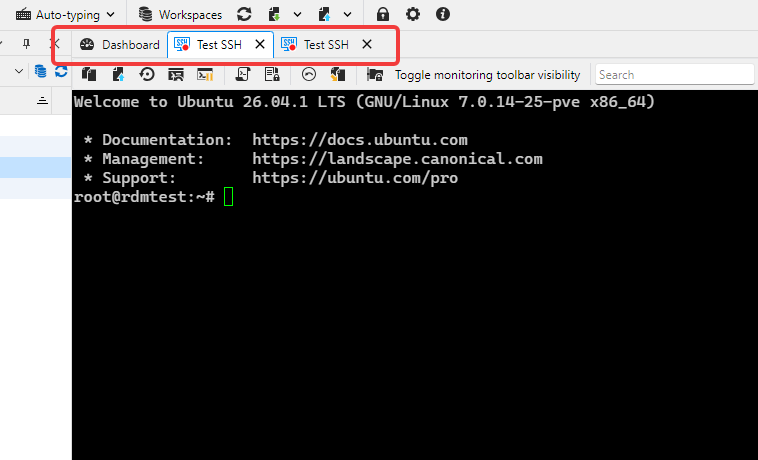
I'm not sure if this is the same issue that I have. My issue is: when I open several SSH sessions, I am able to switch between them using CTRL+TAB, or CTRL+SHIFT+TAB. This is what I expect.
But when I press CTRL+TAB when the rightmost session is active (or CTRL+SHIFT+TAB when the leftmost session is active), it switches to the Dashboard, and then it is stuck at Dashboard - those above keys don't work anymore. I'd like to be able to just switch away from the Dashboard to the session next to it by pressing CTRL+TAB, and it should be the default behavior.
This is currently 3.15, but I think it was the same in 3.16.
Thanks in advance.
@RDMTinkerer
Hello.
First move to next tab is functional. But on the next tab is not focused cursor in the ssh terminal session (like your screenshot). And then is not functional moving to next tabs.
Thank you.
Best regards.
Ales
RDP v2026.3.15.0 - keyboard shortcuts for tab navigion (previous, next) sometimes are not functional
Hello Ales,
Thank you for the update, and for testing so carefully. It is useful that the shortcuts came back after the second restart, because it tells us the problem is not in the shortcut configuration itself.
To narrow it down, could you tell us:
1. What type of entry are the two "terminal" sessions (for example SSH Shell, PuTTY, PowerShell or Windows Terminal)?
2. When it happens, is there any session open at all? Does it also happen right after starting RDM, before opening any session?
3. What keyboard layout do you use? Do you have other keyboard software running (AutoHotkey, a keyboard or mouse utility, another remote tool)?
4. Does it tend to start after something specific, such as locking or unlocking the PC, waking it from sleep, or switching windows with Alt+Tab?
The next time it happens, please do not restart RDM first. Open Help > Troubleshooting > Application logs, and send us what you see there from that moment.
As a test, you could also change the two tab shortcuts to a combination without Alt, for example Ctrl+Shift+PageUp and Ctrl+Shift+PageDown.
Please let us know whether the behavior is the same.
Thank you in advance!
Best regards,
@Sam Moynihan
Hello Sam.
SSH terminal session
It does not matter - I tested with no other session opened.
Yes - I user AutoHotKey. But then it occurred to me that this might actually be the problem, so I ran tests without this application. Without success.
No other special actions.
BUT I described my observation in a ticket: "RDP v2026.3.15.0 - inactive focus to SSH terminal window when switching tabs":
I see the difference between your tests and my tests. I open whole folder with sessions with CTRL + ENTER. Goal is this:
- You are moving between session by clicking on tab and it is functional.
- BUT I moving between tabs by keyboard shortcuts. I switch from first tab to next tab by keyboard shortcut CTRL+ALT+PGDOWN (next tab navigation) and the cursor in second session is inactive and from now are keyboard shortcuts between tab navigation not functional.
I hope that it helps.
Thank You very much.
Best regards,
Ales
RDP v2026.3.15.0 - inactive focus to SSH terminal window when switching tabs
Hello Ales,
Thank you for testing 2026.3.16.0 and for the detailed description. Good to hear that opening the SSH sessions one by one now works as expected, including the keyboard shortcuts for moving between tabs.
For the case where you open several sessions with Ctrl+Enter on the folder, we tried to reproduce it on 2026.3.16.0 with a folder of four SSH Shell entries. We confirmed the "Do you want to open 4 sessions?" prompt and then clicked each tab header, both after the sessions had connected and while they were still connecting. In every tab, the terminal took the keyboard focus right away, so we could not see the problem on our side yet. That means something in your setup or in the exact steps differs from ours, and we would like to find out what.
Could you please answer the following?
- How many SSH entries are in the folder, and are they all direct entries of that folder, or is there a subfolder?
- Do the entries use a typing macro, an after-opening event, or another event that runs after connecting?
- Is the anchor icon in the status bar at the bottom right of the main window turned on? (This is a different icon from the tray icon of RDM.)
- Under File - Settings - User interface - Tree view, what are the values of "Auto-focus tab on item select" and "Auto-select item on tab focus"?
- Is the main window maximized when this happens, and are the tabs docked in the main window?
- If you select the same entries and use Open selection from the right-click menu instead of Ctrl+Enter on the folder, does the focus problem also appear?
A short screen recording would help us a lot. Please keep the whole RDM window visible, open the sessions with Ctrl+Enter on the folder, and then switch through the tabs until you reach one where the cursor focus is missing. You can send me the video via DM, I will DM you now so you can see where to send it.
The tab navigation shortcuts that stop working are already being followed in your other case, so we will keep that part there. If a tab does not take the focus, clicking once inside the terminal is the only workaround for now.
Thank you for your patience and your help.
Best regards,
@Sam Moynihan
Hello Sam.
there are 16 SSH sessions directly in th folder (no subfolders)
no typing macro and no any other action after openning session
the anchor icon is turned on
both values of "Auto-focus tab on item select" and "Auto-select item on tab focus" are set to "never"
yes - the window is maximalized and the tabs are docked in the main window
yes - it is same behavior with CTRL + ENTER or content menu (not matter how it is done)
BUT now I see the difference between your tests and my tests. I open whole folder with sessions with CTRL + ENTER. Goal is this:
- You are moving between session by clicking on tab and it is functional.
- BUT I moving between tabs by keyboard shortcuts. I switch from first tab to next tab by keyboard shortcut CTRL+ALT+PGDOWN (next tab navigation) and the cursor in second session is inactive and from now are keyboard shortcuts between tab navigation not functional.
I hope that it helps.
Thank You very much.
Best regards,
Ales
RDP v2026.3.15.0 - inactive focus to SSH terminal window when switching tabs
Hello,
Thank you for your patience while our team looked into the issue you reported.
I'm happy to let you know that the latest version of Remote Desktop Manager (2026.3.16.0) includes a fix for this problem. You can download it from our website here:
https://devolutions.net/remote-desktop-manager/download/
Once you have installed the update, could you please test it in your environment and confirm that everything now works as expected? If the issue persists or if you notice anything unusual related to the same original problem, just reply to this message with a few details, and we will be glad to look into it further.
Thank you for your collaboration.
Best regards,
@Maxim Robert
Hello Robert.
I tested RMD version 2026.3.16 and if I open multiple tabs manually everything is ok. The terminal cursor is focused to the SSH session and functional keyboard shortcuts for moving over tabs (previous and next tab) are also ok.
But if I open multiple tabs with SSH terminal session by CTRL+ENTER on the folder the cursor focus is not active on some tabs. If cursor is focused on the tab then functional keyboard shortcuts for moving over tabs, but if I move to the tab without active terminal cursor focus the keyboard shortcuts for moving over tabs are not functional (another ticket "RDP v2026.3.15.0 - keyboard shortcuts for tab navigion (previous, next) sometimes are not functional").
Thank you very much.
Best regards,
Ales
RDP v2026.3.15.0 - keyboard shortcuts for tab navigion (previous, next) sometimes are not functional
Hello Ales,
Thank you for testing these steps!
Your results tell us a few things. All of Remote Desktop Manager’s shortcuts stop at the same time, even with the keyboard grab enabled. Restarting the application does not fix it, but restarting Windows sometimes does. So the problem is not the shortcut configuration. Remote Desktop Manager has stopped receiving the keys, and that state outlasts the application itself.
The steps below will help us find out why.
1. If the shortcuts are not working right now, please check these first:
Leftover process: Close Remote Desktop Manager, open Task Manager, go to the Details tab and check whether RemoteDesktopManager.exe is still running. If it is, end it, reopen Remote Desktop Manager and test Ctrl+Shift+L. A process left running in the background would explain why restarting the application does not help but restarting Windows does.
Other applications: Test whether shortcuts work in other applications. If they also fail, the cause is on the Windows side rather than in Remote Desktop Manager.
2. Then restart Windows, and set up the following so we capture the next occurrence:
Disable API hooking: Go to File – Settings – Entry types – Sessions – Remote Desktop (RDP) – Advanced and set Enable API hooking to Disabled. We are aware of an issue in versions 2026.3.14 and 2026.3.15 where keyboard input can break in embedded RDP sessions after using Alt+Tab, and a fix is planned for an upcoming version. If the shortcuts keep working with this setting disabled, that confirms your issue is related. Please do not change this setting if you connect through Devolutions Gateway.
With this information, we can either confirm the cause or at least we will have everything we need to reproduce it.
Thank you in advance!
Best regards,
@Sam Moynihan
Hello Sam.
ad 1) I executed RDM, keyboard shortcuts without success. I closed RDM and check process manager - no process RemoteDesktopManager.exe. I executed RDM again and I tested keyboard shortcuts - without success (two SSH terminal session), but I thing that keyboard shortcuts are catched by SSH terminal session (because cursor moves or some chars are typed to terminal console) and not by RDM.
If I pressed CTRL+SHIFT+L (dashboard) - terminal screen is reseting
If I pressed CTRL+ALT+PAGEUP (previous tab) - current terminal line moves down about one line
If I pressed CTRL+ALT+PAGEDOWN (next tab) - current terminal line moves up about one line
ad 2) I checked settings of Enable API hooking, but I had already to Disabled.
Thank you very much for your help.
Best regards,
Ales
@aleskomarek
I closed RDM second time and I executed RDM again and keyboard shortcuts are ok. It is strange.
Shortcuts in other applications has no troubles.
RDP v2026.3.15.0 - keyboard shortcuts for tab navigion (previous, next) sometimes are not functional
Hello Ales,
Thank you for testing these steps!
Your results tell us a few things. All of Remote Desktop Manager’s shortcuts stop at the same time, even with the keyboard grab enabled. Restarting the application does not fix it, but restarting Windows sometimes does. So the problem is not the shortcut configuration. Remote Desktop Manager has stopped receiving the keys, and that state outlasts the application itself.
The steps below will help us find out why.
1. If the shortcuts are not working right now, please check these first:
Leftover process: Close Remote Desktop Manager, open Task Manager, go to the Details tab and check whether RemoteDesktopManager.exe is still running. If it is, end it, reopen Remote Desktop Manager and test Ctrl+Shift+L. A process left running in the background would explain why restarting the application does not help but restarting Windows does.
Other applications: Test whether shortcuts work in other applications. If they also fail, the cause is on the Windows side rather than in Remote Desktop Manager.
2. Then restart Windows, and set up the following so we capture the next occurrence:
Disable API hooking: Go to File – Settings – Entry types – Sessions – Remote Desktop (RDP) – Advanced and set Enable API hooking to Disabled. We are aware of an issue in versions 2026.3.14 and 2026.3.15 where keyboard input can break in embedded RDP sessions after using Alt+Tab, and a fix is planned for an upcoming version. If the shortcuts keep working with this setting disabled, that confirms your issue is related. Please do not change this setting if you connect through Devolutions Gateway.
With this information, we can either confirm the cause or at least we will have everything we need to reproduce it.
Thank you in advance!
Best regards,
@Sam Moynihan
Hello Sam.
ad 1) I executed RDM, keyboard shortcuts without success. I closed RDM and check process manager - no process RemoteDesktopManager.exe. I executed RDM again and I tested keyboard shortcuts - without success (two SSH terminal session), but I thing that keyboard shortcuts are catched by SSH terminal session (because cursor moves or some chars are typed to terminal console) and not by RDM.
If I pressed CTRL+SHIFT+L (dashboard) - terminal screen is reseting
If I pressed CTRL+ALT+PAGEUP (previous tab) - current terminal line moves down about one line
If I pressed CTRL+ALT+PAGEDOWN (next tab) - current terminal line moves up about one line
ad 2) I checked settings of Enable API hooking, but I had already to Disabled.
Thank you very much for your help.
Best regards,
Ales
RDP v2026.3.15.0 - keyboard shortcuts for tab navigion (previous, next) sometimes are not functional
Hello.
CTRL+SHIFT+L do nothing in navigation panel
ALT, CTRL, SHIFT (once each) and then CTRL+SHIFT+L also do nothing
I have no functional solution for brought the shortcuts back another then restart application or computer. Now I restarted RDM application for example 5 times without success shortcuts functional.
Thank you very much.
Best regards,
Ales
RDP v2026.3.15.0 - keyboard shortcuts for tab navigion (previous, next) sometimes are not functional
Hello.
yes, the magnet icon is enabled
no - nor another keyboard shortcuts like CTRL+SHIFT+L are not working
Thank you very much.
Best regards
Ales
RDP v2026.3.15.0 - keyboard shortcuts for tab navigion (previous, next) sometimes are not functional
Hello.
Both keyboard shortcuts are in Default Mode.
It does not matter if I'm in inside session windows and it does not matter if it is SSH sessin terminal window or RDP session window.
When I close RDM application and execute it again sometimes it repair keyboard shortcuts tab navigation trouble.
Thank you,
Best regards,
Ales
RDP v2026.3.15.0 - keyboard shortcuts for tab navigion (previous, next) sometimes are not functional
Hello.
RDP v2026.3.15.0, Windows 11 26H2, windows updates 2026-10, simple xml workspace.
Sometimes are not functional defined keyboard shortcuts for switching between session tabs (previous and next).
I have defined CTRL+ALT+PAGEUP (previous tab), CTRL+ALT+PAGEDOWN (next tab). There is no collision with other software keyboard shortcuts.
Nothing solves the trouble (for example change keyboard shortcuts), sometimes help computer rebooting.
Thank you.
Best regards,
Ales
RDP v2026.3.15.0 - inactive focus to SSH terminal window when switching tabs
Hello.
Yes, that is right.
I use simple xml workspace.
I'm opening SSH terminal sessions "by hand" - one by one
There is tray icon in task bar of Remote Desktop Manager
Thank you.
Best regards,
Ales
RDP v2026.3.15.0 - inactive focus to SSH terminal window when switching tabs
Hello.
On Windows 11 26H2 (26300.9711) and RDM v2026.3.15.0 I have trouble with focus to the new SSH terminal window on multiple opened session when switching tabs.
Trouble is for first access to the SSH terminal window - I have to click to activate focus to the SSH terminal window. When I access to the SSH terminal window by switching tabs (by keyboard shortcuts or by mouse) next time the fucus is ok.
Thank you.
Best regards,
Ales
v2025.3.26.0 - trouble in linux terminal console with function keys
Hello Maxim.
Great, in version 2025.3.29.0 is bug really fixed and shortcuts in linux terminal in Midnight Commander are correct.
Thank You very much for Your help.
Best regards,
Ales
v2025.3.26.0 - trouble in linux terminal console with function keys
Hello Jacob.
Thank You very much for Your response and soution in next releases.
Best regards,
Ales
v2025.3.26.0 - trouble in linux terminal console with function keys
Hello Jacob.
Captured logs in verbose level 2 are saved in attachment.
Testing version of Devolutions.RemoteDesktopManager.win-x64.2025.3.27.0
Thank You very much for Your help.
Best regards,
Ales
v2025.3.26.0 - trouble in linux terminal console with function keys
Hello Marc.
I do two same tests on the same server connected by SSH to terminal console.
Devolutions.RemoteDesktopManager.win-x64.2025.3.25.0
LAlt + s
^[s 27 0033 0x1b
115 0163 0x73
LShift + LAlt + ?
^[? 27 0033 0x1b
63 0077 0x3f
Devolutions.RemoteDesktopManager.win-x64.2025.3.27.0
LAlt + s
^[S 27 0033 0x1b
83 0123 0x53
LShift + LAlt + ?
^[/ 27 0033 0x1b
47 0057 0x2f
Code differences are highlighted.
Thank You for Your help.
Best regards.
Ales
v2025.3.26.0 - trouble in linux terminal console with function keys
Hello.
After upgrading from version v2025.3.25.0 to v2025.3.26.0 or to v2025.3.27.0 there is a trouble with function keys in linux terminal console.
I use in Midnight Commander Alt+s (fast search in file list) or Shift+Alt+? (searching dialog), but now it's not functional.
I try change terminal and keyboard setting in connection definition but not with success.
Is there any solution of this?
Thank You very much.
Best regards,
Ales
SSH terminal input broken when using Alt-Tab
Hello Alexandre.
Great work!
In version 2023.2.32.0 there is the issue, but in beta version 2023.3.14.0, which I downloaded today morning, there is NOT the issue.
Thank You very much for great job.
Best regards, Ales
SSH terminal input broken when using Alt-Tab
Hello.
I tested Windows 2019 Server installed in default localization (EN) and there is no this issue.
Is there any bind to the issue to Windows with another than default localization?
Keyboard settings does not matter.
SSH terminal input broken when using Alt-Tab
Thank You Alexandre for Your response.
I tryied some tests but without success - still same issue:
- removing the configuration file RemoteDesktopManager.cfg
- removing applications installed last week
- another linux connections (centos linux 7, rocky linux 8 and 9, debian linux 12)
- another computer
When I use ALT+TAB combination to switch to window with Devolutions Remote Desktop Manager with linux terminal tab it seems that key ALT je still pressed and does not release. When I press ALT key again it release and linux terminal is functional as normal.
It has same behavior as I hold ALT key in linux terminal window.
It does not matter on version and configuration of RDM.
Any other suggestions what can I try?
Thank You for Your response.
Best regards, Ales