Steve Poirier
Assistance Required – RDM Upgrade Fails Due to Incomplete Uninstallation
Hello Steve
Thanks for the information. Can I ask what SCCM you were using for your proof-of-concept?
If you were to try again, I might recommend adjusting the deployment to always generate a verbose log. Something like:
msiexec /i "Setup.RemoteDesktopManager.2025.3.17.0.msi" /q /l*v %TEMP%\rdm-install.log
If the machines being deployed to are online, it's possible for RDM to download and install the .NET Runtime itself. You can pass INSTALL_DOTNET_RUNTIME="1" as a parameter to msiexec (it's a property, so it should come at the end of the command). This is designed to make things easier with SCCM.
If you don't mind, please drop an email to service@devolutions.net and I'd be happy to coordinate through our support team to get you a copy of the uninstall script. It's something I prefer to give on a case-by-case basis rather than posting publicly.
Please, let me know if you have any questions
Kind regards,
@Richard Markiewicz
We run SCCM 2503 - all device not have internet access - need to insure I inject the .NET.
Script requested.
Thanks for the tips for my deployment.
Assistance Required – RDM Upgrade Fails Due to Incomplete Uninstallation
Hello
This error isn't one that I've seen before with Windows Installer, and I'm not sure that it relates to the registry. Broadly this isn't something that should be happening - it should not be necessary to uninstall the prior version at all; although I understand that when you force an uninstall that works around the problem.
If you wouldn't mind - If you're able to reproduce the issue on one of the problematic devices - a log from Windows Installer would be incredibly helpful. You can generate that by invoking the installer from the command line, e.g.
"msiexec /i {path-to-msi-to-install} /l*v {path-to-log-file}"
So, if your terminal is in the directory holding the .msi:
"msiexe /i Setup.RemoteDesktopManager.2025.3.17.msi /l*v rdm-install.log"
(Importantly, if your terminal is PowerShell, make sure it doesn't prefix the .msi with "./". Windows Installer doesn't understand that syntax)
Then, the installer will launch and you can run through it as normal; reproduce the error condition; and you'll find the rdm-install.log file in the specified location, which you can share with me.
Can I also ask how you're doing the mass deployment here? Are you using an SCCM tool or is it simply the case of manually running the install on every system, or something in-between?
I do have an uninstall script hat I could share that completely removes RDM from the client machine, in a similar way to the Microsoft tool but much faster. But again - this shouldn't be necessary - it would be great if we can troubleshoot this a little so we can correct whatever causes it, and prevent it from happening the next time you upgrade...
Please let me know if something isn't clear or you have further questions
Kind regards,
@Richard Markiewicz
Hello,
Thank you for your reply.
Yes, we are using SCCM to deploy the upgrade, but I encountered the same issue when attempting to install manually (only the Setup.RemoteDesktopManager.2025.3.17.0.msi) on the problematic devices.
Currently, we no longer have devices with this issue in our environment, as it occurred during the POC. The problem affected 2 out of 6 devices, which led us to pause the POC in order to identify a more reliable deployment method.
For reference, the deployment .bat used via SCCM runs the following commands:
windowsdesktop-runtime-9.0.4-win-x64.exe /quiet /norestart
msiexec /i "Setup.RemoteDesktopManager.2025.3.17.0.msi" /q
Should we encounter additional devices with the same failure (requiring an extension of the POC), I will provide the relevant logs for your review.
You mentioned that RDM does not need to be uninstalled to upgrade. However, in the cases we observed, the old version was removed but could not be used, likely failing during the upgrade process and leaving the system in an unusable state.
Additionally, you mentioned an uninstall script. If this script does not remove user settings, I would appreciate it if you could provide a copy for our testing.
Thank you for your support.
Best regards,
Assistance Required – RDM Upgrade Fails Due to Incomplete Uninstallation
Hello,
We are currently attempting to upgrade from a previous 2025 release to the latest version 2025.3.17.0 of Remote Desktop Manager. The upgrade succeeds on approximately 50% of our devices. However, on the remaining systems, the previous version of RDM is partially removed - certain registry entries remain, which prevents the new version from installing successfully.
The installation fails with an error similar to:
“This application was not intended to be installed.”
When we manually run the Microsoft Program Install and Uninstall Troubleshooter (Fix problems that block programs from being installed or removed – Microsoft Support), we are then able to install version 2025.3.17.0 without encountering the error.
Could Devolutions please advise which registry keys or entries should be cleaned to allow the new version to install properly during mass deployment?
Thank you,
Host - Adresse change miggration
Hello Steve,
Thank you for your reply,
You could create a Custom Installer Package with the new data source configuration included:
https://docs.devolutions.net/rdm/installation/client/custom-installer-service/
You could then deploy this new package using SCCM.
Alternatively, you could create an export of the new data source configuration and have the users import it:
https://docs.devolutions.net/rdm/data-sources/import-export/
Let me know if this helps,
Best regards,
@Samuel Dery
Thanks for the reply.
Does a Custom Installer Package will wipe current user personal setting and entry manually created in RDM?
Any risque or drawback?
Thanks
@Steve Poirier
Whats I mean is if I create a new cumstom installer and select my new DataSource client get the Use new configuration (lose mine) or Keep my configuration. Does only the DataSurce will be change if they select lose mine. Also, is there a way to not give this prompt to user and inject the new datasource?
Host - Adresse change miggration
Hello Steve,
Thank you for your reply,
You could create a Custom Installer Package with the new data source configuration included:
https://docs.devolutions.net/rdm/installation/client/custom-installer-service/
You could then deploy this new package using SCCM.
Alternatively, you could create an export of the new data source configuration and have the users import it:
https://docs.devolutions.net/rdm/data-sources/import-export/
Let me know if this helps,
Best regards,
@Samuel Dery
Thanks for the reply.
Does a Custom Installer Package will wipe current user personal setting and entry manually created in RDM?
Any risque or drawback?
Thanks
Host - Adresse change miggration
How can we manage to update the HOST adresse for all our user Data Source profile? The DB name will not change but we plan to move the DB on a new server (HOST) and wich to avoid create an alias.
Is there a place in the config file we could push by script or sccm - or other.
Thanks
Switching vault not possible after upgrade to 2023.3.31.0
Look's to be link with Synch - if we start a synch the admin get they grey vault... we disable all Automatic Synch - look's more stable now.
Will followup if need more help but for now we look good.
Probably a new features from the old version - BD/Vault lock at synch. Was not locking at synch in the pass.
Switching vault not possible after upgrade to 2023.3.31.0
Could you tell me if any Synchronizer is running? Not that I'm aware. Is there a place to see ALL potential Synch in progress whitout checking vault by vault?
Could you tell me which settings they have or if it's configured to run automatically? Ad container Synch, filter by server - not automatic.
Switching vault not possible after upgrade to 2023.3.31.0
Good morning/bon matin,
Version was 2023.1.25.0 / MSSQL
See below - all zone stay grey and not accessible. My account is Full Admin of RDM. RDM have the Online icone green.

Switching vault not possible after upgrade to 2023.3.31.0
...more details... if we open RDM the vault can be switch but after a short period of time everything become grey.
Switching vault not possible after upgrade to 2023.3.31.0
Vault stay grey and the possibility to switch between vaults I have access is not possible anymore after upgrade 2023.3.31.0
Using the Multiple Monitor Span Display in Remote Desktop Manager
Thanks - that's the part I was missing.
Using the Multiple Monitor Span Display in Remote Desktop Manager
According to this article it was possible to span on multiple screens if possible but from the version we run I cant see this option from the Display settinsg - we running version 2023.1.26.0
Is there a way that RDM connect in fullscreen using 2 display or more at the same time for the unique RDM connection?
Thanks
Client Upgrade from 2022 to 2023
Hello,
Usually installing a newer RDM version should replace the older one.
What RDM 2022 version was isntalled? Is it 2022.1, 2022.2 or 2022.3?
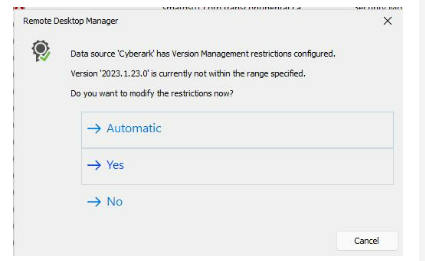
About the prompt the users are getting, it's because the Version Management options have been configured in Administration - System Settings. If you update the Maximum version parameter, the users won't get this version prompt anymore.
https://help.remotedesktopmanager.com/datasourcesettings_versionmanagement.html
Best regards,
Thanks, it work. Still, one last question related to this - the 1st message is now gone (related to the version) but my client still get this pop-up after the upgrade. Any settings can force Ignore the new config file so users not have to deal with this pop-up?
Thanks

Client Upgrade from 2022 to 2023
Merci Érica nous allons tester le tout.
Bonne journée
/Steve
Client Upgrade from 2022 to 2023
Is there a way to upgrade from version 2022 to 2023?
If we install 2023 via SCCM old client 2022 still present in Add/Remove programs and user get a message at 1st use of 2023: Data Source has Version Management restriction configured. (Do you want to modify the restriction now? (Automatic/Yes/No)
Basically, is there a way to pass from 2022 to 2023 whiteout involving the client user as much as possible; like a simple update inside the same versioning.
Thanks