scampsd
Is it possible having multiple remote connections for one single VPN?
That explains a lot:
Some days ago I was testing around, clicking on everything in order to find a setting, and afterwards I saw that all my RDM sessions were messed up.
Apparently I had clicked on "Inherited", and as all my RDM sessions are inside the same folder, this caused all RDM sessions to inherit from each other.
I have learnt a great lesson and I'll put all my RDM sessions in separate folders in order to avoid such a thing in the future. :-)
Thanks
How to use RDM for an entire company, to be used inside and outside of company's private network?
Thanks a lot for your clear explanation, but in my company we might have a weird request:
For us, the main feature is not the remote desktop session, but the VPN access: we have quite some employees who only need to open the VPN, but not to start a remote desktop session.
As we are looking for new software, we wonder if it might be possible to allow VPN access and block remote desktop session creation.
While having a look at the video, explaining the consequences of user management and permissions, I see permissions concerning viewing, adding, editing, deleting, viewing passwords and connecting, but what I don't see, is the distinction between VPN access and remote desktop connection creation, as in this screenshot (screenshot from video around 2:12, URL "https://help.remotedesktopmanager.com/securitysystem_permissions.html"):
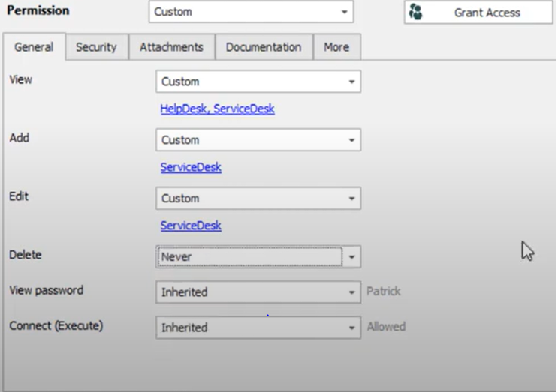
As I'm working with the free trial-version, I don't have access to that feature, so I need to depend on explanations from the website.
Can you confirm or deny whether it is possible to enable and/or disable the permission to open a VPN without actually opening a Remote Desktop connection?
Thanks
Is it possible having multiple remote connections for one single VPN?
When creating a new session, I have the impression I always need to re-type the entire VPN configuration, while I have customers with multiple RDP destinations, all under one and the same VPN. I already had a look at VPNGroup but that seems not to cover what I'm looking for.
I there a way to define a VPN and have multiple remote desktop sessions, pointing at it?
Thanks in advance
P.s. I've seen a forum question, being set as "RESOLVED". How can I do that?
Add-on for eCatcher from Ewon?
I believe so, I went to their website "eCatcher Online Help (ewon.biz)", the left side contains an API chapter.
Can you check with them in order to know how to add their application to an RDM configuration?
Thanks
Is it possible to customise the RSA Secure ID form?
I have modified "My personal credentials" as "RSA Secure ID", as you can see here:
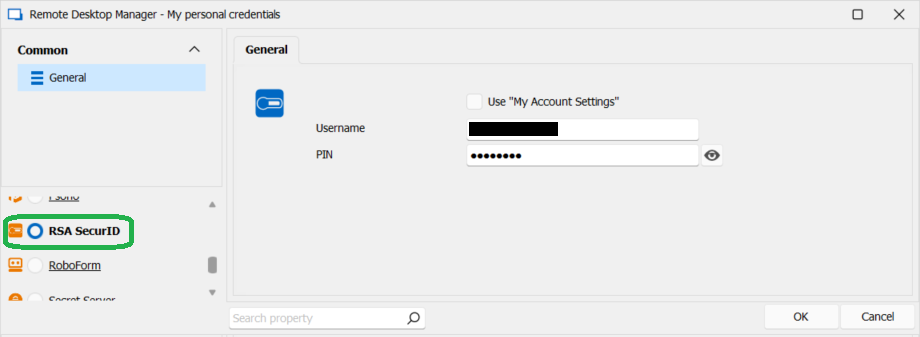
When I want to open a connection, using those credentials, this is the messagebox I see:
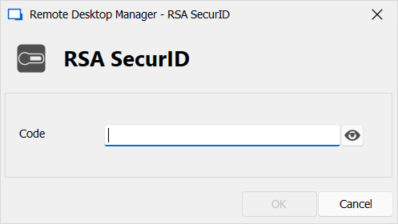
I would like to modify the user interface of this messagebox, like adding some explanation on what the user need to do in order to acquire that code.
How can I achieve this?
For your information: I might change from "My personal credentials" to "Custom".
Thanks in advance
Pulse Secure, combined with incomplete password
I have done a test in order to close the VPN connection: in the VPN/SSH/Gateway main form I pressed the square button, while in the Settings form the checkbox "Show Command Line" was still checked. The following things went wrong:
The RSA Secure ID was asked again (twice) while this should not be needed during connection closing.
The VPN connection was not closed.
The commandline was not shown (although I can confirm it is shown while opening the VPN connection).
I have tried the commandline you mentioned, and the result is weird:
Commmandline ipconfig command starts following output:
C:\>ipconfig
Windows IP Configuration
Ethernet adapter Ethernet 7:
   Connection-specific DNS Suffix  . : BM.CUSTOMERGROUP.BE
   Link-local IPv6 Address . . . . . : ff88::22ff:ea18:3f6:91bc%29
   IPv4 Address. . . . . . . . . . . : 10.241.5.26
   Subnet Mask . . . . . . . . . . . : 255.255.255.255
   Default Gateway . . . . . . . . . :
The commandline command you mentioned seems to be correct but it does not yield the desired result:
"C:\Program Files (x86)\Common Files\Pulse Secure\Integration"\pulselauncher.exe -signout -url  https://ssl.customer_URL.com
Already disconnected.
An extra ipconfig yields the same result as before.
For your information, I'm running the command prompt as administrator.
Access is denied at "Close VPN"
Good morning,
I'm working with the version "2023.1.15.0 64-bit", according to "Help, About".
I am an end-user, but the explanations "a certain point" is quite vague. Is there a way to get more information?
Thanks
Add-on for eCatcher from Ewon?
One of my customers requests a VPN, based on eCatcher from Ewon (to be downloaded at "https://www.ewon.biz/technical-support/pages/all-downloads").
Are there any plans, creating such an add-on?
Thanks in advance
Access is denied at "Close VPN"
I have created a Remote Desktop Connection, based on a WatchGuard SSL VPN.
I manage opening the VPN, but closing it seems not to be possible, due to an "Access is denied" error message.
In attachment, a screenshot of the general settings and the WatchGuard SSL VPN settings:
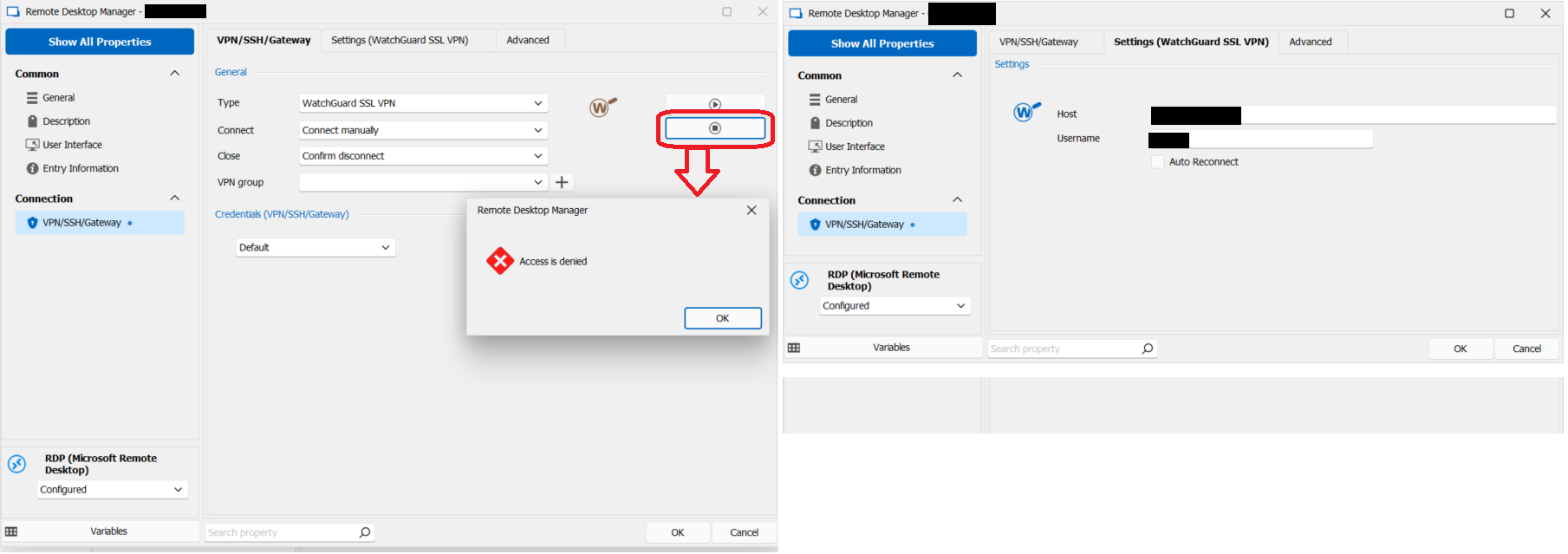
Does anybody have an idea?
Thanks
RDM version 2023.1.15.0 64-bit: where can it be installed?
I have a Windows-10 computer. I have installed RDM version 2023.1.15.0, and everything is working fine.
I want to install that same RDM on another machine (in order to use it as a jump host), but that's not simple:
My one other host is a Windows Server 2019, version 1809. The RDM installation requires a .Net framework 4.8.1, which is blocked on that machine.
My second other host is a Windows 7 computer.
I was not expecting such a blocking error on the installation of RDM.
How can I solve this issue? (Could I use an older version of RDM and if yes, which one, and is my trial license also valid on that installation?)
Thanks in advance
How to use RDM for an entire company, to be used inside and outside of company's private network?
I have downloaded a free 30-day trial of the Remote Desktop Manager, in order to decide whether or not to use it for the entire company I'm working for. The background idea is to have one tool, which every colleague can just start up and use for connecting to remote desktops.
In order to do this, I see two challenges:
The RDM information (list of RDM sessions, together with their VPN configuration) is stored on my local computer, it should be possible to import this from a central data source.
Quite of the remote desktop connections require a VPN connection, based on VPN related software. This can be "Pulse Secure", "Microsoft VPN", "WatchGuard", "Forticlient", ...
Solutions:
I can very well imagine there's an easy way to modify the location of the directory from "C:\Users\Username\AppData\Local\Devolutions\RemoteDesktopManager" to some central location, that should not be a problem.
That might be an issue: all that software is installed locally and I believe it must be installed locally in order for it to work. However, one of the reasons I'm working with this trial is to get a "single-button-click" solution for all my colleagues, relieving them from the burden of constantly needing to install extra software on their system.
Now I have two (sorry, three) questions:
a. What about my second "solution"? How can the corresponding situation be tackled?
b. Are there any more things to consider?
c. While checking Connections.db using a simple text editor, I noticed that using the same password for two different Remote Desktop Sessions, the <SafePassword> tag seems to contain the same password, making it very vulnerable for hackers. Are there ways to improve the security of the passwords?
Thanks in advance
Where is RDM information saved?
Thanks. This is exactly the information I was looking for.
Where is RDM information saved?
When I close Remote Desktop Manager, there is no question whether or not to save any modified data. Also, when opening, there's no question on where to load the RDM information from.
While checking my computer, I've found a directory "%AppData%\Devolutions\", but this is empty.
Imagine I want to remove everything and start over while keeping a copy of my work, it's quite interesting to know where my work is stored.
Where is that? Where is all information from the "Local Data Source" stored on my computer?
How to get Forticlient VPN running?
I know it's possible to modify the installation path, but I don't find the mentioned application, nor the directory it's supposed to be installed in. Therefore I'm wondering if the name of the application is correct (for me, those tools are just needed to get a connection working, I'm no security/communication specialist). I went to Microsoft Store, following this URL "https://apps.microsoft.com/store/detail/forticlient/9WZDNCRDH6MC", is this the application which corresponds with Devolutions' Foriclient application?
How to get Forticlient VPN running?
I have just created an RDM session, based on a Forticlient VPN.
While trying to open the VPN, I get the question about the installation path of FortiSSL (FortiSSLVPNclient.exe), the default path seems to be "C:\Program Files\Fortinet\SslvpnClient".
However, I don't have this directory on my PC: this is what I have:
Directory structure:
C:\Program Files\Fortinet>dir /AD
...
08/06/2022 14:40 <DIR> .
08/06/2022 14:40 <DIR> ..
04/04/2023 14:12 <DIR> FortiClient
08/06/2022 14:40 <DIR> FortiEDR
0 File(s) 0 bytes
4 Dir(s) 260,282,814,464 bytes free
"FortiSSLVPN*.exe" programs:
C:\Program Files\Fortinet>dir /S /B FortiSSLVPN*.exe
C:\Program Files\Fortinet\FortiClient\FortiSSLVPNdaemon.exe
C:\Program Files\Fortinet\FortiClient\FortiSSLVPNsys.exe
=> no FortiSSLVPNclient.exe
What can I do in order to make this work? (I went to Windows Store for getting FortiClient)
Thanks in advance
Pulse Secure, combined with incomplete password
By the way, how do I close a VPN connection? There's a "Close VPN" button, but when I click that, it asks for the credentials (???) and finally when checking "IpConfig" in the command prompt I see that the VPN connection does not get closed. I have tried this, using "Manually later" and the default "on session close" in the VPN/SSH/Gateway tab but none is working fine:
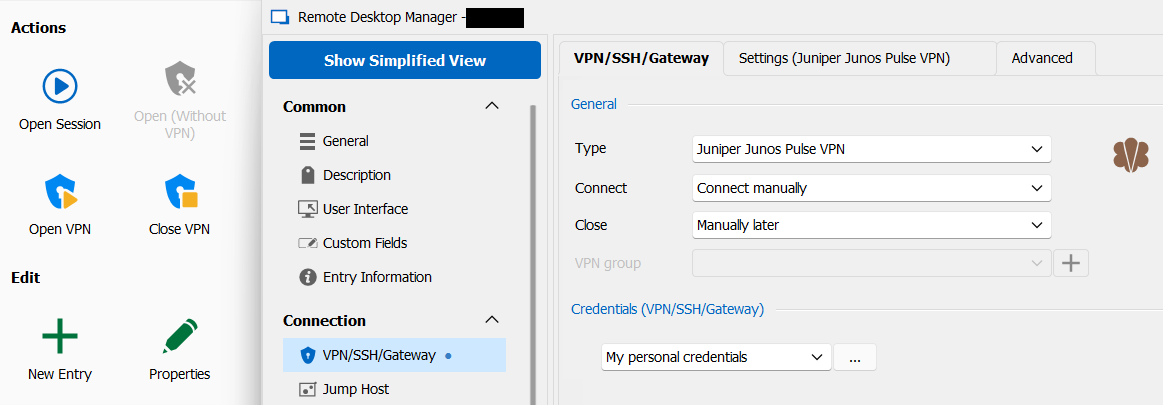
Pulse Secure, combined with incomplete password
Ok, thanks, it's behaving much better now, but still we're not there yet:
I see in the commandline the correct RSA SecureID (the two logins/codes being concatenated, one after the other, in the correct order), but now the credentials from the general tab and the one from the VPN/SSH/Gateway tab are equal, which makes completely no sense!
How can I tell RDM to use two different credentials, one for the Remote Desktop and one for the VPN/SSH/Gateway?
Thanks
Dominique
Pulse Secure, combined with incomplete password
Progressing, but not there yet. I have purchased the 30-day trial license, but in order to get it working, I needed to define the RSA SecureID as "My Personal credentials" instead of "Linked (vault)", that latter seems not to work.
The question is asked for a code, but when I enter this the connection is not established, so I'd like to know what's going on? Is the password, which is used, indeed the concatenation of the RSA SecureID, followed by the code, or is something else happening?
I had a look in the logs, but that information is not there.
Hereby a screenshot of the situation:
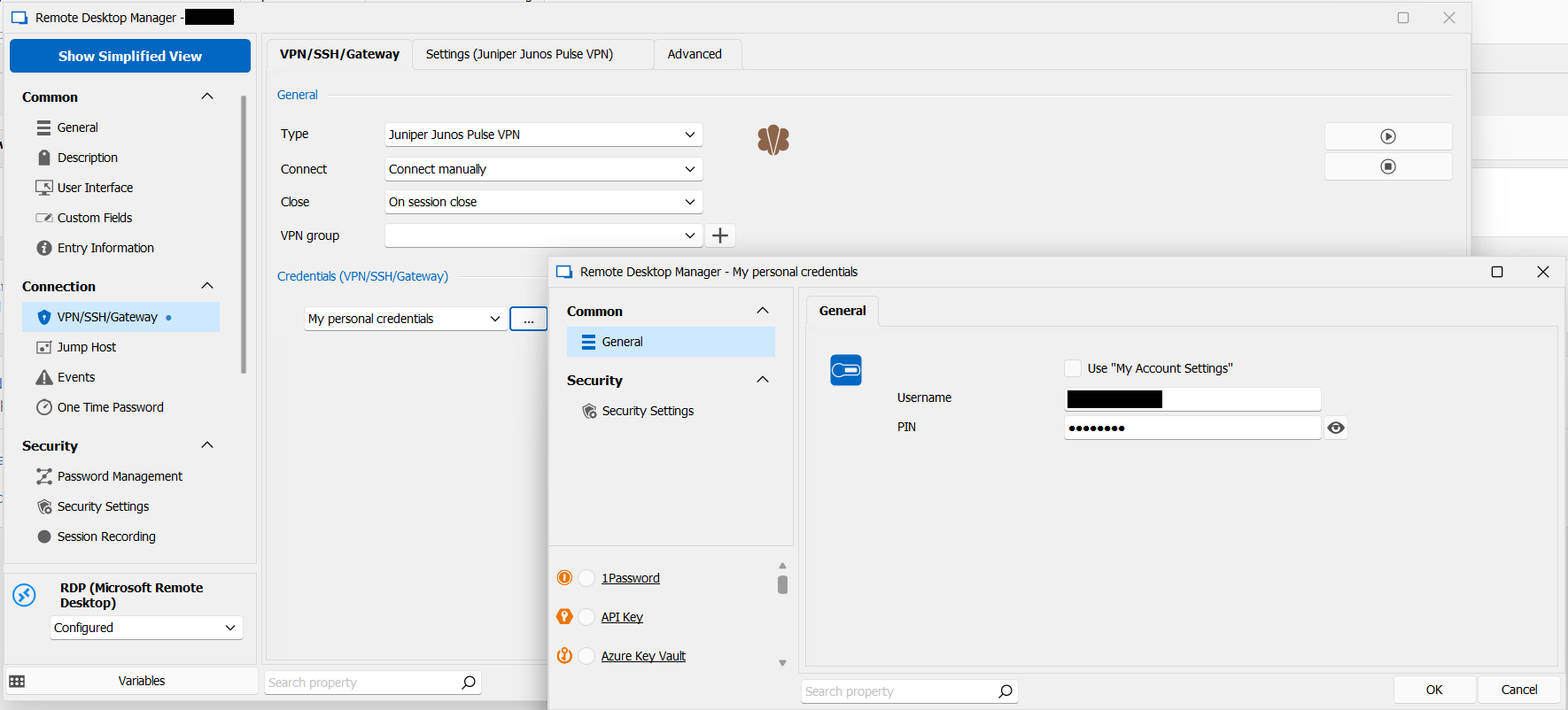
Hereby the logs:
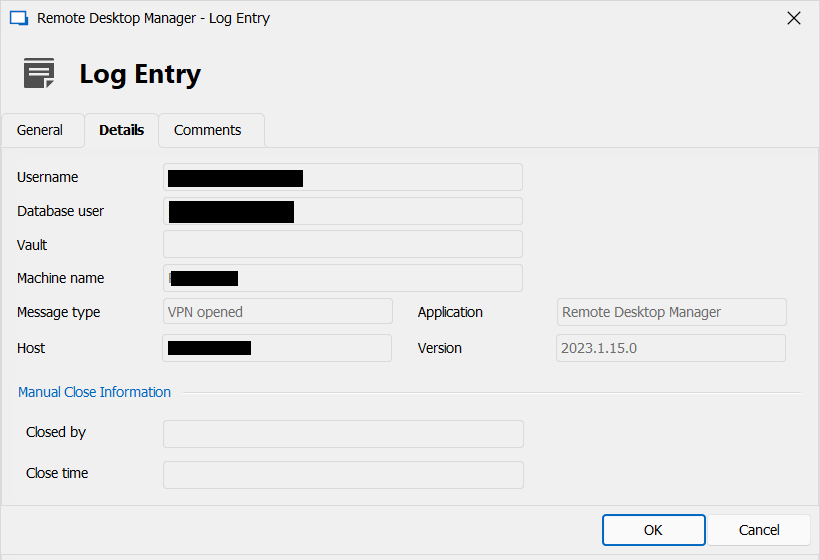
Best regards
Add-on for PaloAlto
Good morning,
I have a customer, who uses GlobalConnect from Palo Alto.
In the forum I have found several discussions about PaloAlto VPN add-ons, but I don't know the current status:
Is there already an add-on for PaloAlto?
Thanks in advance
Dominique
Pulse Secure, combined with incomplete password
I still don't know how to proceed: in order to create that RSA SecureID entry: when I click on the "Credentials" combobox, choose "My personal credentials", and start the dialogbox, this is what I see:
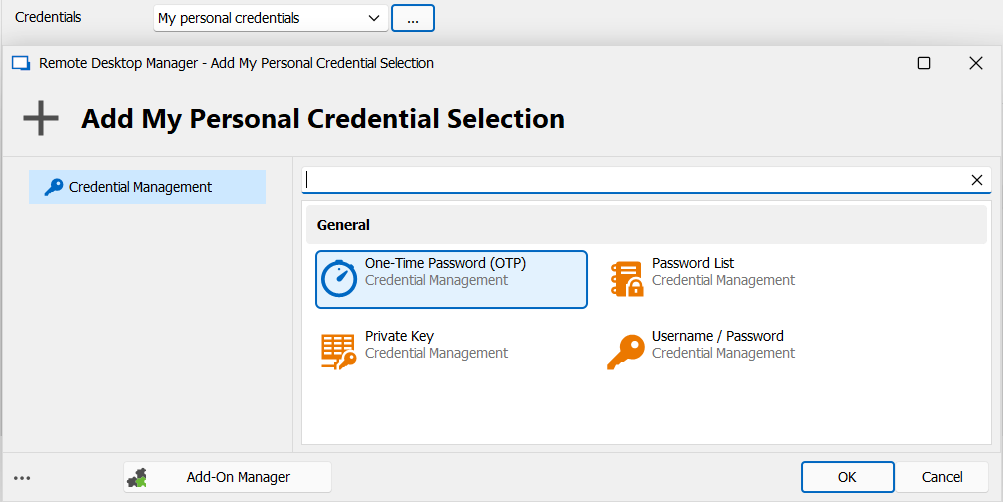
As you see, there's no item with an icon like yours:

.
I also had a look in the Add-On manager, but also there I did not find an entry with that icon.
Can you give me some more information on how to create that RSA SecureID?
For your information, I'm working with version "2023.1.15.0 64-bit" (as mentioned in Help, About).
Thanks
Dominique
Pulse Secure, combined with incomplete password
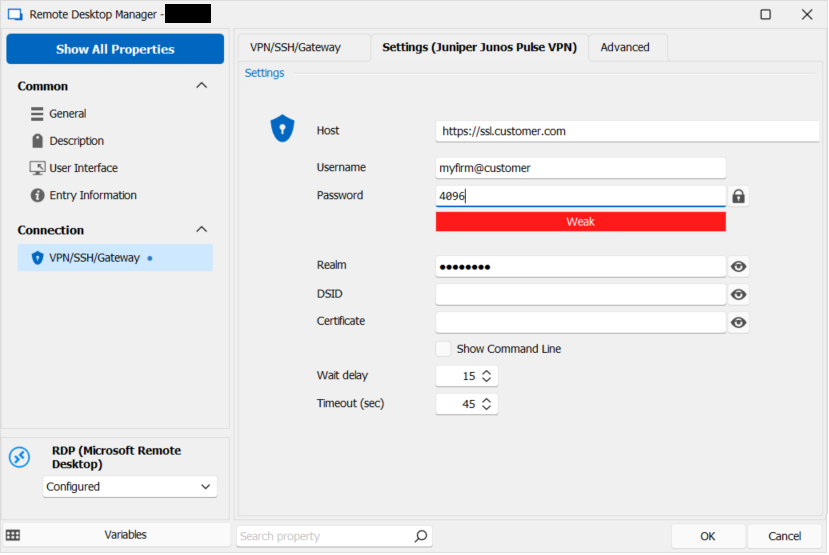
I'm setting my first steps in Remote Desktop Manager, and I would like to add a Pulse Secure VPN session with incomplete password.
As I've understood from some posts here, I need to add the add-on "Juniper Junos Pulse VPN", I have done that.
Now I'm trying to fill in the needed information, but there's a catch: the customer is not using a full password, but a combination of a fixed four-digit number and a "one-time-password", generated by a smartphone app, called "Authenticator-ES".
This would mean that, in the Remote Desktop Manager, I need to have the possibility to fill in the password when I open the VPN, but I don't know how to do this: I have just tried leaving the password field empty but even this does not force the password to be asked.
In attachment there are two screenshots. I would like the "Open VPN" action to ask for the password, showing the four digits (4096) as shown in the second screenshot, if possible.
Does anybody know how to do this?
Thanks in advance
First screenshot, containing the basic information:
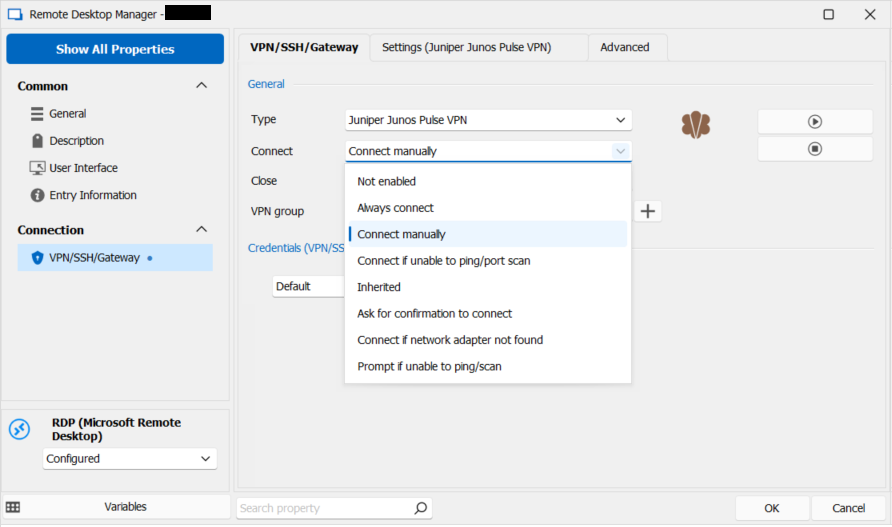
Second screenshot, showing the VPN specific information: