How to use RDM for an entire company, to be used inside and outside of company's private network?
How to use RDM for an entire company, to be used inside and outside of company's private network?

I have downloaded a free 30-day trial of the Remote Desktop Manager, in order to decide whether or not to use it for the entire company I'm working for. The background idea is to have one tool, which every colleague can just start up and use for connecting to remote desktops.
In order to do this, I see two challenges:
- The RDM information (list of RDM sessions, together with their VPN configuration) is stored on my local computer, it should be possible to import this from a central data source.
- Quite of the remote desktop connections require a VPN connection, based on VPN related software. This can be "Pulse Secure", "Microsoft VPN", "WatchGuard", "Forticlient", ...
Solutions:
- I can very well imagine there's an easy way to modify the location of the directory from "C:\Users\Username\AppData\Local\Devolutions\RemoteDesktopManager" to some central location, that should not be a problem.
- That might be an issue: all that software is installed locally and I believe it must be installed locally in order for it to work. However, one of the reasons I'm working with this trial is to get a "single-button-click" solution for all my colleagues, relieving them from the burden of constantly needing to install extra software on their system.
Now I have two (sorry, three) questions:
a. What about my second "solution"? How can the corresponding situation be tackled?
b. Are there any more things to consider?
c. While checking Connections.db using a simple text editor, I noticed that using the same password for two different Remote Desktop Sessions, the <SafePassword> tag seems to contain the same password, making it very vulnerable for hackers. Are there ways to improve the security of the passwords?
Thanks in advance
All Comments (4)
Hello Scampsd,
Thank you for contacting us on that matter.
Remote Desktop Manager seems to be complex at first with all the features, but where RDM shines the most, is that this is a user-friendly application.
1- If you have access to both data sources in RDM, you could copy the whole vault of your local database and paste it into your other database.
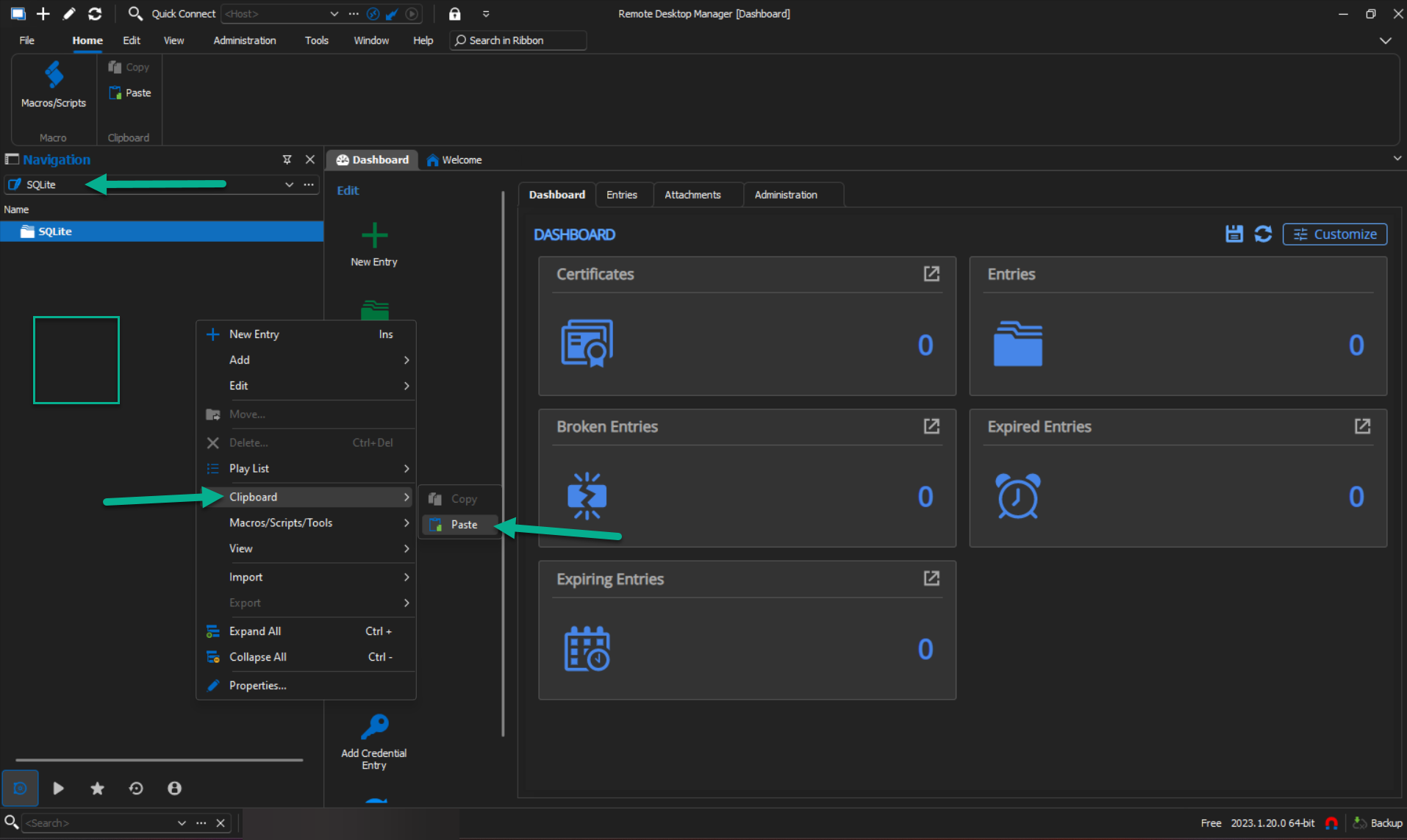
To do so, Select your Local Data Source -> right-click on your vault folder -> Clipboard -> copy (make sure to check the change ID checkbox and include password history) -> OK -> change your data source -> right-click in the navigation panel -> Clipboard -> Paste.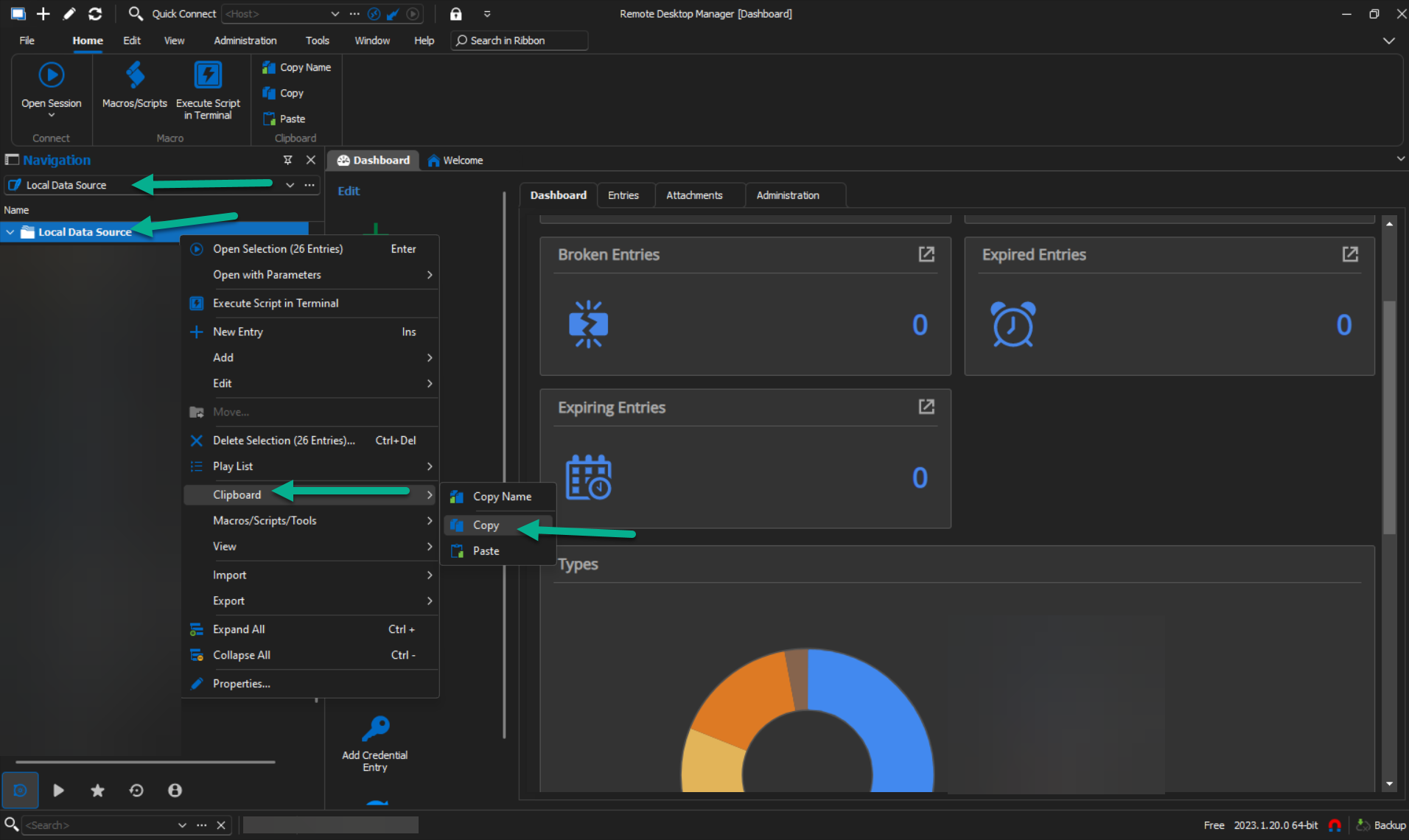
2- Except for Pulse Secure VPN, all the other ones are supported in RDM and can be set to open in pair with your RDP session.
This feature could be set by selecting an RDP entry -> Properties -> VPN/SSH/Gateway.
Please note that this feature could be set by batch edit too.
https://docs.devolutions.net/kb/remote-desktop-manager/how-to-articles/batch-edit-rdm/#batch-edit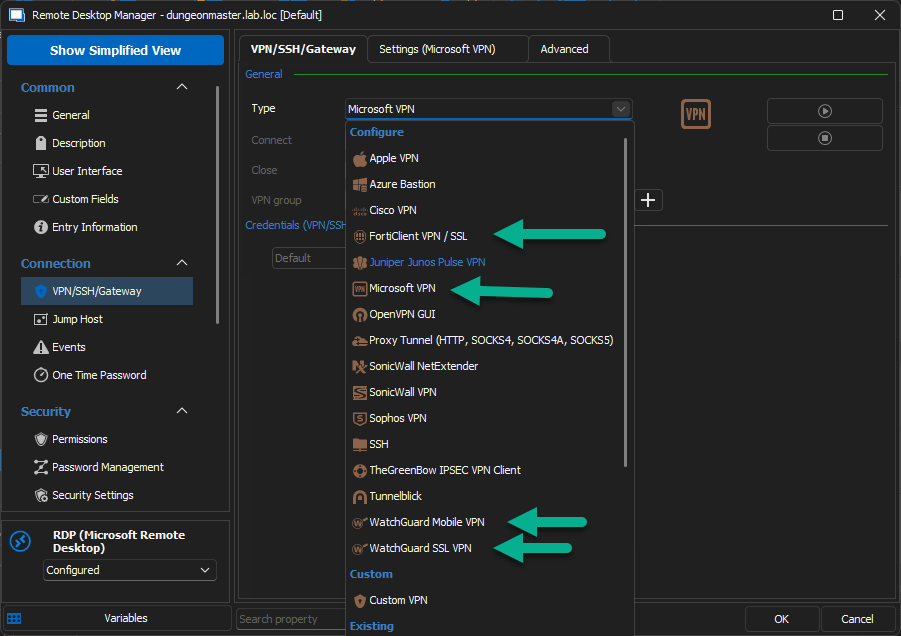
In terms of security, if you opted for an advanced data source, you could use a security provider to encrypt your data.
On top of that, you could set an MFA on your data source for more security.
Here you could find more information about it:
https://docs.devolutions.net/kb/remote-desktop-manager/knowledge-base/security-providers-best-practices/
If you are looking for an easy setup for your users (simple-button-click), some of our customers opted for a TS environment. It's a simple installation of RDM where you create the Default.cfg and pushes your master configuration to all of your users.
Here you could find more information about it:
https://help.remotedesktopmanager.com/installation_terminalservices.html
Best regards,
Patrick Ouimet
VPN.png
move2.png
move1.png
Thanks a lot for your clear explanation, but in my company we might have a weird request:
For us, the main feature is not the remote desktop session, but the VPN access: we have quite some employees who only need to open the VPN, but not to start a remote desktop session.
As we are looking for new software, we wonder if it might be possible to allow VPN access and block remote desktop session creation.
While having a look at the video, explaining the consequences of user management and permissions, I see permissions concerning viewing, adding, editing, deleting, viewing passwords and connecting, but what I don't see, is the distinction between VPN access and remote desktop connection creation, as in this screenshot (screenshot from video around 2:12, URL "https://help.remotedesktopmanager.com/securitysystem_permissions.html"):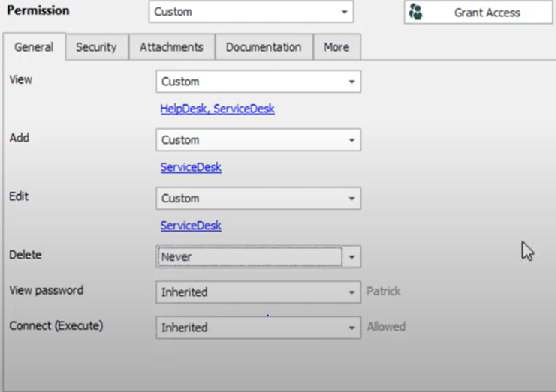
As I'm working with the free trial-version, I don't have access to that feature, so I need to depend on explanations from the website.
Can you confirm or deny whether it is possible to enable and/or disable the permission to open a VPN without actually opening a Remote Desktop connection?
Thanks
7fb284bb-1168-415d-8ba2-bce450be65d8.png
Hello Scampsd,
Thank you for this quick reply.
In RDM, you could create a VPN entry for your users to double-click and connect to the selected domain.
Permission in RDM is a bit blurry at first but when you understand them, it’s a wonderful tool.
Let me explain, the basic permission (the one that everyone has to follow) could be set at the data source itself by going to Administration -> System setting -> Default Permissions.
Going down to the permission tree, we have the permission of the vault.
If you have multiple vaults, each of them can have specific permission.
Those permissions could be set by going to Administration -> Vault settings -> Permissions.
And deeper to the permission we have entries.
Entries could have their own permission and can be set separately.
Doing so, a user that doesn’t have permission to view RDP entries will not see them but will be able to see and open a VPN entry.
This one could be set by selecting an entry -> Properties -> Permissions.
May I suggest that you ask for a 30-day trial and see if RDM is the right tool for you?
Doing so, you will be able to play with it and have a better understanding of what RDM could offer.
Here is the link to ask for a trial:
https://devolutions.net/remote-desktop-manager/trial
Let me know if this works for you.
Best regards,
Patrick Ouimet
You're exploring Remote Desktop Manager (RDM) for your company, which is a great initiative! For your second solution regarding VPN connections, each VPN client will likely need to be installed locally, so consider using a centralized VPN management solution to streamline that process. Additionally, ensure that colleagues have proper user permissions and training to maximize RDM's effectiveness. Regarding password security, you can enhance it by using RDM's built-in vault features to encrypt and securely manage passwords. Companies have diverse strategies for growth and innovation, whether through product development or expanding into new markets. I came across a range of essays on https://www.topessaywriting.org/samples/company that discuss how organizations like Coca-Cola or tech startups adapt to changing environments. These essays offer insights into how businesses navigate competition, sustainability, and consumer demands, helping me appreciate the intricate balance companies must strike to remain relevant and successful in today's market.