
Lubo Dimitrov
Powershell - How to configure new Datasource?
Good morning, Erica!
Thank you for your assistance.
It turned out that the particular server from which we are trying to access the RDM server has no network access to it.,
Please, consider that problem resolved.
thank you for your assistance
Powershell - How to configure new Datasource?
Hello all,
We are using powershell module version 2022.3.1.8 (latest one for Powershell 5.1) against our Devolutions server version 2022.3..35.0 64bit
I am trying to establish a new connection to our deveolution server, using Application ID and secret.
Trying the following document - how-to-set-up-a-dvls-data-source-with-remote-desktop-manager-powershell-module.pdf (windows.net) I tried to run the commands:
$Datasource = New-RDMDataSource -DVLS -Server $DVLS -Name 'My DPS' -ScriptingTenantID $RDM.ScriptingTenantID -ScriptingApplicationPassword $ScriptingApplicationPassword
After which I am trying to set the datasource
$DataSource|Set-RDMDataSource |Update-RDMUI
Here I receive an error: [Error] The operation has timed out.
Then I tried
Set-RDMDatasourceProperty $datasource -Property 'ScriptingTenantID' -Value $RDM.ScriptingTenantID
Set-RDMDatasourceProperty $datasource -Property 'ScriptingApplicationPassword' -Value $ScriptingApplicationPassword
Then when I try
Set-RDMCurrentDataSource $datasource.ID
I receive the following error:
The remote name could not be resolved: 'the_domain_of_our_devolutions_server'.
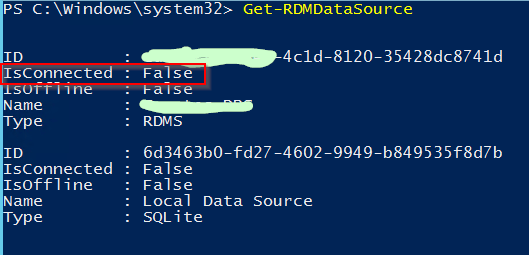
The Datasource property IsConnected is False
So in other words, how can I configure the dataousrce (it already exists in the Devolutions server), using powershell?
The application ID and password that I use are correct and are working fine.
thank you in advance.
Set-RDMsession throws "Connection has invalid group specified" - 2021.2.29 - 64bit
Hi Richard, sorry, I made it a bit convoluted.
The $Group is not a top level folder.
So we have a repository that is already set - 'repo name'
The top level folder has a name - 'Secure Center'
The folder underneath is - 'Pilot'
And I need to create a folder inside the Pilot called - 'Lubo'
I tried to run by passing the full path including the top level folder, and the pilot folder as well, so it looks like that
$topLevel = 'Secure Center'
$Group = 'Pilot'
$FolderName = 'Lubo'
I pass it like that
$session = New-RDMSession -Type Group -Group "$topLevel\$Group\$FolderName" -Name $FolderName -Verbose
Set-RDMSession -Session $session
it returns the same error.
I tried all kind of combinations, including the repository name in the group name, but all returned the same error.
When I create the new session, the $session.Group is of the type System.String, if that matters.
I tried to debug the Set-RDMSession cmdlet, but it just fails directly.
Thank you in advance for all your help.
Set-RDMsession throws "Connection has invalid group specified" - 2021.2.29 - 64bit
Sorry, scratch my last comment
Set-RDMsession throws "Connection has invalid group specified" - 2021.2.29 - 64bit
Hello Richard, thanks for the update.
I tried that but without a success. It throws me the same error.
$parentFolder = 'repositoryName'
$Group = 'Pilot'
$FolderName = 'Lubo'

New-RDMSession -Type Group -Name $FolderName -Group "$ParentFolder\$Group" -SetSession
or
$session = New-RDMSession -Type Group -Group "$ParentFolder\$Group" -Name $FolderName -Verbose
Set-RDMSession -Session $session
Basically I used to provide the full path to the group where the new folder will be created.
It looked like
$session = New-RDMSession -Type Group -Group "repositoryName\Pilot" -Name 'Lubo' It still throws me the same error unfortunately.
Is it a good idea to allow virtual folders and would that alleviate the problem? From the other thread that you mentioned that, I couldn't figure it out where to turn that from.
Thanks in advance.
Set-RDMsession throws "Connection has invalid group specified" - 2021.2.29 - 64bit
Hello everyone, I hope you are doing well.
I am using:
Powershell version 5.1
Devolutions 2021.2.29 64 bit - Enterprise edition
Powershell Module 2021.2.0.43
I am trying the following script to create a new folder in an existing repository.
$FolderName = 'Lubo'
$GroupName = 'repositoryName\Pilot'
$session = New-RDMSession -Type Group -Group $ParentFolder -Name $GroupName
Set-RDMSession -Session $session
Update-RDMUI
At the Set-RDMSession it throws
Set-RDMSession : Connection has invalid group specified.I tried also
New-RDMSession -Type Group -Name $FolderName -Group $ParentFolder -SetSessionand
Set-RDMSession -Session $session -refreshbut it returns the same error.
I tried to run the Update-RDMUI in between those runs, but without a success.
It is interesting that the same folder/sessions structure in a test local repository it works without any errors.
Thank you in advance, for your cooperation!
"Invalid username and password, please verify your credentials" when getting an RDM datasource
Ha, it worked!!!!
I just re-run the Set-RDMCurrentDataSource $ds.ID and it worked!
Marvelous!
You are great! Thank you so much!
Cheers,
Lubo
"Invalid username and password, please verify your credentials" when getting an RDM datasource
Hello Erica, thanks for detailed steps.
I created a new app and saved the application ID and the password string.
Executed all lines without any errors.
At the end I even ran Update-RDMUI.
Upon running the Get-RDMDatasource with my datasource name, it still reported it as not connected.
Get-RDMRepository returns "WARNING: Your connection is not ready"
What I noticed when I was setting the new App is that there was already one that was called with the name Genetec DPS, which I couldn't edit nor delete and it wasn't enabled.
Hence, I created a new App and called it Genetec_DPS.
Do you suspect that this underscore in the app name is the problem, or it is unrelated?
All the best,
Lubo
"Invalid username and password, please verify your credentials" when getting an RDM datasource
Good morning, Erica, thanks for your reply.
RDM version Enterprise Edition 2021.2.29.0 64bit
The datasource is Devolution server.
We use Office365 authentication (Active Directory). The same user that I log in to the server is used to login to the Devolutions Server.
when I press Test connection I receive a successful connection response.
Cheers,
Lubo
"Invalid username and password, please verify your credentials" when getting an RDM datasource
Using PowerShell RDM module 2021.2.0.43 on Windows Server 2019, I am trying to connect to our RDM server.
I am connected through the RDM application successfully, and my password and username are working fine.
Upon trying to run those commands,
$DS = Get-RDMDataSource -Name $DataSourceName
Update-RDMUI
Set-RDMCurrentDataSource -ID $ds.ID
Update-RDMUI
I receive three lines of error:
Invalid username or password, please verify your credentials
Invalid username or password, please verify your credentials
Invalid username or password, please verify your credentials
Get-RDMRepository returns the error:
WARNING: Your connection is not ready
I tried running them through PS 5.1 as well as 7.2.10, but the result is the same.
I presume I am doing something small wrong that prevents me from connecting.
Thank you in advance for your attention.
Powershell 7 with RDM modules returns an exception: The type initializer for 'Client.ConnectorFactory' threw an exception
Thank you, Jonathan,
That helped!
Powershell 7 with RDM modules returns an exception: The type initializer for 'Client.ConnectorFactory' threw an exception
Actually, following the PDF document from new-remote-desktop-manager-powershell-module.pdf (windows.net) I tried to run it like that
Set-RDMCurrentDataSource $ds.ID and it worked.
With $ds only it doesn't work
However, it is still showing the datasource as not connected


Is there a way to establish the connection from powershell or to make sure the connection is established?
Thanks
Powershell 7 with RDM modules returns an exception: The type initializer for 'Client.ConnectorFactory' threw an exception
Yes, it gives me the ID of the datasource, which is a system.guid type.

Note, to make the datasource visible to the powershell session, I installed RDM Enterprise version with a temporary license on it, and imported the datasource configuration from our main server. I logged in to it and through the GUI, and everything looked good.
This is what we did previously, before the upgrade of the main RDM server to 2021.2.29.0.
Thanks for all your help.
Powershell 7 with RDM modules returns an exception: The type initializer for 'Client.ConnectorFactory' threw an exception
I got this error when I try this

Note: We installed enterprise edition on that Server with a temporary license in order to make the connection to the main Devolution server, so that the Datasource shows up in the list.
Is it possible it interferes with it?
Powershell 7 with RDM modules returns an exception: The type initializer for 'Client.ConnectorFactory' threw an exception
Found a workaround here:
Copied the RemoteDesktopManager folder from the PS7 modules folder located at c:\Program Files\Powershell\Modules, into the 5.1 folder located at c:\Program Files\WindowsPowershell\Modules.
Used the command Import-Module RemoteDesktopManager -UseWindowsPowershell
This way I can run the commands now.
The drama is that my datasource is not connected. Is there a quick way to connect to it?
Powershell 7 with RDM modules returns an exception: The type initializer for 'Client.ConnectorFactory' threw an exception
Hello all,
We are using PS 7.2.1, and the module version is 2021.2.0.43
I wiped out all possible modules that were previously used.
Now the installation of the module goes fine, without any errors, however no commands can be used. Here it is a screeshot of the fresh installation of the Module, plus running two commands - Get-RDMInstance and Get-RDMDatasource

How can I trace what is interfering with the module?
We tried installing the module for the CurrentUser, and then wiped out all modules content and installed it for AllUsers, but the result was the same

Powershell 7 with RDM modules returns an exception: The type initializer for 'Client.ConnectorFactory' threw an exception
Attempting to install the module fresh returns this error.
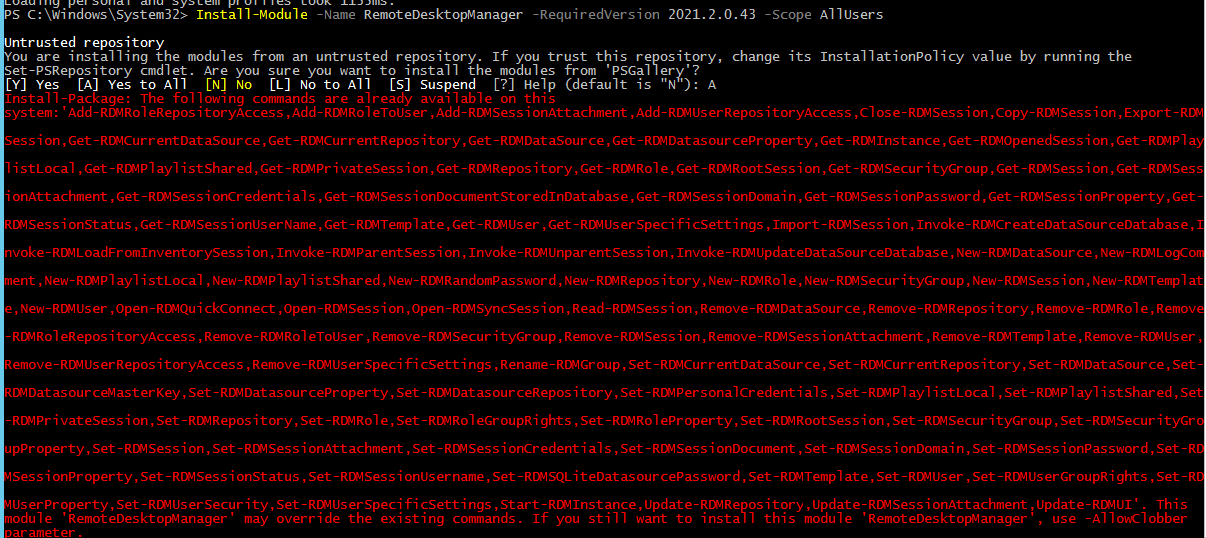
However, when I run Get-Command (any of the commands) it says the command is not recognized

I can install the module only if I select -AllowClobber
Powershell 7 with RDM modules returns an exception: The type initializer for 'Client.ConnectorFactory' threw an exception
We are trying to run some commands from a Server 2012R2 to our RDM.
We installed the RemoteDesktopModule
The RDM server is version 2021.2.29.0
We tried to install the module with 2022.3.1.2, with 2021.2.0.43 and 2021.2.0.29.
We installed it using the cmdlet from the PSGallery - Install-Module -Name RemoteDesktopManager -RequiredVersion 2021.2.0.29
However, when running ANY command, even Get-RDMInstance we receive always the same error:
Get-RDMInstance: Object reference not set to an instance of an object.
or
The type initializer for 'Client.ConnectorFactory' threw an exception.\n at Client.ConnectorFactory..ctor()
Tried multiple times to completely uninstall the module, cleaned all $env:PSModulePath folders from anything that resembles the Module, installed again, restarted the server, and got the same error at the end.
Is there any way to trace the source of the issue?
Thanks!