Set-RDMsession throws "Connection has invalid group specified" - 2021.2.29 - 64bit
Set-RDMsession throws "Connection has invalid group specified" - 2021.2.29 - 64bit

Hello everyone, I hope you are doing well.
I am using:
Powershell version 5.1
Devolutions 2021.2.29 64 bit - Enterprise edition
Powershell Module 2021.2.0.43
I am trying the following script to create a new folder in an existing repository.
$FolderName = 'Lubo'
$GroupName = 'repositoryName\Pilot'
$session = New-RDMSession -Type Group -Group $ParentFolder -Name $GroupName
Set-RDMSession -Session $session
Update-RDMUI
At the Set-RDMSession it throws
Set-RDMSession : Connection has invalid group specified.
I tried also
New-RDMSession -Type Group -Name $FolderName -Group $ParentFolder -SetSession
and
Set-RDMSession -Session $session -refresh
but it returns the same error.
I tried to run the Update-RDMUI in between those runs, but without a success.
It is interesting that the same folder/sessions structure in a test local repository it works without any errors.
Thank you in advance, for your cooperation!
All Comments (6)
Hello,
The name of the new group also needs to be specified in the group parameter. Simply change the third line to the following and you should be all set:
$session = New-RDMSession -Type Group -Group $ParentFolder\$GroupName -Name $GroupName
As for why it is working locally, most likely virtual folders are allowed, this is why you do not get an error. You may have issues in the future, however, especially if you try to delete entries in that structure.
Best regards,
Richard Boisvert
Hello Richard, thanks for the update.
I tried that but without a success. It throws me the same error.
$parentFolder = 'repositoryName'
$Group = 'Pilot'
$FolderName = 'Lubo'

New-RDMSession -Type Group -Name $FolderName -Group "$ParentFolder\$Group" -SetSession
or
$session = New-RDMSession -Type Group -Group "$ParentFolder\$Group" -Name $FolderName -Verbose
Set-RDMSession -Session $session
Basically I used to provide the full path to the group where the new folder will be created.
It looked like
$session = New-RDMSession -Type Group -Group "repositoryName\Pilot" -Name 'Lubo'
It still throws me the same error unfortunately.
Is it a good idea to allow virtual folders and would that alleviate the problem? From the other thread that you mentioned that, I couldn't figure it out where to turn that from.
Thanks in advance.
Hello,
We do not recommend turning on virtual folders, it is only useful in niche cases.
I thought the parentFolder was the folder you wanted to create the subfolder in, but it is the $Group variable. Can you please use the following instead:
$session = New-RDMSession -Type Group -Group "$Group\$FolderName" -Name $FolderName
Just to be certain, $Group (Pilot) is a top-level folder in the repository, and $FolderName (Lubo) will be a subfolder you want to create in it. If there are any folders above Pilot, they would need to be included in the $Group variable.
If you need to switch a repository first, you can use
$repo = Get-RDMRepository $parentFolder
Set-RDMCurrentRepository $repo
Best regards,
Richard Boisvert
Sorry, scratch my last comment
Hi Richard, sorry, I made it a bit convoluted.
The $Group is not a top level folder.
So we have a repository that is already set - 'repo name'
The top level folder has a name - 'Secure Center'
The folder underneath is - 'Pilot'
And I need to create a folder inside the Pilot called - 'Lubo'
I tried to run by passing the full path including the top level folder, and the pilot folder as well, so it looks like that
$topLevel = 'Secure Center'
$Group = 'Pilot'
$FolderName = 'Lubo'
I pass it like that
$session = New-RDMSession -Type Group -Group "$topLevel\$Group\$FolderName" -Name $FolderName -Verbose
Set-RDMSession -Session $session
it returns the same error.
I tried all kind of combinations, including the repository name in the group name, but all returned the same error.
When I create the new session, the $session.Group is of the type System.String, if that matters.
I tried to debug the Set-RDMSession cmdlet, but it just fails directly.
Thank you in advance for all your help.
Hello Lubo,
It seems your previous manipulations may have created ghosts in your folders, since the command you sent above worked for me in RDM 2023.1.23 and the module Devolutions.Server 2023.1.7.
Could you try with a new folder and see if you have the issue?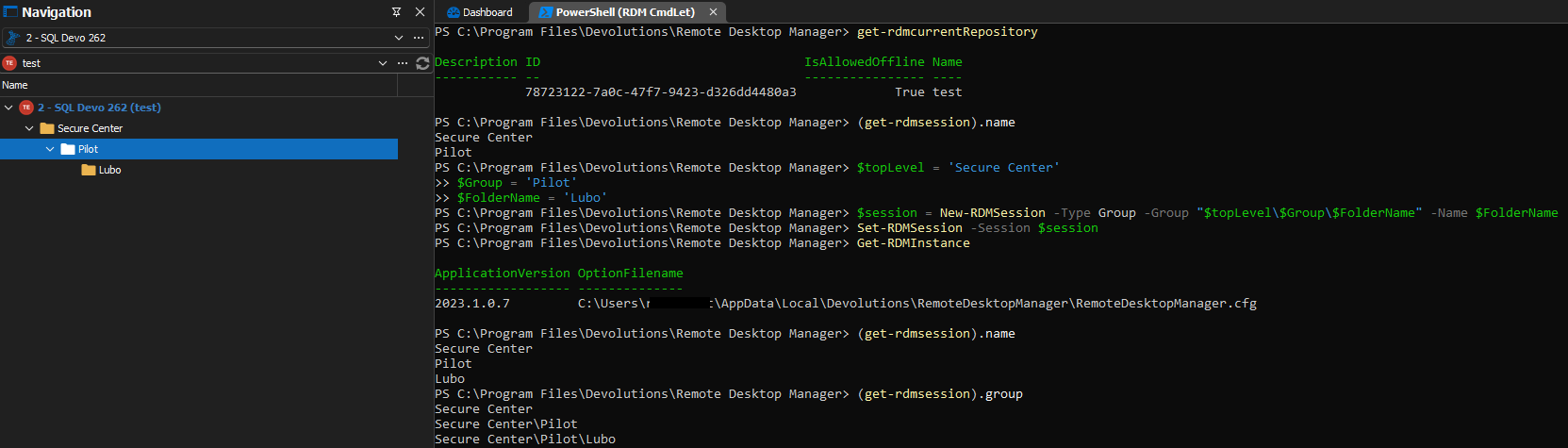
It is normal for the group property to be a string.
Best regards,
Richard Boisvert
d1fe59aa-3e30-4d75-8f5e-48b769ff885c.png