
thorstenschiebler
ssh connection issues with devolutions gateway
Hello Richard,
thank you. The update resolved this issue. You can set it as closed.
Best wishes,
Thorsten
ssh connection issues with devolutions gateway
Hello Richard,
yes the SSH entry in RDM.
Best regards,
Thorsten


With devolutions gateway
[23.06.2023 09:05:11] Devolutions Protocols version: 2023.6.14.1 Windows
[23.06.2023 09:05:11] Terminal font: Courier New [Courier New, fixed=True]
[23.06.2023 09:05:11] Starting SSH, verbose level: 4
[23.06.2023 09:05:11] Setting up connection
[23.06.2023 09:05:11] Connecting to port: 8181 (IP any)
[23.06.2023 09:05:11] Sending pre-connection PDU: 754 length
[23.06.2023 09:05:11] SSH banner: SSH-2.0-OpenSSH_8.2p1 Ubuntu-4ubuntu0.7
[23.06.2023 09:05:11] Sending kex init
[23.06.2023 09:05:11] Protocol error: unexpected packet size
[23.06.2023 09:05:11] Disconnection in progress
[23.06.2023 09:05:11] Bytes sent: 896, Bytes received: 77
[23.06.2023 09:05:11] Packets sent: 1, Packets received: 0
[23.06.2023 09:05:11] Kex completed: 0
[23.06.2023 09:05:11] Pending kex: 1
[23.06.2023 09:05:11] Disconnecting
Without gateway
[23.06.2023 09:06:55] Devolutions Protocols version: 2023.6.14.1 Windows
[23.06.2023 09:06:55] Terminal font: Courier New [Courier New, fixed=True]
[23.06.2023 09:06:55] Starting SSH, verbose level: 4
[23.06.2023 09:06:55] Setting up connection
[23.06.2023 09:06:55] Connecting to port: 22 (IP any)
[23.06.2023 09:06:55] SSH banner: SSH-2.0-OpenSSH_8.2p1 Ubuntu-4ubuntu0.7
[23.06.2023 09:06:55] Sending kex init
[23.06.2023 09:06:55] Received kex init
[23.06.2023 09:06:55] Selected algorithms: curve25519-sha256, ssh-ed25519, chacha20-poly1305@openssh.com, chacha20-poly1305@openssh.com, implicit by cipher, implicit by cipher, none, none
[23.06.2023 09:06:55] Sending Ed25519 kex init
[23.06.2023 09:06:55] Received Ed25519 kex reply
[23.06.2023 09:06:55] Successfully authentified server
[23.06.2023 09:06:55] Sending new keys message
[23.06.2023 09:06:55] Received new keys message
[23.06.2023 09:06:55] Sending userauth service request
[23.06.2023 09:06:55] Received extension info message
[23.06.2023 09:06:55] Server accepts public key types: ssh-ed25519,sk-ssh-ed25519@openssh.com,ssh-rsa,rsa-sha2-256,rsa-sha2-512,ssh-dss,ecdsa-sha2-nistp256,ecdsa-sha2-nistp384,ecdsa-sha2-nistp521,sk-ecdsa-sha2-nistp256@openssh.com
[23.06.2023 09:06:55] Received service accepted message
[23.06.2023 09:06:55] Sending userauth init request
[23.06.2023 09:06:55] Received userauth failure: publickey,password
[23.06.2023 09:06:55] Starting password authentication
[23.06.2023 09:06:55] Sending userauth password request
[23.06.2023 09:06:55] Received userauth success
[23.06.2023 09:06:55] User authenticated successfuly by password
[23.06.2023 09:06:55] Sending session channel open request: 0/-
[23.06.2023 09:06:56] Received global request: hostkeys-00@openssh.com , no need to reply
[23.06.2023 09:06:56] Received channel open confirmation: 0/0 WS 200000/0 MPS 32000/32768
[23.06.2023 09:06:56] Sending pty request: 0/0 xterm-256color width = 217 height = 64
[23.06.2023 09:06:56] Received channel success: 0/0
[23.06.2023 09:06:56] Sending environment variable request: LANG=en_US.UTF-8 0/0
[23.06.2023 09:06:56] Received channel success: 0/0
[23.06.2023 09:06:56] Sending shell request: 0/0
[23.06.2023 09:06:56] Received window adjust: 0/0 2097152
[23.06.2023 09:06:56] Received channel success: 0/0
[23.06.2023 09:06:56] Sending pty size change: 0/0 width = 217 height = 64
[23.06.2023 09:06:56] New Data 164 bytesssh connection issues with devolutions gateway
I've sent it per mail.
ssh connection issues with devolutions gateway
Hello,
since the last update to 2023.2.1.0 we have issues with the ssh connections through the devolutions gateway.
It's working without the gateway from RDM. The settings are the same. Seems that the Kex handling is not working.
Log - ssh connection through gateway
[21.06.2023 14:29:07] Devolutions Protocols version: 2023.6.14.1 Windows
[21.06.2023 14:29:07] Terminal font: Courier New [Courier New, fixed=True]
[21.06.2023 14:29:07] Starting SSH, verbose level: 4
[21.06.2023 14:29:07] Setting up connection
[21.06.2023 14:29:07] Connecting to port: 8181 (IP any)
[21.06.2023 14:29:07] Sending pre-connection PDU: 765 length
[21.06.2023 14:29:09] Disconnection in progress
[21.06.2023 14:29:09] Bytes sent: 24, Bytes received: 0
[21.06.2023 14:29:09] Packets sent: 0, Packets received: 0
[21.06.2023 14:29:09] Kex completed: 0
[21.06.2023 14:29:09] Disconnecting
With putty I can connect from the gateway to the server.
RDM 2023.2.9.0 64-bit
Devolutions Server 2023.2.1.0
Devolutions Gateway 2023.2.1.0
Do you have any idea?
Devolutions.Powershell - New-RDMDataSource Error
Hello Richard,
I have only the devo-backup connection left, the other connections are deleted.
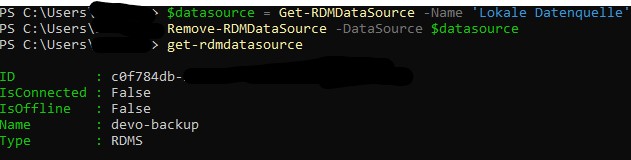
In the RDM the connection is also available. You can see in the Powershell Tab the correct application key. I can't save this manually because of the missing username (yellow marker).
In the settings I have for the rdm and other accounts 2FA as mandatory. Is this a problem with the application key?
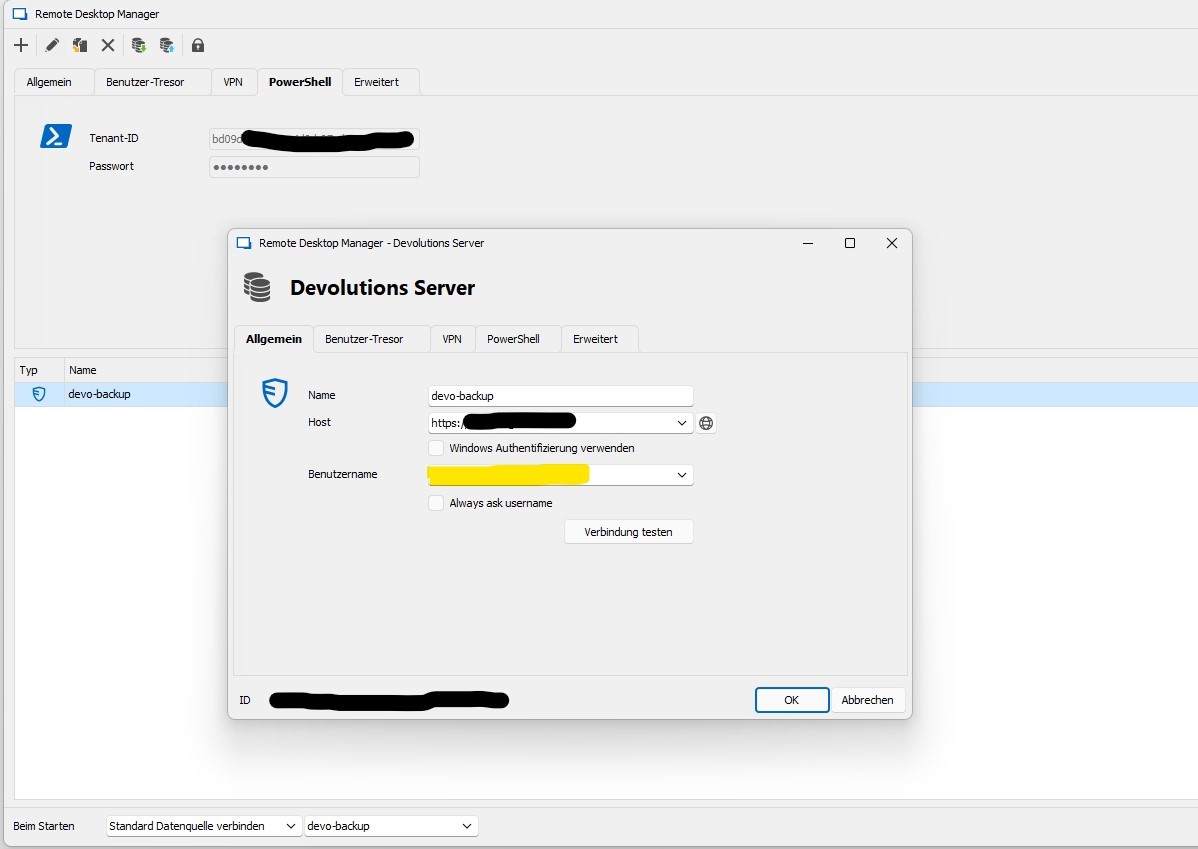
Devolutions.Powershell - New-RDMDataSource Error
Thank you Richard!! Seems that I used to unedited screenshot ...
here is the output.
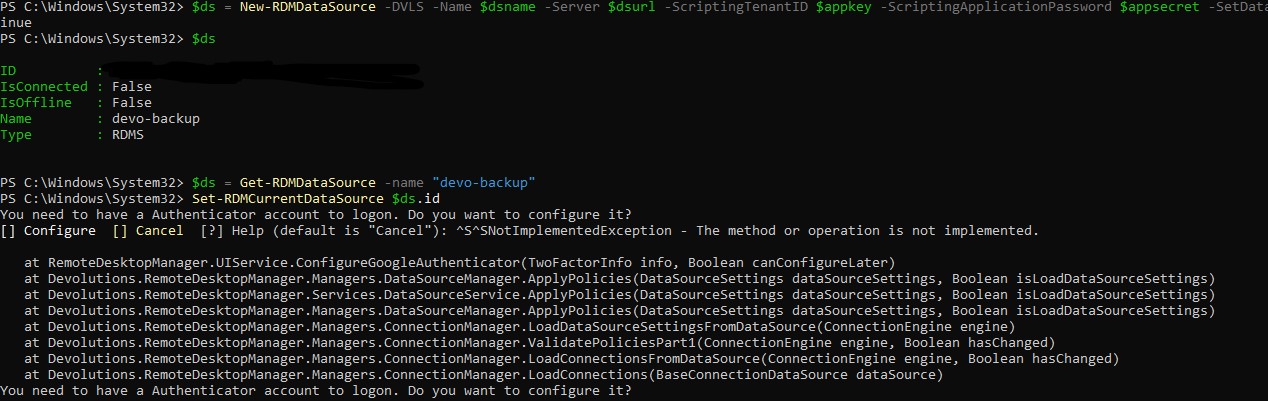
Devolutions.Powershell - New-RDMDataSource Error
Hello Richard,
yes it is RDM 2023.1.0.8 and Powershell 7.3.4.
After the "New-RDMDataSource -DVLS ...." command it gets a little timeout timeout.
Remote Desktop Manager [Loading sessions from data source Local Data Source]
[Error] The operation has timed out
Seems there is anything not correct. Application secret change has been tried.
I've created the applicatoin key and tried the code. I've tried it on my machine and also on the devolutions server itself.
Devolutions.Powershell - New-RDMDataSource Error
Hello,
I've got problems with the new powershell module.
The following code is in use.
$dsname = "devo-backup"
$dsurl = "https://xxxxxx.xxx.xx"
$appkey = "zsd"
$appsecret = "xyz"

$ds = New-RDMDataSource -DVLS -Name $dsname -Server $dsurl -ScriptingTenantID $appkey -ScriptingApplicationPassword $appsecret -SetDatasource -WarningAction SilentlyContinue
Error Msg: "[Error] The operation has timed out."
And if I try "Set-RDMCurrentDataSource" I get the following, seems that the datasource is not configured correct.
PS C:\Users\xyc\Documents\PowerShell\Modules\Devolutions.PowerShell\2023.1.0.8> Set-RDMCurrentDataSource -ID 'yxc'
You need to have a Authenticator account to logon. Do you want to configure it?
[] Configure  [] Cancel  [?] Help (default is "Cancel"):
Is there any error log or idea?
Vault HTML Export with the "Devolutions Server PowerShell Module"
Hello Richard,
thank you for your help. I use the rdm version 2022.3.32.0 and devolutions server 2022.3.9.0. Our goal is to get an encrypted wile which we can backup on a daily base to get on our systems without devolutions.
With the rdm I always have the manual login with 2FA when I start my script. I don't want to disable the 2FA for security reasons.
Do you have a alternative for the backup which is secure?
Maybe with the Get-DSEntry command? Couldnt make it working.
Best wishes,
Thorsten
Vault HTML Export with the "Devolutions Server PowerShell Module"
Hello, is there a possibility to export all vaults via "Devolutions Server PowerShell Module". I could only find a solution for the remote desktop manager powershell module.
I try to automate a backup solution via powershell. In case of the remote desktop manager I always have to run the application.
Best wishes,
Thorsten
Credentials (find by name - user vault)
Hello Richard,
thank you! This helped me.
Best wishes,
Thorsten
Credentials (find by name - user vault)
Yes, we have the same credentials for different servers.
If I change the password of User1 I have to change 3 accounts.
account1: user1 password1 server1
account2: user1 password1 server2
account3: user1 password1 server3
Because the name lookup "Find by name" is looking for the exact name for the server.

Best would be if I could add multiple names for the same credentials where the "Find by name" is looking at.
Hope it is clear enough :) If not I can add some informations.
Credentials (find by name - user vault)
Hello,
we have multiple user accounts for the same server. So the server is created in the company vault and the users have a account in the user vault.
The settings I use is at credentials "Find by name (User Vault)": server1
Every user has that account name with key1 to access the server.

The account needs to be named with "server1". Is there another possibility to name it different? Because the user account is used for different servers.
And I don't want to create multiple user accounts for the same login. On a password change it would be to much work.

I couldn't find a solution to add the "server1" entry in the account which would be read by the "Find by name". I tried "Tags" for example.

Thank you for your help!