
fabian.gygax
Credentials not injected when using search accross vaults
Hi Jacob,
Thanks for your reply. For now it seems as if all subsets are affected, but I'll try to reproduce the behaviour with a new subset as requested. For now we navigate to the desired entry an open the connection from there. I'll get back to you asap.
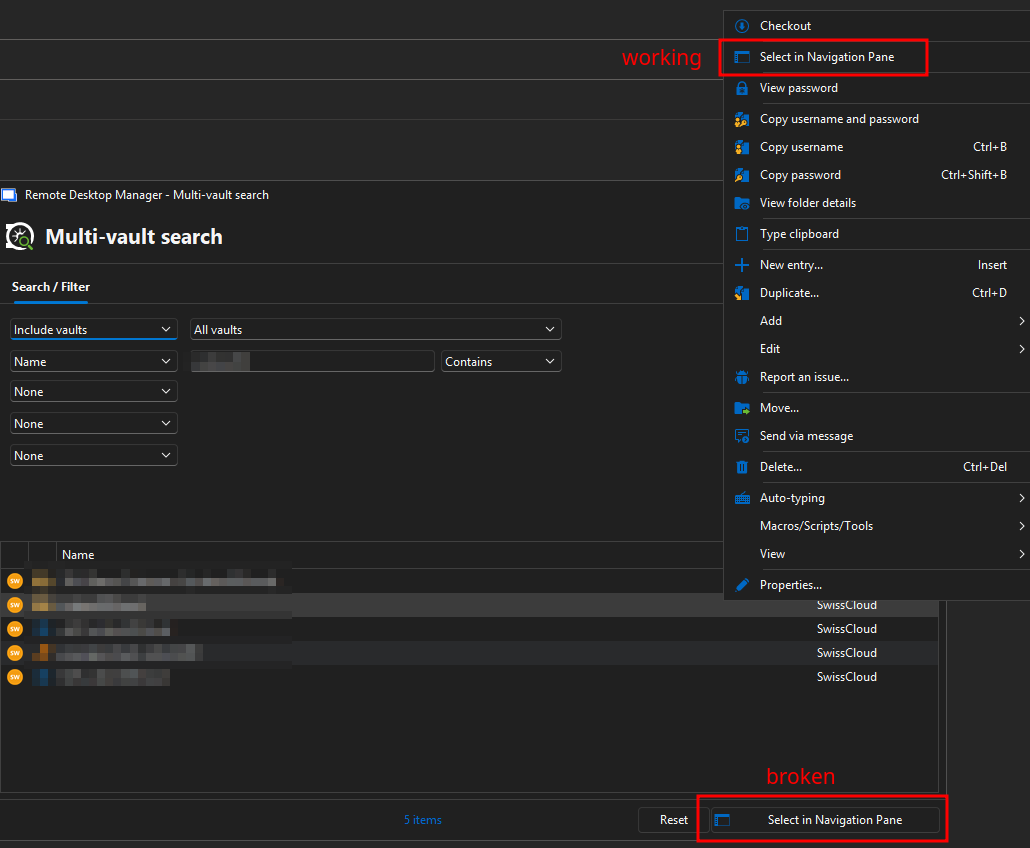
At the same time we've also observed that the button 'Select in Navigation Pane' (or double-click for that matter as 'SelectInNavigationPaneOnDoubleClickInAdvancedSearch' is set ) inside the Multi-vault search seems to be broken. If used, the Multi-vault search dialog just disappears without doing anything. We can however correctly use the option from the right-click context menu. I don´t know if these to issues might be related. To eachother
Credentials not injected when using search accross vaults
Hi Community,
We've updated to RDM 2025.3.20, DVLS 2025.3.5 from the latest 2023 version which was long overdue. After the upgrade we've noticed a strange behaviour when trying to connect to an RDP session directly from the search results.
Our folder layout looks like this:
Folder 'RDP' with linked Credentials to a username/password objects.
RDP Sessions with Credentials set to 'inherit'.
The way we use RDM is to search for the desired connection using the search box in the bottom left-hand corner (NOT the dedicated Search window). We've got the option 'all vaults' enabled in order to be able to do a cross-vault search without needing to open the advanced search.
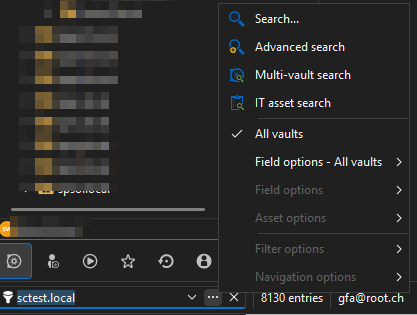
We then use a double click to connect to the desired server.
This has always worked without an issue.
Since the update however we're prompted for credentials when using this approach.
If we right click on the search result and select 'Select in Navigation pane' prior connecting via double click, the credentials are injected correctly.
Is this behaviour to be expected? As we haven't upgraded in a long time I cannot pinpoint this to the the current version. I haven't found anything of use in the forums, either.
EDIT: The same thing happens if we use the Multi-vault search feature.
Thank you in advance for any help and input regarding this issue.
Kind Regards,
Fabian
Prevent creating tags
Hello,
I second that idea. We're kind of in the same boat. While I appreciate people trying to organise entries, using tags quickly gets out of hand as everybody adds/creates them as they see fit (my absolute favourite are duplicate tags containing typos).
Just the possibility to restrict who can create then would be greatly appreciated.
Kind regards,
Fabian
Tags in different colors
Hi David and Benjamin,
I've just stumbled across this thread and I find this idea interesting as well. Our support team also heavily relies upon quickly identifying certain data and colours are always helpful.
I'd even go one step further and I think it would be neat if entries in the tree view could be somewhat conditionally formatted based on tags (i.e. bold text if tag X is set, red text if tag Y is set), similarly to Microsoft Outlook's conditional formatting of folder contents.
Best regards,
Fabian
Move to vault permission
Hi William,
That's good to know.
Is there a way to move an entry (or copy / paste) from one vault to another while keeping the access logs, then?
Best Regards,
Fabian
Move to vault permission
Hi,
I've just tested the proposed approach using the copy feature and everything seems to work fine. In order to preserve the access logs, I was forced to not change the ID of the entry, however. I instantly got a warning that this might cause some unforeseen issues. What are the dangers related to this?
Best regards,
Fabian
Limit search results to certain connection types / folders
Hi Maxim,
Sorry for my delayed response. I've taken a look at the forum post. This indeed works if the search is limited to the current vault. We use the 'All Vaults' option, however. In this case the option is not available.

Would you consider implementing this in the future?
Best regards,
Fabian
Limit search results to certain connection types / folders
Hello everyone,
Is there a way to limit the search results while searching in all vaults to specific connection type?
For context we structure our customers in dedicated folders accross mutiple vaults. As we do not know right off the bat in which vault a customer is located, we use the 'search all vaults' option.
The main issue with this approach is that we get far more hits that we would actually want as often connections contain the customer's name and are therefore listed as well.
Example:
Let's assume we do a multi-vault search for our customer 'demo.local'.
This yields the below search results.
I would like to limit them the the folders 'demo.local' as i can jump to these entries via right click - 'select in Navigation pane'

I know i could achieve this by using the advanced search (in fact this is what I'm doing), but a lot of our users find this too tedious.
We're using
RDM version 2023.3.36.0
Devolutions Sever version 2023.3.13.0
Thanks in advance for any input.
Regards,
Fabian
Your datasource is in read-only mode
Hi Érica,
Just here to say thank you. This was nearly driving me insane as I updated our staging environment (including the PS module) to 2023.3.x while our production is still at 2023.2.x. I was aware that the RDM Client could not be on a higher version than DVLS (as stated in the release notes), but I didn't consider this is true for the PS module as well. Maybe you could point that out in the release notes as well next time.
Regards,
Fabian
Ability to reset secret of DVLS Application/API
Hi François,
Thanks for your positive reply.
Rotating it via PS or API would be ideal, but the GUI would be OK, too. I think implementing the feature via API / PS would be more consistent, though.
Cheers,
Fabian
Ability to reset secret of DVLS Application/API
Hi Richard,
We are in the same situation as we tend to rotate application secrets regularly while heavily integrating DVLS in our scripting. Secret rotation should be a base feature as many IdPs tend to issue short-lived application secrets with a live time of less than a year. Can you tell the priority this ticket has in your backlog?