Your datasource is in read-only mode

Hello everyone,
i am trying to create a script for creating a new entry in a specific vault, at the moment i was able to authenticate via the "New-RDMDataSource" command, but when i go to create a new entry the server replies "Your datasource is in read-only mode".
To access my DVLS server I am using an APP account that have admin privileges for all Vaults: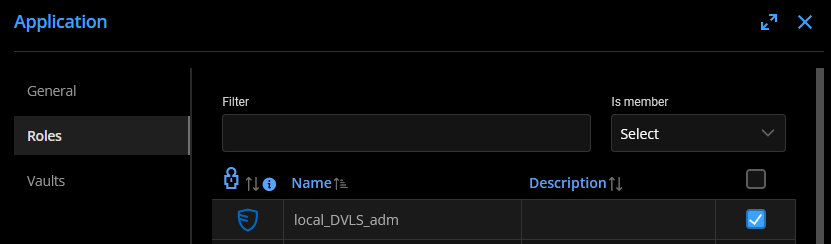
Here my error: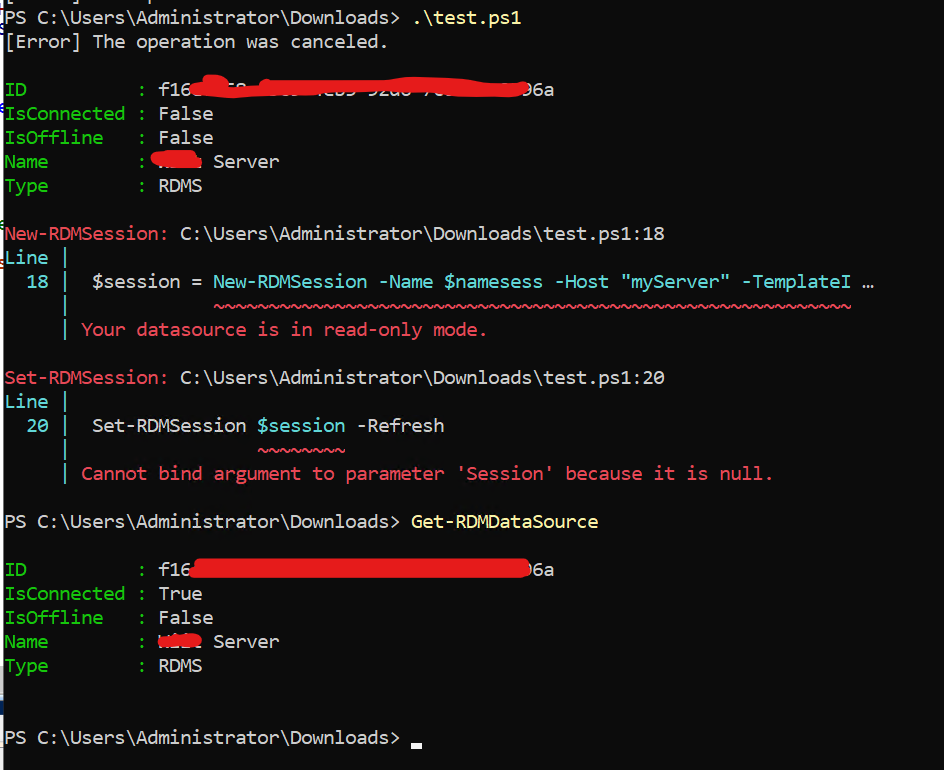
As you can see my datasource i connected as needed after script execution.
And this is my code:
#Setto sessione con autentica APP
$dsname = "XXXXXX"
$dsurl = "XXXXXXX"
$appkey = "XXXXXXXXX"
$appsecret = "XXXX"
New-RDMDataSource -DVLS -Name $dsname -Server $dsurl -ScriptingTenantID $appkey -ScriptingApplicationPassword $appsecret -SetDatasource
$ds = Get-RDMDataSource -Name $dsname
Set-RDMCurrentDataSource $ds

$template = Get-RDMTemplate | Where-Object -FilterScript {$_.Name -eq "XXXXXXX_TEMPLATE"}

$namesess = "test_templ"

$session = New-RDMSession -Name $namesess -Host "myServer" -TemplateID $template.id

Set-RDMSession $session -Refresh
Update-RDMUI
As you can see from the code at the moment I have not selected a repository where to create the entry. If you have any suggestions on how to use the "Set-RDMCurrentRepository" command they are welcome!
Can anyone help me understand why it is not working?
Thanks
Regards
immagine.png
error_rdm.png
All Comments (7)
Hello,
What DVLS version and Devolutions.PowerShell module version are you using?
To get the module version, you can use Get-RDMInstance cmdlet.
Since version 2023.3, there is a protection that automatically switches to read-only mode if versions are mismatched, like DVLS 2023.2 and module 2023.3.
If you want to downgrade the Devolutions.PowerShell module, you need to uninstall the current installed version before.
Let us know if that helps.
Best regards,
Érica Poirier
Hi Erica and thanks for your reply,
my DVLS version is 2023.2.10.0 and i'm using 2023.3.1 module version.
So i have to use 2023.2.X module with a DVLS 2023.2.X?
Thanks
Regards
Hello,
That's right, you need to use the module version 2023.2.0.9 to connect with read/write access on your data source.
Uninstall-Module Devolutions.PowerShell -AllVersions
Install-Module -Name Devolutions.PowerShell -RequiredVersion 2023.2.0.9 -Force
Once you will upgrade your DVLS to 2023.3.x, then you have to upgrade the Devolutions.PowerShell module.
Best regards,
Érica Poirier
Hello,
That's right, you need to use the module version 2023.2.0.9 to connect with read/write access on your data source.
Uninstall-Module Devolutions.PowerShell -AllVersions
Install-Module -Name Devolutions.PowerShell -RequiredVersion 2023.2.0.9 -Force
Once you will upgrade your DVLS to 2023.3.x, then you have to upgrade the Devolutions.PowerShell module.
Best regards,
Hi Erica,
thanks now the read only problem is solved after changing module version.
Now i'm executing this code:
$dsname = "XXXXX"
$dsurl = "XXXXXX"
$appkey = "XXXXX"
$appsecret = "XXXXXXX"
New-RDMDataSource -DVLS -Name $dsname -Server $dsurl -ScriptingTenantID $appkey -ScriptingApplicationPassword $appsecret -SetDatasource
$ds = Get-RDMDataSource -Name $dsname
Set-RDMCurrentDataSource $ds.ID

$template = Get-RDMTemplate | Where-Object -FilterScript {$_.Name -eq "XXXXXX_TEMPLATE"}

$namesess = "test_templ"

Set-RDMCurrentRepository -id 582XXXXXXXXXXXXXXXXXXXXXX58d

$session = New-RDMSession -Name $namesess -Host "myServer" -TemplateID $template.id
write-host $session #check session is ok
Set-RDMSession -Session $session -Refresh
Update-RDMUI
Get-RDMDataSource | Remove-RDMDataSource
And i get some "[Error] The operation has timed out." and this error (IsConnected became true when the script is adding the connection):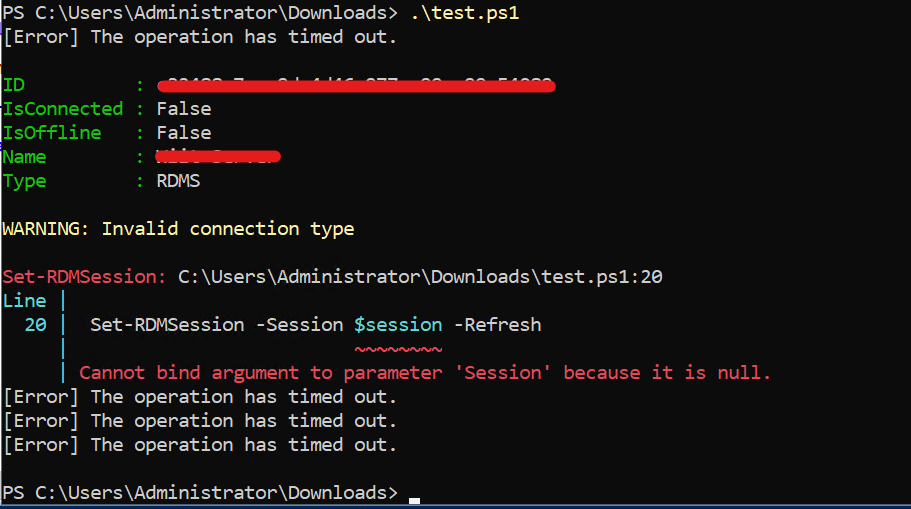
The Shared Template i'm tring to use is a CyberArk PSM Connection with these settings: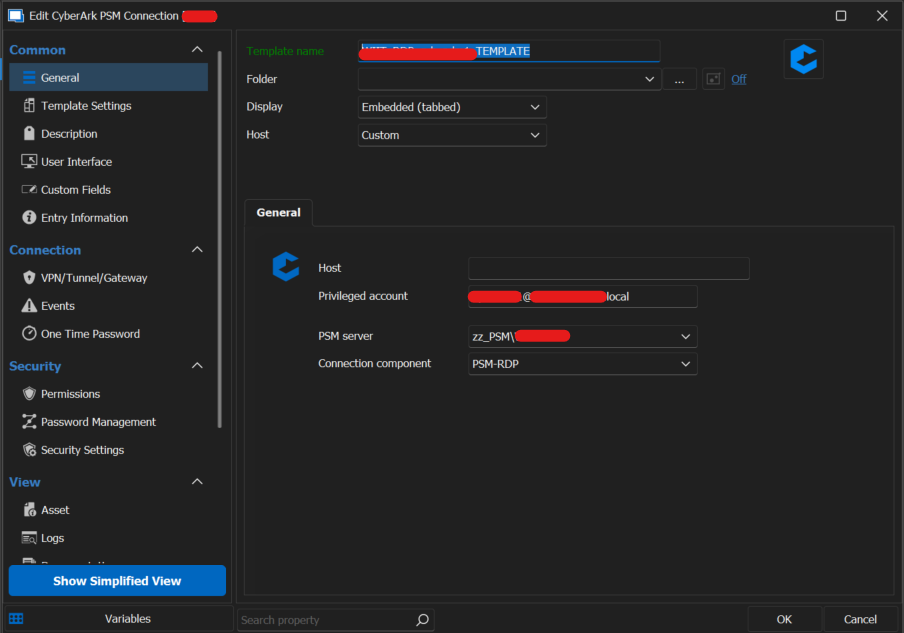
rdm.png
immagine.png
Hi Federico,
Thank you for your feedback.
Could you please increase the Connection timeout parameter with the following commands you can put just before the Set-RDMCurrentDataSource?
Set-RDMDatasourceProperty -DataSource $ds -Property "Timeout" -Value 60
Set-RDMDataSource $ds
Let us know if that helps.
Best regards,
Érica Poirier
Hi Érica,
Just here to say thank you. This was nearly driving me insane as I updated our staging environment (including the PS module) to 2023.3.x while our production is still at 2023.2.x. I was aware that the RDM Client could not be on a higher version than DVLS (as stated in the release notes), but I didn't consider this is true for the PS module as well. Maybe you could point that out in the release notes as well next time.
Regards,
Fabian
Hello Fabian,
Thank you for your feedback.
I will inform our developer teams of your suggestion to also mention the PS module version in the release notes.
Best regards,
Érica Poirier