Credentials not injected when using search accross vaults

Hi Community,
We've updated to RDM 2025.3.20, DVLS 2025.3.5 from the latest 2023 version which was long overdue. After the upgrade we've noticed a strange behaviour when trying to connect to an RDP session directly from the search results.
Our folder layout looks like this:
- Folder 'RDP' with linked Credentials to a username/password objects.
- RDP Sessions with Credentials set to 'inherit'.
The way we use RDM is to search for the desired connection using the search box in the bottom left-hand corner (NOT the dedicated Search window). We've got the option 'all vaults' enabled in order to be able to do a cross-vault search without needing to open the advanced search. 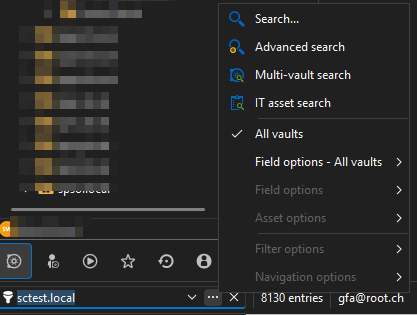
We then use a double click to connect to the desired server.
This has always worked without an issue.
Since the update however we're prompted for credentials when using this approach.
If we right click on the search result and select 'Select in Navigation pane' prior connecting via double click, the credentials are injected correctly.
Is this behaviour to be expected? As we haven't upgraded in a long time I cannot pinpoint this to the the current version. I haven't found anything of use in the forums, either.
EDIT: The same thing happens if we use the Multi-vault search feature.
Thank you in advance for any help and input regarding this issue.
Kind Regards,
Fabian
af6a3d63-86a2-4a5a-853f-9cd7c9758bc8.png
All Comments (3)
Hello,
Thank you for reaching out regarding this matter.
Could you please confirm whether all entry sets like this are not working, or only a specific subset?
I tested the behavior using the same version as yours but was unable to reproduce the issue, everything appears to be working as expected on my end.
Would you be able to recreate the scenario from scratch for testing purposes? I’m curious to see if the recent update may have broken the link between entries.
Please let me know if you’re able to reproduce the issue with a new set of entries.
Best regards,
Jacob Lafrenière
Hi Jacob,
Thanks for your reply. For now it seems as if all subsets are affected, but I'll try to reproduce the behaviour with a new subset as requested. For now we navigate to the desired entry an open the connection from there. I'll get back to you asap.
At the same time we've also observed that the button 'Select in Navigation Pane' (or double-click for that matter as 'SelectInNavigationPaneOnDoubleClickInAdvancedSearch' is set ) inside the Multi-vault search seems to be broken. If used, the Multi-vault search dialog just disappears without doing anything. We can however correctly use the option from the right-click context menu. I don´t know if these to issues might be related. To eachother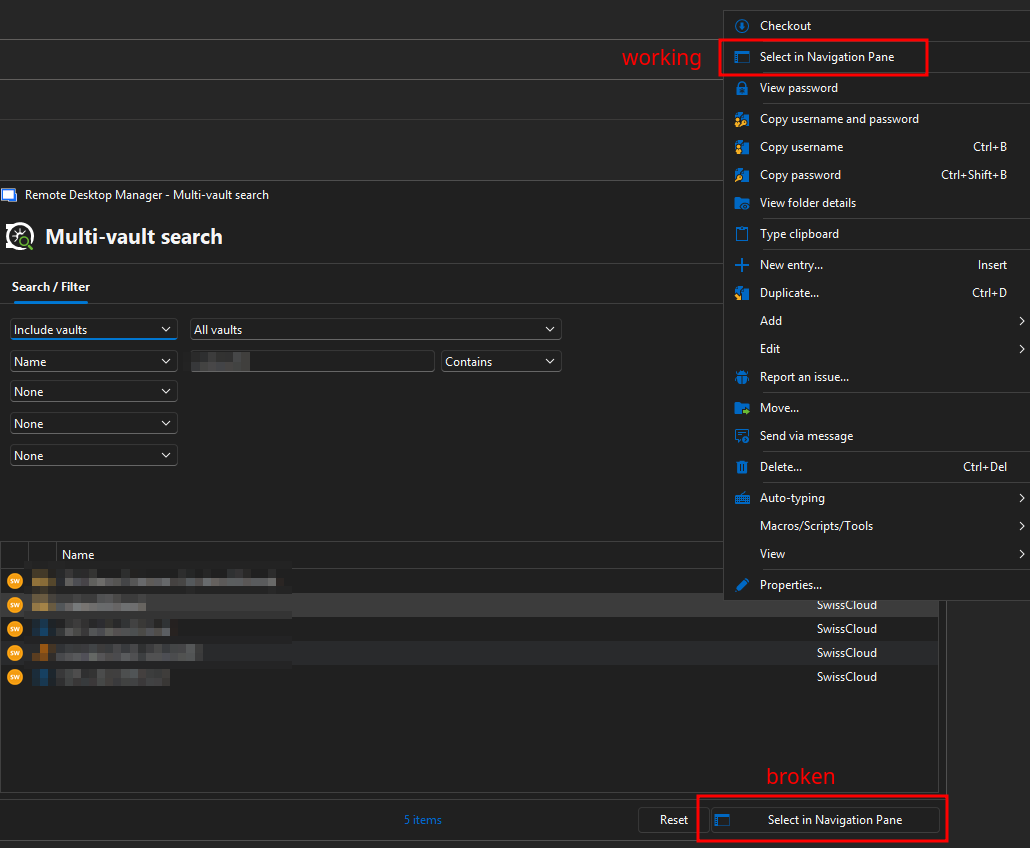
f7dd63a2-8002-4ae8-acbb-1ef00806eeaa.png
Hello,
Thank you for the follow-up.
I wasn’t able to reproduce the issue on my side either. Everything is working as expected using RDM 2025.3.21.0 and DVLS 2025.3.5.0.
As a next step, I recommend testing with the portable version of RDM. You can follow the setup instructions here:
https://docs.devolutions.net/rdm/kb/how-to-articles/portable-rdm-installation/
Please let me know if the issue persists when using the portable version.
Best regards,
Jacob Lafrenière