
atclaus
Claude Code, OSC 52, Copy Text
OK thanks. I am sure the Type Clipboard is needed in some scenarios other than mine, but when I could not copy/paste into Claude Code I kept changing the text in a dedicated macro to be what I needed to paste and it worked with the speed of it just fine - several hundred characters across multiple lines (ones that Type Cliboard threw a little bit of a fit about "are you sure - this is long")
Rapid Switching of Tabs on Own
@Alexis Geller Peiro See this as well. The SSH CLI is in the red part at the top and below it you can see my navigation side bar with two different connections being rapidly switched, despite no actions from me. https://knoweth0127.s3.us-east-1.amazonaws.com/Screen+Recording+2026-07-22+183737.mp4
Claude Code, OSC 52, Copy Text
Amazing! It does! AND ctrl+shift+v will paste text. no more modifying a macro to paste my text every time.
The macro raises a second tangential question - why is macro typing so fast but "Type clipboard" on the Home Ribbon is sooooo slow?
Rapid Switching of Tabs on Own
It has happened for a while (several months?), and I do keep my RDM up to date. Currently on 2026.2.13.0 64-bit (PreJIT). I use a local XML
Claude Code, OSC 52, Copy Text
Unfortunately, it does not. You succeeded in Claude Code? Chatting with Claude (about Claude - the irony!) I got:
- Claude Code toggles bracketed paste mode (\e[?2004h/l) as part of normal operation — this is standard/expected terminal behavior, not unique or misconfigured on Claude Code's end
- Ask specifically: does RDM's right-click paste emit ESC[200~ / ESC[201~ around pasted content, or inject raw keystrokes?
- Contrast: SSH/tmux "work" because they don't require paste to be specially delimited; Claude Code doesClaude Code, OSC 52, Copy Text
So, this quickly escalated beyond my knowledge areas, but I have seen workarounds in other environments, so would love to an RDM solution:
SSH via RDM to Debian 13
Run tmux
run Claude Code
select text, does not go to clipboard (like it does in ssh sessions otherwise)
From my searches, it has to do with OSC 52 output. There is even a popup in CC that says: sent 436 chars via OSC 52 . if paste fails, hold Shift (Option in iTerm2, Fn in Terminal. app) while selecting for native copy but not seeming to work with RDM.
See this bug on anthropic: https://github.com/anthropics/claude-code/issues/62699
And this about going to /tui default (which I have not done for a couple other reasons): https://github.com/anthropics/claude-code/issues/62462
Rapid Switching of Tabs on Own
See video here: https://knoweth0127.s3.us-east-1.amazonaws.com/Recording+2026-07-16+214241.mp4 (not sure how else to show this).
Note that for the first 9s the right tab is the only one selected. Simply hovering the mouse over the left one causes the screen flicker. Obviously not desired!
This is not consistent. It does seem most likely to happen when more than 1 tab in a separate window and then computer locked for a while.
Pop-Up Prompt Windows Not On Same Scree
@Carl Marien that does keep it after I move it, but it does not make it so popups occur on the screen that you are using.
RDM on screen 1, popup appears on screen 2, move to screen 1, click y/n
RDM on screen 1, popup appears on screen 1 - good
RDM moved to screen 2, popup appears on screen 1 - need to move it again
SFTP Preserve Time in SSH Not Honored
Hello,
Just to confirm, in this case, it's specifically with the SFTP session and not with the SSH terminal using the SFTP side-panel? Since, from what I understand, the SFTP side-panel never preserves timestamps at the moment.
Regards,
@Hubert Mireault
That is correct. In a dedicated SFTP session!
SFTP Preserve Time in SSH Not Honored
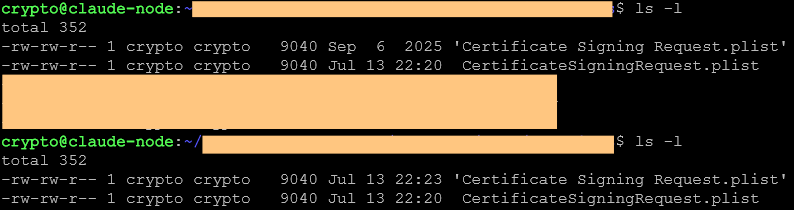
Thanks both. I am encountering a similar albeit different issue - moving the same file more than once does not preserve time stamp after the first copy.
I tried this both letting RDM overwrite, manually deleting it from within the SFTP session in RDM first, and rm from Debian via parallel ssh before copying. All the same result.

This one definitely falls as bug vs request!
Further, dragging the same file into another folder for the first time still preserves the time stamp. But a new file dragged right after keeps its metadata. This time I did not rm it, but just overwrote it from the SFTP session:
Pop-Up Prompt Windows Not On Same Scree
I use 4 montiors, often repositioning RDM (and/or sub-windows) across them. It seems more recent that message pop ups do not follow the screen that they are on. So I do something on screen 1, looking at screen 1, but the pop-up stopping me from proceeding is on screen 2.
SFTP Preserve Time in SSH Not Honored
Main settings has "yes" for Preserve timestamps when downloading/uploading, but it does not when using SFTP in the side-pane SFTP of an SSH session.
I confirmed this for a new SSH entry created after having the SFTP preserver timestamp enabled (even though I would expect it to have worked regardless as an overall toggle). I do not see an option in the SSH config (even under SFTP) to toggle preserve timestamps there).
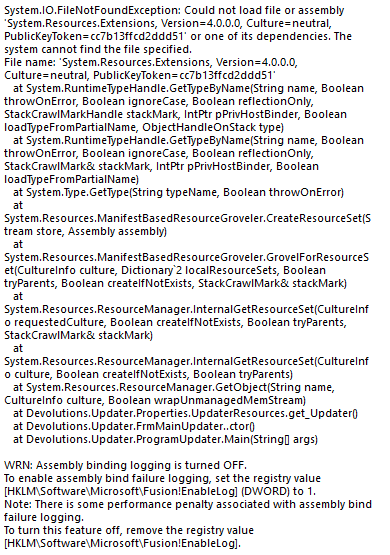
Fail to Update: System.IO.FileNotFoundException...
Trying to update from 2025.3.15.0 to 2025.3.16.0 and repeatedly get this.
SFTP Do Same for All Existing Overwrite/Skip Fails to Do Same
Correct. I did not have the screen up to get exact wording. After having to click on about 300 files I did not feel like trying again!
SFTP Do Same for All Existing Overwrite/Skip Fails to Do Same
Transferred a folder across sftp within an ssh. I was on a PC and ssh'd into the linux machine, copying from Linux to PC. Whole folder with a bunch of existing items and it did not "accept" the check box to do the same skip/overwrite.
2025.3.15.0 64-bit (PreJIT). I know x.16.0 is available, but in the middle of something.
Apple Remote Desktop ARD Multiple Monitors
Thank you Richard for the very comprehensive explanation. Given ShareResX is shareware product with full features for 10 days, I may try it. If it works, I will report back here.
Otherwise, I can just hope that others wish for the same!
Apple Remote Desktop ARD Multiple Monitors
Is there a way to stretch a MacOS (M1 Mini) via ARD across more than 1 monitor? I have a 2x2 monitor setup (each just 1080p) and would like to take advantage of two monitors when connecting from my PC. So far I tried stretching the popped out window across two screens manually, but it maintains ratio and resolution. Would like to make it 3840x1080. Thanks!
Frozen RDM when Connection Forcibly Closed by Remote Host
Thanks. Do you still need logs? I was away from the computer in question yesterday.
Frozen RDM when Connection Forcibly Closed by Remote Host
Just updated. sudo reboot -h 0 froze the whole program. it finally terminated itself. no error message. just a frozen program
Frozen RDM when Connection Forcibly Closed by Remote Host
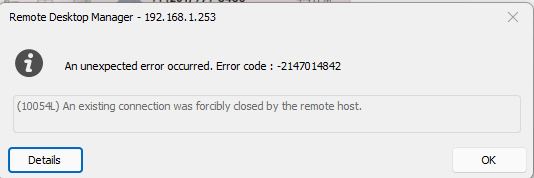
Now I rebooted the same device via ssh and it froze the whole RDM. no error. Device in question is an Raspberry Pi 4B 8GB. Should be (close to) up to date.
Frozen RDM when Connection Forcibly Closed by Remote Host
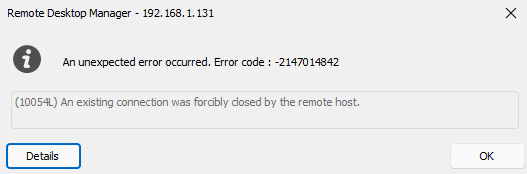
Happened again just now when I rebooted my router and wifi went down. Could not click on Details and eventually RDM just crashed and I have to relaunch
Frozen RDM when Connection Forcibly Closed by Remote Host
I have had multiple times where RDM will just totally freeze up. I finally grabbed a screen shot of the error. I am on Windows 11 with the RDM 2023.2.33.0 64-bit
At the time, I was SSH to two linux machines and apple remote desktop
Ubuntu CLI Shutdown --> Frozen RDM
My SQL skills are not that strong, so not sure how to go about doing that exactly. Is there an easy conversion method?
Ubuntu CLI Shutdown --> Frozen RDM
An XML file (if that is what you are asking) locally hosted
Ubuntu CLI Shutdown --> Frozen RDM
I do not think it has been only after an update, but I am not 100% sure.
I do not have any older versions.
No SSH changes were made.