
Timo
Set macro password
Hi!
Could you please confirm whether the “Allow password in variable” option is enabled in the credential entry? With this setting enabled on my end, the configuration works as expected.
@Jacob Lafrenière
Ah, now it is working. I thought this setting must set in the entry with the script, but this way around it make more sense.
Thank you!
CU,
Timo
Set macro password
Hi @Jacob Lafrenière
I have tested this:
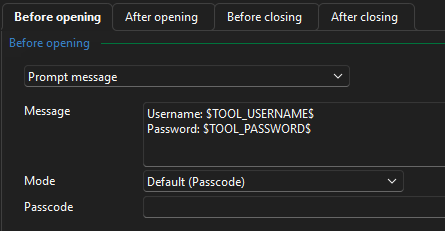
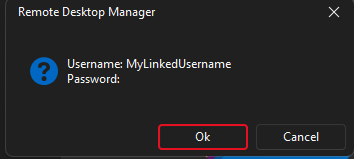
If I use username / password, it is working:
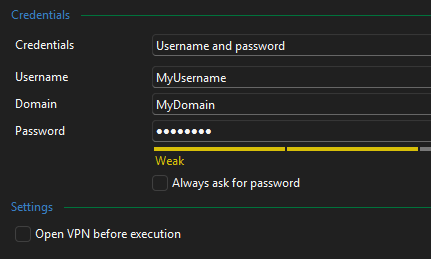
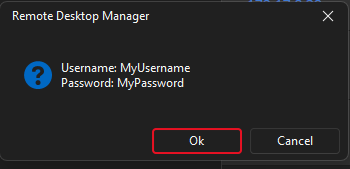
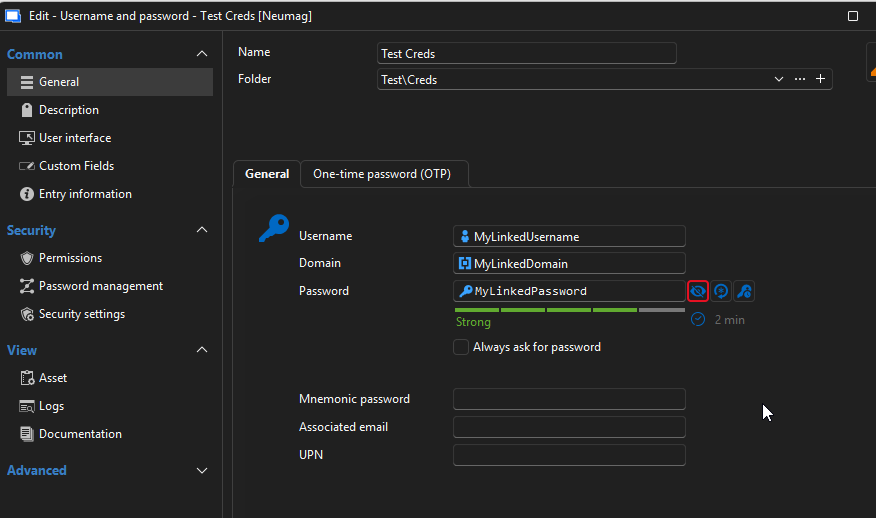
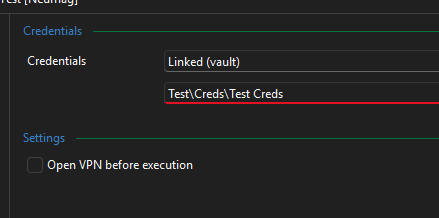
But if I use a linked entry, it is not working:
CU,
Timo
Set macro password
Hi @Erica Poirier
Is the linked vault entry located in the same vault or in another vault?
It is in the same vault.
CU,
Timo
Set macro password
Hi! @Erica Poirier
If you want to use a different credential for the Events, you can use the Tools feature to link a credential entry and use the Tools variables instead of setting the password in the Macro password property.
I tested the tools approach and it does not work linke expected: If I use a linked valt entry, the $TOOL_PASSWORD$ is always empty in my macro.
If I use username/password entry, the $TOOL_PASSWORD$ is filled with the password.
The "Password in variable" checkbox is anabled in the security settings.
I use RDM 2026.1.10 and Powershel modul 2026.1.3
CU,
Timo
Access RDM via C# or REST API
Hi!
Thanks for the quick reply.
I guess, there are no plans to release the powershell module as .NET-DLL / nuget package? At the core it's all .NET I assume....
CU,
Timo
Access RDM via C# or REST API
Hi!
Using RDM with a SQL-Server Datasource. Is there a way to access the datasource via C# or web/REST API?
I know the powershell module, but I want to develop a GUI for automated tasks and powershell and GUI is PIA...
CU,
Timo
Set macro password
Hi!
Thanks a lot!
Set-RDMSessionProperty works like a charme!
The solution via the tools feature I will try in the future.
CU,
Timo
Set macro password
Hi
Thanks for the answer.
If I set the Macro passwort in the RDM the script is working without a problem. The problem is, to set the macro password via a powershell script.
We create alle entries with powershell scripts. The prefered solution is to use a linked credential entry, but I have no idea how.
The credentials for the session are not the same that are used in the macro.
As there are only variables for the entry, the parent and the folder I see no way to reference a total different credential entry.
I will try to use a custom field as a workaround.
CU,
Timo
Export template not encoded
Hi!
Is there a way to export an entry template not encoded? Like an export from a session?
CU,
Timo
Set macro password
Hi!
First as context: I want to execute a command on a remote host. Actual solution is a ssh session with an "After open" macro and closing this session after execution.
The command has an password as parameter.
Using a linked entry, does not work, so I want to set the macro password with an powershell script.
How can I set the macro password with a powershell script?
The secure password is stored in $session.Events.AfterConnectionTypingMacroSafePassword but setting does not work.
I know the Set-RDMSessionPassword command. Is there something simmilar for the macropassword?
CU,
Timo
Accessing child entries/objects
Hi!
This works for me, thanks.
CU,
Timo
Accessing child entries/objects
Hi!
I have a entry template group with some entries
<myTemplateGroup>
  <entry1>
  <entry2>
  <entry3>
Now following code
$entryFolder = "my\folder\name"
$entryName  = "myEntryName"
$entryGroup = $entryFolder + "\" + $entryName
$entry = New-RDMSession -Type Group -Group $entryGroup  -Name $entryName
$entry.GroupDetails.GroupType = "Server"
set-RDMSession -Session $entry
$tmp = New-RDMSession -Type TemplateGroup -TemplateID $tid -Group $entryGroup
How can I access and change the <entry1> ,<entry2> ,<entry3> before I set it in the database with set-RDMSession -Session $tmp ?
CU,
Timo
RDP over SSH Tunnel
Hi!
I have the same requirements (RDP over SSH) but an other approach: I did not setup an seperate tunnel session, but confugured the sessin within the RDP session. My question here: Is it possible to get the credentials from a "Linked (Vault)" source?

CU,
Timo
Get existing password templates
This might be helpfull if I ran an interactive powershell session, but not if I ran a script with parameters.
Never mind, I figured out a working solution.
Strange caching(?) problem
Hi!
I ran in some strange problems. When testing scrips I often create and delete folder/entries with the same name. Before creating a folder/entrie I test if this forlder/entrie exists:
function Test-EntryExists {
param (
        [Parameter(Mandatory)]
        [string] $Folder
        )
    $retval = $true
    $entryName = $Folder.Split("\")[-1]
    try{
        $session = Get-RDMSession -Name $entryName -Group $Folder -ErrorAction Stop
        if($session.count -eq 0){
            $retval = $false
        }
    }
    catch{$retval = $false}
    return $retval
}
Sometimes I get a false back although the folder exists. Creating this folder creates an error "Folder already exists".
Closing the powershell session and using a new one to test the existing of the folder returns the correct value true.
So it seems to be an kind of caching problem.
Parallel to the powershell session I have a RDM desktop session open. I was not able to figure out a way to reproduce this behavior.
Is there a method to refresh the data in the powershell session?
Using Powershell 7.4, Devolutions.Powershell module 2023.2.0.10 and RDM 2023.2.32.0
I can not update RDM or module.
CU,
Timo
Get existing password templates
Hi!
I know how to set the password. My problem is the "<your template name>" part, because I don't know if a template with that name exists.
At the moment I have this working solution, but I wonder if there is a method to get the existing password templates
function New-RandomPasswordFromTemplate {

    param (
            [Parameter(Mandatory,HelpMessage="Passwordtemplate")]
            [string] $templateName
        )
    $password = "default"
    try {
        $password = New-RDMRandomPassword -TemplateName $templateName
    }
    catch {
        $password = New-RDMRandomPassword -TemplateName "default"
    }
    return $password
}
CU,
Timo
Get existing password templates
Hi!
How can I get the password templates?
Get-RDMTemplate only retrieves the entry templates.
I want to get random passwords from templates. The template name is derived from the entry name. If the template does not exist a default template shall choosen.
ATM I try to get a password with the derived name and if this fails retrieving a password with the default name.
Is there a better way?
CU,
Timo
How to create a SQL datasource with cutom login
Hi!
I want to create a datasource with a custom login. I have tried this:
$securePW = convertto-securestring "myDBPassword" -asplaintext -force
$ds = New-RDMDataSource -SQLServer -Database "myDatabase"  -Username "myDBuser" -Password $securePW  -Server "mySQLserver" -Name "myDS"
Set-RDMDataSourceProperty -DataSource $ds -Property "LoginMode" -Value "Custom"
Set-RDMDataSource -DataSource $ds
That seems working fine. No error.
But setting current datasource does not work:
get-rdmdatasource -Name "myDS" | Set-RDMCurrentDataSource
Login failed for user ''.
Login failed for user ''.
Login failed for user ''.
Login failed for user ''.
This also happen, if I set the username / password in the Set-RDMCurrentDataSource command.
In the RDM the datasource ist set up like this and working
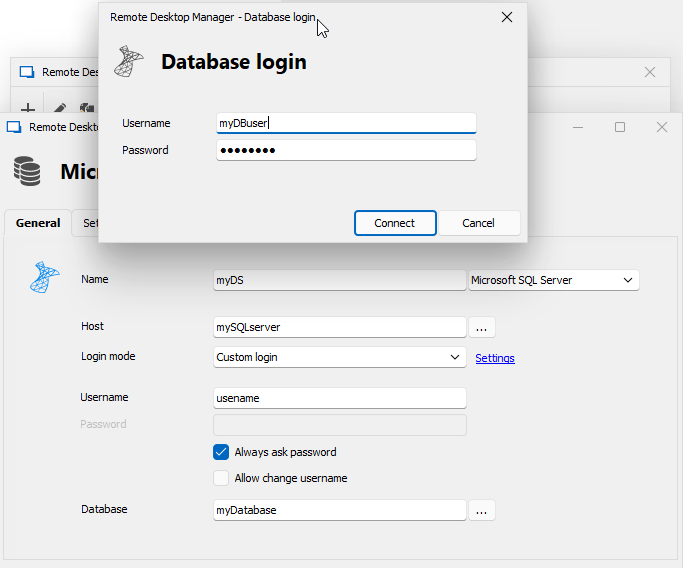
The RDM and the powershell does not share the configuration. I want / have to set up the datasource via the powershell.
I am using powershell 7.4.1, RDM V2023.2.32.0 and powershell module V2023.2.0.10
I can not upgrade RDM and/or powershell module for compatibility reasons.
CU,
Timo
Settings folder path powershell module linux
Hi!
Under which folder path the settings, especially the datasources, are stored? I use docker and want to create a volume with the settings for the datasources.
CU,
Timo
Set "Trust Certificate" for SQL Datasource
Hi!
I get an error:
$securePW = convertto-securestring "MyPassword" -asplaintext -force
$ds = New-RDMDataSource -SQLServer -Database "myDatabase" -Username "myUsername" -Password $securePW -Server "myServer\myInstance" -Name "MyNewConnection"
Set-RDMDataSource -DataSource $ds
Set-RDMDataSourceProperty -DataSource $ds -Property "TrustServerCertificateMode" -Value $True
Set-RDMDataSource $ds
[Error] The operation was canceled.
But when I run Get-RDMDataSource the datasource is listet and I can set the DS as RDMCurrentDatasource and all works fine.
For me there is no need to set the option with the New-RDMDataSource command. Setting after creation with Set-RDMDataSourceProperty is all i need.
Thank you!
CU,
Timo
Set "Trust Certificate" for SQL Datasource
Hi!
I am using the powershell module in a ubuntu docker container. The SQL linux driver force me to use encryption, so I installed a self signed certificate.
I am able to connect to the SQL server:
sqlcmd -S <server>\<instance> -U <user> -P <passwort> -C
The -C means "Trust Server Certificate"
In the RDM GUI I have to set the advanced setting "Trust certificate" to true to connect to the server.
How can I do this in the powershell module? ATM I get [Error] The operation was canceled when I set the datasource.
CU,
Timo
Set-RDMCurrentDatasource -forcepromptanswer does not work
Hi!
That is not the point. I am aware of this. In my usecase (testing and reading access only) all works fine with the new modul on old database. But the point is: The -ForcePromptAnswer does not work.
CU,
Timo
Set-RDMCurrentDatasource -forcepromptanswer does not work
Hi!
I am using the Devolutions.PowerShell 2023.2.0.8 with an older MSSQL-Datasource. I don't wand/can upgrade the database yet. If I set the datasource I get this prompt
A database upgrade is required. If you don't upgrade, the data source will not be available.

Data source name: my_datasource
Current version: 809
Target version: 874
[] Yes  [] No  [?] Help
I tried to avoid this prompt with
Get-RDMDataSource -name my_datasource | Set-RDMCurrentDataSource -ForcePromptAnswer Nobut it does not work.
Datasource reauthentication
Hi!
thanks for the quick answer, but unfortunately this does not work. There is no error, but the permissions are not set.
CU,
Timo
Datasource reauthentication
Hi!
I have a MSSQL datasource with custom login mode. "Always aks password" an "Allow change username" are enabled. When I make a set-rdmcurrentdatasource I am prompt to enter username/password. All works fine.
But how I can force a reauthentication? I have different user with different permissions and at the moment the only thing that works is to create a new pwsh session to force an authentication. Even a set-RDMCurrentDataSource with username/passwort as parameter doues not work.
CU,
Timo