
MathieuVHM
Cannot rename folders anymore
@Eduard Sepúlveda López: Case can be closed, end user is back from holiday and the issue is no longer occuring. Maybe something stale in the client/database/cache that finally got cleared. Anyway as far as I know, nobody is still suffering from this issue on our end and I have no way of reproducing it either so this can be closed again.
Cannot rename folders anymore
Does a full restart of RDM make any difference? If the error disappears right after a restart but comes back after a while, that would point to something in the client's session state getting confused over time rather than a persistent configuration problem.
Also, before triggering the rename, is there any chance the affected user has a Properties window open for any entry inside that vault, even one that's been minimized or pushed to the background? The error itself says "entries being edited in other windows," which can sometimes refer to open edit dialogs rather than checkout locks. Worth a quick check.
No to both unfortunately, he can reproduce it by renaming a folder right after restarting RDM. Laptop was also restarted a few times so guessing not a weird Windows thing either.
If neither of those leads anywhere, the most useful next step would be a profiler trace captured right when the error occurs. To grab one, the affected user just needs to go to Help > Profiler (how to use the profiler), reproduce the rename, and hit Send trace to Support (direct message with a link to upload the results will be sent) and we'll take a look at what RDM is detecting internally when it blocks the operation.
User is currently out of office until 6 July so will ask him to provide one next week.
Cannot rename folders anymore
Hi Mathieu,
This looks like a stale checkout lock. When RDM goes to save a renamed folder, it checks whether anything inside is currently checked out. If a previous session left a lock open without releasing it properly (say, after a crash or an abrupt disconnect), RDM blocks the rename and attempts a new checkout on the folder itself, which then has to be cleared manually before you can try again.
As an administrator, you can release the stuck lock directly from the RDM tree: right-click the affected folder and select Check in. That option is available to admins even when the entry is checked out by someone else. You can also see everything currently locked under View > Opened Sessions > Entry states. And to prevent stale locks from piling up going forward, there's an automatic check-in timeout under Administration > System Settings > Vault.
Please give that a try and let us know if it does the trick for your colleague!
Best regards,
@Eduard Sepúlveda López
Good morning Eduard, this doesn't seem to be the issue. The other user himself has no problem manually clearing the locked folder again. Plus I also just logged in with the superadmin and there are currently no entries checked out or stuck in that vault. Weirdly enough, I was able to briefly reproduce this for my own user but it doesn't seem to be occuring for me anymore.
I have enabled the Automatic check-in after 60 minutes, I'll ask the affected user if he can test again in an hour to be absolutely sure.
Edit: An hour has passed since the change, issue still persists.
Cannot rename folders anymore
RDM version: 2026.2.11.0
Devolutions server: 2026.2.9.0
We have a vault that seems to have gotten some kind of corruption on first sight.
Weirdly enough, we cannot edit folders anymore in this specific vault.
Tested with multiple users, same symptoms, seems to be limited to one specific vault right now.
Steps to reproduce:
1) Edit subfolder in RDM client, right click properties
2) Change the name of the folder & click save
3) Following error pops up:
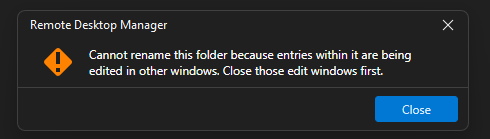
Error is bogus though, no other entries in the folder are being edited or are even open.
5) RDM initiates check-out on the folder as well, user has to manually unlock the folder again under 'opened sessions'
6) Repeat from step 1
1Password Azure AD SSO
Great news, I just spotted the following, tested it and it now works for us! Thanks for all the effort.
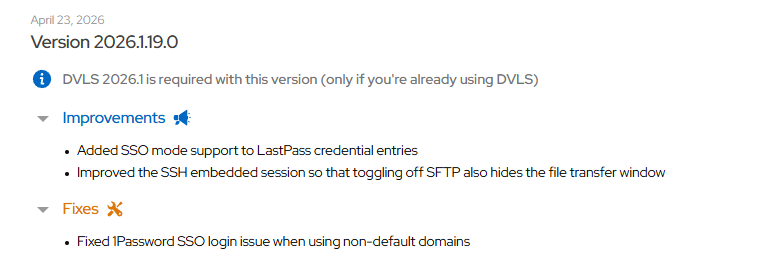
1Password Azure AD SSO
@Hubert Mireault Back from holidays, just updated everything but the issue persists, also still getting the 'login to 1password failed' error.
RDM client: 2026.1.16.0
Devolutions server: 2026.1.12.0
PasswordManagerAccess.Common.InternalErrorException: Invalid or unexpected response from the server (HTTP status: OK)
 ---> System.Text.Json.JsonException: JSON deserialization for type 'PasswordManagerAccess.OnePassword.Model+LoginInfo' was missing required properties including: 'userUuid', 'signInAddress'.
   at System.Text.Json.ThrowHelper.ThrowJsonException_JsonRequiredPropertyMissing(JsonTypeInfo parent, BitArray assignedOrNotRequiredPropertiesSet)
   at System.Text.Json.Serialization.Converters.ObjectDefaultConverter`1.OnTryRead(Utf8JsonReader& reader, Type typeToConvert, JsonSerializerOptions options, ReadStack& state, T& value)
   at System.Text.Json.Serialization.JsonConverter`1.TryRead(Utf8JsonReader& reader, Type typeToConvert, JsonSerializerOptions options, ReadStack& state, T& value, Boolean& isPopulatedValue)
   at System.Text.Json.Serialization.JsonConverter`1.ReadCore(Utf8JsonReader& reader, T& value, JsonSerializerOptions options, ReadStack& state)
   at System.Text.Json.Serialization.Metadata.JsonTypeInfo`1.Deserialize(Utf8JsonReader& reader, ReadStack& state)
   at System.Text.Json.JsonSerializer.ReadFromSpan[TValue](ReadOnlySpan`1 utf8Json, JsonTypeInfo`1 jsonTypeInfo, Nullable`1 actualByteCount)
   at System.Text.Json.JsonSerializer.ReadFromSpan[TValue](ReadOnlySpan`1 json, JsonTypeInfo`1 jsonTypeInfo)
   at System.Text.Json.JsonSerializer.Deserialize[TValue](String json, JsonSerializerOptions options)
   at PasswordManagerAccess.Common.RestClient.DeserializeFromJson[T](String json)
   at PasswordManagerAccess.Common.RestClient.MakeRequestAsync[TContent,TData](String endpoint, HttpMethod method, HttpContent content, Dictionary`2 headers, Dictionary`2 cookies, Int32 maxRedirects, Func`2 deserialize, CancellationToken cancellationToken)
   --- End of inner exception stack trace ---
   at PasswordManagerAccess.OnePassword.Client.GetLoginInfo(String username, RestClient rest, CancellationToken cancellationToken)
   at PasswordManagerAccess.OnePassword.Client.SsoLogIn(Credentials credentials, AppInfo app, IAsyncUi ui, IAsyncSecureStorage storage, RestClient rest, CancellationToken cancellationToken)
   at PasswordManagerAccess.OnePassword.Client.SsoLogIn(Credentials credentials, AppInfo app, IAsyncUi ui, IAsyncSecureStorage storage, IRestTransport transport, CancellationToken cancellationToken)
   at PasswordManagerAccess.OnePassword.Client.SsoLogIn(Credentials credentials, AppInfo app, IAsyncUi ui, IAsyncSecureStorage storage, CancellationToken cancellationToken)
   at Devolutions.RemoteDesktopManager.Managers.OnePasswordManager.Initialize(ConnectionEngine engine, String username, String password, String accountKey, String uuid, String url, OnePasswordLoginMethod loginMethod)


PasswordManagerAccess.Common.InternalErrorException: Invalid or unexpected response from the server (HTTP status: BadRequest)
 ---> System.Text.Json.JsonException: JSON deserialization for type 'PasswordManagerAccess.OnePassword.Model+LoginInfo' was missing required properties including: 'userUuid', 'signInAddress', 'authMethods'.
   at System.Text.Json.ThrowHelper.ThrowJsonException_JsonRequiredPropertyMissing(JsonTypeInfo parent, BitArray assignedOrNotRequiredPropertiesSet)
   at System.Text.Json.Serialization.Converters.ObjectDefaultConverter`1.OnTryRead(Utf8JsonReader& reader, Type typeToConvert, JsonSerializerOptions options, ReadStack& state, T& value)
   at System.Text.Json.Serialization.JsonConverter`1.TryRead(Utf8JsonReader& reader, Type typeToConvert, JsonSerializerOptions options, ReadStack& state, T& value, Boolean& isPopulatedValue)
   at System.Text.Json.Serialization.JsonConverter`1.ReadCore(Utf8JsonReader& reader, T& value, JsonSerializerOptions options, ReadStack& state)
   at System.Text.Json.Serialization.Metadata.JsonTypeInfo`1.Deserialize(Utf8JsonReader& reader, ReadStack& state)
   at System.Text.Json.JsonSerializer.ReadFromSpan[TValue](ReadOnlySpan`1 utf8Json, JsonTypeInfo`1 jsonTypeInfo, Nullable`1 actualByteCount)
   at System.Text.Json.JsonSerializer.ReadFromSpan[TValue](ReadOnlySpan`1 json, JsonTypeInfo`1 jsonTypeInfo)
   at System.Text.Json.JsonSerializer.Deserialize[TValue](String json, JsonSerializerOptions options)
   at PasswordManagerAccess.Common.RestClient.DeserializeFromJson[T](String json)
   at PasswordManagerAccess.Common.RestClient.MakeRequestAsync[TContent,TData](String endpoint, HttpMethod method, HttpContent content, Dictionary`2 headers, Dictionary`2 cookies, Int32 maxRedirects, Func`2 deserialize, CancellationToken cancellationToken)
   --- End of inner exception stack trace ---
   at PasswordManagerAccess.OnePassword.Client.GetLoginInfo(String username, RestClient rest, CancellationToken cancellationToken)
   at PasswordManagerAccess.OnePassword.Client.SsoLogIn(Credentials credentials, AppInfo app, IAsyncUi ui, IAsyncSecureStorage storage, RestClient rest, CancellationToken cancellationToken)
   at PasswordManagerAccess.OnePassword.Client.SsoLogIn(Credentials credentials, AppInfo app, IAsyncUi ui, IAsyncSecureStorage storage, IRestTransport transport, CancellationToken cancellationToken)
   at PasswordManagerAccess.OnePassword.Client.SsoLogIn(Credentials credentials, AppInfo app, IAsyncUi ui, IAsyncSecureStorage storage, CancellationToken cancellationToken)
   at Devolutions.RemoteDesktopManager.Managers.OnePasswordManager.Initialize(ConnectionEngine engine, String username, String password, String accountKey, String uuid, String url, OnePasswordLoginMethod loginMethod)
OnePassword - Settings.BrowseWebTitle - Session was not initialized
Loading user info ADMIN_account (obscured account info)
user.UserSecurity.IsAdministrator: False
Migrating data - up to dateMain thread (UI) - Level - 1 - [Debug]
----------------------------------------
SelectionChanged - Default : 64 ms
Silent: PasswordManagerAccess.Common.InternalErrorException: No SSO login method found for account firstname.lastname@company.be (obscured my email here)
at PasswordManagerAccess.OnePassword.Client.SsoLogIn(Credentials credentials, AppInfo app, IAsyncUi ui, IAsyncSecureStorage storage, RestClient rest, CancellationToken cancellationToken)
at PasswordManagerAccess.OnePassword.Client.SsoLogIn(Credentials credent...
RDMS.SaveConnection : 57 ms
RefreshConnections...
LoadConnections UI - [Devolutions Server : Devolutions Server] - [NS] - ReadOnly - 64-bit...
HasSecurityChanged : 26 ms
Reload: False - HasSecurityChanged: False - HasChanged: True
LoadConnectionsFromDataSource...
LoadDataSourceSettings...
DVLS - Api - .GetData : 34 ms - Count : 1
LoadDataSourceSettings : 51 ms
GetConnections...
RDMS.GetConnections...
DecryptData - Multithreaded : 0 ms - Count : 1
DeserializeData - Multithreaded : 0 ms - Count : 1
Fetched 1 sessions
Fetched 0 removed sessions
RDMS.GetConnections : 0 ms
GetConnections : 0 ms
DoMergeConnections - ReadOnly : 1 ms
LoadConnectionsFromDataSource : 140 ms
Load connection overrides...
Has changes : 16 ms
Reload : 34 ms
Load connection overrides : 51 ms
RefreshRepositories : 2 ms
FavoriteManager.LoadFolders : 50 ms
LoadConnections UI - [Devolutions Server : Devolutions Server] - [NS] - ReadOnly - 64-bit : 316 ms
RefreshConnections : 318 ms
Connection States: Refresh : 12 ms
TreeView.LoadConnectionList...
BeginUpdate...
LoadConnectionInTreeNode : 2 ms
PreCreateGroups : 1 ms - Run count : 1
BeginUpdate : 7 ms
TreeView.LoadConnectionList : 8 ms
Load Expand States...
Expanded: 0 - Nodes : 915
Nodes...
Expand : 0 ms - Run count : 1
Nodes : 0 ms
Load Expand States : 0 ms
SelectionChanged - Default : 9 ms
RefreshConnections...
LoadConnections UI - [Devolutions Server : Devolutions Server] - [NS] - ReadOnly - 64-bit...
HasSecurityChanged : 15 ms
Reload: False - HasSecurityChanged: False - HasChanged: False
Load connection overrides...
Has changes : 11 ms
Reload : 36 ms
Load connection overrides : 48 ms
RefreshRepositories : 1 ms
FavoriteManager.LoadFolders : 66 ms
LoadConnections UI - [Devolutions Server : Devolutions Server] - [NS] - ReadOnly - 64-bit : 148 ms
RefreshConnections : 149 ms
Connection States: Refresh : 12 ms
TreeView.LoadConnectionList...
BeginUpdate...
LoadConnectionInTreeNode : 3 ms
PreCreateGroups : 0 ms - Run count : 1
BeginUpdate : 6 ms
TreeView.LoadConnectionList : 7 ms
Load Expand States...
Expanded: 0 - Nodes : 915
Load Expand States : 0 ms
PrivateConnectionManager.Refresh...
LoadConnections [Devolutions Server : Devolutions Server - User Vault] - [User : ADMIN_account] - ReadOnly - 64-bit : 18 ms
PrivateConnectionManager.Refresh : 31 ms
TreeView.LoadConnectionList...
BeginUpdate : 58 ms
TreeView.LoadConnectionList : 58 ms
Load Expand States...
Expanded: 0 - Nodes : 1
Nodes...
Expand : 0 ms - Run count : 1
Nodes : 0 ms
Load Expand States : 0 ms
TreeView.LoadConnectionListInCustomFolders...
BeginUpdate : 2 ms
TreeView.LoadConnectionListInCustomFolders : 3 ms
Load Expand States...
Expanded: 3 - Nodes : 25
Nodes...
Expand : 0 ms - Run count : 3
Nodes : 0 ms
Load Expand States : 0 ms
SelectionChanged - Favorites : 11 ms
SelectionChanged - Favorites : 34 ms
Silent: System.IO.IOException: The specified registry key does not exist.
at Microsoft.Win32.RegistryKey.Win32Error(Int32 errorCode, String str)
at Microsoft.Win32.RegistryKey.GetValueKind(String name)
at Devolutions.RemoteDesktopManager.Managers.PolicyManager.get_IsRDPRestrictedAdminModePolicyEnabled()
TreeView.LoadConnectionListInCustomFolders...
BeginUpdate : 2 ms
TreeView.LoadConnectionListInCustomFolders : 2 ms
Load Expand States...
Expanded: 3 - Nodes : 25
Nodes...
Expand : 0 ms - Run count : 2
Nodes : 0 ms
Load Expand States : 0 ms
SelectionChanged - Favorites : 12 ms
Silent: System.TimeoutException: The operation has timed out.
at System.IO.Pipes.NamedPipeClientStream.ConnectInternal(Int32 timeout, CancellationToken cancellationToken, Int32 startTime)
at System.Threading.ExecutionContext.RunFromThreadPoolDispatchLoop(Thread threadPoolThread, ExecutionContext executionContext, ContextCallback callback, Object state)
--- End of stack trace from previ...
Thread : 6
----------------------------------------
6 - OfflineManager.Save - Global...
6 - Repository : 1 ms
6 - Expiration : 3 ms
6 - OfflineManager.Save - Global : 5 ms
6 - OfflineManager.Save - ADMIN_account...
6 - Repository : 1 ms
6 - Expiration : 4 ms
6 - OfflineManager.Save - ADMIN_account : 5 ms
6 - OfflineManager.Save - ADMIN_account...
6 - Repository : 2 ms
6 - Expiration : 4 ms
6 - OfflineManager.Save - ADMIN_account : 7 ms
6 - Connection States: Refresh : 13 ms
Thread : 11
----------------------------------------
11 - OfflineManager.Save - Context - NS...
11 - DataSourceSettings : 5 ms
11 - SaveSecurityInfo...
11 - 0a802886-b12a-4af4-9bc1-64518d47b9a3
11 - SaveSecurityInfo : 8 ms
11 - Expiration : 13 ms
11 - OfflineManager.Save - Context - NS : 58 ms
Thread : 13
----------------------------------------
13 - Sync to Offline - Devolutions Server - NS : 2 ms - Count : 1
13 - Sync to Offline - Devolutions Server - NS - [End batch] : 38 ms
13 - Sync to Offline - Devolutions Server - NS : 3 ms - Count : 1
Thread : 29
----------------------------------------
29 - PrivateConnectionManager.Refresh...
29 - LoadConnections [Devolutions Server : Devolutions Server - User Vault] - [User : ADMIN_account] - ReadOnly - 64-bit : 23 ms
29 - PrivateConnectionManager.Refresh : 41 ms
Thread : 35
----------------------------------------
35 - GlobalConnectionManager.Refresh...
35 - LoadConnections [Devolutions Server : Devolutions Server - Global Vault] - [Global] - ReadOnly - 64-bit : 21 ms
35 - GlobalConnectionManager.Refresh : 32 ms
Thread : 36
----------------------------------------
36 - GlobalConnectionManager.Refresh...
36 - LoadConnections [Devolutions Server : Devolutions Server - Global Vault] - [Global] - ReadOnly - 64-bit : 29 ms
36 - GlobalConnectionManager.Refresh : 41 ms
36 - OfflineManager.Save - ADMIN_account...
36 - Repository : 1 ms
36 - Expiration : 4 ms
36 - OfflineManager.Save - ADMIN_account : 6 ms
Thread : 37
----------------------------------------
37 - OfflineManager.Save - Context - NS...
37 - DataSourceSettings : 2 ms
37 - SaveSecurityInfo...
37 - 0a802886-b12a-4af4-9bc1-64518d47b9a3
37 - SaveSecurityInfo : 9 ms
37 - Expiration : 6 ms
37 - OfflineManager.Save - Context - NS : 19 ms
37 - OfflineManager.Save - Global...
37 - Repository : 1 ms
37 - Expiration : 4 ms
37 - OfflineManager.Save - Global : 6 ms
37 - PrivateConnectionManager.Refresh...
37 - LoadConnections [Devolutions Server : Devolutions Server - User Vault] - [User : ADMIN_account] - ReadOnly - 64-bit : 29 ms
37 - PrivateConnectionManager.Refresh : 40 ms1Password Azure AD SSO
Hello,
@MathieuVHM @ubialek It's possible there's some edge cases or certain SSO setups that we don't fully support, or simply that there's a bug in the implementation. It worked well in our environment, but it doesn't mean it'll necessarily work in all cases, unfortunately. Could you both do two things, it would help us diagnose this issue.
First, go in the Help tab in the ribbon, and turn on the performance profiling. Go in the debug tab, and set the value to 1. You will need to keep this window opened.
Then, reproduce the issue with 1Password. This will output some logs in the window, and I'd like to see these logs. It will help us pinpoint where this is failing a bit more easily.
Additionally, after having reproduced this issue, please go in the Help > Application logs section of the ribbon. It's possible there would be an error logged there, with a timestamp matching when you reproduced the issue, and I would also like to see that, as it may contain vital information for us.
Before sending either of these, just ensure there is no sensitive information and that it can be shared publically. There should not be, but it's better to validate this before sending it.
Regards,
@Hubert Mireault
Ubialek already provided the logs but maybe useful to be able to compare or to rule out PEBCAK. We are also using Microsoft Entra/Azure by the way.
Performance profiling - performance tab
Main thread (UI) - Level - 1 - [Debug]
----------------------------------------
Connection States: Refresh : 20 ms
Silent: PasswordManagerAccess.Common.InternalErrorException: Invalid or unexpected response from the server (HTTP status: OK)
 ---> System.Text.Json.JsonException: JSON deserialization for type 'PasswordManagerAccess.OnePassword.Model+LoginInfo' was missing required properties including: 'userUuid', 'signInAddress'.
   at System.Text.Json.ThrowHelper.ThrowJsonException_JsonRequiredPropertyMis...
RefreshConnections...
    LoadConnections UI - [Devolutions Server : Devolutions Server] - [NS] - ReadOnly - 64-bit...
        HasSecurityChanged : 17 ms
        Reload: False - HasSecurityChanged: False - HasChanged: False
        Load connection overrides...
            Has changes : 16 ms
        Load connection overrides : 16 ms
        RefreshRepositories : 1 ms
        FavoriteManager.LoadFolders : 54 ms
    LoadConnections UI - [Devolutions Server : Devolutions Server] - [NS] - ReadOnly - 64-bit : 119 ms
RefreshConnections : 119 ms

Thread : 87
----------------------------------------
87 - PrivateConnectionManager.Refresh...
87 -     LoadConnections [Devolutions Server : Devolutions Server - User Vault] - [User : redactedadminuser] - ReadOnly - 64-bit : 18 ms
87 - PrivateConnectionManager.Refresh : 39 ms
87 - OfflineManager.Save - redactedadminuser...
87 -     Repository : 1 ms
87 -     Expiration : 10 ms
87 - OfflineManager.Save - redactedadminuser: 12 ms

Thread : 91
----------------------------------------
91 - GlobalConnectionManager.Refresh...
91 -     LoadConnections [Devolutions Server : Devolutions Server - Global Vault] - [Global] - ReadOnly - 64-bit : 18 ms
91 - GlobalConnectionManager.Refresh : 39 ms

Thread : 108
----------------------------------------
108 - OfflineManager.Save - Global...
108 -     Repository : 2 ms
108 -     Expiration : 6 ms
108 - OfflineManager.Save - Global : 9 ms
Performance profiling - debug tab
OnePassword - Descriptor.OpenWeb - Session was not initialized
Migrating data - up to date
Application logs
PasswordManagerAccess.Common.InternalErrorException: Invalid or unexpected response from the server (HTTP status: OK)
 ---> System.Text.Json.JsonException: JSON deserialization for type 'PasswordManagerAccess.OnePassword.Model+LoginInfo' was missing required properties including: 'userUuid', 'signInAddress'.
   at System.Text.Json.ThrowHelper.ThrowJsonException_JsonRequiredPropertyMissing(JsonTypeInfo parent, BitArray assignedOrNotRequiredPropertiesSet)
   at System.Text.Json.Serialization.Converters.ObjectDefaultConverter`1.OnTryRead(Utf8JsonReader& reader, Type typeToConvert, JsonSerializerOptions options, ReadStack& state, T& value)
   at System.Text.Json.Serialization.JsonConverter`1.TryRead(Utf8JsonReader& reader, Type typeToConvert, JsonSerializerOptions options, ReadStack& state, T& value, Boolean& isPopulatedValue)
   at System.Text.Json.Serialization.JsonConverter`1.ReadCore(Utf8JsonReader& reader, T& value, JsonSerializerOptions options, ReadStack& state)
   at System.Text.Json.Serialization.Metadata.JsonTypeInfo`1.Deserialize(Utf8JsonReader& reader, ReadStack& state)
   at System.Text.Json.JsonSerializer.ReadFromSpan[TValue](ReadOnlySpan`1 utf8Json, JsonTypeInfo`1 jsonTypeInfo, Nullable`1 actualByteCount)
   at System.Text.Json.JsonSerializer.ReadFromSpan[TValue](ReadOnlySpan`1 json, JsonTypeInfo`1 jsonTypeInfo)
   at System.Text.Json.JsonSerializer.Deserialize[TValue](String json, JsonSerializerOptions options)
   at PasswordManagerAccess.Common.RestClient.DeserializeFromJson[T](String json)
   at PasswordManagerAccess.Common.RestClient.MakeRequestAsync[TContent,TData](String endpoint, HttpMethod method, HttpContent content, Dictionary`2 headers, Dictionary`2 cookies, Int32 maxRedirects, Func`2 deserialize, CancellationToken cancellationToken)
   --- End of inner exception stack trace ---
   at PasswordManagerAccess.OnePassword.Client.GetLoginInfo(String username, RestClient rest, CancellationToken cancellationToken)
   at PasswordManagerAccess.OnePassword.Client.SsoLogIn(Credentials credentials, AppInfo app, IAsyncUi ui, IAsyncSecureStorage storage, RestClient rest, CancellationToken cancellationToken)
   at PasswordManagerAccess.OnePassword.Client.SsoLogIn(Credentials credentials, AppInfo app, IAsyncUi ui, IAsyncSecureStorage storage, IRestTransport transport, CancellationToken cancellationToken)
   at PasswordManagerAccess.OnePassword.Client.SsoLogIn(Credentials credentials, AppInfo app, IAsyncUi ui, IAsyncSecureStorage storage, CancellationToken cancellationToken)
at Devolutions.RemoteDesktopManager.Managers.OnePasswordManager.Initialize(ConnectionEngine engine, String username, String password, String accountKey, String uuid, String url, OnePasswordLoginMethod loginMethod)1Password Azure AD SSO
@Hubert Mireault Is there perhaps a guide on how to set this up? Maybe I'm doing something horribly wrong but I am already stuck on adding the 1password SSO credential entry.
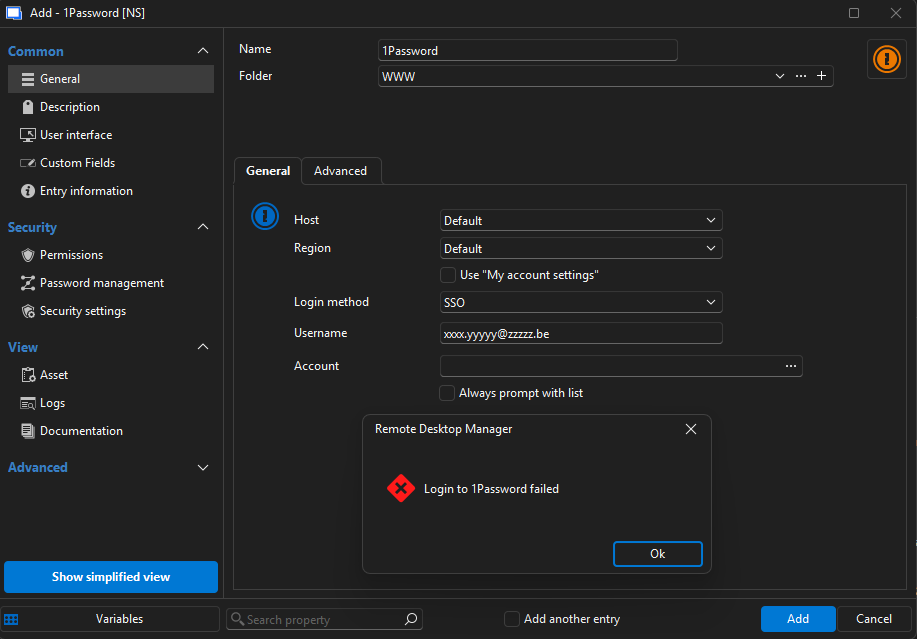
I also tried entering the custom host that is being displayed in my 1password app but no difference.
Whenever I click the 3 dots next to account, I always just get a 'Login to 1Password failed'. I'm also never prompted for my password or anything.
Currently running 2026.1.9.0.
DVLS daily re-authenticate
SSO is unfortunately not an option as we are using different admin accounts for RDM access. MFA is currently not enabled yet but that is the goal in the future, I would just first like to fix the daily authentication thing.
Weirdly enough, not all users are affected. I just reinstalled my laptop this Monday, added the DVLS data source and haven't had to authenticate since the initial login. However I have a colleague who just informed me that he even has to reauthenticate when simply closing and reopening RDM on his laptop.
Is there perhaps an RDM client setting which could trigger this? Or is there perhaps a way to troubleshoot/debug why the reauthentication is being triggered?
DVLS daily re-authenticate
Hi William,
I just had a look however everything is checked out in that menu.
I'm not really sure what the exact trigger is because a shutdown/reboot of the laptop doesn't trigger it.
However usually when coming in the office and opening RDM for the first time, we are required to authenticate again.

DVLS daily re-authenticate
Dear Devolutions team,
By default, we have to authenticate our DVLS data source daily in RDM (AD authentication). We found this a bit excessive so I wanted to change it to a weekly basis, basically every Monday morning. Now I tried changing this behaviour by setting the token lifetime to 6 days and then stopping/starting the server. However we are still required to authenticate daily, it seems that the token lifetime isn't doing much.
I also read on the forums here to disable 'Force token public IP validation' however this was already disabled by default.

DVLS v2024.2.10.0
RDM v2024.2.20.0
Any ideas/suggestions?
Kind regards,
Mathieu
Bug: DVLS can't deal with trailing space password
Hi Érica,
Thanks for the quick reply and passing on the issue to engineering, much appreciated! 😉
Kind regards,
Mathieu
Bug: DVLS can't deal with trailing space password
This just gave a colleague and I, a bit of a headache. I was trying to set him up with RDM however he kept getting the 'incorrect credentials' error when trying to add DVLS as a data source. Note that we have AD integration setup so users login using their domain credentials and get assigned the correct vault/permissions through AD groups.
Now I kept blaming him of having fat fingers obviously but he also tried copy pasting the password from a password manager and could still RDP into other domain servers with the same credentials. After some troubleshooting, we discovered that DVLS cannot handle passwords which contain a trailing space.
I also tried reproducing this by creating a local user in DVLS with a trailing space in the password and I got the same issue.
DVLS 2024.2.8.0
Upgrade from 2023.2.11 to 2023.3.13 failed with access denied
Could also just be something on our end to be honest. Our servers do have some hardening and generally run several agents/tools (Rapid7, SentinelOne, Guardicore) that could interfere.
Just glad I bumped into this thread because it was a bit of a head-scratcher. ;-)
Upgrade from 2023.2.11 to 2023.3.13 failed with access denied
@larsbjerringjensen: Thanks for the tip. Just ran into the same issue trying to upgrade from 2024.2.6.0 to 2024.2.8.0. None of the suggestions worked except for yours.
Tried the following:
- Give allow all permissions to dll (didn't work, so in use)
- Stop IIS website (didn't work)
- Stop DVLS server (didn't work)
- Stop DVLS scheduler (didn't work)
- Reboot (didn't work)
- Set DVLS scheduler to manual + reboot = magic fix (probably in combination with some of the above steps but still, this was needed)
1Password Azure AD SSO
We're in the process of rolling out DVLS and RDM in our company and we are also missing this. Was excited to see there was 1Password support but unfortunately not compatible with our SSO.
So +1 here for the 1Password Azure AD SSO integration feature.
Combine linked credentials with macro's
Thanks, managed to get it working, perfect! ;)
Combine linked credentials with macro's
Simple suggestion however maybe less simple to implement.😉
Anyway here goes: would it be possible to create macro variables to retrieve the credentials from the linked/inherited object?
I find the current macro password a bit tedious having to manually re-enter the password again.


For instance, in above example which I use to autofill credentials, it would be easier if I could change my macro to:
{DELAY}{TAB}{DELAY}$LINKEDVAULT_USERNAME${TAB}$LINKEDVAULT_PASSWORD${TAB}{ENTER}
The $LINKEDVAULT variable is simply an example as it should also work for inherited credentials however you probably catch my drift.