1Password Azure AD SSO
2 votes

Hello,
is it possible to integrate the new Azure AD SSO feature of 1Password into RDM?
Thanks
All Comments (39)
a quick integration of the new SSO feature of 1password in RDM would be dreamlike :)
Hello,
Your topic has been moved to the feature request section of the forum.
Best regards,
Richard Boisvert
Hello,
I have opened a ticket. We will have to investigate to see if it's possible.
Regards,
Hubert Mireault
are there any news on this? would be great to hear something about it. :)
Nothing new for now unfortunately.
Regards,
Hubert Mireault
We're also using 1Password with Azure AD SSO.
Any news on this topic?
Hello,
Nothing new for now, it's not something simple and requires a lot of changes. Our ticket is still open.
Regards,
Hubert Mireault
Hi Hubert,
another 8 months have passed, can you already give an update? or perhaps a possible roadmap?
Best Regards
Hello,
Unfortunately we haven't made progress on this. We've had other priorities when it comes to password integrations, both existing and new, for example updating our library to be asynchronous (in progress), as well as updating the Duo implementation to V4.
We would like to eventually add support for Azure AD SSO in our 1Password integration but this is not a simple task and we haven't had many requests for it over the years. I understand though, that for our users who are using Azure AD SSO, supporting this would be very nice. I will see if this is something we can add to a future roadmap, but I can't make any promise on if we will be able to deliver.
Regards,
Hubert Mireault
We're in the process of rolling out DVLS and RDM in our company and we are also missing this. Was excited to see there was 1Password support but unfortunately not compatible with our SSO.
So +1 here for the 1Password Azure AD SSO integration feature.
Hey Hubert,
any update on this?
I would also appreciate that feature.
Hello,
Nothing new for now, but we are noting your interest in this.
Regards,
Hubert Mireault
We would also love to see this feature in a future update since we cannot use the 1Password integration before that.
Thank you for the feedback. Just to let you know, at the moment we're (still) focusing on migrating a few of our libraries to be asynchronous to improve performance, then LastPass SSO support is next. Soon after we will hopefully be able to work on 1Password Azure AD SSO. These are all big projects and knowing that many of our users would start using or make more use of the integration is good for us to know, so we can keep this on the roadmap.
Regards,
Hubert Mireault
This is preventing us from moving to SSO with 1Password. Which is a huge bummer.
Are there any news on this?
Integration of the SSO function of 1password into RDM would definitely be appreciated.
Hello,
No news for now unfortunately. There was a shuffle of priorities during 2025.2 and 2025.3 which meant we couldn't yet implement LastPass Azure AD SSO (which means it also delayed supporting it in 1Password). LastPass SSO is on our roadmap for 2026.1 and we will see what we can do in regards to 1Password from there. It's not a simple addition so there may be challenges along the way.
Regards,
Hubert Mireault
Hello,
I wanted to let you know that we've been making progress on Azure AD SSO for 1Password. For now it's too early to say whether it will be in our 2026.1 version early next year, but we're still actively working on this and it looks promising.
Regards,
Hubert Mireault
Hello,
Our 2026.1 release will include support for 1Password SSO login.
Regards
Jonathan Del Signore
Hello,
Our 2026.1 release will include support for 1Password SSO login.
Regards
@Jonathan Del Signore
perfect! Thanks a lot!
How can I get this version?
My Remote Desktop Manager tells me I'm up-to-date with my version 2025.3.29.0.
In the past I was able to configure some settings in Version management, but I don't find that setting in my RDM anymore.
So, when is version 2026.1.4.0 scheduled for release?
Hello,
We are currently planning to release version 2026.1 around March, with a beta version coming out a few weeks prior. Due to the changes required with the integration, this couldn't make it into a minor update of 2025.3.
Regards,
Hubert Mireault
@Hubert Mireault Is there perhaps a guide on how to set this up? Maybe I'm doing something horribly wrong but I am already stuck on adding the 1password SSO credential entry.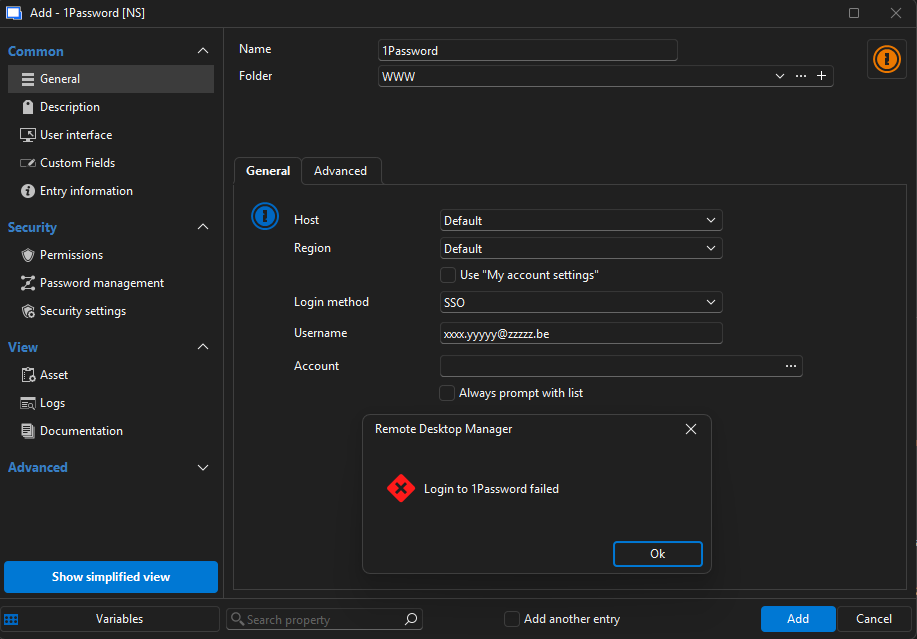
I also tried entering the custom host that is being displayed in my 1password app but no difference.
Whenever I click the 3 dots next to account, I always just get a 'Login to 1Password failed'. I'm also never prompted for my password or anything.
Currently running 2026.1.9.0.
28edfe2f-1c1c-4049-a05f-0a97d84f31e1.png
I was able to get the 1Password entry saved with the following options: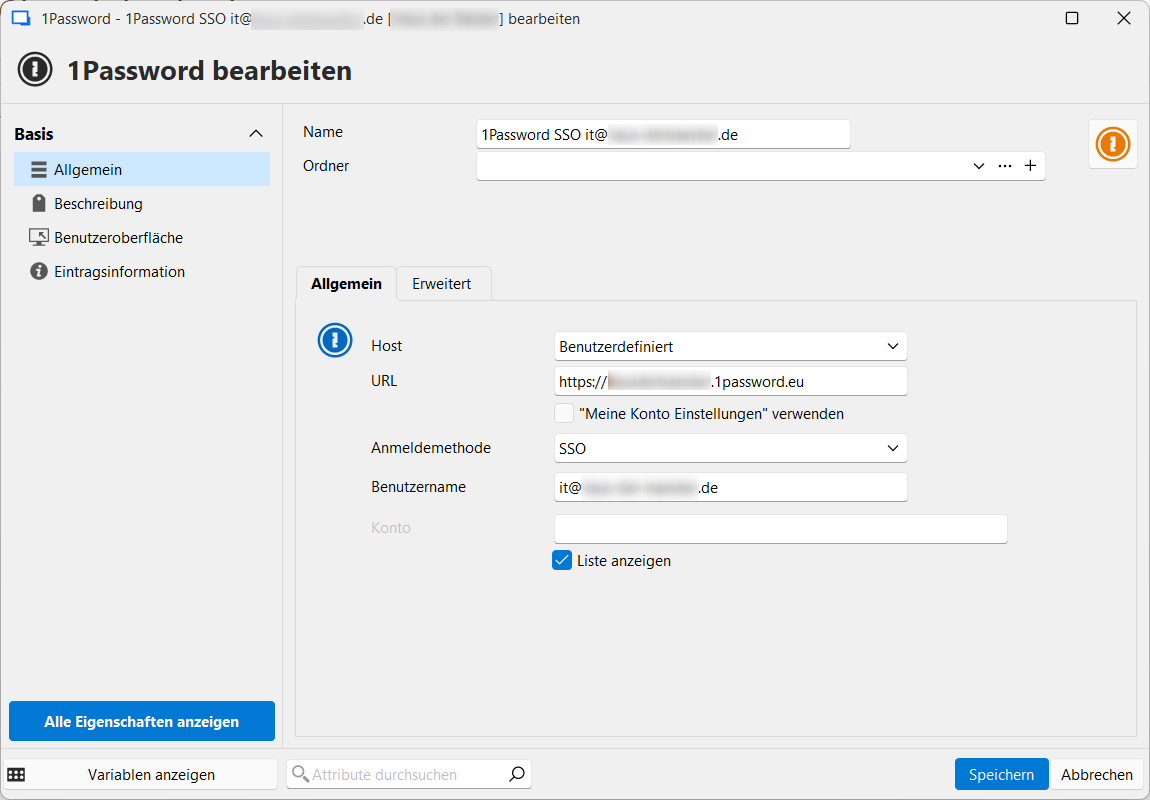
But I'm stuck again at adding 1Password as login for a connection. Clicking on "Aus Liste auswählen" ["Choose from list"] gives an error: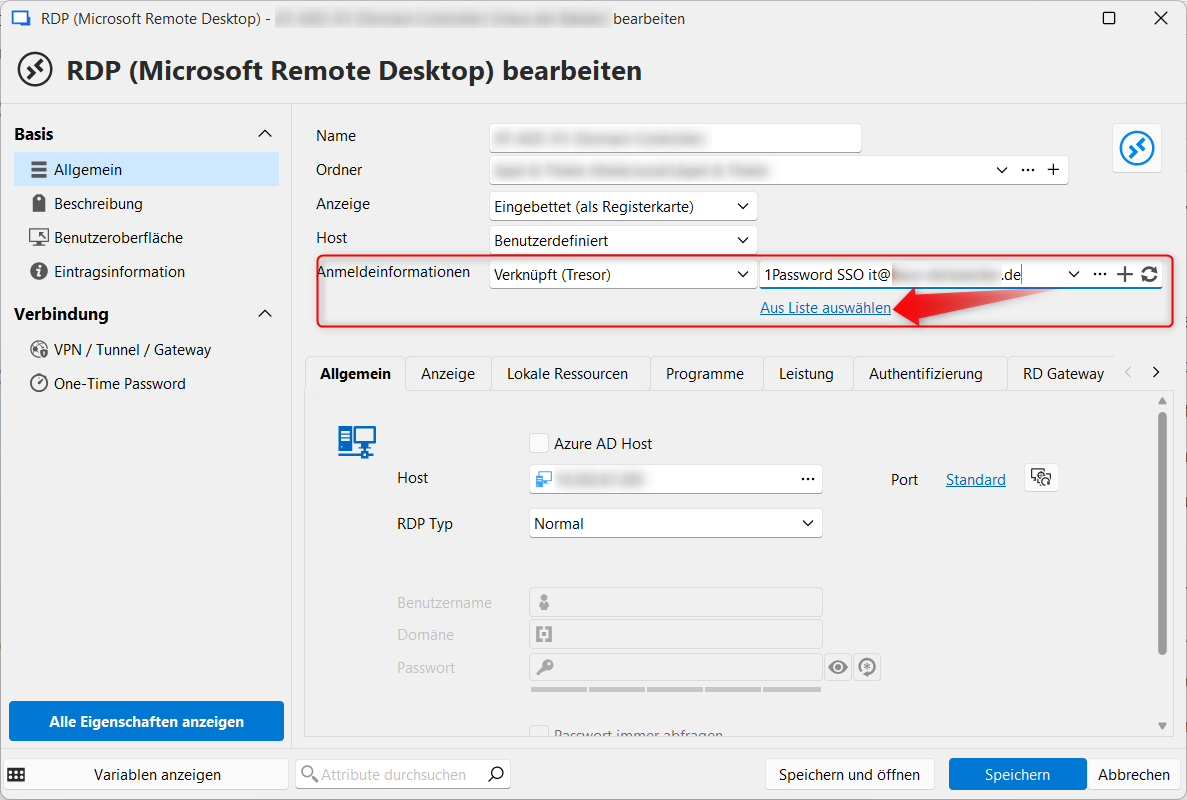
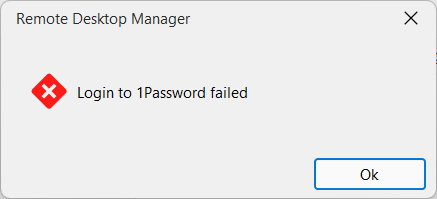
c8027bbe-faf1-4b12-a2fa-20732c69c5ae.png
bb3a2b4d-edc1-460f-b1e4-e3f5b0e321c2.png
df3c9053-f879-4389-82d3-2839fd39db25.png
Hello,
@MathieuVHM @ubialek It's possible there's some edge cases or certain SSO setups that we don't fully support, or simply that there's a bug in the implementation. It worked well in our environment, but it doesn't mean it'll necessarily work in all cases, unfortunately. Could you both do two things, it would help us diagnose this issue.
First, go in the Help tab in the ribbon, and turn on the performance profiling. Go in the debug tab, and set the value to 1. You will need to keep this window opened.
Then, reproduce the issue with 1Password. This will output some logs in the window, and I'd like to see these logs. It will help us pinpoint where this is failing a bit more easily.
Additionally, after having reproduced this issue, please go in the Help > Application logs section of the ribbon. It's possible there would be an error logged there, with a timestamp matching when you reproduced the issue, and I would also like to see that, as it may contain vital information for us.
Before sending either of these, just ensure there is no sensitive information and that it can be shared publically. There should not be, but it's better to validate this before sending it.
Regards,
Hubert Mireault
Debug output: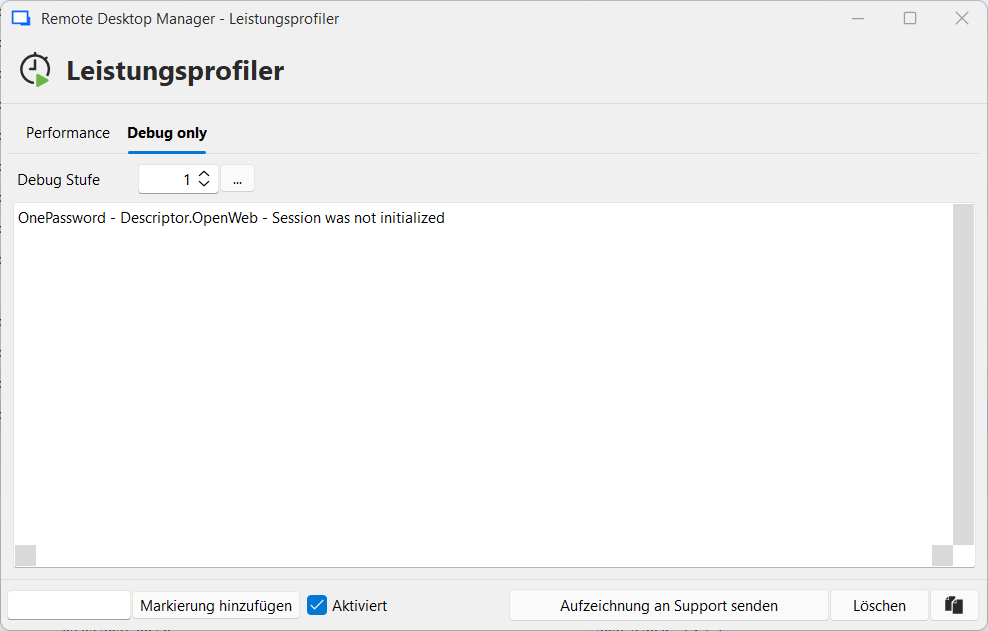
Performance Tab:
Main thread (UI) - Level - 1 - [Debug]
----------------------------------------
SelectionChanged - Default...
OnCurrentConnectionChanged : 3 ms
SelectionChanged - Default : 117 ms
Connection States: Refresh : 90 ms
Hub Data Source - Resolving password for connection 1Password SSO it@[DOMAIN].de
Silent: PasswordManagerAccess.Common.InternalErrorException: Invalid or unexpected response from the server (HTTP status: OK)
---> System.Text.Json.JsonException: JSON deserialization for type 'PasswordManagerAccess.OnePassword.Model+LoginInfo' was missing required properties including: 'userUuid'; 'signInAddress'.
at System.Text.Json.ThrowHelper.ThrowJsonException_JsonRequiredPropertyMis...
Log entry:
PasswordManagerAccess.Common.InternalErrorException: Invalid or unexpected response from the server (HTTP status: OK)
---> System.Text.Json.JsonException: JSON deserialization for type 'PasswordManagerAccess.OnePassword.Model+LoginInfo' was missing required properties including: 'userUuid'; 'signInAddress'.
at System.Text.Json.ThrowHelper.ThrowJsonException_JsonRequiredPropertyMissing(JsonTypeInfo parent, BitArray assignedOrNotRequiredPropertiesSet)
at System.Text.Json.Serialization.Converters.ObjectDefaultConverter`1.OnTryRead(Utf8JsonReader& reader, Type typeToConvert, JsonSerializerOptions options, ReadStack& state, T& value)
at System.Text.Json.Serialization.JsonConverter`1.TryRead(Utf8JsonReader& reader, Type typeToConvert, JsonSerializerOptions options, ReadStack& state, T& value, Boolean& isPopulatedValue)
at System.Text.Json.Serialization.JsonConverter`1.ReadCore(Utf8JsonReader& reader, T& value, JsonSerializerOptions options, ReadStack& state)
at System.Text.Json.JsonSerializer.ReadFromSpan[TValue](ReadOnlySpan`1 json, JsonTypeInfo`1 jsonTypeInfo)
at System.Text.Json.JsonSerializer.Deserialize[TValue](String json, JsonSerializerOptions options)
at PasswordManagerAccess.Common.RestClient.DeserializeFromJson[T](String json)
at PasswordManagerAccess.Common.RestClient.MakeRequestAsync[TContent,TData](String endpoint, HttpMethod method, HttpContent content, Dictionary`2 headers, Dictionary`2 cookies, Int32 maxRedirects, Func`2 deserialize, CancellationToken cancellationToken)
--- End of inner exception stack trace ---
at PasswordManagerAccess.OnePassword.Client.GetLoginInfo(String username, RestClient rest, CancellationToken cancellationToken)
at PasswordManagerAccess.OnePassword.Client.SsoLogIn(Credentials credentials, AppInfo app, IAsyncUi ui, IAsyncSecureStorage storage, RestClient rest, CancellationToken cancellationToken)
at PasswordManagerAccess.OnePassword.Client.SsoLogIn(Credentials credentials, AppInfo app, IAsyncUi ui, IAsyncSecureStorage storage, IRestTransport transport, CancellationToken cancellationToken)
at PasswordManagerAccess.OnePassword.Client.SsoLogIn(Credentials credentials, AppInfo app, IAsyncUi ui, IAsyncSecureStorage storage, CancellationToken cancellationToken)
at Devolutions.RemoteDesktopManager.Managers.OnePasswordManager.Initialize(ConnectionEngine engine, String username, String password, String accountKey, String uuid, String url, OnePasswordLoginMethod loginMethod)
06b056c9-6236-4f79-8a64-509ec9ed5071.png
Thank you for the logs, it looks like there's some data we're expecting that isn't found, or maybe we're parsing the returned data incorrectly.
Could you let me know what SSO you're using? We've only implemented Azure AD SSO for now, so if you're using a different one, that might be why it's failing.
Regards,
Hubert Mireault
We're using Azure AD / Entra ID. This is what a login to 1Password looks like for me: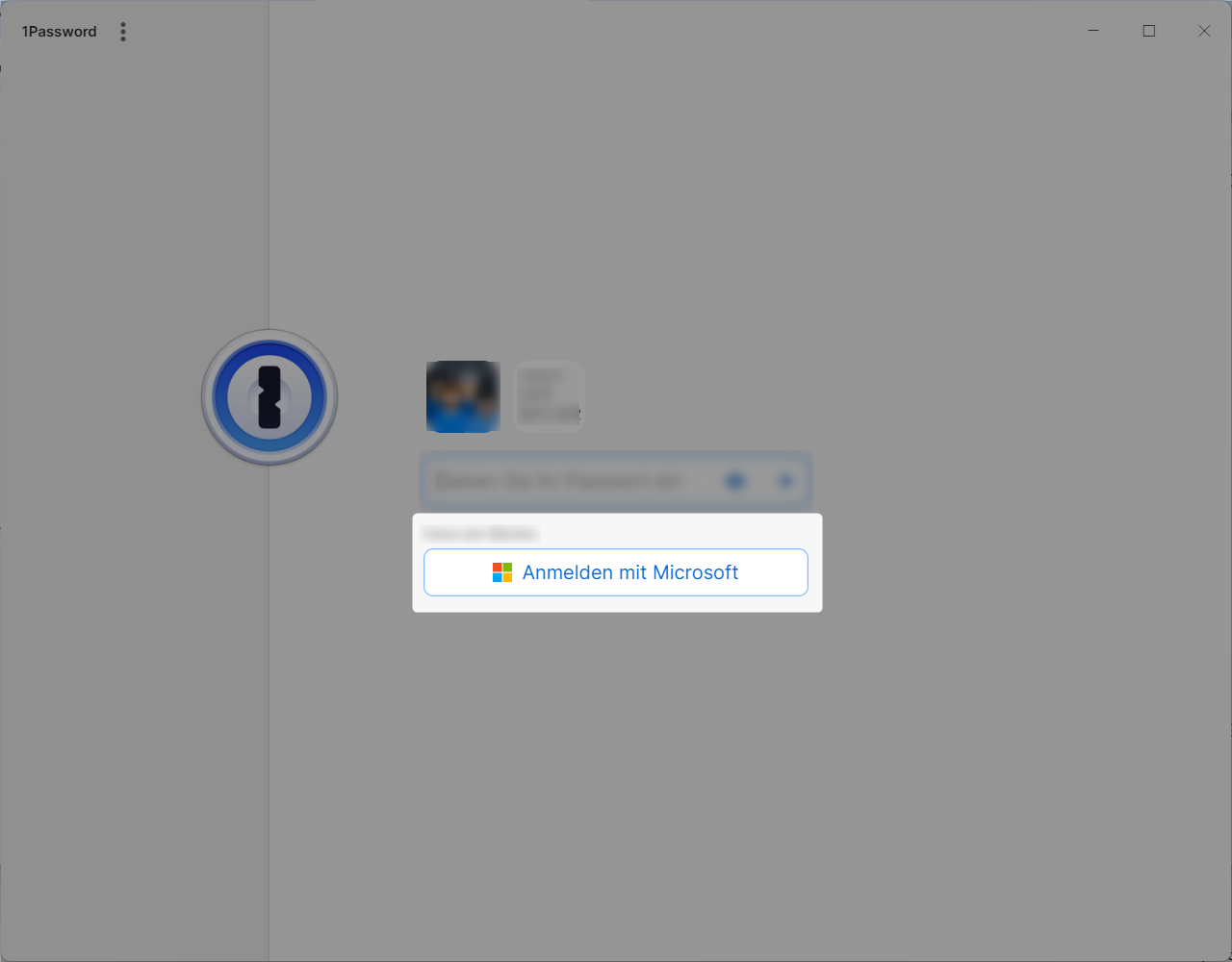
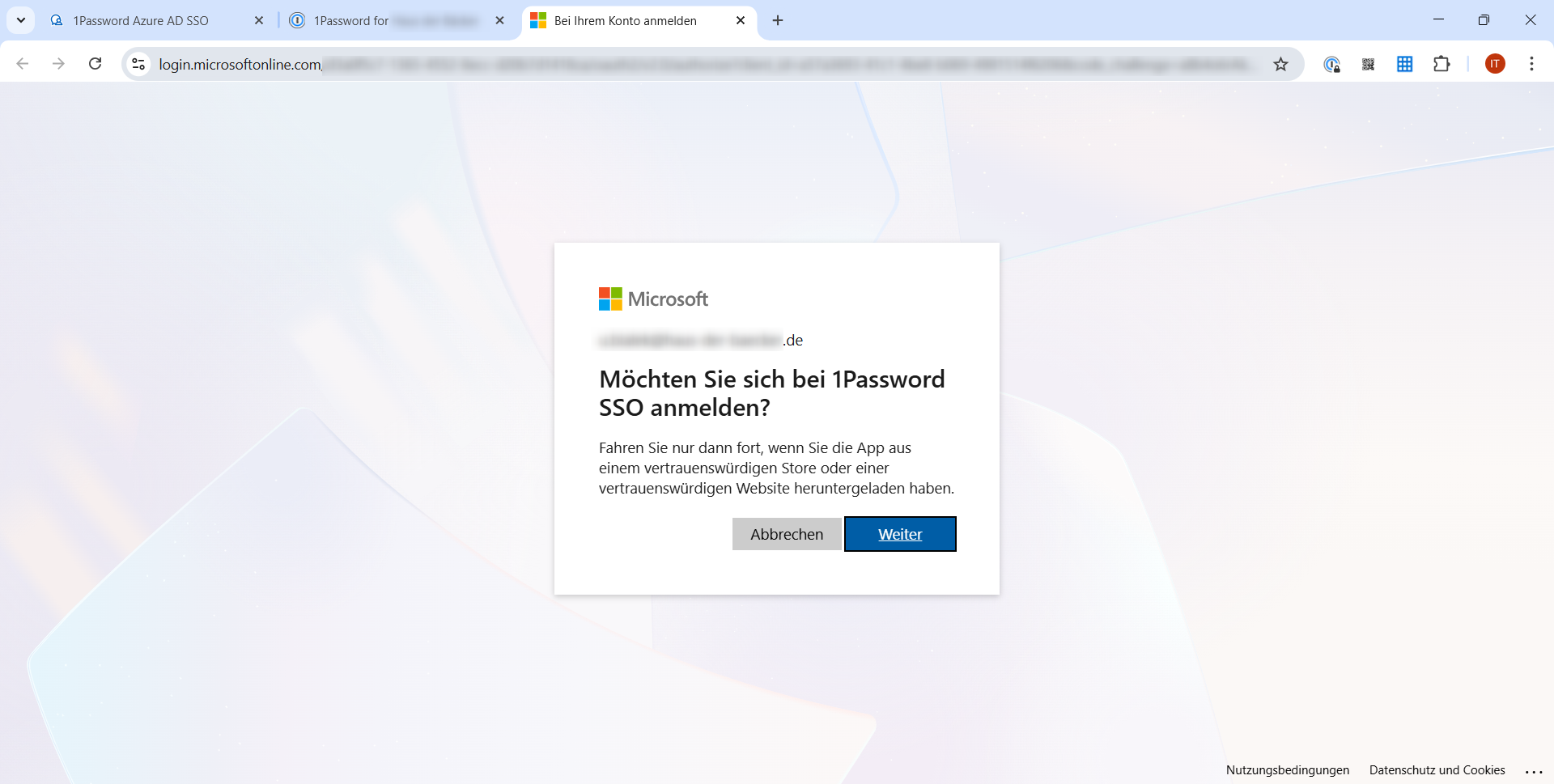
The SSO is handled by this Business-App in Entra: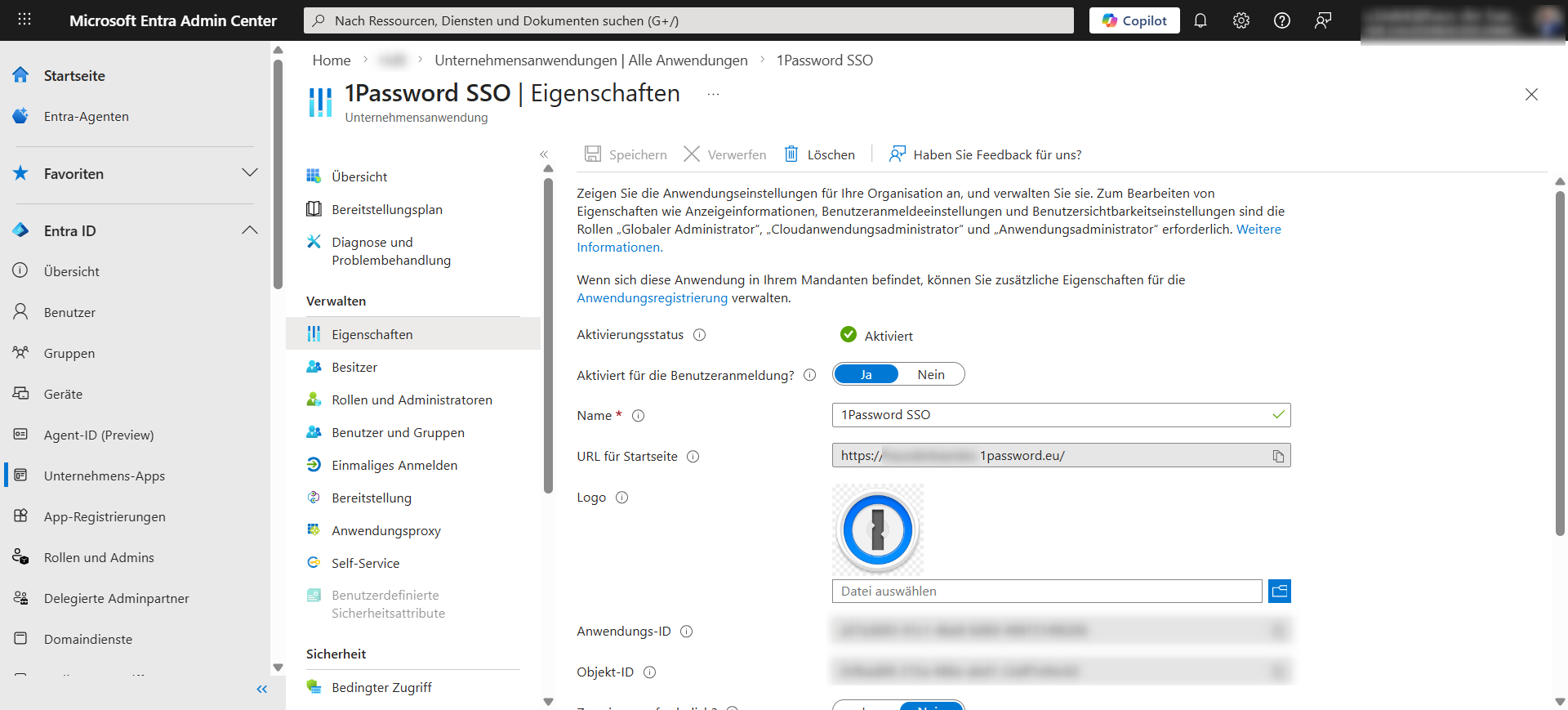
2084ac92-47c7-4161-b305-741c290330a0.png
a6aae204-1362-4290-b027-2ba106105ed5.png
7c4761cf-ac0e-4330-993a-8d94f7951fbe.png
Perfect, thank you for this information. I'll forward this to our devs for analysis.
Regards,
Hubert Mireault
Hello,
@MathieuVHM @ubialek It's possible there's some edge cases or certain SSO setups that we don't fully support, or simply that there's a bug in the implementation. It worked well in our environment, but it doesn't mean it'll necessarily work in all cases, unfortunately. Could you both do two things, it would help us diagnose this issue.
First, go in the Help tab in the ribbon, and turn on the performance profiling. Go in the debug tab, and set the value to 1. You will need to keep this window opened.
Then, reproduce the issue with 1Password. This will output some logs in the window, and I'd like to see these logs. It will help us pinpoint where this is failing a bit more easily.
Additionally, after having reproduced this issue, please go in the Help > Application logs section of the ribbon. It's possible there would be an error logged there, with a timestamp matching when you reproduced the issue, and I would also like to see that, as it may contain vital information for us.
Before sending either of these, just ensure there is no sensitive information and that it can be shared publically. There should not be, but it's better to validate this before sending it.
Regards,
@Hubert Mireault
Ubialek already provided the logs but maybe useful to be able to compare or to rule out PEBCAK. We are also using Microsoft Entra/Azure by the way.
Performance profiling - performance tab
Main thread (UI) - Level - 1 - [Debug]
----------------------------------------
Connection States: Refresh : 20 ms
Silent: PasswordManagerAccess.Common.InternalErrorException: Invalid or unexpected response from the server (HTTP status: OK)
 ---> System.Text.Json.JsonException: JSON deserialization for type 'PasswordManagerAccess.OnePassword.Model+LoginInfo' was missing required properties including: 'userUuid', 'signInAddress'.
   at System.Text.Json.ThrowHelper.ThrowJsonException_JsonRequiredPropertyMis...
RefreshConnections...
    LoadConnections UI - [Devolutions Server : Devolutions Server] - [NS] - ReadOnly - 64-bit...
        HasSecurityChanged : 17 ms
        Reload: False - HasSecurityChanged: False - HasChanged: False
        Load connection overrides...
            Has changes : 16 ms
        Load connection overrides : 16 ms
        RefreshRepositories : 1 ms
        FavoriteManager.LoadFolders : 54 ms
    LoadConnections UI - [Devolutions Server : Devolutions Server] - [NS] - ReadOnly - 64-bit : 119 ms
RefreshConnections : 119 ms

Thread : 87
----------------------------------------
87 - PrivateConnectionManager.Refresh...
87 -     LoadConnections [Devolutions Server : Devolutions Server - User Vault] - [User : redactedadminuser] - ReadOnly - 64-bit : 18 ms
87 - PrivateConnectionManager.Refresh : 39 ms
87 - OfflineManager.Save - redactedadminuser...
87 -     Repository : 1 ms
87 -     Expiration : 10 ms
87 - OfflineManager.Save - redactedadminuser: 12 ms

Thread : 91
----------------------------------------
91 - GlobalConnectionManager.Refresh...
91 -     LoadConnections [Devolutions Server : Devolutions Server - Global Vault] - [Global] - ReadOnly - 64-bit : 18 ms
91 - GlobalConnectionManager.Refresh : 39 ms

Thread : 108
----------------------------------------
108 - OfflineManager.Save - Global...
108 -     Repository : 2 ms
108 -     Expiration : 6 ms
108 - OfflineManager.Save - Global : 9 ms
Performance profiling - debug tab
OnePassword - Descriptor.OpenWeb - Session was not initialized
Migrating data - up to date
Application logs
PasswordManagerAccess.Common.InternalErrorException: Invalid or unexpected response from the server (HTTP status: OK)
 ---> System.Text.Json.JsonException: JSON deserialization for type 'PasswordManagerAccess.OnePassword.Model+LoginInfo' was missing required properties including: 'userUuid', 'signInAddress'.
   at System.Text.Json.ThrowHelper.ThrowJsonException_JsonRequiredPropertyMissing(JsonTypeInfo parent, BitArray assignedOrNotRequiredPropertiesSet)
   at System.Text.Json.Serialization.Converters.ObjectDefaultConverter`1.OnTryRead(Utf8JsonReader& reader, Type typeToConvert, JsonSerializerOptions options, ReadStack& state, T& value)
   at System.Text.Json.Serialization.JsonConverter`1.TryRead(Utf8JsonReader& reader, Type typeToConvert, JsonSerializerOptions options, ReadStack& state, T& value, Boolean& isPopulatedValue)
   at System.Text.Json.Serialization.JsonConverter`1.ReadCore(Utf8JsonReader& reader, T& value, JsonSerializerOptions options, ReadStack& state)
   at System.Text.Json.Serialization.Metadata.JsonTypeInfo`1.Deserialize(Utf8JsonReader& reader, ReadStack& state)
   at System.Text.Json.JsonSerializer.ReadFromSpan[TValue](ReadOnlySpan`1 utf8Json, JsonTypeInfo`1 jsonTypeInfo, Nullable`1 actualByteCount)
   at System.Text.Json.JsonSerializer.ReadFromSpan[TValue](ReadOnlySpan`1 json, JsonTypeInfo`1 jsonTypeInfo)
   at System.Text.Json.JsonSerializer.Deserialize[TValue](String json, JsonSerializerOptions options)
   at PasswordManagerAccess.Common.RestClient.DeserializeFromJson[T](String json)
   at PasswordManagerAccess.Common.RestClient.MakeRequestAsync[TContent,TData](String endpoint, HttpMethod method, HttpContent content, Dictionary`2 headers, Dictionary`2 cookies, Int32 maxRedirects, Func`2 deserialize, CancellationToken cancellationToken)
   --- End of inner exception stack trace ---
   at PasswordManagerAccess.OnePassword.Client.GetLoginInfo(String username, RestClient rest, CancellationToken cancellationToken)
   at PasswordManagerAccess.OnePassword.Client.SsoLogIn(Credentials credentials, AppInfo app, IAsyncUi ui, IAsyncSecureStorage storage, RestClient rest, CancellationToken cancellationToken)
   at PasswordManagerAccess.OnePassword.Client.SsoLogIn(Credentials credentials, AppInfo app, IAsyncUi ui, IAsyncSecureStorage storage, IRestTransport transport, CancellationToken cancellationToken)
   at PasswordManagerAccess.OnePassword.Client.SsoLogIn(Credentials credentials, AppInfo app, IAsyncUi ui, IAsyncSecureStorage storage, CancellationToken cancellationToken)
   at Devolutions.RemoteDesktopManager.Managers.OnePasswordManager.Initialize(ConnectionEngine engine, String username, String password, String accountKey, String uuid, String url, OnePasswordLoginMethod loginMethod)
Thanks for the additional information, I'll forward this as well. I know there's another issue that's been fixed in 1Password but we'll have to confirm if it should also fix this one.
Regards,
Hubert Mireault
Hello,
We were able to reproduce the same issue with one of our setups. We are investigating for a fix and will let you know once it's ready.
Regards
Jonathan Del Signore
Hello,
A fix for this issue will be included in version 2026.1.11.0.
Regards
Jonathan Del Signore
I just updated to version 2026.1.11.0. I'm still not able to use 1Password SSO. Here's the error log:
Debug only
OnePassword - Settings.BrowseWebTitle - Session was not initialized
Performance
Connection States: Refresh : 69 ms
Hub Data Source - Resolving sensitives for connection 1Password SSO it@[DOMAIN]
Hub Data Source - Resolving password for connection 1Password SSO it@[DOMAIN]
Silent: PasswordManagerAccess.Common.InternalErrorException: No SSO login method found for account it@[DOMAIN]
at PasswordManagerAccess.OnePassword.Client.SsoLogIn(Credentials credentials, AppInfo app, IAsyncUi ui, IAsyncSecureStorage storage, RestClient rest, CancellationToken cancellationToken)
at PasswordManagerAccess.OnePassword.Client.SsoLogIn(Credentials credentia...
Log
PasswordManagerAccess.Common.InternalErrorException: No SSO login method found for account it@[DOMAIN]
at PasswordManagerAccess.OnePassword.Client.SsoLogIn(Credentials credentials, AppInfo app, IAsyncUi ui, IAsyncSecureStorage storage, RestClient rest, CancellationToken cancellationToken)
at PasswordManagerAccess.OnePassword.Client.SsoLogIn(Credentials credentials, AppInfo app, IAsyncUi ui, IAsyncSecureStorage storage, IRestTransport transport, CancellationToken cancellationToken)
at PasswordManagerAccess.OnePassword.Client.SsoLogIn(Credentials credentials, AppInfo app, IAsyncUi ui, IAsyncSecureStorage storage, CancellationToken cancellationToken)
at Devolutions.RemoteDesktopManager.Managers.OnePasswordManager.Initialize(ConnectionEngine engine, String username, String password, String accountKey, String uuid, String url, OnePasswordLoginMethod loginMethod)
same for me.
I have updated to 2026.1.11.0 just a moment ago and it still fails: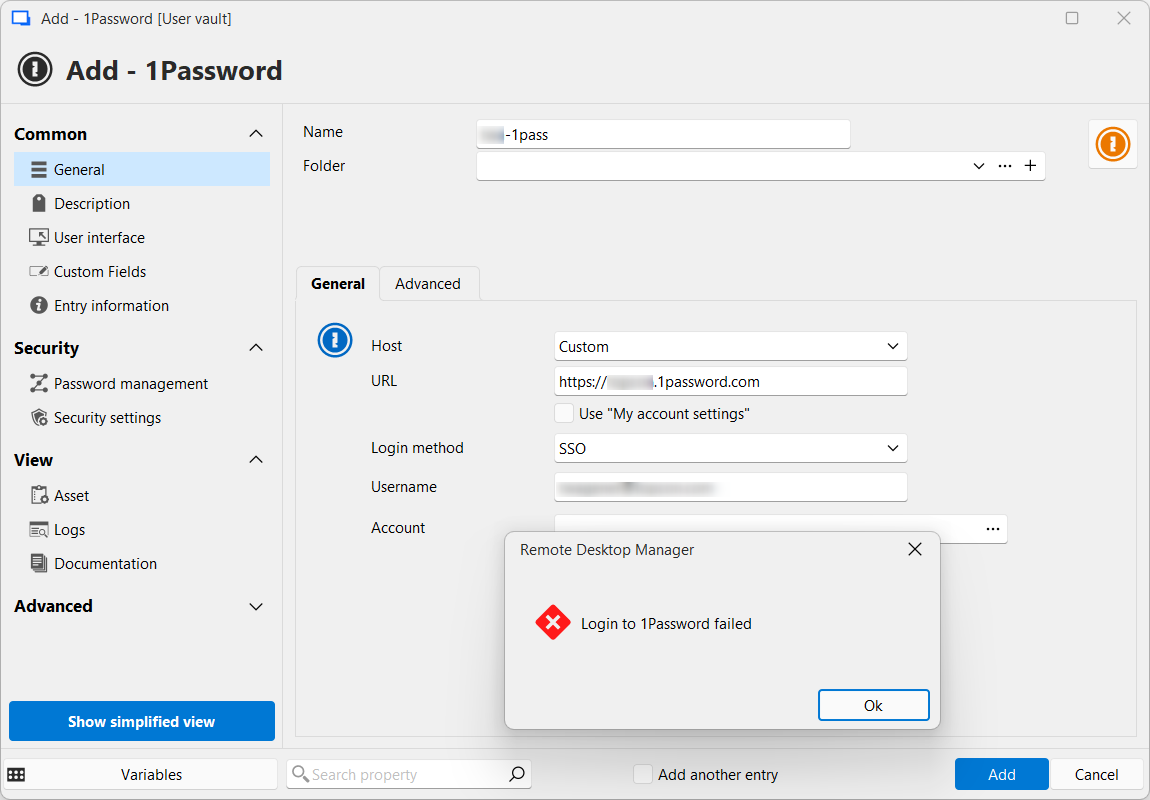
a3dc9283-3770-44a4-b44a-3bf82e64b398.png
@Hubert Mireault Back from holidays, just updated everything but the issue persists, also still getting the 'login to 1password failed' error.
RDM client: 2026.1.16.0
Devolutions server: 2026.1.12.0
PasswordManagerAccess.Common.InternalErrorException: Invalid or unexpected response from the server (HTTP status: OK)
 ---> System.Text.Json.JsonException: JSON deserialization for type 'PasswordManagerAccess.OnePassword.Model+LoginInfo' was missing required properties including: 'userUuid', 'signInAddress'.
   at System.Text.Json.ThrowHelper.ThrowJsonException_JsonRequiredPropertyMissing(JsonTypeInfo parent, BitArray assignedOrNotRequiredPropertiesSet)
   at System.Text.Json.Serialization.Converters.ObjectDefaultConverter`1.OnTryRead(Utf8JsonReader& reader, Type typeToConvert, JsonSerializerOptions options, ReadStack& state, T& value)
   at System.Text.Json.Serialization.JsonConverter`1.TryRead(Utf8JsonReader& reader, Type typeToConvert, JsonSerializerOptions options, ReadStack& state, T& value, Boolean& isPopulatedValue)
   at System.Text.Json.Serialization.JsonConverter`1.ReadCore(Utf8JsonReader& reader, T& value, JsonSerializerOptions options, ReadStack& state)
   at System.Text.Json.Serialization.Metadata.JsonTypeInfo`1.Deserialize(Utf8JsonReader& reader, ReadStack& state)
   at System.Text.Json.JsonSerializer.ReadFromSpan[TValue](ReadOnlySpan`1 utf8Json, JsonTypeInfo`1 jsonTypeInfo, Nullable`1 actualByteCount)
   at System.Text.Json.JsonSerializer.ReadFromSpan[TValue](ReadOnlySpan`1 json, JsonTypeInfo`1 jsonTypeInfo)
   at System.Text.Json.JsonSerializer.Deserialize[TValue](String json, JsonSerializerOptions options)
   at PasswordManagerAccess.Common.RestClient.DeserializeFromJson[T](String json)
   at PasswordManagerAccess.Common.RestClient.MakeRequestAsync[TContent,TData](String endpoint, HttpMethod method, HttpContent content, Dictionary`2 headers, Dictionary`2 cookies, Int32 maxRedirects, Func`2 deserialize, CancellationToken cancellationToken)
   --- End of inner exception stack trace ---
   at PasswordManagerAccess.OnePassword.Client.GetLoginInfo(String username, RestClient rest, CancellationToken cancellationToken)
   at PasswordManagerAccess.OnePassword.Client.SsoLogIn(Credentials credentials, AppInfo app, IAsyncUi ui, IAsyncSecureStorage storage, RestClient rest, CancellationToken cancellationToken)
   at PasswordManagerAccess.OnePassword.Client.SsoLogIn(Credentials credentials, AppInfo app, IAsyncUi ui, IAsyncSecureStorage storage, IRestTransport transport, CancellationToken cancellationToken)
   at PasswordManagerAccess.OnePassword.Client.SsoLogIn(Credentials credentials, AppInfo app, IAsyncUi ui, IAsyncSecureStorage storage, CancellationToken cancellationToken)
   at Devolutions.RemoteDesktopManager.Managers.OnePasswordManager.Initialize(ConnectionEngine engine, String username, String password, String accountKey, String uuid, String url, OnePasswordLoginMethod loginMethod)


PasswordManagerAccess.Common.InternalErrorException: Invalid or unexpected response from the server (HTTP status: BadRequest)
 ---> System.Text.Json.JsonException: JSON deserialization for type 'PasswordManagerAccess.OnePassword.Model+LoginInfo' was missing required properties including: 'userUuid', 'signInAddress', 'authMethods'.
   at System.Text.Json.ThrowHelper.ThrowJsonException_JsonRequiredPropertyMissing(JsonTypeInfo parent, BitArray assignedOrNotRequiredPropertiesSet)
   at System.Text.Json.Serialization.Converters.ObjectDefaultConverter`1.OnTryRead(Utf8JsonReader& reader, Type typeToConvert, JsonSerializerOptions options, ReadStack& state, T& value)
   at System.Text.Json.Serialization.JsonConverter`1.TryRead(Utf8JsonReader& reader, Type typeToConvert, JsonSerializerOptions options, ReadStack& state, T& value, Boolean& isPopulatedValue)
   at System.Text.Json.Serialization.JsonConverter`1.ReadCore(Utf8JsonReader& reader, T& value, JsonSerializerOptions options, ReadStack& state)
   at System.Text.Json.Serialization.Metadata.JsonTypeInfo`1.Deserialize(Utf8JsonReader& reader, ReadStack& state)
   at System.Text.Json.JsonSerializer.ReadFromSpan[TValue](ReadOnlySpan`1 utf8Json, JsonTypeInfo`1 jsonTypeInfo, Nullable`1 actualByteCount)
   at System.Text.Json.JsonSerializer.ReadFromSpan[TValue](ReadOnlySpan`1 json, JsonTypeInfo`1 jsonTypeInfo)
   at System.Text.Json.JsonSerializer.Deserialize[TValue](String json, JsonSerializerOptions options)
   at PasswordManagerAccess.Common.RestClient.DeserializeFromJson[T](String json)
   at PasswordManagerAccess.Common.RestClient.MakeRequestAsync[TContent,TData](String endpoint, HttpMethod method, HttpContent content, Dictionary`2 headers, Dictionary`2 cookies, Int32 maxRedirects, Func`2 deserialize, CancellationToken cancellationToken)
   --- End of inner exception stack trace ---
   at PasswordManagerAccess.OnePassword.Client.GetLoginInfo(String username, RestClient rest, CancellationToken cancellationToken)
   at PasswordManagerAccess.OnePassword.Client.SsoLogIn(Credentials credentials, AppInfo app, IAsyncUi ui, IAsyncSecureStorage storage, RestClient rest, CancellationToken cancellationToken)
   at PasswordManagerAccess.OnePassword.Client.SsoLogIn(Credentials credentials, AppInfo app, IAsyncUi ui, IAsyncSecureStorage storage, IRestTransport transport, CancellationToken cancellationToken)
   at PasswordManagerAccess.OnePassword.Client.SsoLogIn(Credentials credentials, AppInfo app, IAsyncUi ui, IAsyncSecureStorage storage, CancellationToken cancellationToken)
   at Devolutions.RemoteDesktopManager.Managers.OnePasswordManager.Initialize(ConnectionEngine engine, String username, String password, String accountKey, String uuid, String url, OnePasswordLoginMethod loginMethod)
OnePassword - Settings.BrowseWebTitle - Session was not initialized
            Loading user info ADMIN_account (obscured account info)
            user.UserSecurity.IsAdministrator: False
Migrating data - up to date
Main thread (UI) - Level - 1 - [Debug]
----------------------------------------
SelectionChanged - Default : 64 ms
Silent: PasswordManagerAccess.Common.InternalErrorException: No SSO login method found for account firstname.lastname@company.be (obscured my email here)
at PasswordManagerAccess.OnePassword.Client.SsoLogIn(Credentials credentials, AppInfo app, IAsyncUi ui, IAsyncSecureStorage storage, RestClient rest, CancellationToken cancellationToken)
at PasswordManagerAccess.OnePassword.Client.SsoLogIn(Credentials credent...
RDMS.SaveConnection : 57 ms
RefreshConnections...
LoadConnections UI - [Devolutions Server : Devolutions Server] - [NS] - ReadOnly - 64-bit...
HasSecurityChanged : 26 ms
Reload: False - HasSecurityChanged: False - HasChanged: True
LoadConnectionsFromDataSource...
LoadDataSourceSettings...
DVLS - Api - .GetData : 34 ms - Count : 1
LoadDataSourceSettings : 51 ms
GetConnections...
RDMS.GetConnections...
DecryptData - Multithreaded : 0 ms - Count : 1
DeserializeData - Multithreaded : 0 ms - Count : 1
Fetched 1 sessions
Fetched 0 removed sessions
RDMS.GetConnections : 0 ms
GetConnections : 0 ms
DoMergeConnections - ReadOnly : 1 ms
LoadConnectionsFromDataSource : 140 ms
Load connection overrides...
Has changes : 16 ms
Reload : 34 ms
Load connection overrides : 51 ms
RefreshRepositories : 2 ms
FavoriteManager.LoadFolders : 50 ms
LoadConnections UI - [Devolutions Server : Devolutions Server] - [NS] - ReadOnly - 64-bit : 316 ms
RefreshConnections : 318 ms
Connection States: Refresh : 12 ms
TreeView.LoadConnectionList...
BeginUpdate...
LoadConnectionInTreeNode : 2 ms
PreCreateGroups : 1 ms - Run count : 1
BeginUpdate : 7 ms
TreeView.LoadConnectionList : 8 ms
Load Expand States...
Expanded: 0 - Nodes : 915
Nodes...
Expand : 0 ms - Run count : 1
Nodes : 0 ms
Load Expand States : 0 ms
SelectionChanged - Default : 9 ms
RefreshConnections...
LoadConnections UI - [Devolutions Server : Devolutions Server] - [NS] - ReadOnly - 64-bit...
HasSecurityChanged : 15 ms
Reload: False - HasSecurityChanged: False - HasChanged: False
Load connection overrides...
Has changes : 11 ms
Reload : 36 ms
Load connection overrides : 48 ms
RefreshRepositories : 1 ms
FavoriteManager.LoadFolders : 66 ms
LoadConnections UI - [Devolutions Server : Devolutions Server] - [NS] - ReadOnly - 64-bit : 148 ms
RefreshConnections : 149 ms
Connection States: Refresh : 12 ms
TreeView.LoadConnectionList...
BeginUpdate...
LoadConnectionInTreeNode : 3 ms
PreCreateGroups : 0 ms - Run count : 1
BeginUpdate : 6 ms
TreeView.LoadConnectionList : 7 ms
Load Expand States...
Expanded: 0 - Nodes : 915
Load Expand States : 0 ms
PrivateConnectionManager.Refresh...
LoadConnections [Devolutions Server : Devolutions Server - User Vault] - [User : ADMIN_account] - ReadOnly - 64-bit : 18 ms
PrivateConnectionManager.Refresh : 31 ms
TreeView.LoadConnectionList...
BeginUpdate : 58 ms
TreeView.LoadConnectionList : 58 ms
Load Expand States...
Expanded: 0 - Nodes : 1
Nodes...
Expand : 0 ms - Run count : 1
Nodes : 0 ms
Load Expand States : 0 ms
TreeView.LoadConnectionListInCustomFolders...
BeginUpdate : 2 ms
TreeView.LoadConnectionListInCustomFolders : 3 ms
Load Expand States...
Expanded: 3 - Nodes : 25
Nodes...
Expand : 0 ms - Run count : 3
Nodes : 0 ms
Load Expand States : 0 ms
SelectionChanged - Favorites : 11 ms
SelectionChanged - Favorites : 34 ms
Silent: System.IO.IOException: The specified registry key does not exist.
at Microsoft.Win32.RegistryKey.Win32Error(Int32 errorCode, String str)
at Microsoft.Win32.RegistryKey.GetValueKind(String name)
at Devolutions.RemoteDesktopManager.Managers.PolicyManager.get_IsRDPRestrictedAdminModePolicyEnabled()
TreeView.LoadConnectionListInCustomFolders...
BeginUpdate : 2 ms
TreeView.LoadConnectionListInCustomFolders : 2 ms
Load Expand States...
Expanded: 3 - Nodes : 25
Nodes...
Expand : 0 ms - Run count : 2
Nodes : 0 ms
Load Expand States : 0 ms
SelectionChanged - Favorites : 12 ms
Silent: System.TimeoutException: The operation has timed out.
at System.IO.Pipes.NamedPipeClientStream.ConnectInternal(Int32 timeout, CancellationToken cancellationToken, Int32 startTime)
at System.Threading.ExecutionContext.RunFromThreadPoolDispatchLoop(Thread threadPoolThread, ExecutionContext executionContext, ContextCallback callback, Object state)
--- End of stack trace from previ...
Thread : 6
----------------------------------------
6 - OfflineManager.Save - Global...
6 - Repository : 1 ms
6 - Expiration : 3 ms
6 - OfflineManager.Save - Global : 5 ms
6 - OfflineManager.Save - ADMIN_account...
6 - Repository : 1 ms
6 - Expiration : 4 ms
6 - OfflineManager.Save - ADMIN_account : 5 ms
6 - OfflineManager.Save - ADMIN_account...
6 - Repository : 2 ms
6 - Expiration : 4 ms
6 - OfflineManager.Save - ADMIN_account : 7 ms
6 - Connection States: Refresh : 13 ms
Thread : 11
----------------------------------------
11 - OfflineManager.Save - Context - NS...
11 - DataSourceSettings : 5 ms
11 - SaveSecurityInfo...
11 - 0a802886-b12a-4af4-9bc1-64518d47b9a3
11 - SaveSecurityInfo : 8 ms
11 - Expiration : 13 ms
11 - OfflineManager.Save - Context - NS : 58 ms
Thread : 13
----------------------------------------
13 - Sync to Offline - Devolutions Server - NS : 2 ms - Count : 1
13 - Sync to Offline - Devolutions Server - NS - [End batch] : 38 ms
13 - Sync to Offline - Devolutions Server - NS : 3 ms - Count : 1
Thread : 29
----------------------------------------
29 - PrivateConnectionManager.Refresh...
29 - LoadConnections [Devolutions Server : Devolutions Server - User Vault] - [User : ADMIN_account] - ReadOnly - 64-bit : 23 ms
29 - PrivateConnectionManager.Refresh : 41 ms
Thread : 35
----------------------------------------
35 - GlobalConnectionManager.Refresh...
35 - LoadConnections [Devolutions Server : Devolutions Server - Global Vault] - [Global] - ReadOnly - 64-bit : 21 ms
35 - GlobalConnectionManager.Refresh : 32 ms
Thread : 36
----------------------------------------
36 - GlobalConnectionManager.Refresh...
36 - LoadConnections [Devolutions Server : Devolutions Server - Global Vault] - [Global] - ReadOnly - 64-bit : 29 ms
36 - GlobalConnectionManager.Refresh : 41 ms
36 - OfflineManager.Save - ADMIN_account...
36 - Repository : 1 ms
36 - Expiration : 4 ms
36 - OfflineManager.Save - ADMIN_account : 6 ms
Thread : 37
----------------------------------------
37 - OfflineManager.Save - Context - NS...
37 - DataSourceSettings : 2 ms
37 - SaveSecurityInfo...
37 - 0a802886-b12a-4af4-9bc1-64518d47b9a3
37 - SaveSecurityInfo : 9 ms
37 - Expiration : 6 ms
37 - OfflineManager.Save - Context - NS : 19 ms
37 - OfflineManager.Save - Global...
37 - Repository : 1 ms
37 - Expiration : 4 ms
37 - OfflineManager.Save - Global : 6 ms
37 - PrivateConnectionManager.Refresh...
37 - LoadConnections [Devolutions Server : Devolutions Server - User Vault] - [User : ADMIN_account] - ReadOnly - 64-bit : 29 ms
37 - PrivateConnectionManager.Refresh : 40 msHello,
Thank you for the logs, I'll forward this information to our developer in charge of the integration.
Regards,
Hubert Mireault
Hello,
We've found a couple bugs in the backend that might explain some of these remaining issues.
We'll let you know once a new version is ready to be tested. It will be easier for us to investigate any outstanding problems on a more stable release.
Regards
Jonathan Del Signore
Great news, I just spotted the following, tested it and it now works for us! Thanks for all the effort.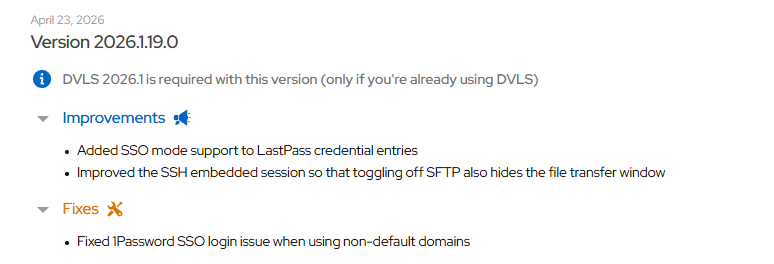
pppp.png