Cannot rename folders anymore

RDM version: 2026.2.11.0
Devolutions server: 2026.2.9.0
We have a vault that seems to have gotten some kind of corruption on first sight.
Weirdly enough, we cannot edit folders anymore in this specific vault.
Tested with multiple users, same symptoms, seems to be limited to one specific vault right now.
Steps to reproduce:
1) Edit subfolder in RDM client, right click properties
2) Change the name of the folder & click save
3) Following error pops up: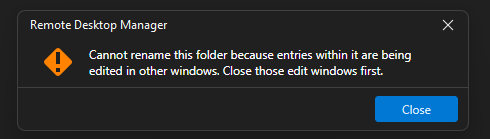 Error is bogus though, no other entries in the folder are being edited or are even open.
5) RDM initiates check-out on the folder as well, user has to manually unlock the folder again under 'opened sessions'
6) Repeat from step 1
e85350ce-4200-421b-8e69-6ea124e84627.png
Recommended Answer
@Eduard Sepúlveda López: Case can be closed, end user is back from holiday and the issue is no longer occuring. Maybe something stale in the client/database/cache that finally got cleared. Anyway as far as I know, nobody is still suffering from this issue on our end and I have no way of reproducing it either so this can be closed again.
All Comments (6)
Hi Mathieu,
This looks like a stale checkout lock. When RDM goes to save a renamed folder, it checks whether anything inside is currently checked out. If a previous session left a lock open without releasing it properly (say, after a crash or an abrupt disconnect), RDM blocks the rename and attempts a new checkout on the folder itself, which then has to be cleared manually before you can try again.
As an administrator, you can release the stuck lock directly from the RDM tree: right-click the affected folder and select Check in. That option is available to admins even when the entry is checked out by someone else. You can also see everything currently locked under View > Opened Sessions > Entry states. And to prevent stale locks from piling up going forward, there's an automatic check-in timeout under Administration > System Settings > Vault.
Please give that a try and let us know if it does the trick for your colleague!
Best regards,
Eduard Sepulveda Lopez
Hi Mathieu,
This looks like a stale checkout lock. When RDM goes to save a renamed folder, it checks whether anything inside is currently checked out. If a previous session left a lock open without releasing it properly (say, after a crash or an abrupt disconnect), RDM blocks the rename and attempts a new checkout on the folder itself, which then has to be cleared manually before you can try again.
As an administrator, you can release the stuck lock directly from the RDM tree: right-click the affected folder and select Check in. That option is available to admins even when the entry is checked out by someone else. You can also see everything currently locked under View > Opened Sessions > Entry states. And to prevent stale locks from piling up going forward, there's an automatic check-in timeout under Administration > System Settings > Vault.
Please give that a try and let us know if it does the trick for your colleague!
Best regards,
@Eduard Sepúlveda López
Good morning Eduard, this doesn't seem to be the issue. The other user himself has no problem manually clearing the locked folder again. Plus I also just logged in with the superadmin and there are currently no entries checked out or stuck in that vault. Weirdly enough, I was able to briefly reproduce this for my own user but it doesn't seem to be occuring for me anymore.
I have enabled the Automatic check-in after 60 minutes, I'll ask the affected user if he can test again in an hour to be absolutely sure.
Edit: An hour has passed since the change, issue still persists.
Hi MathieuVHM,
Thanks for testing that out and keeping us posted.
A couple of things worth trying with the affected user before we dig deeper:
Does a full restart of RDM make any difference? If the error disappears right after a restart but comes back after a while, that would point to something in the client's session state getting confused over time rather than a persistent configuration problem.
Also, before triggering the rename, is there any chance the affected user has a Properties window open for any entry inside that vault, even one that's been minimized or pushed to the background? The error itself says "entries being edited in other windows," which can sometimes refer to open edit dialogs rather than checkout locks. Worth a quick check.
If neither of those leads anywhere, the most useful next step would be a profiler trace captured right when the error occurs. To grab one, the affected user just needs to go to Help > Profiler (how to use the profiler), reproduce the rename, and hit Send trace to Support (direct message with a link to upload the results will be sent) and we'll take a look at what RDM is detecting internally when it blocks the operation.
Best regards,
Eduard Sepulveda Lopez
Does a full restart of RDM make any difference? If the error disappears right after a restart but comes back after a while, that would point to something in the client's session state getting confused over time rather than a persistent configuration problem.
Also, before triggering the rename, is there any chance the affected user has a Properties window open for any entry inside that vault, even one that's been minimized or pushed to the background? The error itself says "entries being edited in other windows," which can sometimes refer to open edit dialogs rather than checkout locks. Worth a quick check.
No to both unfortunately, he can reproduce it by renaming a folder right after restarting RDM. Laptop was also restarted a few times so guessing not a weird Windows thing either.
If neither of those leads anywhere, the most useful next step would be a profiler trace captured right when the error occurs. To grab one, the affected user just needs to go to Help > Profiler (how to use the profiler), reproduce the rename, and hit Send trace to Support (direct message with a link to upload the results will be sent) and we'll take a look at what RDM is detecting internally when it blocks the operation.
User is currently out of office until 6 July so will ask him to provide one next week.
@Eduard Sepúlveda López: Case can be closed, end user is back from holiday and the issue is no longer occuring. Maybe something stale in the client/database/cache that finally got cleared. Anyway as far as I know, nobody is still suffering from this issue on our end and I have no way of reproducing it either so this can be closed again.
Hi MathieuVHM,
Alright, glad to hear the end user is now working without issues.
Closing this thread now as requested.
Best regards,
Eduard Sepulveda Lopez