
jaltmann
Navigation window focus
This is working as intended now, thank you for the fix! I sincerely appreciate how Devolutions operates around customer inquiries and implements fixes, you guys rock!
Navigation window focus
Hi Alexis,
Thank you for your reply. I'm not referring to the filter feature; I'm referring to the type-to-find. What I'm referring to is when you're in the navigation window and you have an asset highlighted, you can start typing the name and it will "snap" to that asset and highlight as you type. it does not remove (filter) the other assets, it simply highlights the asset your looking for so you can quickly hit "enter" after you're on asset that you're highlighting. Filtering is the opposite of the experience that' I'm referring to.
What used to work long ago with an "unpinned" navigation menu, is simply clicking that navigation menu to expand the hidden menu would allow you to directly type and use the type-to-find feature without having to first select an asset in the list. What's happening is the UI, when clicking that hidden nav menu to expand, doesn't focus the window for direct keyboard input until you first click an asset.
Thank you,
Jordan
Navigation window focus
Once upon a time, many many versions ago, for those of us that use the Navigation menu unpinned (collapsed), when clicking navigation to expand the menu, it would also focus that navigation window so you could immediately start typing an asset name (for type-to-find) without having to first click an asset within the menu.
I would love to see that come back as it saves having to click the navigation menu every single time you want to use type-to-find to search within your catalog of assets.
2026.3.5.0 - What happened to navigation type-to-find?
Awesome! It works as intended, thank you for getting that submitted and subsequently fixed.
2026.3.5.0 - What happened to navigation type-to-find?
I've noticed a few regressions on this over the years. In legacy versions of RDM with the navigation tab open, you could start typing the name of an asset and it would highlight as you type instead of doing a filter without even having to click into the navigation pane.
The previous version was much of the same with the exception if you wanted to do this, you had to first click an asset in your list and then start typing (a bit more annoying but acceptable).
In today's version, not even that works, so now it's clumsy to find an asset and it appears as filter is the only search option?
Rerun Schedule Job parameters jacked up
Hello Ruben,
We're running the latest version (2026.2.2) on Server 2025 as a virtual machine.
[CmdletBinding()]
param(
[Parameter(Mandatory = $false)]
[string[]] $Paths = @(
"\\host\sanitizedpath1",
"\\host\sanitizedpath2"
),
[Parameter(Mandatory = $false)]
[switch] $Recurse,
# Set true to simulate deletions (no files removed)
[Parameter(Mandatory = $false)]
[switch] $DryRun
)
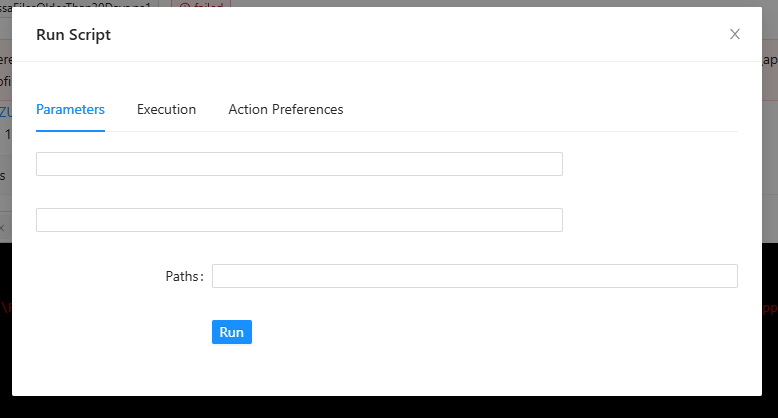
To test, I edited the script and reselected the "dry run" option when selecting the schedule's parameters. The job ran successfully. I clicked the job details and clicked "Rerun Job" and I'm met with the same output as the original screenshot (no checkbox or anything indicating "dry run" is checked.
I just saw this today, so unsure if it was previously an issue.
Rerun Schedule Job parameters jacked up
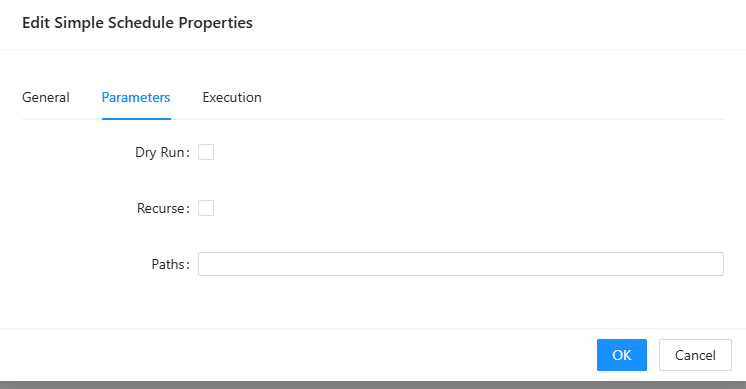
Parameters look normal when editing a script's schedule like below:
Re-running a failed job the parameters show up like this:
'
Move version information back to top
I have to scroll to the bottom to find my version, it was way more convenient on top (or at least put in a help menu).
Link domain user, Office365 user to DVSL custom user
We are considering deploying DVLS company wide. Azure typically has about two IdP related SSO issues per year and we would need to have a backup in case authentication through the IdP goes down. I didn't see anything in the settings or release notes for version 2022.1.12.0 or earlier, is this functionality you explained available or still in development?
Permissions
Hello,
Is there a way to get close to NTFS style permissions? I'd like the ability to set permissions on a folder so that users may create their own credentials and set permissions on that credential while having the parent folder locked down (no ability to edit permissions on the parent). This would be akin to being able to set permissions on "this entry" and specific permissions for "sub entries" like NTFS's "This folder, this folder and subfolders, subfolders only" style permissions. This would also help with users that have delete permissions so that they don't accidently delete all the credentials below a folder. I'd essentially like to lay out permission in this hierarchy:
Vault (Root) [Only sys admins or a specific group has the ability to create folders/entries]
-> Help Desk (Restrict the ability to delete or modify permissions on this folder, but allow sub-entries to be deleted and permissions to be modified by help desk)
---> Some credential entry (Help Desk to delegate permission of this object only to whomever they need to view the credential)
-> Infrastructure (Restrict the ability to delete or modify permissions on this folder, but allow sub-entries to be deleted and permissions to be modified by infrastructure team)
---> Some credential entry (Infrastructure team to delegate permission of this object only to whomever they need to view the credential)
I would like to give each respective department the ability to create their own credentials within their own folder, and view credentials from another groups within the same vault if their group/user were granted the view and view-password permissions.
As a workaround, I thought about having a vault administrator with the ability to change permissions and delete entries, however, this could potentially expose passwords within a department's vault if the vault's admin doesn't know how permissions work or accidently set a permission incorrectly. My only other solution to make this as easy as possible for department heads/admins, would be to give them full reign over their vault and have all other users be given read-only access. We lose flexibility with this.
In the past, with Password Vault Manager, we were able to keep our credentials in a separate folder and create a shortcut in another folder so other groups within our department could view the credential.