Navigation window focus

Once upon a time, many many versions ago, for those of us that use the Navigation menu unpinned (collapsed), when clicking navigation to expand the menu, it would also focus that navigation window so you could immediately start typing an asset name (for type-to-find) without having to first click an asset within the menu.
I would love to see that come back as it saves having to click the navigation menu every single time you want to use type-to-find to search within your catalog of assets.
All Comments (4)
Hello Jordan,
Thank you for your suggestion. The behavior you describe, where opening the auto-hidden navigation pane placed the cursor in the filter box, can be recovered with the following setup:
1. Make sure you are on the latest 2026.3 update of Remote Desktop Manager, as this was adjusted in a recent build.
2. Right-click the navigation bar to open the navigation layout menu.
3. Set Filter location to Navigation pane (top) or Navigation pane (bottom).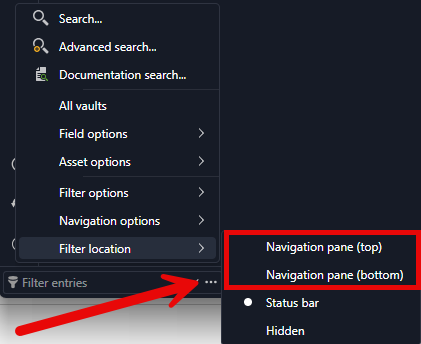
With the filter placed inside the navigation pane, opening the auto-hidden pane should put the cursor in the filter box, so you can start typing right away.
Could you let us know if this works for you?
Best regards,
Alexis Geller Peiro
8a12fd9c-4a3d-4193-8c61-297d5fe59dc0.png
Hi Alexis,
Thank you for your reply. I'm not referring to the filter feature; I'm referring to the type-to-find. What I'm referring to is when you're in the navigation window and you have an asset highlighted, you can start typing the name and it will "snap" to that asset and highlight as you type. it does not remove (filter) the other assets, it simply highlights the asset your looking for so you can quickly hit "enter" after you're on asset that you're highlighting. Filtering is the opposite of the experience that' I'm referring to.
What used to work long ago with an "unpinned" navigation menu, is simply clicking that navigation menu to expand the hidden menu would allow you to directly type and use the type-to-find feature without having to first select an asset in the list. What's happening is the UI, when clicking that hidden nav menu to expand, doesn't focus the window for direct keyboard input until you first click an asset.
Thank you,
Jordan
Hello Jordan,
Thank you for your patience and for the clear explanation of the type-to-find behavior.
We were able to reproduce it. With the Navigation pane auto-hidden, clicking the Navigation tab expands the pane, but the keyboard focus does not go to the tree, so typing right away does not find anything until an entry is clicked first. In our tests, the same steps worked in 2026.2 and no longer work in 2026.3.13.0.
We have reported this internally so the development team can investigate it.
Thank you again for taking the time to describe it so precisely.
Best regards,
Alexis Geller Peiro
This might be the same root problem as the nav bar enter behavior issue I posted here:
https://forum.devolutions.net/topics/56788/pressing-enter-in-navigation-to-launch-the-last-previously-selected-rd#244947