Pressing Enter in Navigation to launch the last previously selected RDP session - now frequently Pins Navigation instead of launching RDP session
Pressing Enter in Navigation to launch the last previously selected RDP session - now frequently Pins Navigation instead of launching RDP session

Version: 2026.3.12.0 64-bit on Windows 11
Reasoning: I'm the type of person that tries to use my keyboard more than mouse whenever possible. All I use RDM for is RDP, and have for many years, so this is largely a big annoyance because of years of trained muscle memory...
Backstory: Frequently, I'm often reconnecting to the last RDP session that I last connected too. When opening the Navigation sidebar, the last RDP session you connected too, remains highlighted. I keep my Navigation bar unpinned at all times and collapsed, for more screen real estate when I launch an RDP session docked in the main RDM window, which is almost how I always use RDM.
Usage: So, for many years now, if I wanted to simply reconnect to the last session I had previously connected too, I would simply click the Navigation bar to show it, then press ENTER on my keyboard, so that it would simply initiate the connection to that same server since it remained selected in the list still.
Problem: Sometime in the last few builds - something has changed in this regard. Now, sometimes when I'd open the Navigation bar, and press ENTER - instead of it connecting to the last session that is still shown as selected - it instead, Pins the Navigation Bar! When this happens the "Pin" icon changes to indicate it's now pinned; and my session is not launched. If I press ENTER again - it now launches the requested session as expected; except now that since the Navigation bar is now Pinned - this causes the session to open in a partial window with the navigation bar space removed from it. This makes it so that I have to disconnect, unpin the Navigation bar, and then re-connect so that it connects at the expected size.
Workaround: If I simply double click on the server name in the list, rather than pressing ENTER, I avoid this behavior. But, I'm frequently not remembering to do this per Reasoning above, leading to a frustration I'm running into daily now since this bug was introduced...
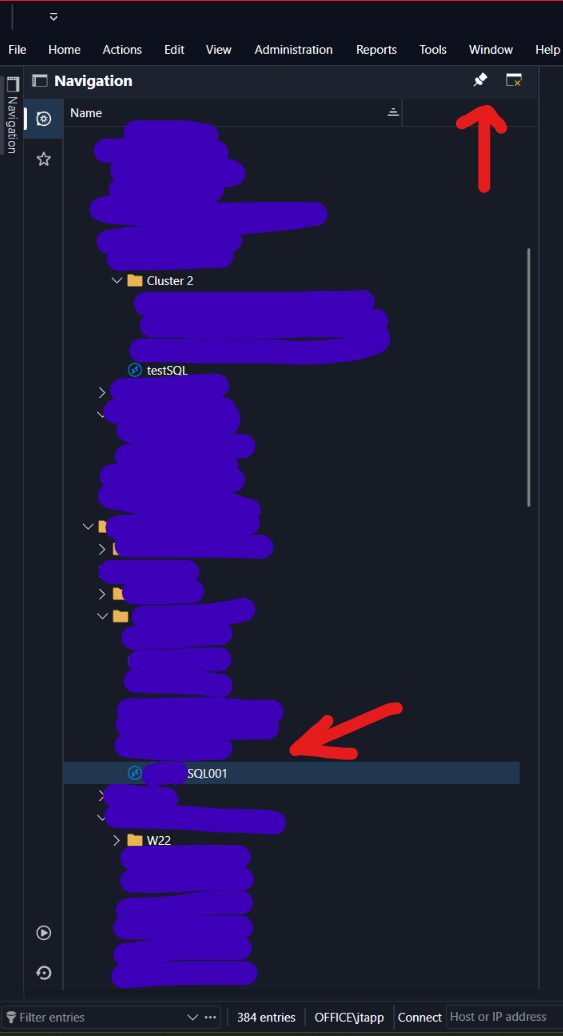
Screenshot: Trying to show what I'm meaning below. As shown I've got a server name already selected. But often times (I can't figure out why this happens sometimes and not others?!), upon pressing ENTER, instead of it launching that session, it instead, interacts with the Pin icon I'm pointing to instead, causing the Navigation bar to Pin.
Recommended Answer
Hi @Alexis Geller Peiro et al.,
It seems like this is fixed in 2026.3.16.0! I can no longer reproduce this on the new version! Although you didn't note a specific fix for this issue in this build or this thread, I believe it may have been the fix for this issue that also solved my issue: https://forum.devolutions.net/topics/56758/navigation-window-focus#246570
Either way I believe you you can close this as fixed now. Ty!
All Comments (3)
Just retested this in the new .13 build released today - `2026.3.13.0 64-bit` and unfortunately, it is not fixed in this build.
Also worth noting another reason I keep running into this is when you've previously connected to multiple RDP / servers - when pressing enter, it used to reconnect you to all of them if you still had multiple selected. This too is impacted. Double clicking on a single entry when multiple are selected only opens the one that you double clicked, not all of them. This is another reason I just got used to pressing ENTER to establish connection so if multiple entries were selected you connect to all of them at once.
Hello @jtapp,
Thank you for the detailed report and for retesting on 2026.3.13.0.
I was able to reproduce this in our lab. With the Navigation pane set to auto-hide, a workspace entry selected, and clicking the Navigation tab followed by Enter, the result differs between versions:
- 2026.3.13.0: Enter pins the pane and the entry is not opened. Keyboard focus lands on the pin button instead of the tree.
- 2026.2.20.0: Enter opens the selected entry and the pane folds back on its own.
So this is a change in behavior between the 2026.2 and 2026.3 builds, not something specific to your setup. It also explains why it only happens sometimes: it depends on where keyboard focus was before you opened the pane.
Regarding multiple selection: with the pane pinned, pressing Enter on several selected entries still opens all of them in 2026.3.13.0 (after the confirmation prompt). So that part is not broken by itself. It is affected only when the pane is auto-hidden, because Enter goes to the pin button instead of the entries.
It looks related to an open internal report about the auto-hidden Navigation pane not giving keyboard focus to the tree when it is opened from the side tab. I do not have a fix version to share yet, but we will let you know here as soon as a fix is available.
In the meantime, double-clicking the entry, as you are already doing, avoids the problem. Clicking once on an entry after opening the pane, before pressing Enter, should also work, since that gives the tree focus.
Best regards,
Alexis Geller Peiro
Hi @Alexis Geller Peiro et al.,
It seems like this is fixed in 2026.3.16.0! I can no longer reproduce this on the new version! Although you didn't note a specific fix for this issue in this build or this thread, I believe it may have been the fix for this issue that also solved my issue: https://forum.devolutions.net/topics/56758/navigation-window-focus#246570
Either way I believe you you can close this as fixed now. Ty!