
(user deleted)
Unable to login - Please verify your internet connection
Patrick
I thought I posted back on this issue over the weekend. It is now solved.
The cause was some testing I was doing on my TLS protocols on this workstation.
Earlier in the week I had disabled TLS v1.1 based upon threat assessment data from my endpoint management software. Turns out their recommendation is wrong. As soon as I turned TLS v1.1 back on - no problem logging into my Devo acct and backing up my config.
Cheers
Bruce
Unable to login - Please verify your internet connection
Patrick
I am using RDM on a single user PC and this function (logging in to my Devo acct) was just fine some months ago.
Not keen on altering my router to start whitelisting scads of URLs just to use this function.
I am no expert but this feels like a case of "too" much security around the Devo acct login - and I am guessing it is either your 2FA implementation OR a need to use an application password.
I just tested it again after ensuring everything 2FA related is correct within my Devo acct and I still cannot login via the application. Via a browser is all good.
B
Unable to login - Please verify your internet connection
Patrick
Thanks for the update. I gave the portable install a go and here is the result:

After I click "Sign In (2) - I was prompted for my Devo acct email and then I hit OK and get (3)
Same error and no ability to connect.
Please advise.
Cheers
B
Unable to login - Please verify your internet connection
Hello
Wanted to backup my RDM Free config using the Online Backup area (under File) and consistently get this:

I have confirmed my actual Devolutions acct works when I login to it via MS Edge.
But nothing will allow me to connect to my acct from the actual application.
Appreciate any insight on what is going on here.
Cheers!
B
Slow Startup of RDM
Jeff
Just tried this bat file as suggested - as I too am seeing very poor startup performance. The batch file ran like crazy posting hundreds of commands and a ton of errors and after all was done - the startup performance never changed at all.
Not sure what you guys are using to build RDMF - but it is - by far - the slowest of apps that I use to manage my environment. I suspect after running that batch file that RDMF is almost all .NET and that's a recipe for slow performance for sure.
Cheers
B
How do I restore an online backup from yesterday?
James
Ok - that makes a bit more sense:
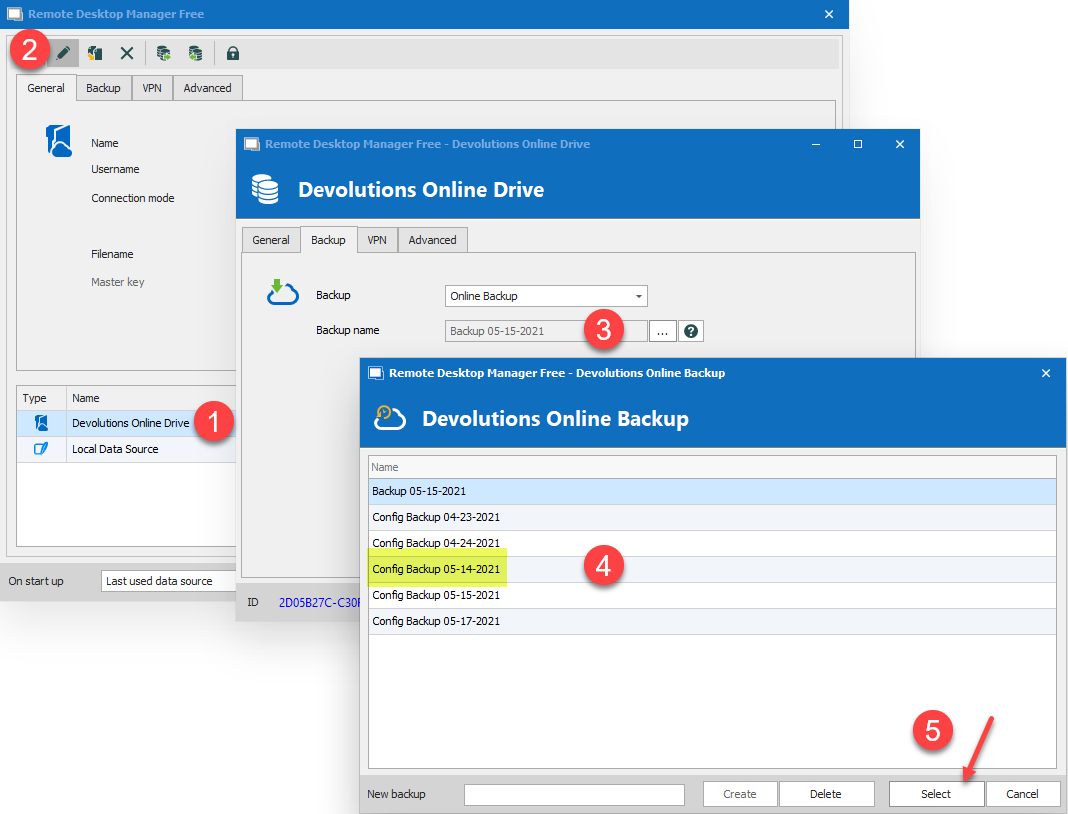
Looks if I can now at least see a reference to 05-14-2021. We are getting there!
But what should I have done at ground zero for this. And I am talking about a fresh install of a new copy of RDM on a brand new PC - what are the steps to get reconnected to this specific online backup AND use the (4) backup to completely restore my freshly installed RDM to its former glory.
Even with the above - and after confirming I can see the 05-14-2021 backup out there somewhere - I still cannot figure how I would restore it?
If I click File->Backup->Restore (while ensuring I am still squarely using the Devo Online Drive for my data source) I still do not see the 05-14-2021 backup.
Still need some steps to understand how to get a fresh install back to the way it was 2 days ago - using these online backups. And as I mentioned earlier - it's a good thing I did local exports of my creds, machines and so on - or I would still be struggling with this.
I am hoping you can see how convoluted this is for a user. I should be able to hit Backup and save ALL settings to a single file either online or on local disk in one easy pass and then be able to hit Restore (or Import) and in mere seconds be back to a working state.
Not exactly sure why this needs to be so complicated. Too many dialogs, edit buttons and other un-necessary moves to make here for a simple and easy config backup.
Thanks!
B
How do I restore an online backup from yesterday?
James
When I go to the location as above - mine is very limited compared to yours:

I can (1) ID the correct data source - which looks like it's pointing in the right place (2) but I cannot click on (3). At all.
And regarding your second question - yes I can see the online backups - but I cannot do anything with them:
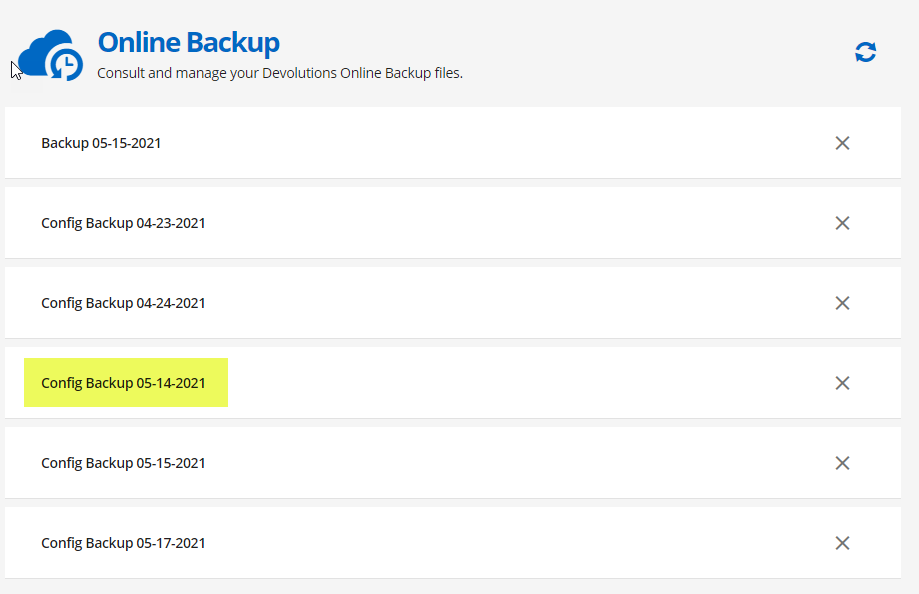
The highlighted item was the complete backup that I took just prior to decommissioning my old computer - and was the one I thought I could use - but there is no way that I see to bring that 5-14-2021 backup into the actual application.
If I switch my data source to Devolutions Online backup and then go File->Backup-View History - all I see is this:

These two backups are my first tests once I got the Online backup account sorted yesterday.
Now - I should also mention that this is the FIRST time I have ever had two data sources - so this could be part of a larger problem.
For years I have only ever had a single Local Data Source and I thought - all this time - that when I was on Local Data Source and then clicked File->Backup->Execute Backup - that this data was going to the "cloud" (My Devolutions Online Backup) as shown in this screen cap:

Or is it? Because this is the exact scenario I had on 5/14/2021 - when I hit Execute Backup three times to make sure I had three backups (even if they were all the same data)
But as the above - when I am in Local Data Store and click File->Backup-Restore - all I see this these two "test" backups done today:

I see nothing from May 14 or older...
As you can see this is a disaster in complexity and I have no idea where my actual 05-14-2021 is.
Appreciate any additional info you can share to either help me find those backups from a few days ago (Did I have an online drive previously defined under another set of credentials?) I have only ever logged into Remote Desktop Manager with my one and only account.
Cheers
B
How do I restore an online backup from yesterday?
Jeff
Not following your logic on this - isn't the point of an online backup to be able to restore that backup at any time for ANY purpose? What does "updating" my entries have to do with this?
I specifically clicked Execute Backup and I can see an online backup listed (See attachment).
Should I not be able to do a backup (like this) here on May 17, 2021

And then if I need to "restore" my RDP config next month or next year - simply go go to Backup (1) and then Restore Backup (2) and be able to choose this specific backup and have this config (and all it's bits) restored?

If I cannot access ANY backup that I have done to the cloud at any time - what am I missing about this function/feature?
I want to take a backup of my entire RDP config whenever the mood strikes and then have it stay there until I decide to remove it (or I really need it - like in a reinstall situation). Make sense?
Clearly I am not getting this - as it appears not to be a storage locker of my config backups - regardless of how many backups I take or whether they have "changed" or not. That is of no consequence to me at all.
Any further explanation would be most helpful.
Cheers
Bruce
How do I restore an online backup from yesterday?
All
Yesterday I rebuilt my primary workstation and prior to the rebuild - I used the online (cloud) backup feature to save a copy of my entire config - thinking it would be awesome to restore it today when I came to reinstalling RDM.
However today - after reinstalling RDM and then logging in my Devolutions acct - and clicking Backup->Restore - I do not see ANY backups at all especially the ones form yesterday which I executed three time to ensure I saved it.
I also see yesterday's backup reference when I look at my online console but there is no way to access it when I choose Restore from the program. It is a good thing I exported all my settings locally so I could import them back into this new install - but right now - this online backup feature is a tad useless without access to all my backups - when I need them?
I am using RDM Free if that makes a difference but I could not determine if it does or not. Would appreciate some guidance on how to navigate ALL my backups in a restore situation.
Thanks
Bruce