Slow Startup of RDM
Hello @all,
the startup of RDM on Windows seems to be very slow.
We using some Notebooks with Windows 10 16-32 GB RAM and Intel Core i7 CPU, Database is local
My VM has 32 GB RAM an 6 CPU, Database is Remote (mysql)
RDM is latest Free (not installed, only portabel Version) and Enterprise Version and on all that Clients the start takes between 40-50 seconds.
Is there somthing what we can do to have a faster startup?
Many thank's in advanced
All Comments (42)
Hello,
One thing that you can try it's to go in the installation folder of your RDM Free and run the OptimizeRDMFree.bat as an administrator.
This should help enhancing the performance.
Best regards,
Jeff Dagenais

Disabled
Jeff
Just tried this bat file as suggested - as I too am seeing very poor startup performance. The batch file ran like crazy posting hundreds of commands and a ton of errors and after all was done - the startup performance never changed at all.
Not sure what you guys are using to build RDMF - but it is - by far - the slowest of apps that I use to manage my environment. I suspect after running that batch file that RDMF is almost all .NET and that's a recipe for slow performance for sure.
Cheers
B
Hello,
I would like you to start RDM using the profiler so that we can see the loading time of RDM.
Usually, I would ask to click on Start / Run and execute the following line C:\Program Files (x86)\Devolutions\Remote Desktop Manager\RemoteDesktopManager64.exe / Profiler, but since you are running RDM in portable mode, you would need to adapt the installation path for your RDM.
Then, you can post the results here.
Best regards,
Jeff Dagenais
Hi,
here are my output:
Main thread (UI)
----------------------------------------
08:02:42.720009	RefreshConnections...
08:02:42.720009	    LoadConnections [UI - MariaDB : DB] - 64-bit...
08:02:42.720009	        Engine.Clear - ClearInternalList - ClearTemplates - ClearRoot : 2 ms
08:02:44.185971	        reload: True hasSecurityChanged: True hasChanged: True
08:02:44.185971	        HasOfflineChanges : 1 ms
08:02:44.583882	        Engine.Clear - ClearInternalList - ClearTemplates - ClearRoot : 0 ms
08:02:44.918715	        LoadConnectionsFromDataSource...
08:02:44.918715	            LoadDataSourceSettingsFromDataSource...
08:02:44.971844	                GetDataSourceSettings : 44 ms
08:02:44.971844	            LoadDataSourceSettingsFromDataSource : 45 ms
08:02:45.634283	            GetConnections...
08:02:45.673615	                Database.GetConnections...
08:02:45.689200	                    Reading connections from database : 23 ms
08:02:45.720481	                    DecryptData : 7 ms - Count : 273
08:02:46.499690	                    DeserializeData : 763 ms - Count : 273
08:02:46.509908	                Database.GetConnections : 862 ms
08:02:46.509908	            GetConnections : 870 ms
08:02:46.520190	            DoMergeConnections...
08:02:46.550915	                PrepareConnectionList : 23 ms
08:02:46.559064	                Loop...
08:02:46.602146	                    Initialize : 4 ms
08:02:46.602146	                    Migrate Connection : 34 ms
08:02:46.602146	                    OfflineManager.Merge : 3 ms
08:02:46.602146	                    Merge With List - Contains : 0 ms
08:02:46.602146	                    Merge With List : 0 ms
08:02:46.602146	                Loop : 43 ms
08:02:46.602146	                Merge Full List...
08:02:46.612396	                    Offline : 11 ms
08:02:46.612396	                    Connections : 0 ms
08:02:46.612396	                Merge Full List : 11 ms
08:02:46.622674	                Filter : 11 ms
08:02:46.622674	                Engine.Clear : 0 ms
08:02:46.622674	            DoMergeConnections : 115 ms
08:02:46.622674	        LoadConnectionsFromDataSource : 1701 ms
08:02:46.766781	        Load connection overrides...
08:02:46.782424	            Has changes : 19 ms
08:02:46.782424	        Load connection overrides : 19 ms
08:02:46.984079	        RefreshRepositories : 190 ms
08:02:47.004416	        Engine.Clear : 0 ms
08:02:47.004416	        OfflineManager.ProcessOfflineData : 0 ms
08:02:47.085882	        PrivateConnectionManager.Refresh : 3 ms
08:02:47.094019	        PrivateConnectionManager.Refresh : 0 ms
08:02:47.096161	        PrivateConnectionManager.Refresh : 0 ms
08:02:47.104238	        PrivateConnectionManager.Refresh : 0 ms
08:02:47.116662	    LoadConnections [UI - MariaDB : DB] - 64-bit : 4397 ms
08:02:47.973549	RefreshConnections : 5261 ms
08:02:47.983683	Connection States: Refresh...
08:02:47.983683	    ClearClosedRunning : 0 ms
08:02:48.004063	    GetAllConnectionStates : 21 ms
08:02:48.004063	    HasChanges : 0 ms
08:02:48.034702	Connection States: Refresh : 63 ms
08:02:48.046984	VariableManager.Sort : 0 ms
08:02:48.087913	TreeView.LoadConnectionList...
08:02:48.087913	    GetGroupInfos : 0 ms
08:02:48.087913	    BeginUpdate...
08:02:48.272746	        LoadConnectionInTreeNode : 20 ms
08:02:48.272746	        PreCreateGroups : 22 ms - Count : 1
08:02:48.272746	    BeginUpdate : 180 ms
08:02:48.272746	TreeView.LoadConnectionList : 182 ms
08:02:50.444729	Silent: Microsoft.Web.WebView2.Core.WebView2RuntimeNotFoundException: Couldn't find a compatible Webview2 Runtime installation to host WebViews. ---> System.IO.FileNotFoundException: Das System kann die angegebene Datei nicht finden. (Ausnahme von HRESULT: 0x80070002)
   --- Ende der internen Ausnahmestapelüberwachung ---
   bei Microsoft.Web.WebView2.Core.CoreWebView2Environment.GetAvailableBrowserVersionString(String browserExecutableFolder)
   bei Devolutions.RemoteDesktopManager.Business.WebView2Manager.get_IsAvailable()
08:02:52.136325	SelectionChanged...
08:02:52.151911	    LoadConnectionList : 8 ms
08:02:52.174117	SelectionChanged : 33 ms
08:02:52.822142	LoadConnectionList : 0 ms
08:02:53.180716	RootDashboardOverviewManager.LoadRootDashboardOverView - Quick Load : 351 ms

Thread : 4
----------------------------------------
4 - 08:02:46.650855	Sync to Offline...
4 - 08:02:46.650855	    Offline.AddOrUpdateConnection : 3 ms
4 - 08:02:47.300235	Sync to Offline : 645 ms - Count : 273

Thread : 5
----------------------------------------
5 - 08:04:58.609830	Connection States: Refresh...
5 - 08:04:58.609830	    ClearClosedRunning : 0 ms
5 - 08:04:58.609830	    GetAllConnectionStates : 9 ms
5 - 08:04:58.609830	    HasChanges : 0 ms
5 - 08:04:58.609830	Connection States: Refresh : 9 ms

Thread : 10
----------------------------------------
10 - 08:02:44.956216	OfflineManager.SaveMeta...
10 - 08:02:45.172384	    SaveSecurityInfo : 212 ms
10 - 08:02:45.188004	    Repository : 8 ms
10 - 08:02:45.256998	    Expiration : 80 ms
10 - 08:02:45.272628	    DataSourceSettings : 1 ms
10 - 08:02:45.272628	    ConnectionOverrideManager.Saving : 3 ms
10 - 08:02:45.272628	OfflineManager.SaveMeta : 314 ms

Thread : 16
----------------------------------------
16 - 08:02:46.622674	OfflineManager.SaveMeta...
16 - 08:02:46.632777	    SaveSecurityInfo : 6 ms
16 - 08:02:46.632777	    Repository : 0 ms
16 - 08:02:46.632777	    Expiration : 1 ms
16 - 08:02:46.632777	    DataSourceSettings : 0 ms
16 - 08:02:46.632777	    ConnectionOverrideManager.Saving : 0 ms
16 - 08:02:46.632777	OfflineManager.SaveMeta : 10 ms

Thread : 21
----------------------------------------
21 - 08:03:58.521429	Connection States: Refresh...
21 - 08:03:58.521429	    ClearClosedRunning : 0 ms
21 - 08:03:58.521429	    GetAllConnectionStates : 9 ms
21 - 08:03:58.521429	    HasChanges : 0 ms
21 - 08:03:58.521429	Connection States: Refresh : 9 ms

Thread : 24
----------------------------------------
24 - 08:02:53.314771	RootDashboardOverviewManager.LoadRootDashboardOverViewAsync - Full Load : 140 ms
Hi,
Thank you for the profiler trace.
Here's what we can deduce from the trace. Keep in mind the trace only looks at loading of the data and not entire startup time.
- The data load takes about 5.2 seconds, this is somewhat slow for 273 entries
RefreshConnections : 5261 ms- This is somewhat slow with all things considered, we would expect 1-2 seconds not 5+ here.
- If we break that down
70msto read the data from the database763 msto create the in memory representation of the data- the rest is manipulating objects in memory, performing security checks
- There is about 1.4 seconds not accounted for in the trace, between these two entries, I will added more tracing in the next build.
08:02:42.720009	        Engine.Clear - ClearInternalList - ClearTemplates - ClearRoot : 2 ms
08:02:44.185971	        reload: True hasSecurityChanged: True hasChanged: True
Great but what does all this mean? Well, not much in the big picture where the startup of the application takes 40-50 seconds as you stated above. So we need to look elsewhere.
Antivirus? Could you try temporarily disabling real-time antivirus checks on the following folders?
- RDM install folder
- %localappdata%\Devolutions folder
P.S.: if you only got 3 flashing cmd windows when you run the optimize script try running it again from an elevated cmd prompt? The output of the should look something like this.
C:\some-folder>C:\Windows\Microsoft.NET\Framework\v4.0.30319\ngen.exe install RemoteDesktopManager.exe
Microsoft (R) CLR Native Image Generator - Version 4.8.4320.0
Copyright (c) Microsoft Corporation.  All rights reserved.
2>    Compiling assembly RemoteDesktopManager.Core, Version=2020.2.20.0, Culture=neutral, PublicKeyToken=null (CLR v4.0.30319) ...
1>    Compiling assembly C:\Users\slavergne\Downloads\2020.2.20.0\RemoteDesktopManager.exe (CLR v4.0.30319) ...
6>    Compiling assembly Devolutions.Cloud.ApiWrapper, Version=1.0.0.0, Culture=neutral, PublicKeyToken=null (CLR v4.0.30319) ...
5>    Compiling assembly Devolutions.Hub.Interoperability.Cryptography, Version=1.1.17.0, Culture=neutral, PublicKeyToken=null (CLR v4.0.30319) ...
4>    Compiling assembly Devolutions.Hub.Interoperability, Version=1.1.17.0, Culture=neutral, PublicKeyToken=null (CLR v4.0.30319) ...
...
Best regards,
Stéfane Lavergne
Hello Stefane,
thanks for the clarification
The Problem is that our User has no Admin rights to run .Net Progamms or disable Antivirus.
On that System they using only a protable version but also on System where i have Admin access, there are no different between running ngen.exe and the Startup of RMD before or after that.
I will check next week what's happend if i disable VirusScan but if so, that not the solution.
It would be nice if someone can deeper ananlyse if there are some better startup time for RDM
Many thanks and have a nice Weekend.
same here. Very slow startup even after clean install, and a little system hangs up. On any mine pc with sdd, 16gb+ ram, etc.
i wait 5+ sec after icon click > before program begins to load. so really nothing happening at this time. Looks like profiler works only after that, so in logs it takes just 2 seconds.
Main thread (UI)
----------------------------------------
20:15:26.097161 RefreshConnections...
20:15:26.098162 LoadConnections [UI - SQLite : Local Data Source] - 64-bit...
20:15:26.099163 Engine.Clear - ClearInternalList - ClearTemplates - ClearRoot : 0 ms
20:15:26.100164 HasSecurityChanged : 0 ms
20:15:26.102166 HasChanged : 0 ms
20:15:26.102166 reload: True hasSecurityChanged: True hasChanged: True
20:15:26.103167 HasOfflineChanges : 0 ms
20:15:26.103167 Engine.Clear - ClearInternalList - ClearTemplates - ClearRoot : 0 ms
20:15:26.204259 LoadConnectionsFromDataSource...
20:15:26.204259 LoadDataSourceSettingsFromDataSource...
20:15:26.263312 GetDataSourceSettings : 58 ms
20:15:26.263312 LoadDataSourceSettingsFromDataSource : 58 ms
20:15:26.292338 GetConnections...
20:15:26.297343 Database.GetConnections...
20:15:26.300345 Reading connections from database : 2 ms
20:15:26.310354 DecryptData : 8 ms - Count : 77
20:15:26.455486 DeserializeData : 142 ms - Count : 77
20:15:26.456487 Database.GetConnections : 164 ms
20:15:26.457488 GetConnections : 166 ms
20:15:26.458488 DoSetConnections...
20:15:26.458488 Engine.Clear - ClearInternalList - ClearTemplates - ClearRoot : 0 ms
20:15:26.478513 DoSetConnections : 21 ms
20:15:26.479508 LoadConnectionsFromDataSource : 275 ms
20:15:26.512538 Load connection overrides...
20:15:26.512538 Has changes : 0 ms
20:15:26.512538 Load connection overrides : 0 ms
20:15:26.513539 RefreshRepositories : 0 ms
20:15:26.514539 Engine.Clear : 0 ms
20:15:26.640654 LoadConnections [UI - SQLite : Local Data Source] - 64-bit : 543 ms
20:15:26.680690 RefreshConnections : 587 ms
20:15:26.683693 Connection States: Refresh : 2 ms
20:15:26.686696 VariableManager.Sort : 0 ms
20:15:26.698707 TreeView.LoadConnectionList...
20:15:26.699707 GetGroupInfos : 0 ms
20:15:26.700708 BeginUpdate...
20:15:26.752756 LoadConnectionInTreeNode : 4 ms
20:15:26.752756 PreCreateGroups : 6 ms - Count : 1
20:15:26.752756 BeginUpdate : 52 ms
20:15:26.752756 TreeView.LoadConnectionList : 54 ms
20:15:27.270226 Silent: System.DllNotFoundException: Unable to load DLL 'WebView2Loader.dll': The specified module could not be found. (Exception from HRESULT: 0x8007007E)
at Microsoft.Web.WebView2.Core.CoreWebView2Environment.GetAvailableCoreWebView2BrowserVersionString(String browserExecutableFolder, String& versionInfo)
at Microsoft.Web.WebView2.Core.CoreWebView2Environment.GetAvailableBrowserVersionString(String browserExecutableFolder)
at Devolutions.RemoteDesktopManager.Business.WebView2Manager.get_IsAvailable()
20:15:27.690608 SelectionChanged...
20:15:27.692610 LoadConnectionList : 2 ms
20:15:27.696613 SelectionChanged : 7 ms
20:15:27.998888 LoadConnectionList : 0 ms
20:15:28.071954 RootDashboardOverviewManager.LoadRootDashboardOverView - Quick Load : 72 ms
Thread : 20
----------------------------------------
20 - 20:15:28.099979 RootDashboardOverviewManager.LoadRootDashboardOverViewAsync - Full Load : 27 ms
Main thread (UI)
----------------------------------------
20:16:43.052043 RefreshConnections...
20:16:43.053044 LoadConnections [UI - SQLite : Local Data Source] - 64-bit...
20:16:43.054045 Engine.Clear - ClearInternalList - ClearTemplates - ClearRoot : 0 ms
20:16:43.055045 HasSecurityChanged : 0 ms
20:16:43.056046 HasChanged : 0 ms
20:16:43.057047 reload: True hasSecurityChanged: True hasChanged: True
20:16:43.057047 HasOfflineChanges : 0 ms
20:16:43.058048 Engine.Clear - ClearInternalList - ClearTemplates - ClearRoot : 0 ms
20:16:43.165146 LoadConnectionsFromDataSource...
20:16:43.165146 LoadDataSourceSettingsFromDataSource...
20:16:43.223199 GetDataSourceSettings : 57 ms
20:16:43.223199 LoadDataSourceSettingsFromDataSource : 57 ms
20:16:43.257230 GetConnections...
20:16:43.263235 Database.GetConnections...
20:16:43.265237 Reading connections from database : 2 ms
20:16:43.269240 DecryptData : 1 ms - Count : 77
20:16:43.415373 DeserializeData : 144 ms - Count : 77
20:16:43.416374 Database.GetConnections : 159 ms
20:16:43.417375 GetConnections : 161 ms
20:16:43.418376 DoSetConnections...
20:16:43.418376 Engine.Clear - ClearInternalList - ClearTemplates - ClearRoot : 0 ms
20:16:43.439394 DoSetConnections : 21 ms
20:16:43.439394 LoadConnectionsFromDataSource : 274 ms
20:16:43.476428 Load connection overrides...
20:16:43.477429 Has changes : 0 ms
20:16:43.477429 Load connection overrides : 0 ms
20:16:43.477429 RefreshRepositories : 0 ms
20:16:43.479431 Engine.Clear : 0 ms
20:16:43.605546 LoadConnections [UI - SQLite : Local Data Source] - 64-bit : 554 ms
20:16:43.645582 RefreshConnections : 598 ms
20:16:43.648584 Connection States: Refresh : 2 ms
20:16:43.651587 VariableManager.Sort : 0 ms
20:16:43.664599 TreeView.LoadConnectionList...
20:16:43.664599 GetGroupInfos : 0 ms
20:16:43.665600 BeginUpdate...
20:16:43.717647 LoadConnectionInTreeNode : 5 ms
20:16:43.717647 PreCreateGroups : 6 ms - Count : 1
20:16:43.717647 BeginUpdate : 52 ms
20:16:43.717647 TreeView.LoadConnectionList : 53 ms
20:16:44.242124 Silent: System.DllNotFoundException: Unable to load DLL 'WebView2Loader.dll': The specified module could not be found. (Exception from HRESULT: 0x8007007E)
at Microsoft.Web.WebView2.Core.CoreWebView2Environment.GetAvailableCoreWebView2BrowserVersionString(String browserExecutableFolder, String& versionInfo)
at Microsoft.Web.WebView2.Core.CoreWebView2Environment.GetAvailableBrowserVersionString(String browserExecutableFolder)
at Devolutions.RemoteDesktopManager.Business.WebView2Manager.get_IsAvailable()
20:16:44.569420 SelectionChanged...
20:16:44.571422 LoadConnectionList : 2 ms
20:16:44.575426 SelectionChanged : 7 ms
20:16:44.930749 LoadConnectionList : 0 ms
20:16:45.002814 RootDashboardOverviewManager.LoadRootDashboardOverView - Quick Load : 71 ms
Thread : 21
----------------------------------------
21 - 20:16:45.030840 RootDashboardOverviewManager.LoadRootDashboardOverViewAsync - Full Load : 26 ms
@faust-dourden
Your profiler trace looks good. ±500 ms to refresh your data is very reasonable.
As for startup times, other what has been mentioned above, there is not much else we can do at this time.
Keep in mind 5-15 seconds of startup is not unheard of in software tools this complex. Nonetheless we are always trying to improve startup/refresh/edit speeds. For example, in the latest version, we no longer support customer created "add-ons". Sounds like a simple but why does this change anything? At startup we no longer need to scan folders trying to import available .dll files while testing them against our add-on interface (also had security implications).
The latest versions of the .NET Framework (5.0 & 6.0, we are currently on .NET 4.8) promise some fairly substantial performance improvements over quite a few important benchmarks.
With this in mind, we are working to eliminate/rewrite code that is not supported in the latest versions of the .NET Framework so that we can upgrade. We have already identified the problem areas (IpcChannel, VMWare Web Services, Easyhook, ...) once we've resolved them all we will upgrade. Our current ETA is Q3 2022.
Best regards,
Stéfane Lavergne
new builds works same way for me. huge freeze during startup at any pc.
But this 2 options made my day. Now it really fast 2sec launch.
Maybe client need better auto detect of acceleration possibility? like some diagnostic at first run and auto choice.
@faust-dourden Very interesting. Are you running high-DPI?
Stéfane Lavergne
no, only default fullhd. Few different pc, amd\intel\nvida, laptops. Same freezes on each.
With the two settings the load is fast now. Fast on all configurations tested?
FYI
Optimize UI performance, Yes => disables animation, improves performance when using RDM through an RDP connection, for example.
Hardware acceleration, if default we do nothing but with the other two we call the corresponding third-party API call to optimize their internal (text) rendering.
Stéfane Lavergne
weird, i switched now both to default but rdm still works fast.
tried on laptop - 1st launch with default settings 10+ seconds. With directX enabled 4-5sec.
Weird indeed. Did you install RDM via the .msi/.exe installer or via the .zip (extract to folder)?
The reason I ask, is that the RDM installer we call a script to "ngen" every non-native platform .dll/.exe to improve startup times. This .Net framework tool that will pre-JIT the .dll/.exe files and writes them back to disk so that when RDM runs the .Net framework will automatically load cached JIT(ed) versions of the .dll/.exe and speedup the startup time.
If you installed via the .zip, you can manually run this script. Simply double click on OptimizeRDM.ps1
Stéfane Lavergne
always .exe installation.
looks like something changed after i switch that option manually.
Where are these settings made?
Many thanks for the information!
@RH - File > Options > Advanced
@Trisitis Oris - I have no idea why calling those two methods would change anything on subsequent starts/run of the application. Both methods are extremely vague on what they actually do so it's kind of hard to diagnose. I'm glad it has resolved it for you and we will keep this in mind and will create a KB for future reference.
Best regards,
Stéfane Lavergne
Many thanks Stefane!
Indeed, the solution from Tristis Oris is working perfect!!! about 2-3 Seconds for Startup!
Many thanks for that!
Best regards
TBC
@slavergne
RDM still has super slow startup and also perfoms slow when open. I'm using a i7 wirh 32GG RAM. Also on other PC's it's slow.
The problem isn't with .NET, as you mentioned early in this thread. Imho the problem lies in using DevExpress for your UI. I've used DevExpress myself for my own projects and experienced also slow performance, so I dumbed it. I'm now using Telerik, which performs better.
It's nice to have a good looking UI, but not when it hurts the user. Why not using WinUI? It looks good and performs ok.
@Marc,
How slow are we talking about? 1+ minute? 30 seconds? Less?
https://docs.devolutions.net/kb/remote-desktop-manager/troubleshooting-articles/startup-performance/
Best regards,
Stéfane Lavergne
It takes 26 seconds before the screens starts appearing (no splash screen to show you that something is happening). After 33 seconds the application is ready to use.
Other RDP apps like RD Tabs and Microsoft Remote Desktop (WinUI) are starting almost instantly.
I already tried the suggestions in the docs, without any real improvement, but to be honest I don't think a user should have to do that. From my experience, the problem lies in the UI toolkit you're using.
Following post as also see lengthy startups of RDM. This is being reported by a number of users.
Most running latest version. Users all have either 8 to 16GB of RAM with i7 CPUs.
Thanks
Iain
Version 2026.2.13.0 64-bit
Data Source SQL
new builds works same way for me. huge freeze during startup at any pc.
But this 2 options made my day. Now it really fast 2sec launch.
Maybe client need better auto detect of acceleration possibility? like some diagnostic at first run and auto choice.
Attempted these but still see a 20-25 seconds before splash screen appears.
Thanks
Iain
Version 2026.2.13.0 64-bit
Data Source SQL
Hello,
We can't see the print screen in your post. Which options have you changed?
Regards
David Hervieux
As per the post above and doc
Thanks
Iain
Version 2026.2.13.0 64-bit
Data Source SQL
8a22ba38-f929-4f7b-abb9-589bcc45fe45.png
Hello,
Do you you get the same result if you just change the Hardware acceleration?
Regards
David Hervieux
Asking users to change different kind of settings just to try to make your application perform better, is a big sign that something is really wrong with your application.
It's the UI Framework you're using.
RD Tabs is fast. Microsoft Desktop Manager is fast. A RDP application shouldn't have to be slow.
I'm moving on.
Speeds up massively with these settings!
Thanks
Iain
Version 2026.2.13.0 64-bit
Data Source SQL
9358b9cd-40f2-41bd-98e8-6d6b7b837d31.png
Tested with several other users and they are all reporting that once the setting is applied it becomes much quicker loading!
Thanks
Iain
Version 2026.2.13.0 64-bit
Data Source SQL
Tested with several other users and they are all reporting that once the setting is applied it becomes much quicker loading!
The first startup is very slow. Startups after that, when modules are in memory, are much faster.
Tested with several other users and they are all reporting that once the setting is applied it becomes much quicker loading!
Appears once a reboot is done first load up will once again take 30+ seconds to start up.
Thanks
Iain
Version 2026.2.13.0 64-bit
Data Source SQL
Hi,
Any update on this. We completed the upgrade and we are still seeing slow startup times of RDM on first load.
Thanks
Iain
Version 2026.2.13.0 64-bit
Data Source SQL
Hello,
I have added information in Diagnostic to display the Startup time. Could you verify the value you get?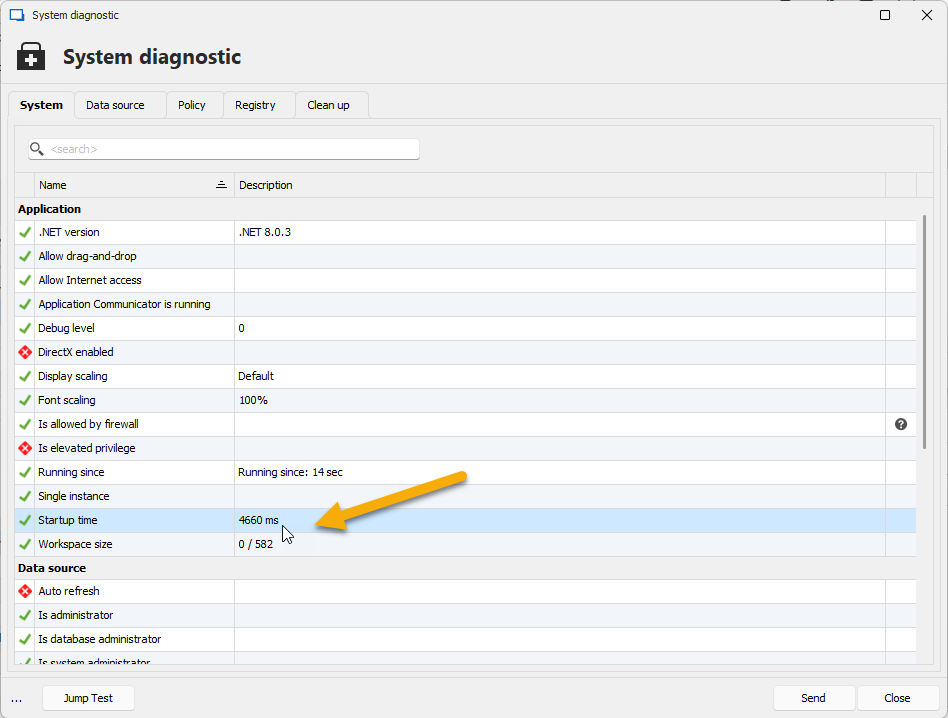
Regards
David Hervieux
fee74e79-9889-4043-923e-8aedea09654e.png
Hi David,
Here is the screen shot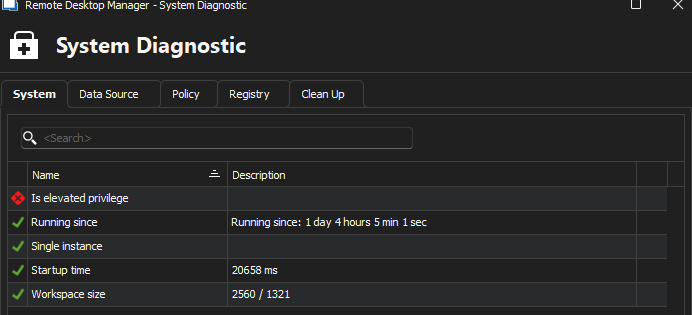
Thanks
Iain
Version 2026.2.13.0 64-bit
Data Source SQL
a06d5643-effb-4701-86f0-06d999dd8da3.png
Hello,
Do you get the same results when you start with the different performance settings?
Regards
David Hervieux
Hi David,
I haven't played about with any performance settings since the update.
Could you please confirm which settings you think are worth trying?
Thanks
Iain
Thanks
Iain
Version 2026.2.13.0 64-bit
Data Source SQL
Hello,
I mean Hardware acceleration and Optimize UI performance. Could you also post a the full diagnostic print screen?
Regards
David Hervieux
Morning,
Current settings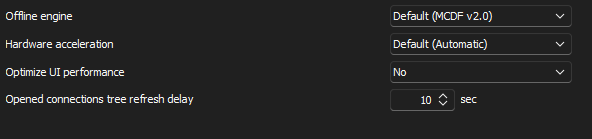
Results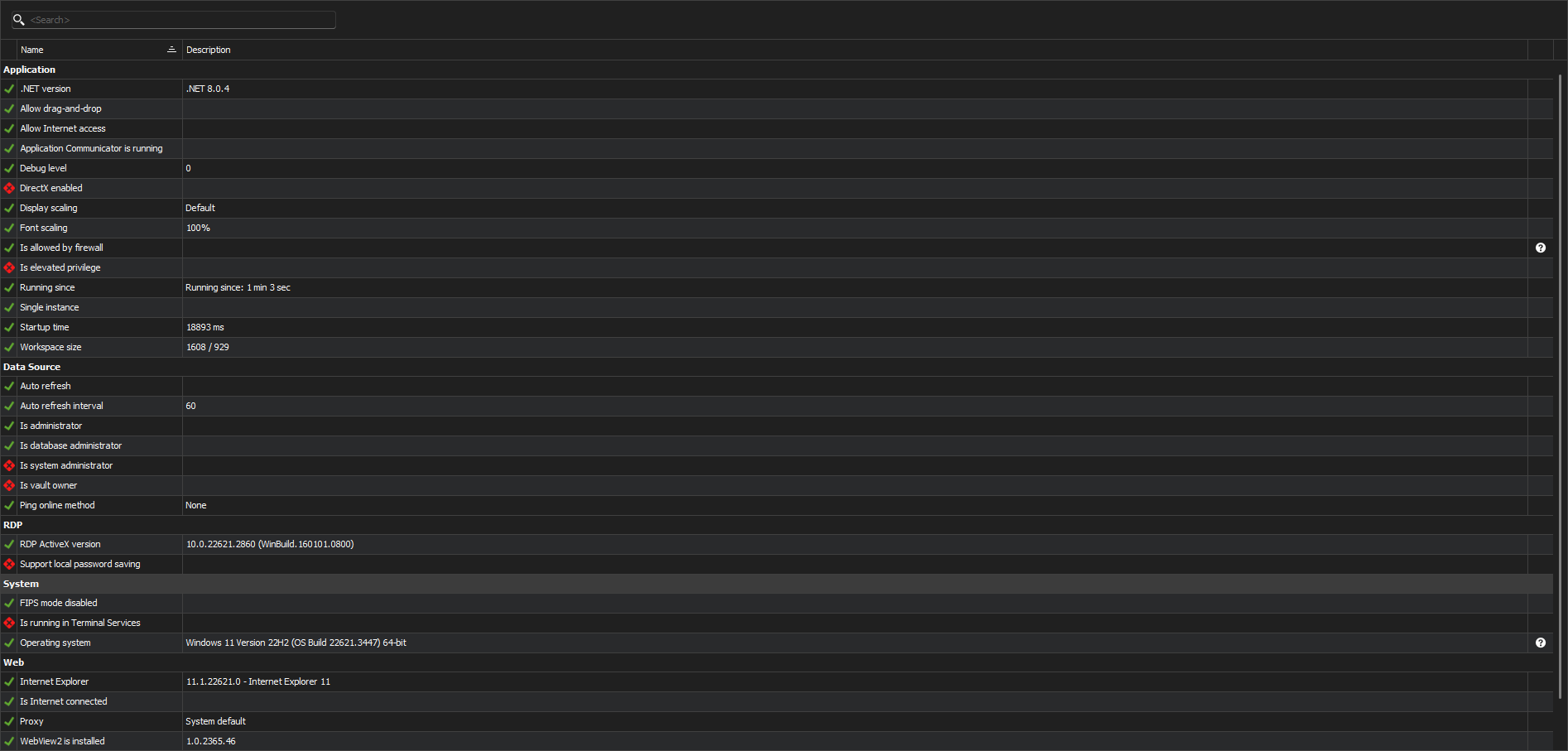
New settings and reboot:
Results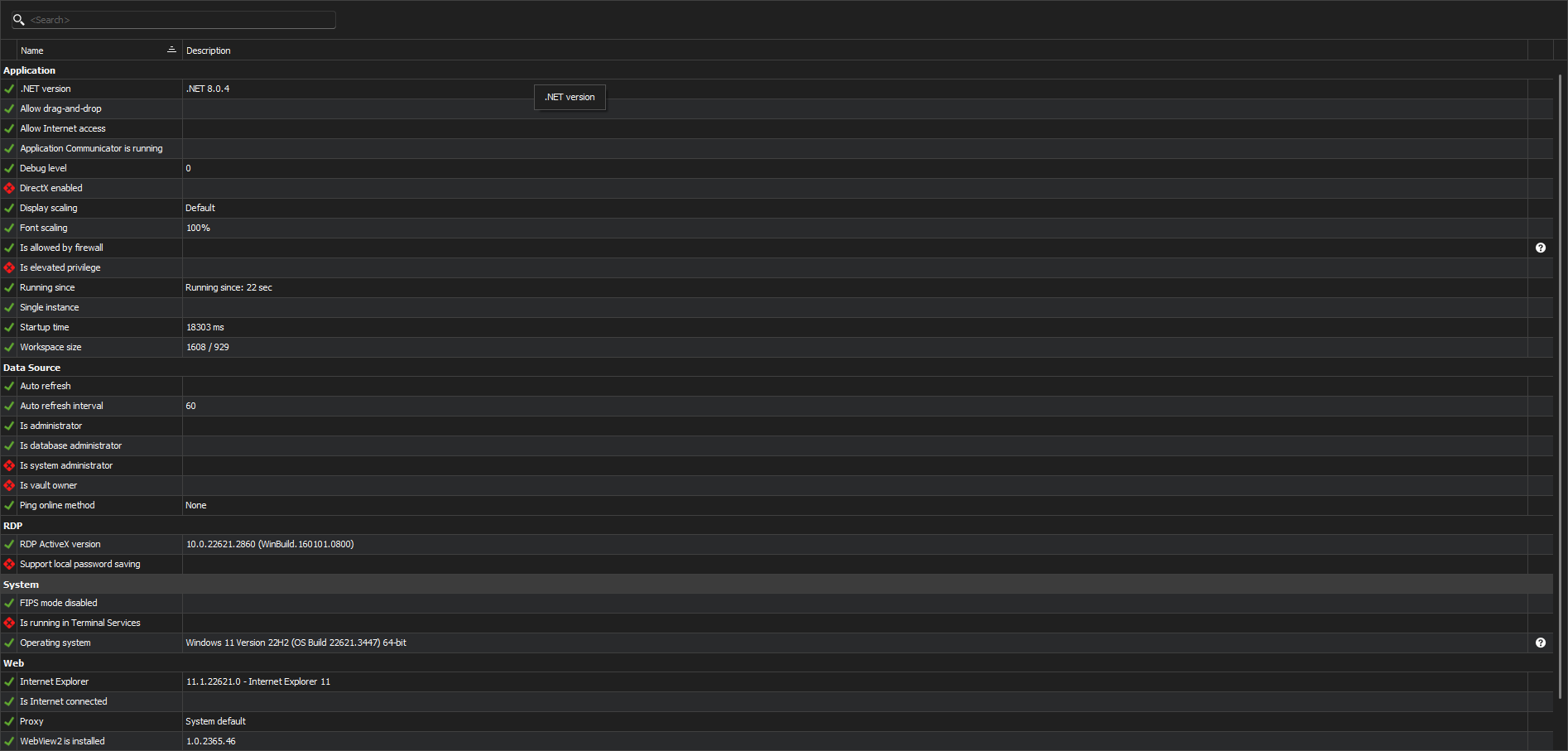
No change in load time seen.
Loads times don't feel as long as they use to if I am honest.
Thanks
Iain
Version 2026.2.13.0 64-bit
Data Source SQL
8510e68d-5ec8-4fcb-9ea1-81a2bcda248a.png
5eb3f18f-2153-4c9c-a132-6a7df027f606.png
122997b4-f277-441e-b491-92779089a361.png
eefc92eb-7d80-4349-95bb-711194e2bcf6.png
Hello,
There is another setting that could help if you have a proxy or a connection issue. Please check 'No Internet connection' in File->Settings.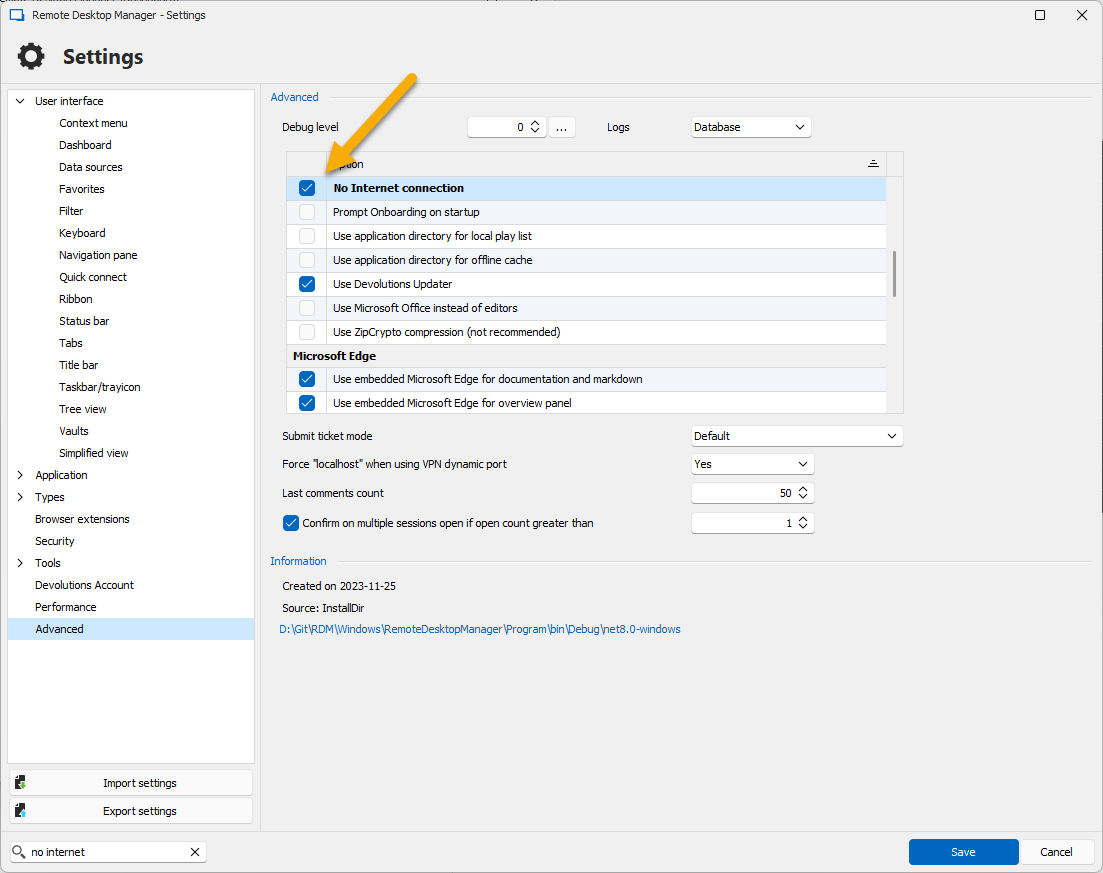
Regards
David Hervieux
ca81932b-27fe-4faf-8ac6-25fefd292263.png
I do have ping setup on the datasource. If its unable to reach it then launches the VPN.
Which of course impact the speed of getting up running, but saves me having to load up the vpn so happy with it.
However, all of this is after the the spalsh screen loading. Which is the bit I genrally see that take quite sometime to load.
Thanks
Iain
Version 2026.2.13.0 64-bit
Data Source SQL
I've opened an account, just to express my frustration using RDM.
It is extremely slow, takes a lot of time to start (reminds me of my old Win98/Pentium2 PC), does not report the current status, like "working", "connecting," or similar, it just hangs and does not respond to any clicks for 5 seconds.
Extremely frustrating!
I have an 11th generation i7CPU with 32GB RAM and an NVME disk with a 2GB/s read speed.
How many resources do you need, honestly?
It's not only me, all my colleagues also complain.
I would certainly look for alternatives, I don't need software that would make me frustrated on a daily basis!
I would honestly be ashamed to put this product on the market in this condition!
Stéfane Lavergne