
nathanjoel
Multiple Folders Issue
That's fantastic, thank you!
Multiple Folders Issue
Hi,
I'm using 2026.3.5.0
You're correct, the ctrl button still allows multiple folders to be selected, but the view doesn't show which folders the asset belongs to.
We often have an asset shared across 20 or 30 different folders, and the function worked perfectly pre-upgrade to 2026.3.5.0
The view seems wrong too. It appears to be nestling folders within each other - when they're not:
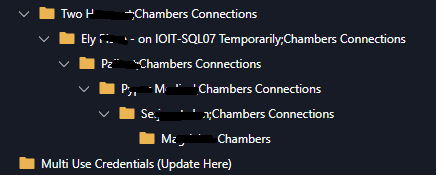
Multiple Folders Issue
Hi all,
There appears to be another issue with the folder selection mentioned above.
When you click onto the dots now, it displays a list of folders, but it's not clear which the entry belongs to - and i can't see a way of adding the entry to multiple folders, like i used to be able to (used to hold ctrl and then select the folders)
@Hubert Mireault @Jafran Majeau
Azure SQL - Quota Reached - UserInfoHistory Table Issue?
Hi Stefane,
Thanks for your help - i truncated the table, and all is fine again now.
Azure SQL - Quota Reached - UserInfoHistory Table Issue?
It’s possible that if you’ve reached the limit of SQL, this approach may not work, as it might not even be able to log (at the database level) the fact that it’s deleting rows. In that case, you could consider truncating the table.
Truncating a table is usually not recommended, so I won’t include the command here. You can Google it if needed, or let me know and I’ll send you the command via direct message.
Best regards,
Thanks - you're correct, the cleanup fails as the limit has been reached.
Could you send me the truncation script?
Is it safe to do on that table? What does it typically store?
Azure SQL - Quota Reached - UserInfoHistory Table Issue?
Our Azure SQL DB mas a max size of 2gb, which has worked fine for the last 3 years.
However, we're now getting warnings in RDM that the quote has been reached.
Looking at the db, it seems that the UserInfoHistory table is taking up 1.5gb.
Any suggests for clearing some space back, or reducing this table? I can't really work out what it's used for.
I've tried clearing activity logs from the RDM end, but i just get the quota warning and nothing happens.
Multiple Folders Issue
Hi, unfortunately this appears to be an issue again in the latest version.
It was definitely fixed at one point, but now appears to be a problem again.
Due to how we have our whole system setup (with us sharing a connection for multiple clients), this is causing us a massive headache.
Multiple Folders Issue
Brilliant, thank you.
Multiple Folders Issue
I believe something may have changed in the latest release of RDM that is effecting the ability for an entry to appear in multiple folders.
We use this setup a lot, where we have multiple clients on the same server. We had one RDP entry shard across all the folders in RDM, so we know when a colleague is on that server. This has worked perfectly up until now.
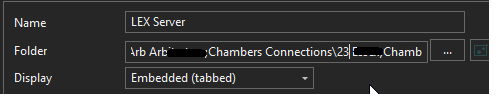
When i go into the properties of the entry, i used to be able to click on the '...' next to the Folder and then select multiple folders by holding down the ctrl key.
When editing the existing record, when i clicked on the '...' button, the list of already selected folders would be present. This is no longer the case.
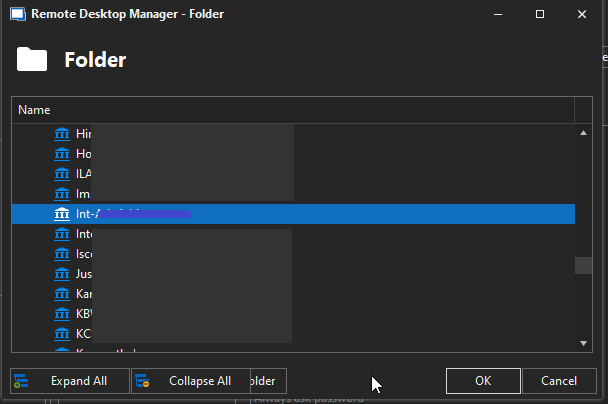
Now when i click the '...' button, it only shows me the current folder - so i have to re-select all of the other folders everytime, which is unworkable as we around 30 folders to remember each time.
Scr1 shows that multiple folders are selected.
Scr1 shows that on the list, only the current folder is then highlighted.
Audit of amendments
Hi, sorry if this is obvious, but i can't find a way of doing it.
Is there a way of seeing what changes were made to a record?
On the records logs, i can see 'Entry Updated' and the time, user etc - but i can't find anywhere what changes were actually made - is password, hostname etc.
Quick Access Toolbar
Ignore this. After all that, i tried Window>Reset Layout and it worked.
Quick Access Toolbar
I seem to have randomly lost my Quick Access toolbar in the top left and can't get it back.
I've followed other older forum posts and deleted the .QTB file, restarted RDM, restarted my machine. Toggled it off and on in the Settings, but it wont come back.
Any other ideas?
Jump Host from User Vault
I've created a RDP Jump Host to my work machine and placed it in my User Vault, however, i can't seem to use it.
When i open up an RDP from the main vault and try to select the Jump Host, the one i create doesn't appear.
Is there a way to use a jump host from the User Vault on rdps from the main/shared vault?
I dont want to put my Jump Host in the main vault as it's for my own work machine, so other colleagues dont need to see it.
SQL Query
Hi,
Sorry, my mistake! It's working perfectly.
Thanks for all of your help on this.
SQL Query
This seems to have updated as follows??

SQL Query
Thanks! This is looking promising, although i am struggling to get it to work.
Our folders aren't specialised, they are just standard folders. What would i need to use instead?
SQL Query
Hi,
So, here is an example of what our setup is like. Each of our clients have their own folder, with a couple of entries each:
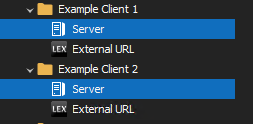
I would like to update the 'Tab Page Title' for all of the individual entries in the folders ('Server' and 'External URL' in the above example).

The 'tab page title' will need to be taken from the folder name ('Example Client 1' etc).
Is this possible?
SQL Query
Hi, the video dind't really help. The post above suggested i user the powershell, not batch edit.
I'm looking to either mass update the Name or (preferably) the Tab Page Title of my connections.
However, they will all be different - i need them to take their name from the folder/group that they're in (they are all in separate folders/groups).
Is this possible?
SQL Query
Ah i see. OK thank you.
Is it possible to batch change the name of RDP connections via the powershell?
SQL Query
Hi, i ran an SQL script on our azure database to batch update some Connection names.
However, RDM doesn't appear to be recognising the changes?
Unattended Wayk Session - Lock Screen
HI,
Thanks - sorted the new installation. The client machine is Windows Server 2012 (v6.2 Build 9200).
Unattended Wayk Session - Lock Screen
Hi, i will check - but Wayk seems to have switched to Agent Mode so i've lost the ability to remote onto another machine.
How do i set it back to normal?
Unattended Wayk Session - Lock Screen
Hi,
I've changed the settings in Wayk and in RDM. When attempting to connect via RDM it simply states 'The Connection Could Not be Established'.
Any ideas?
Unattended Wayk Session - Lock Screen
We have set up an unattended Wayk session on a client's computer, but they insist on locking the machine regularly.
When we then inialise the Wayk session, we have to type the password back in on the Windows Lock Screen.
Is there a way around this?
We are using RDM as well so the password will not be available to all of our Staff, so we need a way of bypassing the Lock Screen and gaining unattended access straight onto the machine. Is this possible?