Multiple Folders Issue

I believe something may have changed in the latest release of RDM that is effecting the ability for an entry to appear in multiple folders.
We use this setup a lot, where we have multiple clients on the same server. We had one RDP entry shard across all the folders in RDM, so we know when a colleague is on that server. This has worked perfectly up until now.
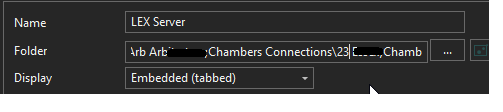
When i go into the properties of the entry, i used to be able to click on the '...' next to the Folder and then select multiple folders by holding down the ctrl key.
When editing the existing record, when i clicked on the '...' button, the list of already selected folders would be present. This is no longer the case.
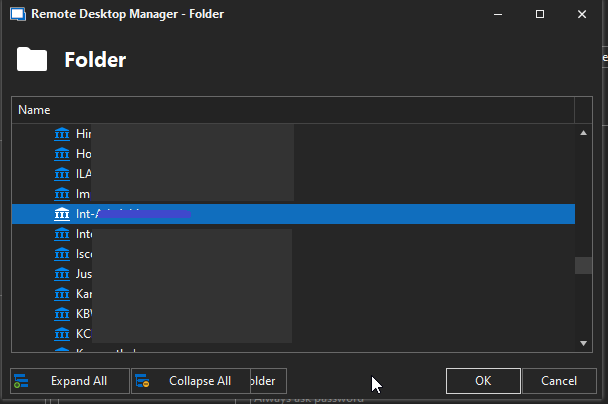
Now when i click the '...' button, it only shows me the current folder - so i have to re-select all of the other folders everytime, which is unworkable as we around 30 folders to remember each time.
- Scr1 shows that multiple folders are selected.
- Scr1 shows that on the list, only the current folder is then highlighted.
Scr2.png
Scr1.png
All Comments (10)
Hello,
Thank you for reporting this issue. I was able to reproduce on our latest version as well, so I've opened a ticket. We will get back to you in this thread once we have a fix.
Regards,
Hubert Mireault
Brilliant, thank you.
Hello,
We've found and fixed the issue. It should be available as early as next version. Thanks for bringing this to our attention!
Regards,
Jafran Majeau
Hi, unfortunately this appears to be an issue again in the latest version.
It was definitely fixed at one point, but now appears to be a problem again.
Due to how we have our whole system setup (with us sharing a connection for multiple clients), this is causing us a massive headache.
Hello,
We've been able to replicate this regression, and have applied a fix for it. Hopefully it shouldn't cause any more problems from now on. Again, thank you for bringing this to our attention. The fix should be available for 2022.3.28
Regards,
Jafran Majeau
Hi all,
There appears to be another issue with the folder selection mentioned above.
When you click onto the dots now, it displays a list of folders, but it's not clear which the entry belongs to - and i can't see a way of adding the entry to multiple folders, like i used to be able to (used to hold ctrl and then select the folders)
@Hubert Mireault @Jafran Majeau
Hello,
I can confirm that the currently selected folder does not seem to automatically be selected when pressing the button with the 3 dots, but I can still select multiple folders (by holding the Ctrl) button.
The tests I am doing are on the upcoming 2026.3.7 version, but they should apply to the currently released version as well. Can you confirm for me which version you're experiencing the issues on?
If it is the 2026.2 version, we will no longer be releasing those versions (except to fix security issues) in the future.
I will investigate and fix the issue with "currently selected folder" not showing up when opening the folder selection and come back to you.
Regards,
Jafran Majeau
Hi,
I'm using 2026.3.5.0
You're correct, the ctrl button still allows multiple folders to be selected, but the view doesn't show which folders the asset belongs to.
We often have an asset shared across 20 or 30 different folders, and the function worked perfectly pre-upgrade to 2026.3.5.0
The view seems wrong too. It appears to be nestling folders within each other - when they're not: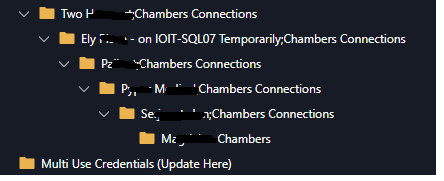
51716be4-801e-4272-805b-5416d2b8f364.png
Hello,
I've replicated the issues you're mentioning, and I've fixed them. You can expect this to work correctly with the upcoming 2026.3.7
Regards,
Jafran Majeau
That's fantastic, thank you!