Azure SQL - Quota Reached - UserInfoHistory Table Issue?

Our Azure SQL DB mas a max size of 2gb, which has worked fine for the last 3 years.
However, we're now getting warnings in RDM that the quote has been reached.
Looking at the db, it seems that the UserInfoHistory table is taking up 1.5gb.
Any suggests for clearing some space back, or reducing this table? I can't really work out what it's used for.
I've tried clearing activity logs from the RDM end, but i just get the quota warning and nothing happens.
All Comments (5)
This can be done via the Clean up manager (Administration > Clean up > Clean up manager) and select the following: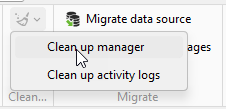
Change the date to an appropriate date & Execute.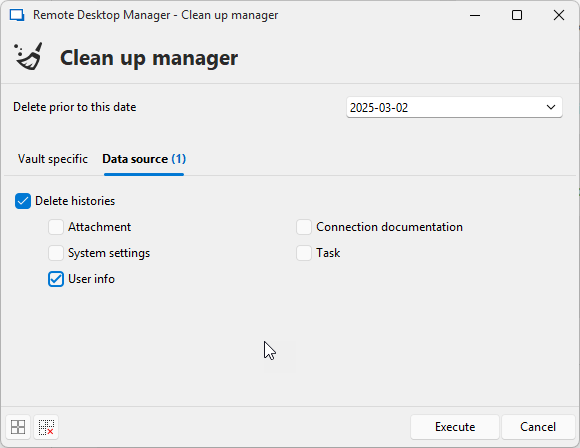
Stéfane Lavergne
93016513-53d9-4b88-92ef-2598d12aa607.png
f04caabb-daa0-4f6f-a9d1-1f44d6123929.png
It’s possible that if you’ve reached the limit of SQL, this approach may not work, as it might not even be able to log (at the database level) the fact that it’s deleting rows. In that case, you could consider truncating the table.
Truncating a table is usually not recommended, so I won’t include the command here. You can Google it if needed, or let me know and I’ll send you the command via direct message.
Best regards,
Stéfane Lavergne
It’s possible that if you’ve reached the limit of SQL, this approach may not work, as it might not even be able to log (at the database level) the fact that it’s deleting rows. In that case, you could consider truncating the table.
Truncating a table is usually not recommended, so I won’t include the command here. You can Google it if needed, or let me know and I’ll send you the command via direct message.
Best regards,
Thanks - you're correct, the cleanup fails as the limit has been reached.
Could you send me the truncation script?
Is it safe to do on that table? What does it typically store?
What does it typically store?
The dbo.UserInfoHistory table stores a history of changes to user settings and data for audit and diagnostic purposes. For example, if you encounter a possible data or settings loss for a particular user, this table can be used to diagnose the issue and potentially restore or recover some data.
Is it safe to perform actions on that table?
Unless you are currently experiencing issues with users, yes.
Could you send me the truncation script?
The script was sent to you via direct message.
Best regards,
Microsoft documentation on Truncate Table
Removes all rows from a table or specified partitions of a table, without logging the individual row deletions. TRUNCATE TABLE is similar to the DELETE statement with no WHERE clause; however, TRUNCATE TABLE is faster and uses fewer system and transaction log resources.
Stéfane Lavergne
Hi Stefane,
Thanks for your help - i truncated the table, and all is fine again now.