
Søren
RDM 2026.3.13.0 - Window garbling of undocked RDP sessions when doing a Microsoft Teams screen share
Hi Erica.
2026.3.13.0 seems to fix the open-undocked sizing and location problem. Thanks.
However -
I did notice window garbling of undocked RDP sessions when doing a Microsoft Teams screen share of the entire screen.
Also very annoying: The empty undocked tab in main window takes focus when shifting focus to undocked screen. This makes it impossible to see other docked screens while using an undocked screen.
BR,
Søren
RDM v2026.3.5.0: RDP Session Display Issue
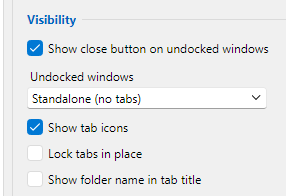
Settings for Undocked Windows is "Standalone (no tabs)":
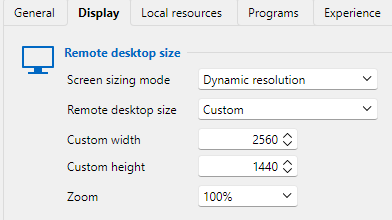
Custom Desktop size is 2560x1440:
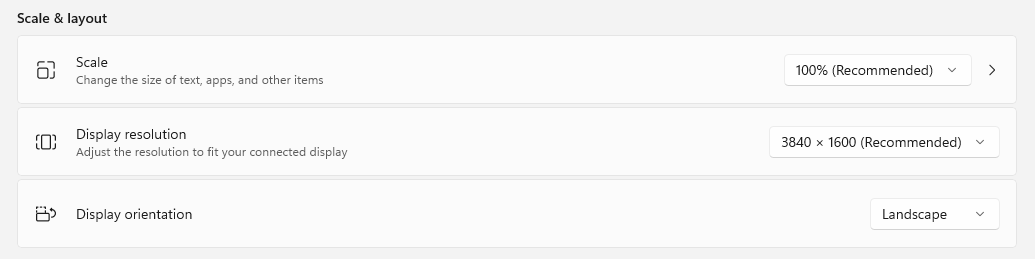
Monitor settings:
When I launch a new undocked session, it opens undocked but with the same size as docked sessions.
In my case, my docked sessions are 1800x1200 and the undocked are supposed to be 2560x1440.
RDM v2026.3.5.0: RDP Session Display Issue
Hi Alexis.
The RDP session display was missing data (displaying default background) and did not recover by itself. Hovering the mouse over the blank areas made it appear. It was all RDP sesssions that were affected by this. It may have been related to resizing, but I can't say for sure. It often appeared when having multiple SSH Terminals and RDP sessions open as tabbed sessions. When closing one of the tabbed SSH sessions, all the RDP sessions got garbled. The display data was there, just not displayed until a manual refresh or mouse-over.
My default connection is Smart Reconnect with desktop size set to Default. I'm now trying to use Dynamic Resolution to see if this works better for me.
After upgrading to 2026.3.10.0, the display garble issue seems to have been fixed. I cannot provoke this error anymore.
But launching from navigation pane directly to an undocked RDP sessions does not remember the previous size and location like it used to. It does not even respect the Custom Desktop Size setting for the session.
Setup: I'm using laptop in a dock with a 3840x1600 monitor. I'm not using multiple monitors for this. Display drivers and firmware is fully up2date.
The display issues started with 2026.3.5.0. I had no issues before this and I did not change my setup.
RDM v2026.3.5.0: RDP Session Display Issue
2026.3.9.0 has improved for undocked sessions, but not for docked sessions. The problem with docked RDP sessions typically arises when closing Terminal in the same instance.
Also - undocked sessions still does not remember previous screen size and location.
RDM v2026.3.5.0: RDP Session Display Issue
I still have major issues with undocked RDP sessions in 2026.3.8.0.
Whenever I open or close an embedded Terminal session, the existing undocked RDP session to a Win11 24H2 sometimes completely garble up.
I've tried all the settings listed here. It seems that Dynamic Resolution, fixed custom size is working the best, but still have RDP display issues.
I noticed that new undocked RDP sessions does not respect Custom Size and forgets last location. It opens in default size and location regardless of what I configure.
Update to 2025.2.13.1 - vi screen update issues and nonprinting characters appearing on screen
I'm also experiencing problems with vim scrolling 1 line up. Only the first line is updating.
Looks like the "insert line at top" is not working when moving cursor up one line at the top line.
RDM version 2025.1.41.0 last working version. 2025.2.13.1 and later is affected by this bug.
Running on Windows 11.