
ksilva
Highlight to Copy right-click Paste
Ran that as instructed and the issue remains. I did notice though this time, RDM is using the local computer buffer to paste content, not the highlighted text in the SSH session - if that makes sense.
Highlight to Copy right-click Paste
Yes, still confirmed. I used a new SSH connection, logged in, tried to highlight text, but when right-clicking RDM isn't using the copy buffer. Might be the local machine buffer possibly?
No other users available right now to confirm with
Highlight to Copy right-click Paste
I should also add "copy text on Selection" is set to "Yes"
Highlight to Copy right-click Paste
We somehow lost the functionality in RDM to highlight text in an SSH session which would copy the text, then right-click paste. I went to extent of a clean install of RDM with AppData clean but that has not fixed the issue either. Is there a setting turned on that we aren't aware of?
RDM v. 2022.3.29 w/DVLS
upgrade to 2022.3.0 - with Web Error HTTP Error 500.30 - ASP.NET Core app failed to start
sorry subject line was misleading. Upgrade to 2022.3.3 (released today). I will send over the app log, I am not seeing any of the 500 errors in there.
Hello,
Just to confirm, were you trying to upgrade to the initial beta (2022.3.0), or the latest version (2022.3.3), which was released earlier today? https://devolutions.net/server/release-notes
Could you go to the Event Viewer on the server hosting the Devolutions Server, expand the Windows Logs folder, and select the Application event log. In it, there will be more details on the 500.30 error.
You can can take a screenshot of the 2-3 errors and either post them here, or send them to service@devolutions.net
Best regards,
upgrade to 2022.3.0 - with Web Error HTTP Error 500.30 - ASP.NET Core app failed to start
Just upgraded to 2022.3.0, from Server Console everything is showing fine. Check IIS diagnostics and that is all green as well. Also checked DB tests, and they all went well.
I also checked I am at 240 for the config of aspNetCore - https://kb.devolutions.net/http-error-500_30.html
Any ideas on what to try next?
Okta Authentication - DVLS Beta 2022.3.0.0
Thanks Nicolas!!
Okta Authentication - DVLS Beta 2022.3.0.0
No need to apologize here ! It's beta, and that why we test
Looks like that workaround works pretty effectively on my systems. I will keep trying it out, but it seems to have worked well for now.
thanks for helping us out on this.
-Lani
Okta Authentication - DVLS Beta 2022.3.0.0
And thanks again for working on this if I haven't said so already
Okta Authentication - DVLS Beta 2022.3.0.0
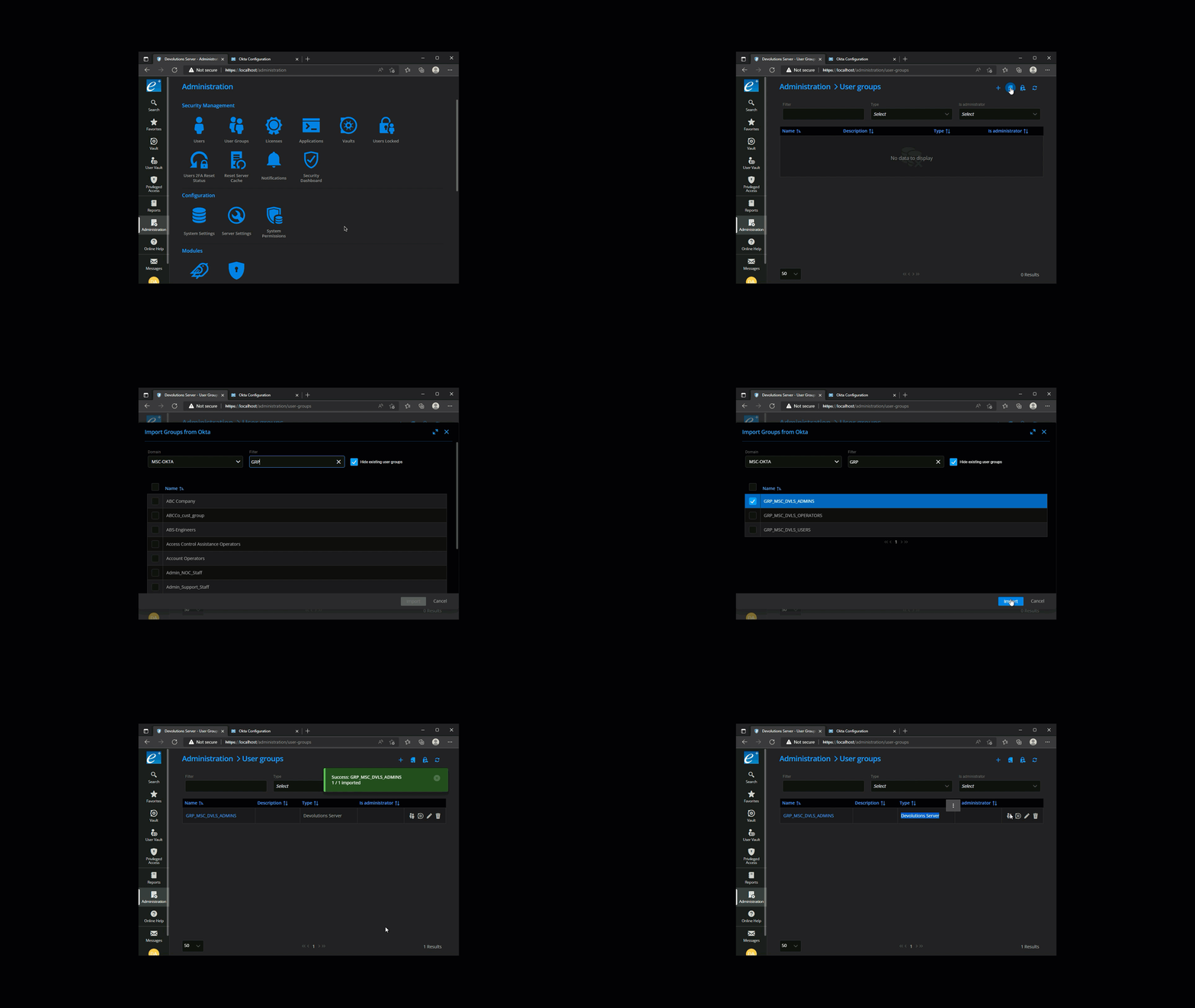
I installed the latest Beta version update VERSION 2022.3.1.0
and it still seems that when the groups are imported from Okta that the group is coded as a 'Devolutions' and not an Okta group.
I did do a DB upgrade as prescribed, and even went to the extent of stop/start of DVLS. Is there something else I should try?
Okta Authentication - DVLS Beta 2022.3.0.0
Thanks for testing that out - glad to hear we can try this again next week.
Okta Authentication - DVLS Beta 2022.3.0.0
Okta Authentication - DVLS Beta 2022.3.0.0
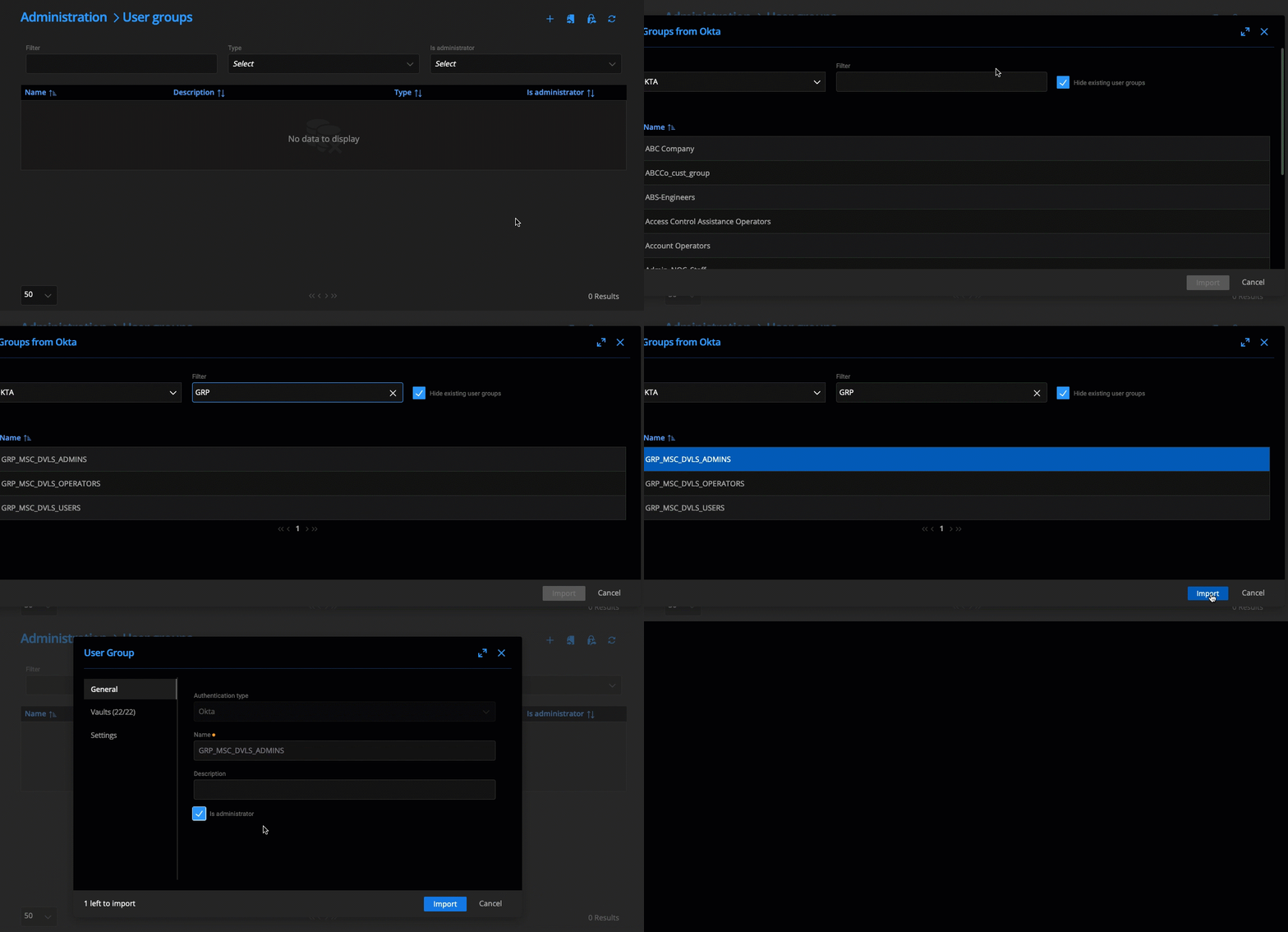
Although I agree with you that this shouldn't work, these groups were imported from Okta (not manually installed). I have attached a short video (.mp4) of the process.
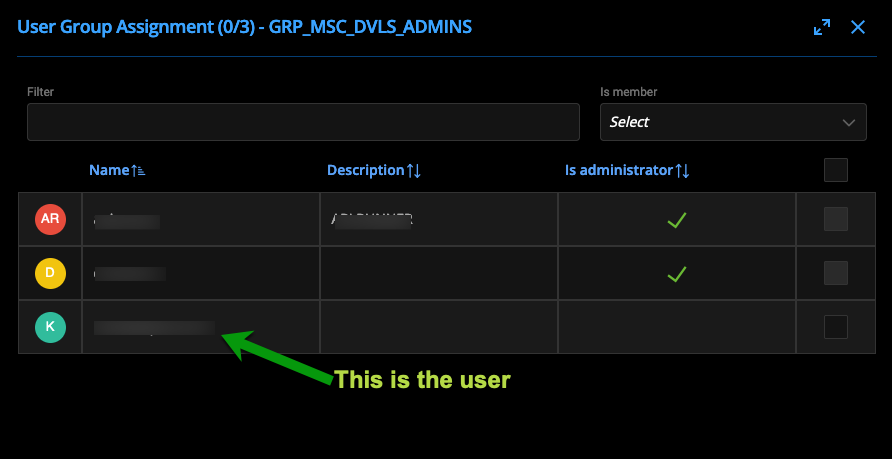
I just re-imported the group, cleared the Okta cache, and tried the login and the situation still exists where the user although a member of the group, DVLS doesn't seem to react to it.
Okta Authentication - DVLS Beta 2022.3.0.0
Here is User Group Assignment
Okta Authentication - DVLS Beta 2022.3.0.0
I believe so -....
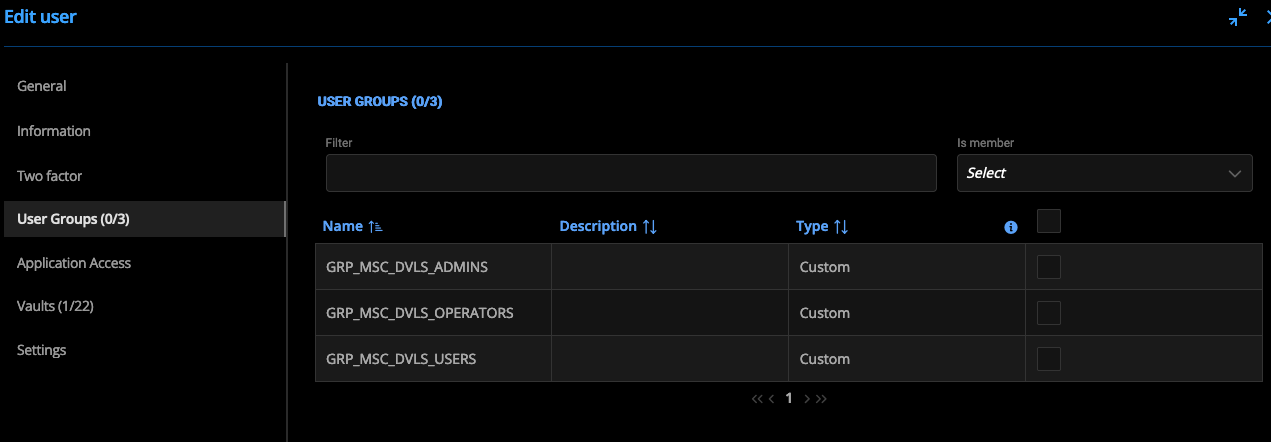
-
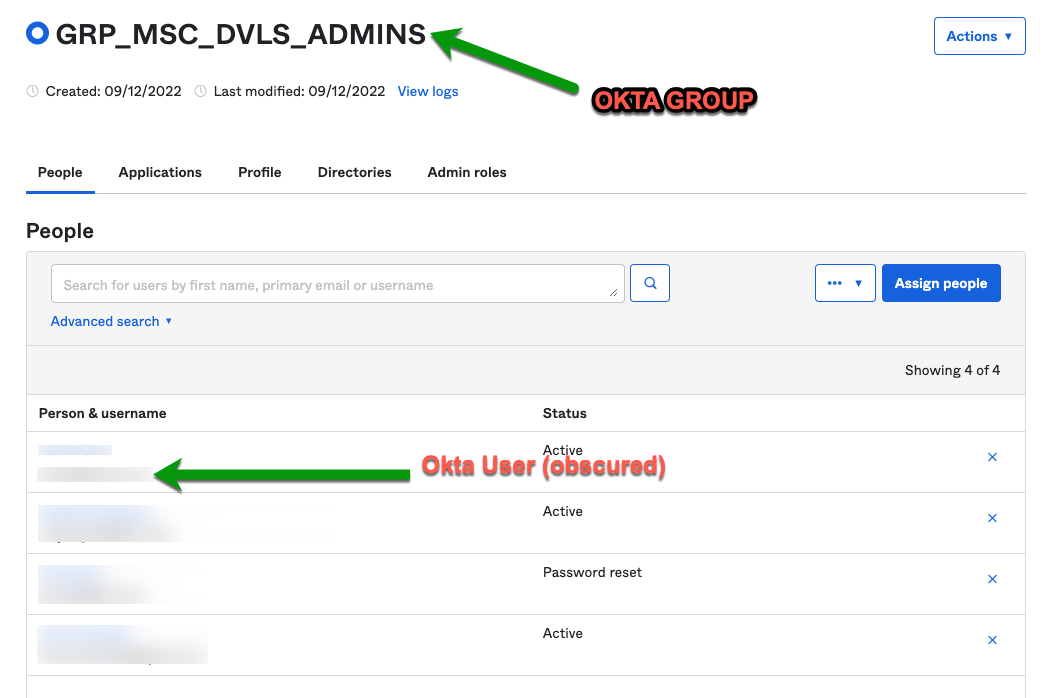
here is my setup
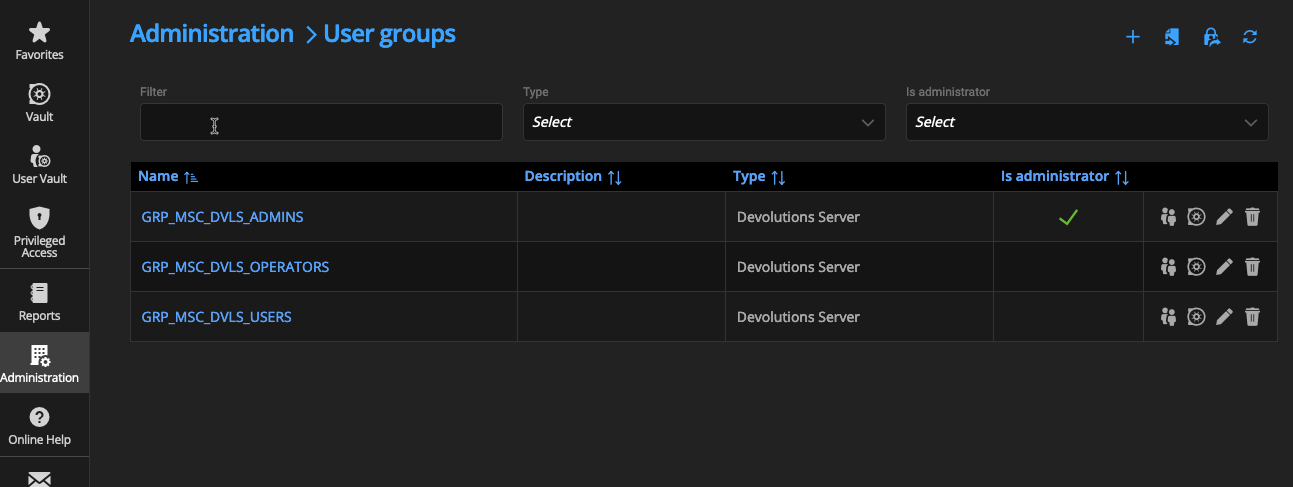
Okta Authentication - DVLS Beta 2022.3.0.0
Installed the new beta version 2022.3 , and I have built out the Okta integration. The integration lets the user in, but it does not respect which groups the users is attached to. Is the integration documentation missing a step for the OIDC groups_Claim?
Okta Groups have been imported to DVLS through the integration
Verified user membership
Any ideas?
Devolutions no longer works with Key and secret after update- not working after updating to latest version of Powershell 2022.1.10
Thanks @Richard
Hello,
The issue is related to AWS ELB, but we do not have this type of configuration in our environment. We are still waiting for additional logs.
Best regards,
Devolutions no longer works with Key and secret after update- not working after updating to latest version of Powershell 2022.1.10
Was there a fix for this one? - I seem to be running into the same exact issue
Hi Brian,
After going through the authentication part of the code base with the developer who worked on it, we narrowed down the issue to 2 options with the information you gave us.
First thing to check would be that "Cli" and "Scripting" are both allowed in your Devolutions Server settings. Those settings are located under Administration -> System Settings -> Application Access.
After that, check under Administration -> Server Settings -> Security and make sure "Force token public IP validation" and "Use X-Forwarded-For" are unchecked. Also clear the first 4 fields on that page.
If the issue persist after those validations, I'd suggest you schedule a remote session with our support team so they can better investigate your setup. To do so, send an email to service@devolutions.net with a link to this thread attached.
Best regards,
Reach HTTPS site through Devolutions Gateway or Jump Host
thank you for the update - looking forward to see the feature in June.
-Lani
Reach HTTPS site through Devolutions Gateway or Jump Host
Using RDM Enterprise trying to reach a URL on the customer side of the Devolutions Gateway - doesn't seem like WEB Sessions have an option for Devolutions Gateway. Also tried setting this up using a jump - which sort of works - however, upon login to the jump RDM Enterprise kicks up the licensing dialogue box - plus it won't carry over the URL credentials. Any thoughts on how to approach this?