
sergey
Lost Devolutions Server and offline cache
Seems I managed to extract credentials using DevoSamples-ps/module/export/Export-RDMCredentialsPassword_ClearText.ps1 at main · Devolutions/DevoSamples-ps · GitHub
Many thanks, Erica ! You saved my soul !!!!
Lost Devolutions Server and offline cache
Hi @Erica Poirier
Thank you for great troubleshooting session today. We managed to connect using PowerShell, but script you shared (DevoSamples-ps/module/export/ExportAllEntriesAllVaults.ps1 at main · Devolutions/DevoSamples-ps · GitHub) produces the error:
Line |
25 | Export-RDMSession -Path "C:\temp\Sessions_$reponame.rdm" -Ses …
| ~~~~~~~~~~~~~~~~~~~~~~~~~~~~~~~~~~~~~~~~~~~~~~~~~~~~~~~~~~~~~
| Your data source is in read-only mode.
Any way to overcome this ?
Lost Devolutions Server and offline cache
nope ( it is also grayed out
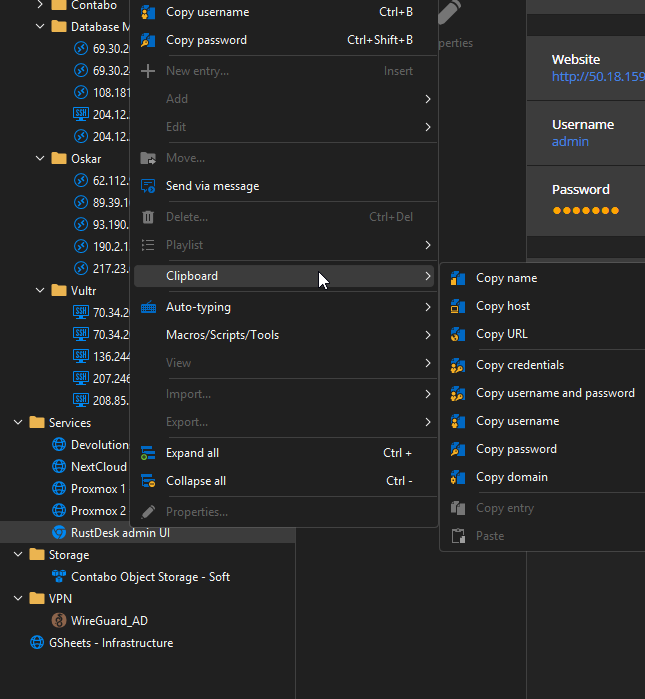
Lost Devolutions Server and offline cache
I wish I could (
A lot of items in menu are grayed out:
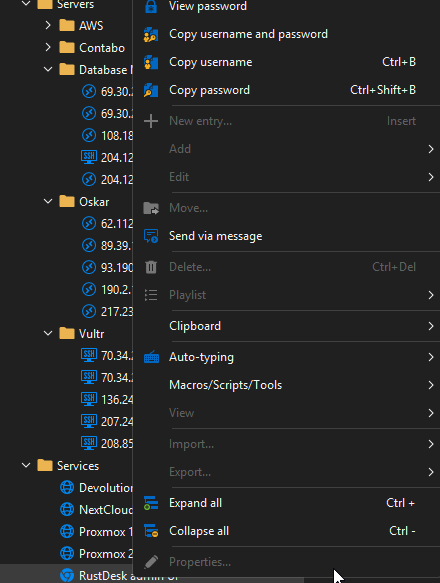
Lost Devolutions Server and offline cache
both answers - no.
serviced with DB got lost completely.
Only cache in local RDM available
Lost Devolutions Server and offline cache
Hi,
I've lost my Devolutions server (deleted whole server by mistake) so looking for a way to restore connections.
In RDP I'm able to use offline mode and connect to entries, but Export and Properties are grayed out.
How can I export data from RDM cache to rdm format so that I can import later when I install new Devolutions Servers ?
Really need your help as all data was there and only offline cache remains with me now.
Test connections automatically
Super.
Checking !
Test connections automatically
Nice !
But what about Linux and MacOs users ? )
any other ways to control RDM ?
Test connections automatically
Thank you, David
As a side question here - does Devolutions RDM have any API or way to interact using scripts or other automation ?
Quick example can be - can I execute bash script that will open RDM (if no opened) and ask it to connect to specified item ?
It can also work - people can just execute script and verify visually that connection is OK.
Test connections automatically
Dear Colleagues,
I have a need to periodically test if connections works fine or no (due to rotated credentials, changes on customers side and so on)
We have 80+ connections of different type.
How can we trigger test for all of them automatically ?
Expected result can vary, but in general, success criteria could be
SSH connected, accepted credentials and we are in console
RDP connected, accepted credentials and we are in
web site opened, accepted credentials and we are forwarded to next page
Unable to copy to clipboard with mouse in MC via SSH
yep. works fine !
thank you a lot !
just to double check - is it mentioned somewhere in guides/documentation ?
Send Alt+Enter in MC via SSH
Dear Colleagues,
I'm using 2022.3.21.0 64-bit on WIndows 10 and my favorite file manager - Midnight Commander.
when navigating files, it is very useful to click Alt+Enter and get current file name to console for commands.
But it doesn't work in Devolutions RDM.
Any chance this is a bug or can be fixed by some setting?
Unable to copy to clipboard with mouse in MC via SSH
Dear Colleagues,
Using 2022.3.21.0 64-bit on Windows 10 and my favorite file manager - Midnight Commander.
When viewing file it is not possible to select text with mouse (even with use of Shift) and copy it to clipboard.
This works fine in Putty and mRemoteNG.
Tried searching forum but without success.
Any chance it is a bug or can be fixed by some setting ?
odo.io integration
@David,
What do you think ? Worth implementing ?
odo.io integration
@David,
sorry for delay.
sure. here is their site - https://odo.io/
they offer solution on reaching sites/ssh/rdp without VPN by proxying traffic.
https://docs.odo.io/docs/ssh-server-access#section-2-ssh-private-key
https://docs.odo.io/docs/rdp-server-access
odo.io integration
Dear Colleagues,
I was wondering if you had any integration with odo.io or any plans on this matter.
FN key in Devolutions Mobile on Android
I'm afraid I do not have bluetooth keyboard (
FN key in Devolutions Mobile on Android
not sure I understand.
What do you mean by "physical keyboard" ? to my Android Samsung phone ?
FN key in Devolutions Mobile on Android
of course.
I like Midnight Commander. And many function in it can be executed using F1-F10 keys.

Also there is a workaround for putty and other ssh clients so that you can send Esc+digit that emulates this but for Devolutions on Android this is not a case.
So I can't use Midnight commander functions properly.
I used JuiceSSH client on Android previously and it could send Fn combinations.

FN key in Devolutions Mobile on Android
Dear Colleagues,
I was trying to find a way to send Fn to ssh session via Devolutions Remote Desktop Mobile on Android - haven't managed to do so.
I use Midnight commander and want to send Fn combinations.
Also tried tric with "Esc + digit" - doesn't work as well.
Tried to find in guide - no luck.
Can you please point me out on how to send Fn ?