Lost Devolutions Server and offline cache

Hi,
I've lost my Devolutions server (deleted whole server by mistake) so looking for a way to restore connections.
In RDP I'm able to use offline mode and connect to entries, but Export and Properties are grayed out.
How can I export data from RDM cache to rdm format so that I can import later when I install new Devolutions Servers ?
Really need your help as all data was there and only offline cache remains with me now.
All Comments (10)
Hello,
Thank you for your feedback.
Is the SQL database still available?
Is the DVLS Console still installed on the server where DVLS was hosted?
I'll create a ticket and send you a link to book an emergency session.
Best regards,
Érica Poirier
both answers - no.
serviced with DB got lost completely.
Only cache in local RDM available
Hello,
Thank you for your feedback.
Could you export the entries when you right-click on the root record and select Export - Export selection (.rdm)?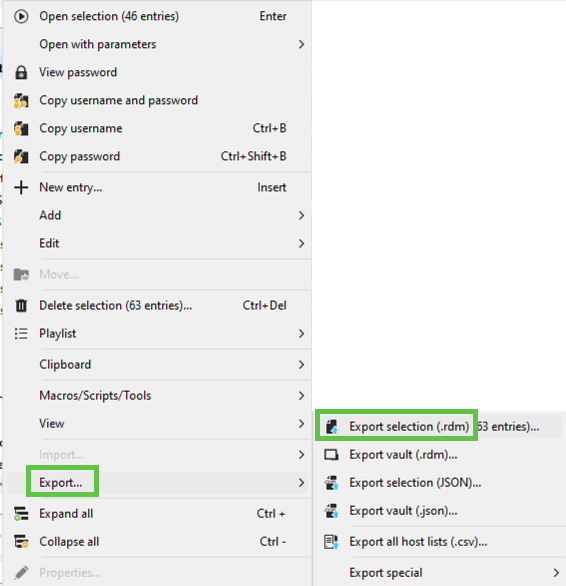
Best regards,
Érica Poirier
5bb5ff28-4229-4204-b3bc-13785ae4c560.png
I wish I could (
A lot of items in menu are grayed out: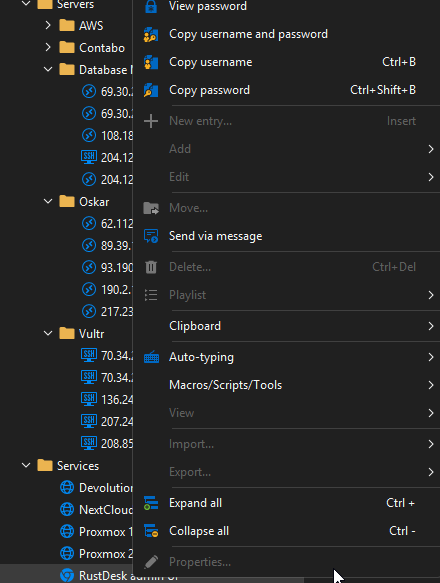
a2fc3db6-8047-4dd2-b501-0ac54fba949a.png
Hello,
Thank you for your feedback.
Are you able to copy the entries using the Clipboard - Copy entry feature?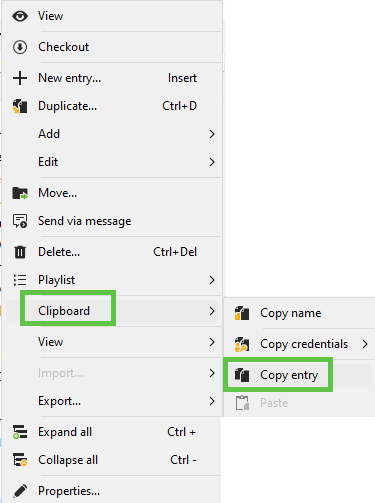
If so, do it from the root record of your vault. Then, go to File - Data Sources, create a SQLite data source, and paste the entries into that data source.
Let me know if that helps.
Best regards,
Érica Poirier
493c71e2-76df-476a-bdd8-75bb8ff83d4a.png
nope ( it is also grayed out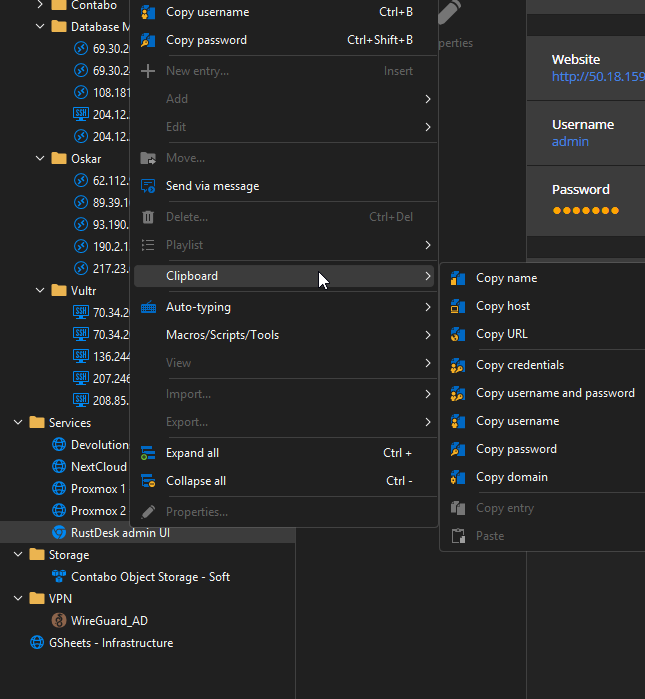
667d74e8-fcaa-4257-8c6e-2e35ced85b80.png
Hello,
Thank you for your feedback.
Please make a copy of the RDM's data source files located under the RDM Configuration files folder to prevent data loss if the offline files expire.
We will have a look during tomorrow's session if we can help you.
Best regards,
Érica Poirier
Hi @Erica Poirier
Thank you for great troubleshooting session today. We managed to connect using PowerShell, but script you shared (DevoSamples-ps/module/export/ExportAllEntriesAllVaults.ps1 at main · Devolutions/DevoSamples-ps · GitHub) produces the error:
Line |
25 | Export-RDMSession -Path "C:\temp\Sessions_$reponame.rdm" -Ses …
| ~~~~~~~~~~~~~~~~~~~~~~~~~~~~~~~~~~~~~~~~~~~~~~~~~~~~~~~~~~~~~
| Your data source is in read-only mode.
Any way to overcome this ?
Seems I managed to extract credentials using DevoSamples-ps/module/export/Export-RDMCredentialsPassword_ClearText.ps1 at main · Devolutions/DevoSamples-ps · GitHub
Many thanks, Erica ! You saved my soul !!!!
Hello Sergey,
Thank you for your feedback.
I'm glad we were able to solve your issue.
Best regards,
Érica Poirier