
StefanSa
run as, no longer works with macros / scripts
Hi there,
In the latest version v2023.2.11 the bug is fixed, thanks for this update.
best regards
Stefan
run as, no longer works with macros / scripts
Hi Min,
That had already been the case.
Best regards
Stefan

run as, no longer works with macros / scripts
You are partly right.
with this portable version, the problem with the wrong user / password does not exist,
but here the error message "The directory name is invalid" comes, which is not true.
If i start the app directly as a macro and not via the computer object, it opens without a problem.
As already mentioned, nothing has been changed in the configuration.
Any help here or a bug ?
best regards
Stefan
run as, no longer works with macros / scripts
The portable version v2023.1.20 also has this problem.
run as, no longer works with macros / scripts
Hi there,
The problem still exists in the latest version v2023.2.9
run as, no longer works with macros / scripts
Hi Etienne,
any news here ?
best Regards
Stefan
run as, no longer works with macros / scripts
Hi Etienne,
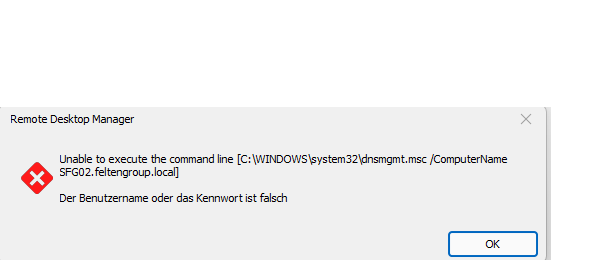
Sorry german text, but as described "User or Password" wrong.
Yes this is started locally, as the remote tools are installed on this notebook.
What seems a bit strange to me is that the error message pops up immediately. Should not first
the cmd box be started as normally ?
run as, no longer works with macros / scripts
Hi Etienne,
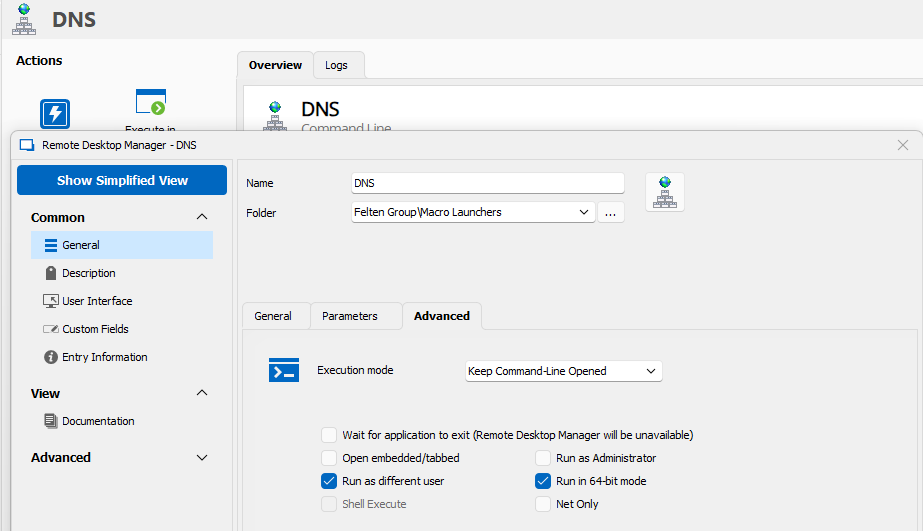
here are the screenshots from the Marco / Script.
I'm not really sure if the version 2023.1.23 had worked after all.
There were some Windows 11 updates since then. However, the last RDM version has problems with it.
Nothing has been changed in the configuration.

run as, no longer works with macros / scripts
Hello,
since version 2023.1.23 we notice that all marcos / scripts with "Run as differend user" so "run as" no longer works. Error message, wrong user / password.
Generally works "run as" on OS, one starts cmd under the relevant user also connects the remote tools without problems.
OS = Windows 11 22H2 (Build 22621.1778)
The configuration has not been changed.
Any idea what this could be ?
Best Regards
Stefan
Time out, if backup drive / path not available.
Hi, Bonjour David
Our ISP that offers cloud storage via WebDAV had a technical problem the days.
We have mapped the cloud storage via share in Windows. At the moment when the status of the cloud storage was unstable or unreachable,
RDM was also not operable for a longer period of time.
Only when we deleted the automatic backup of the DB, the problems with RDM were also solved.
Regards
Stefan
Time out, if backup drive / path not available.
Hi Samuel,
is there already an idea how to solve this problem ?
regards
Stefan
Time out, if backup drive / path not available.
Hi Samuel,
Version = 2022.3.31.0 64-bit
DB = SQLite
best regards
Stefan
Time out, if backup drive / path not available.
Hi there,
Have here the last version of the RDM in use.
We see that if there is problem with the db backup path / drive problems (drive not accessible), RDM the spinner runs and is not operable.
After a longer period of time, you can operate it again. In the moment of inoperability, it is also very difficult to terminate the RDM via Taskamanger.
Any help here ?
Stefan
[ssh] "User prompt string" analogous to "Password promp string"
Hi Hubert,
Thank you for your quick reply.
The $USERNAME$ variable now works as desired.
But now i still have the problem with the "Password prompt string". How do i pass the password here ?


Best Regards.
Stefan Sabolowitsch
[ssh] "User prompt string" analogous to "Password promp string"
Hi Hubert,
thank you for the quick reply.
Would be nice if there was a solution.
regards
Stefan Sabolowitsch
[ssh] "User prompt string" analogous to "Password promp string"
Hi there,
We have this "user prompt" with a ssh login e.g. cisco switch.

Therefore it would be good to have a "User prompt string" analogous to "Password promp string"
Thanks for RDM.
Stefan Sabolowitsch
Create subobject no longer works.
Hi Stéfane,
I miss the menu item "System Settings".

I hope not that the function is not available in the Free version.
Create subobject no longer works.
any news / help here ?
ssh with sftp option does not work as expected.
Hi Sam,
thanks for your help.
But after trying again, interestingly, it now works with VC.
What was the cause here, i can not tell you.
Best regards
Stefan Sabolowitsch
Create subobject no longer works.
Hi Daniel
I want to achieve this as in this already successfully created example.
In this example in the spec. ESET MGMT Gui

I can't get this to work anymore, maybe I'm doing something wrong. How do i create a parent / subconnection?
See the small presentation in mp4, here i try to create a web subobject for an existing rdp object.
I do not want to succeed.
thx
Stefan Sabolowitsch
ssh with sftp option does not work as expected.
Hi there,
When i edit a file with Notepad using ssh-sftp and then save it, it is also saved to the server in an updated form.
If i do the same with VC (Visual Studio Code Editor), the modifications is not saved to the server.
This would be important because of json, c++ files etc.
thx
Stefan
PS: latest RDM Version, local.
Create subobject no longer works.
Hi Gabriel,
Last RDM version, DB version 1.14.1 local installation.
The Parent menu item is missing here, but the Un-Parent menu item is available for the child object.
Best Regards
Stefan Sabolowitsch
Create subobject no longer works.
Hi there,
First, thanks for the good RDM tool.
Currently i have the problem that i can not create a subobject for an existing object.
Maybe i am doing something wrong.
It should look like this.

If i want to do this for another object, it is not created as a sub-object but on the same level structur as an independent object.
What am i doing wrong ?
thx
Stefan
No RDP login possible with option {Domain}\{User}
Hi,
>>-Does the problem happen on the desktop app as well (Windows or Mac) or just on the iOS app?
no problems here.
>>-do you use variables in the username? (e.g. $CONTACT_USERNAME$ or $CUSTOM_FIELD1$)
no
regards
Stefan
No RDP login possible with option {Domain}\{User}
Hi,
>>Are you using the latest version of the RDM iOS app?
yes
>>What model of iPhone/iPad are you using?
iPhone 8 Plus
>>What version of iOS is installed on the device
13.3.1
regards
Stefan