run as, no longer works with macros / scripts

Hello,
since version 2023.1.23 we notice that all marcos / scripts with "Run as differend user" so "run as" no longer works. Error message, wrong user / password.
Generally works "run as" on OS, one starts cmd under the relevant user also connects the remote tools without problems.
OS = Windows 11 22H2 (Build 22621.1778)
The configuration has not been changed.
Any idea what this could be ?
Best Regards
Stefan
All Comments (13)
Hello,
Just to confirm, could you send a screenshot of your entries' properties?
I will have this tested on my side.
Best Regards,
Etienne Lord
Hi Etienne,
here are the screenshots from the Marco / Script.
I'm not really sure if the version 2023.1.23 had worked after all.
There were some Windows 11 updates since then. However, the last RDM version has problems with it.
Nothing has been changed in the configuration.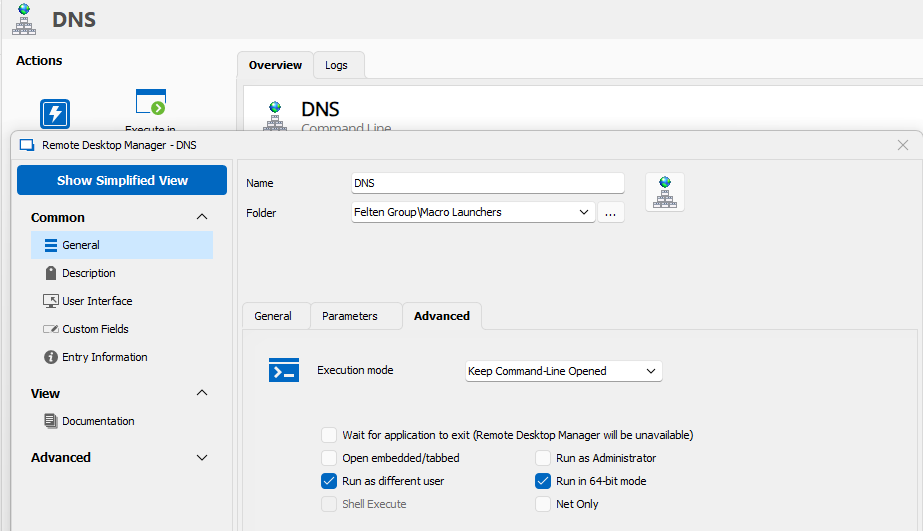

Screenshot 2.png
Screenshot 1.png
Hello,
Thank you, could you also send a screenshot of the error message that you receive?
Also, you run this command locally or in a remote session?
Best regards,
Etienne Lord
Hi Etienne,
Sorry german text, but as described "User or Password" wrong.
Yes this is started locally, as the remote tools are installed on this notebook.
What seems a bit strange to me is that the error message pops up immediately. Should not first
the cmd box be started as normally ?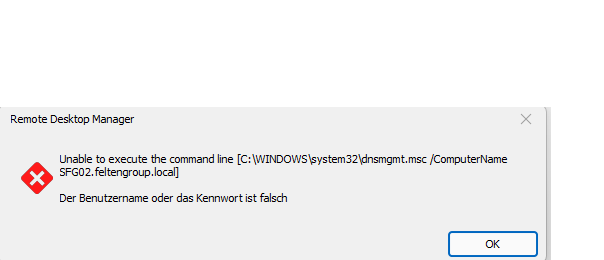
Screenshot 3.png
Hi Etienne,
any news here ?
best Regards
Stefan
Hello Stefan,
this is a bug and is already reported - in the meantime you could use a portable version with 2023.1.20 to bypass the issue for now.
Regards,
Min
Hi there,
The problem still exists in the latest version v2023.2.9
The portable version v2023.1.20 also has this problem.
Hello Stefan,
I've just tested it once more to make sure. The attached session works well for me with the portable version (2023.1.20.0)
Regards,
Min
RUN AS.rdm
You are partly right.
with this portable version, the problem with the wrong user / password does not exist,
but here the error message "The directory name is invalid" comes, which is not true.
If i start the app directly as a macro and not via the computer object, it opens without a problem.
As already mentioned, nothing has been changed in the configuration.
Any help here or a bug ?
best regards
Stefan
Screenshot 6 portable .png
Screenshot 5 portable .png
Hello Stefan,
This looks like a bug, I'll update the ticket with this information. As a test, could you set the Execution mode to Keep Command-Line Opened in the Command Line session and give it a try with 2023.1.20.0?
Regards,
Min
Hi Min,
That had already been the case.
Best regards
Stefan
08294d00-d941-4789-87a1-24f3bc217268.png
Hi there,
In the latest version v2023.2.11 the bug is fixed, thanks for this update.
best regards
Stefan