
michelle47
RDM: Ability to email all users
Feel free to close out this request.
I found I could export a list of all users, then copy paste into excel and then just select all the email addresses and send a message to all my users of RDM. This will suffice for me.
Thank you for responding.
Michelle
RDM: Ability to email all users
Please add a feature which will allow administrators the ability to email all users in RDM.
Load from System Information
FQDN shows same result.
I run the RDM application as my regular account.
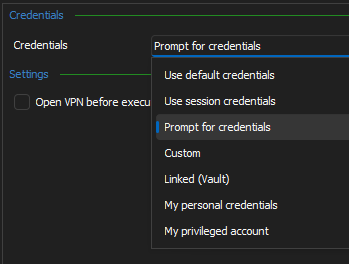
When I connect to a server, I am prompted for my Smart Card credentials and PIN.
This feature would really be nice if it worked.
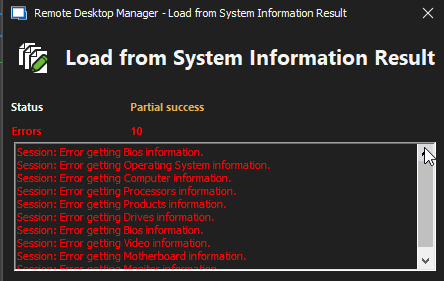
However, when you click the "Load from System Information" button, I am not prompted for or offered the choice to enter my Smart Card credentials.
So, the result is:
Load from System Information
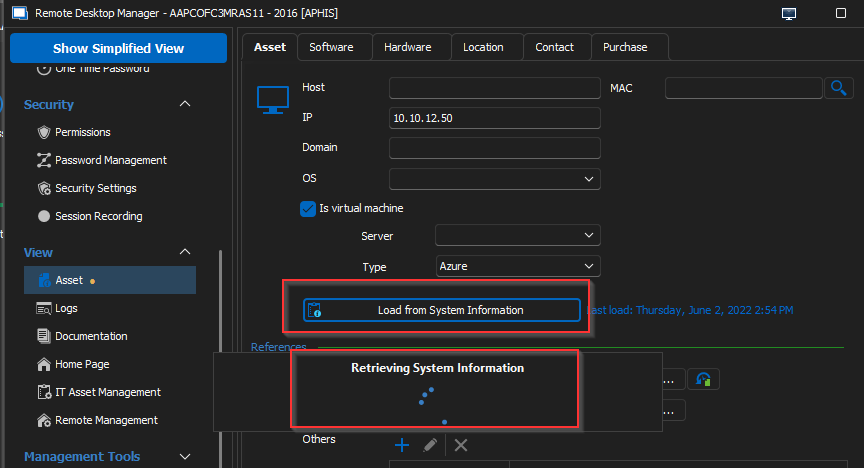
On an RDP Session, under Properties, then "View" there is an "Asset" tab where one is offered the option to “Load from System Information”. Please add and option under the "Tools" section to force, when the “Load from System Information” button is clicked, to use a "Smart Card" to connect to the computer/server and pull the System Information.
Documentation not saving when page updated.
Disregard, version 2022.2.26.0 fixes the issue.
Documentation not saving when page updated.
Using Enterprise Edition 2022.2.23.0 64-bit, when I change / update a page on the "Documentation" page the update does not stick.
As soon as I leave the page and return the update is lost.
Activity Log Entries - Non-Modal Screens
Yes, with the Notes fields. And maybe a checkbox or something so we can limit the report to only activity logs that have notes in the Notes field?
The column customization would be really nice, just report on what one wants to see.
Thank you.
Activity Log Entries - Non-Modal Screens
Yes, I saw that and was trying to figure out a way to add the notes and remove some of the other columns.
I take it we do not yet have the option of selecting the information we'd like into a custom report?
Activity Log Entries - Non-Modal Screens
Thank you!
One last (I hope) question, is there a way to then 'report' from my activity logs for the servers I have performed activities on for say the week?
(I am still trying to figure this one out)
I am hoping to use this report, if possible, for a WAR (Weekly Activity Report), which would show the server name, Start/End times, and Notes.
Thanks again.

Activity Log Entries - Non-Modal Screens
I have the Dashboard open, as shown, and I would prefer to be able to double-click and edit the notes in there so I could this on several servers at a time since the second picture shows me the server name I am working on which means if I have 2 or 3 of these up for editing while performing tasks on the servers I won't edit the wrong entry. If possible.


Activity Log Entries - Non-Modal Screens
I don't see any right click > edit notes on any Activity Log entry, and you are correct, there is no way to edit the Notes field, I was hoping they could make it so I could edit the Notes field, just add my comments so when I look back, I can see what I was doing at that time. I know there is a pre and post logon event we can modify but sometimes we are doing several things on a server and I would like to just add them to the notes field as I go along.
Activity Log Entries - Non-Modal Screens
When one double-clicks on an Activity Log entry, could you please make the window which pops open "Non-Modal" so one can push it off to the side so during the connection, one can add notes to the Notes field, thus documenting the actions they are performing during their connection to the server.
Thank you for your consideration.
Hide empty folders
Hubert,
I would like to second this request but ask that the ability to hide any/all the folders in the root, maybe a checkbox.
We are now up to 32 users and climbing and being an admin I see all the individual folders that have been created for the various admins.
I would like to only see my folder 99% of the time and only have to view another's folder if I am assisting them with something.
Thank you for your consideration.
RDM Dashboard View Export To Excel
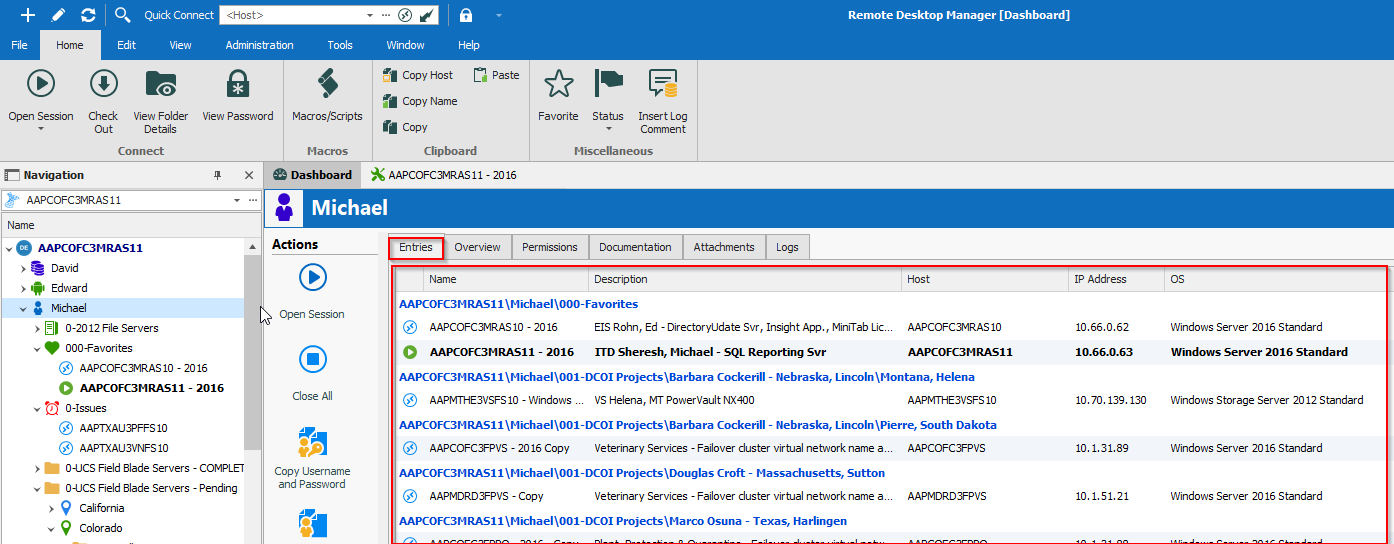
All the ‘Entries’ shown in the red box below.
One should be able to highlight all the entries and either copy
or export them but so far nothing work to give me the information shown in the
view.
I have 290 entries under my name and I am trying to share the information shown, in text format only, with a co-worker of mine who needs the information shown for a project he is working on.
Thank you.
RDM Dashboard View Export To Excel
Please add the ability to export to Excel, the Dashboard view which includes the Name, Description, Host, IP Address, and OS fields? All the current options fail to export the data which is relevant to me. Thank you.
Automatic fill-in of the information tab
This is what I use for now.
This should look correct once copied and pasted into PowerShell
# First, this worked for me, my hope is you will find it helpful.
# I called this my RDM_MetaData_Updater.ps1
# Remote Desktop Manager (RDM) Version 2020.1.20.0 64-bit Enterprise Edition
# Using a SQL Server 2016 DB
# I am running this in PowerShell version 5.1.18362.752 as an administrator on my local desktop.
# RDM is running on this same desktop as my regular user account.
Clear-Host
Import-Module "C:\Program Files (x86)\Devolutions\Remote Desktop Manager\RemoteDesktopManager.PowerShellModule.psd1"
# Set your DS (Data Source), mine is on our SQL server
# You can find your data source under in your RDM under File/Data Sources
$DS = Get-RDMDataSource -Name MySQLServerName
# Next, I get all of the sessions under my group name.
# This grabs everything, including folders, etc.
$Sessions = Get-RDMSession -GroupName "Michael" -IncludeSubFolders
# Next, for testing, I wanted to update the IP Address on a single server
# in the RDM.
ForEach ($Session in $Sessions)
{
# So, if the Host name matched the server I was looking for then I would run my script.
# For me, if I wanted to run through all my servers I would change the IF line to:
# If($Session.ConnectionType -eq "RDPConfigured")
# You can get as creative as you'd like.
If($Session.Host -eq "NameOfServerToUpdate")
{
# I just wanted to see it found the correct host.
$Session.Host
$IPv4Address = (Get-ADComputer -Identity $Session.Host -Properties IPv4Address).IPv4Address
# And here I just wanted to what IPAddress was found.
$IPv4Address
Set-RDMSessionProperty -ID $Session.ID -Path "MetaInformation" -Property "IP" -Value $IPv4Address
# Do not forget to do a refresh on your RDM console to see the updated information.
}
}
Inventory report and populating "Information" tab
# First, this worked for me, my hope is you will find it helpful.
# I called this my RDM_MetaData_Updater.ps1
# Remote Desktop Manager (RDM) Version 2020.1.20.0 64-bit Enterprise Edition
# Using a SQL Server 2016 DB
# I am running this in PowerShell version 5.1.18362.752 as an administrator on my local desktop.
# RDM is running on this same desktop as my regular user account.
Clear-Host
Import-Module RemoteDesktopManager
# Set your DS (Data Source), mine is on our SQL server
# You can find your data source under in your RDM under File/Data Sources
$DS = Get-RDMDataSource -Name MySQLServerName
# Next, I get all of the sessions under my group name.
# This grabs everything, including folders, etc.
$Sessions = Get-RDMSession -GroupName "Michael" -IncludeSubFolders
# Next, for testing, I wanted to update the IP Address on a single server
# in the RDM.
ForEach ($Session in $Sessions)
{
# So, if the Host name matched the server I was looking for then I would run my script.
# For me, if I wanted to run through all my servers I would change the IF line to:
# If($Session.ConnectionType -eq "RDPConfigured")
# You can get as creative as you'd like.
If($Session.Host -eq "NameOfServerToUpdate")
{
# I just wanted to see it found the correct host.
$Session.Host
$IPv4Address = (Get-ADComputer -Identity $Session.Host -Properties IPv4Address).IPv4Address
# And here I just wanted to what IPAddress was found.
$IPv4Address
Set-RDMSessionProperty -ID $Session.ID -Path "MetaInformation" -Property "IP" -Value $IPv4Address
# Do not forget to do a refresh on your RDM console to see the updated information.
}
}
My Inventory Report
Is there anyway to limit the inventory report gathering to a specific OU?
Copy Folder and All Objects (Servers) Within
Sweet! Thank you! Awesome support!
Copy Folder and All Objects (Servers) Within
I cannot find how to do this so assuming it is not possible, please correct me if I am wrong.
Could we please have the ability to copy a folder and all objects within?
For instance, I have a folder, Data Center Print Servers, with four (4) servers within.
A colleague of mine would also like to have these same servers under his area and instead of copying each individually, he would like to just copy my folder and add it to his area.
Thank you for your consideration.
Auto Update Entry Properties from AD
Would it be possible to add the ability for the program to do the following?
When you click or right-click on a Windows Server name in the tree, have the option to have the application pull the description, IPAddress, Subnet, Gateway, Domain, etc., and any other fields you may feel like, and populate / update the current entry properties with information from Active Directory.
Thanks.