
k526816
Does RDM Serial Port support named pipe?
Hi,
Would like to know if RDM Serial Port (or other type) support named pipe in windows?
Thank you.
Version 2025.2.17.0 SSH terminal display gibberish characteres
It seems to occur randomly and more often when showing/displaying large amount of text on terminal.
Example:


Steps to reproduce:
1. Perform a directory listing loop (using ubuntu as example)
while true; do ls /etc/ssl/certs/; sleep 1; done;
SSH Port Forward seems to be broken in version 2025.2.16.0
Hi @Denis Vincent ,
I have tried 2025.2.17.0, the dynamic port forwarding issue still persist.
However, i am able to find out the issue.
There is this jumphost that for some reason would hang (without timeout) when a connection is established to "config.edge.skype.com". When this happen, the Port Forwarding no longer listen/process new incoming connections request on port 50001.
So in 2025.1.41.0, the same connection to "config.edge.skype.com" would hang (without timeout) but the Port Forwarding continue to be able to process new incoming connection request on the port 50001 without issue.
SSH Port Forward seems to be broken in version 2025.2.16.0
Hi @Stephan Haupt ,
>>In addition to Denis’s questions, could you please confirm whether there are any special characters used in the Host of your Port Forward entry?
No special character.
>> Also, if possible, an export of your session (without including your credentials) would be very helpful for further troubleshooting.
As attached but i masked some entry and removed the credential entry.
SSH Port Forward seems to be broken in version 2025.2.16.0
Hi,
>> For the missing local port forwarding, I have found a possible cause for this bug and a fix has been made that will be available in the next release.
For the record, the Local Port Forwarding, the is IPv6 that I am dealing with and it seems to not parse the IPv6 correctly.
>> What I understand is that no connection is successful going through the dynamic port forwarding, am I correct?
There are logs indicating connection open and closed but the page is not loading.
The xxx.yyy.local is a masked domain and it will be resolved to ipv6 address.
I have even try to use IP directly instead of hostname, still no luck.
Listening on: 127.0.0.1:50001D
Received global request: hostkeys-00@openssh.com, no need to reply
New connection on: 127.0.0.1:50001
Sending forward channel open request: 0|- xxx.yyy.local:443
Received channel open confirmation: 0~0 WS 200000|2097152 MPS 32000|32768
Successfully established connection 127.0.0.1:50001 -> xxx.yyy.local:443
New connection on: 127.0.0.1:50001
Sending forward channel open request: 1|- unitedstates.smartscreen.microsoft.com:443
Sending channel close request: 0|0
Received channel close request: 0|0
Closed tunnel: 127.0.0.1:50001|:0
Received channel open confirmation: 1~1 WS 200000|2097152 MPS 32000|32768
Successfully established connection 127.0.0.1:50001 -> unitedstates.smartscreen.microsoft.com:443
New connection on: 127.0.0.1:50001
Sending forward channel open request: 0|- config.edge.skype.com:443
>> If so, what is connecting to it? (another entry from RDM, an external application?)
Yes, another entry from RDM (edge browser entry) with --proxy-server="socks5://127.0.0.1:50001" settings
>> and what proxy protocol is it setup to use? (SOCKS4, SOCKS4a or SOCKS5?)
SOCKS5 only
SSH Port Forward seems to be broken in version 2025.2.16.0
Sure, i will try to explain.
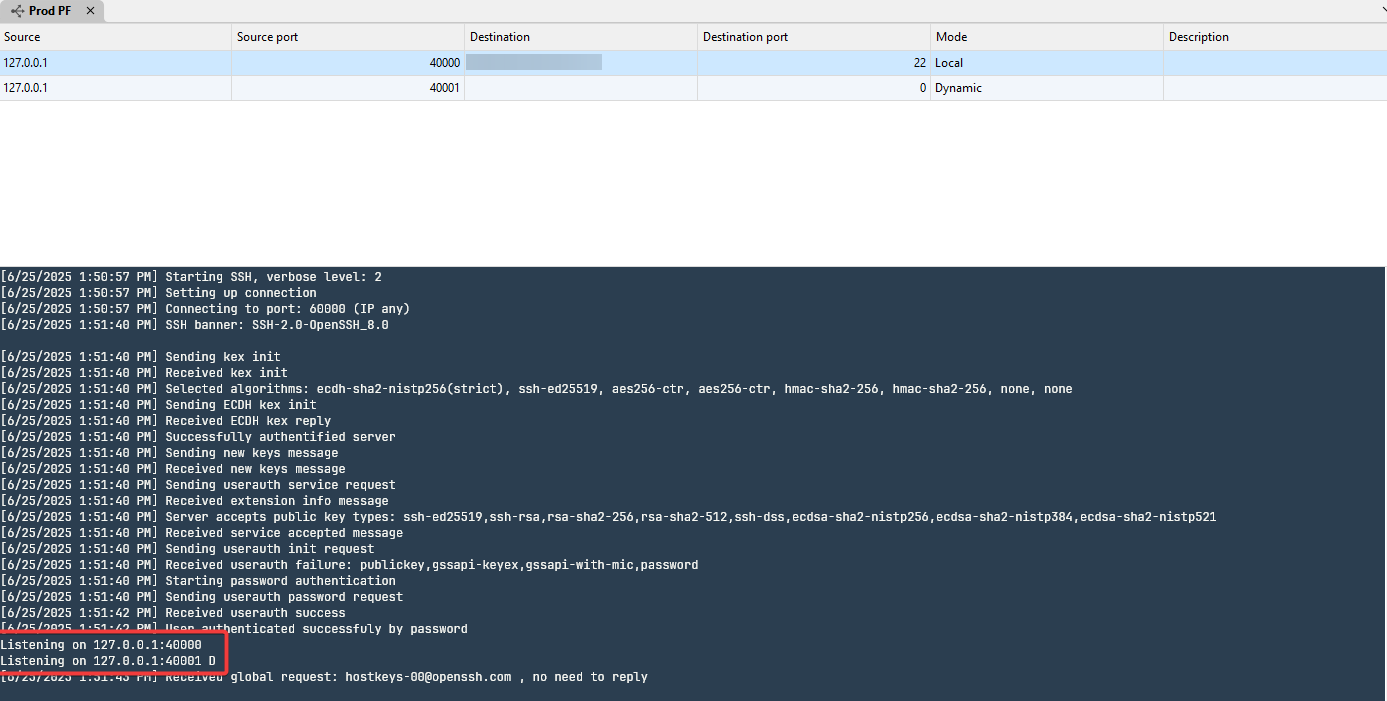
Below is the port forwarding config in version 2025.1.41.0 and as you can see in the red box highlighted , there are two listening when the port forwarding is enable
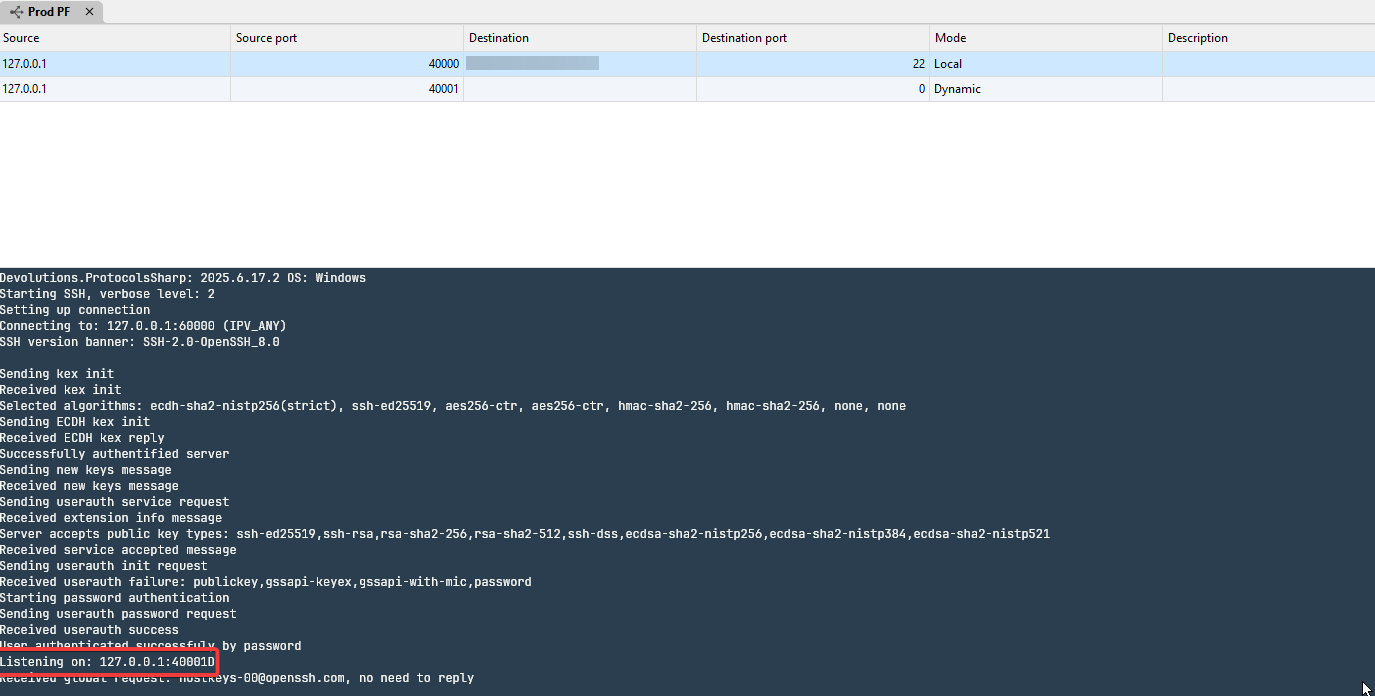
Below is the port forwarding config in version 2025.2.16.0 and as you can see in the red box highlighted , there are only one listening when the port forwarding is enable. The local port forwarding is missing and on top of that the dynamic port forwarding is actually not working as well.
SSH Port Forward seems to be broken in version 2025.2.16.0
I am having issue with SSH Port Forward in version 2025.2.16.0, when fallback to version 2025.1.41.0, the same config is working without issue.
Winscp not embedding on 2024.3.17
After upgrading to 2024.3.17, the winscp is not able to embedded to RDM window now. It is working fine on 2024.3.16
control + mouse wheel zoom not working after latest upgrade
I am facing this problem as well after upgrading to version. 2023.2.33.0 64-bit. The control button + mouse wheel zoom does not work on the SSH terminal.
Random RDM Not Responding on 2023.2.18.0
>> I'd like to know, how many SSH tabs were opened at once before you began closing them ?
Probably around 3 to 4.
Sometimes it is a mixture of SSH tabs, Edge Browser and WinSCP.
Random RDM Not Responding on 2023.2.18.0
Hi,
I am facing random RDM not responding when closing SSH terminal window.
The error messages I get from application logs are as follow:
[7/26/2023 9:47:44 PM - 2023.2.18.0 - 64-bit] Error Silent: System.Threading.ThreadAbortException: Thread was being aborted.
   at System.Threading.WaitHandle.WaitOneNative(SafeHandle waitableSafeHandle, UInt32 millisecondsTimeout, Boolean hasThreadAffinity, Boolean exitContext)
   at System.Threading.WaitHandle.InternalWaitOne(SafeHandle waitableSafeHandle, Int64 millisecondsTimeout, Boolean hasThreadAffinity, Boolean exitContext)
   at System.Threading.WaitHandle.WaitOne(Int32 millisecondsTimeout, Boolean exitContext)
   at Devolutions.RemoteDesktopManager.Business.HttpBrowserLinker.Run()
[7/26/2023 9:47:44 PM - 2023.2.18.0 - 64-bit] Error Silent: System.Threading.ThreadAbortException: Thread was being aborted.
   at Devolutions.RemoteDesktopManager.Business.HttpBrowserLinker.Run()
   at System.Threading.ExecutionContext.RunInternal(ExecutionContext executionContext, ContextCallback callback, Object state, Boolean preserveSyncCtx)
   at System.Threading.ExecutionContext.Run(ExecutionContext executionContext, ContextCallback callback, Object state, Boolean preserveSyncCtx)
   at System.Threading.ExecutionContext.Run(ExecutionContext executionContext, ContextCallback callback, Object state)
at System.Threading.ThreadHelper.ThreadStart()RDM v2020.1.19.0 Not able to embed WINSCP window
Hi David,
Thanks for the info that WinSCP and IPV6 integration is yet to be available. Hope it will be available soon.
As for the Host and Proxy Host syntax, it is as follow:
For host field, i have tried both this format 2001:db8:0:0:0:0:2:1, [2001:db8:0:0:0:0:2:1], the result is similar not working.
The Proxy Host (IPv6) is a SSH tunnel to JumpHost with dynamic (-D) options.
This same tunnel works on Winscp
There is one thing i see missing in the Native SCP. I cannot specify the shell to use. I need to specify the shell for my use case.
The sample Winscp setting is as follow:
/rawsettings Shell=bash ProxyHost=127.0.0.1 ProxyPort=8081 ProxyMethod=2
The SFTP is not available on remote server and I can only use SCP in my use case.
Thank you.
RDM v2020.1.19.0 Not able to embed WINSCP window
Hi,
Sorry to bump this old thread.
I have tried on RDM v2020.2.12.0 and it seems that the problems still persist. The WINSCP in IPV6 is not embedded and the Native SCP does not work on proxy.
Just checking if the mentioned issues are fixed in RDM v2020.2.12.0
Thank you.
RDM v2020.1.19.0 Not able to embed WINSCP window
Hi David and Denis,
Thanks for all the support!
Hope the next release would be available soon :)
Thank you.
RDM v2020.1.19.0 Not able to embed WINSCP window
Hi,
Great! At least the issue is found.
I have try the built-in SCP but I cant seems to get it work with the sock5 proxy, no specific error was given even with verbose log.
Thus resorting to winscp
Thank you..
RDM v2020.1.19.0 Not able to embed WINSCP window
Hi,
I have tested IPv4 with sock5 proxy settings, it is able to embed properly.
The information you have requested are as follow:


RDM v2020.1.19.0 Not able to embed WINSCP window
The WINSCP window is not embedded with the following configuration:
Following is the IPv6 + Sock5 Proxy connection:

The WINSCP application actually started up ok but RDM complains the following:

The WINSCP do not have problem embedding into RDM if I am using direct IPv4 address.
Not too sure if it is IPv6 or the extra Tunnel setting which is causing the issue here.
Do let me know if additional information is required.
Thank you.
2019.2.12.0: SSH Shell ask for user password (access by certificate)
Hi,
I am having the same issue as well in v2019.2.13.0.
Attached is the log files. It seems that the "RSA private key check failed" is happening.
The same key is able to be used to perform cert login using other client without issue.
On a side note, "SSH Port Forward" -> "Private Key" -> "Private Key type" -> "Data" is not able to delete or paste private key (no response when click).
Not too sure what is the error.
RDM Free v2019.1.30.0 force 2 factor authentication on new terminal type
In the RDM FREE v2019.1.30.0, the SSH session keeps popping out 2 factor authentication in the new terminal type although password has been configured.
It only resolved after choosing the terminal type back to the Legacy Terminal ins File -> Options -> Types -> Terminal -> User Legacy Terminal