
cmanns
RDMFree High CPU Load and random Freezes
Thanks for the replies.
So far i haven't seen the same behaviors from RDPFree. I can significantly reduce the CPU load on my host machine if i change the refresh in the NetData VMs (which is odd) but, I think my original issue of RDMF freezing up kinda got lost.
Is anyone else seeing that behavior? or is my use cas the only one?
RDMFree High CPU Load and random Freezes
Processor AMD Ryzen 7 2700X (8 core) 4.15Ghz
Windows 10 Pro
Version 2004
OS Build 19041.329
Experience Windows Feature Experience Pack 120.2202.130.0
RDM runs with up 25% CPU and for no reason i can tell will just freeze.
I've looked at the logs there is nothing in there except the connections Info. There is also no crash detail . the only recovery is to force RDM to close via task manager.
I Just saw a thread on using RDPFree as the type so i've switched over to that. So far the CPU usage is back down to 10% (which is more inline with what i expected) but I'll have to wait and see if the app locks up again.
Screenshot of my typical RDM setup and task manager usage are attached.


RDM-Free 2020.2.12.0 64bit - Chome error?
That fixed it. Thank you.
I had the profiler running because RDM free hagns after a while and i was trying to debug.
RDM-Free 2020.2.12.0 64bit - Chome error?
When trying to edit properties for a Web browser session. If Application is "default" doesnt really occur, if Chrome or Firefox selected for application this occurs consistently..
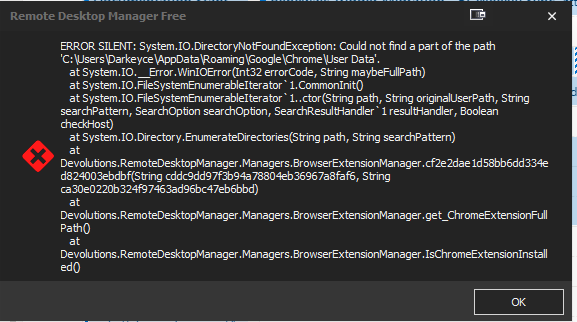
Grr Misspelled title "Chrome", can't fix it. :(
Windows 10 Pro
Version 2004
OS Build 19041.264
Method for Clearing Browser Cache?
Hello,
It's possible to accomplish this for our embedded Chrome browser.
To do so, go in File -> Options -> Types -> Web and press the Clear Cache button at the bottom.
Please note that we use a third party library for the integration of Firefox and Chrome embedded. It's not the original browser that is resized for fit in the tab.
Best regards,
Thank you for identifying that option...I missed it repeatedly.
It is however frustrating that I cannot be using any Web sessions for that clear button to work.
Regards,
Christopher
Method for Clearing Browser Cache?
I've got a web browser session in which certain screen items have become non-responsive. If I use a standalone chrome browser things work fine. All i can assume is that the browser cache needs to be cleared.
is there a way to clear the browser cache of an RDM web session?
Thanks