Method for Clearing Browser Cache?
I've got a web browser session in which certain screen items have become non-responsive. If I use a standalone chrome browser things work fine. All i can assume is that the browser cache needs to be cleared.
is there a way to clear the browser cache of an RDM web session?
Thanks
All Comments (16)
Hello,
It's possible to accomplish this for our embedded Chrome browser.
To do so, go in File -> Options -> Types -> Web and press the Clear Cache button at the bottom.
Please note that we use a third party library for the integration of Firefox and Chrome embedded. It's not the original browser that is resized for fit in the tab.
Best regards,
Jeff Dagenais
hi!
May I suggest that you implement an option "clear embedded browser caches on startup" (or per browser option)?
KR
Guenther
@gpunktschmitz,
I have assigned this thread to our engineering department so that they can have a look at the feasibility of this request.
Best regards,
Jeff Dagenais
Thank you for identifying that option...I missed it repeatedly.
It is however frustrating that I cannot be using any Web sessions for that clear button to work.
Regards,
Christopher

Hello,
We added an option to clear embedded browser(chrome) cache on startup.
It will be included in the next release of RDM.
Best regards,
Could this also being added to firefox?
Best regards,
Kaj Graficom
@Arcangel321
I think it's possible to do that but I have to mention that Firefox embedded will be soon deprecated. Unfortunately it's not longer possible to update the component that we use (Firefox has changed the way they package the engine) and we are using an old Firefox version no longer supported (60). Are you able to switch to embedded Chrome?
Regards
David Hervieux
To bad!
We just switched over to Firefox for our Webmail ECP because it's not working with chrome(errors)
Best regards,
Kaj Graficom
We could try to update the Chrome component.
David Hervieux
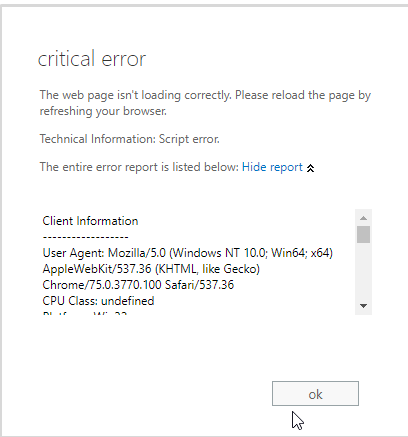
It only happens in the embedded version of chrome:
Client Information
------------------
User Agent: Mozilla/5.0 (Windows NT 10.0; Win64; x64) AppleWebKit/537.36 (KHTML, like Gecko) Chrome/75.0.3770.100 Safari/537.36
CPU Class: undefined
Platform: Win32
System Language: undefined
User Language: en-US
CookieEnabled: true
-----------------
Exception Details
-----------------
Date: Tue Mar 24 2020 13:55:32 GMT+0100 (Central European Standard Time)
Message: Script error.
Url:
Line: 0
Call Stack
----------
Error
at Function.ErrorHandling.$EM (https://webmail.XXXXX.com/ecp/15.0.1497.6/scripts/common.js:1:172926)
at ErrorHandling.showUnhandledException (https://webmail.XXXXXX.com/ecp/15.0.1497.6/scripts/common.js:1:172011)
Dump Event
----------
isTrusted = true
message = Script error.
filename =
lineno = 0
colno = 0
error = null
NONE = 0
CAPTURING_PHASE = 1
AT_TARGET = 2
BUBBLING_PHASE = 3
type = error
target = [object Window]
currentTarget = [object Window]
eventPhase = 2
bubbles = false
cancelable = true
defaultPrevented = false
composed = false
timeStamp = 5417.729999986477
srcElement = [object Window]
returnValue = true
cancelBubble = false
path = [object Window]
composedPath = function composedPath() { [native code] }
stopPropagation = function stopPropagation() { [native code] }
stopImmediatePropagation = function stopImmediatePropagation() { [native code] }
preventDefault = function preventDefault() { [native code] }
initEvent = function initEvent() { [native code] }
Detailed Call Stack
-------------------
Can ou disclose when firefox is being removed from embedded?
Best regards,
Kaj Graficom
2020-03-24 13_55_35-Remote Desktop Manager.png
Hello,
Sorry to jump in, but for your Chrome error, does this occur when using Office 365 services? If that is the case, could you try using the option "disable autofill on new tab"? It can be found here: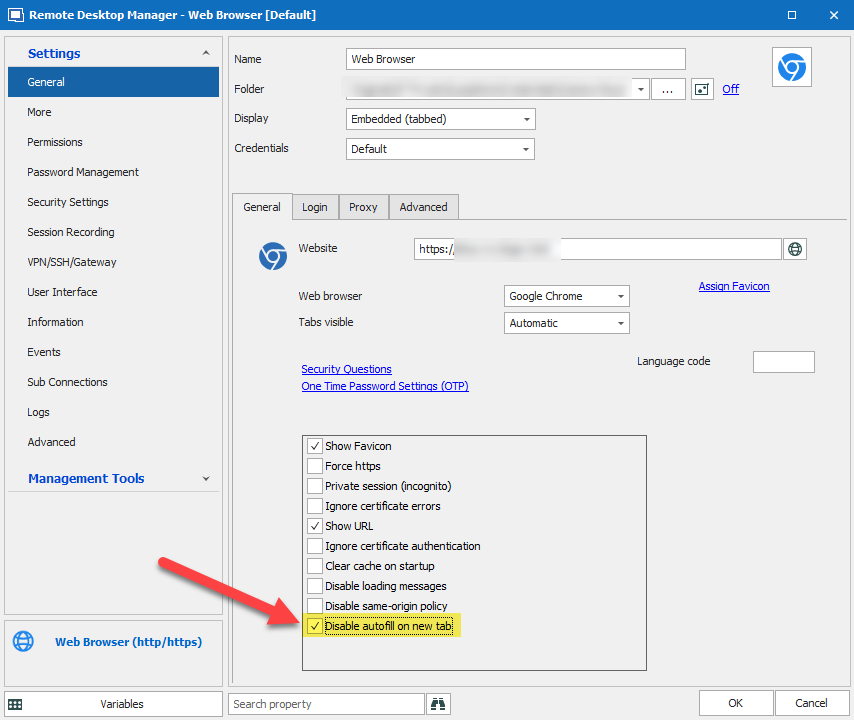
We've had a few clients for which this fixed this kind of issue with Office 365 services, since it breaks when checking if there is a need to autofill credentials on a new tab (despite there not being a need to since you're already logged in by then).
Otherwise, it would be very useful for us if you could give us the site you're using so we can see if we could make a fix for this.
Regards,
Hubert Mireault
2020-03-24_9-14-45.png
HI, can i Send you a DM for the website?
Best regards,
Kaj Graficom
Of course, no problem. You can send me a private message on the forum. Also, if to get this error we would need to login, we would need an access to the website as well.
Regards,
Hubert Mireault
Login is not possible, this is an environment of a customer.
Best regards,
Kaj Graficom
Unfortunately then knowing the URL wouldn't help us reproduce or fix the issue, so I'm not sure what we could do. And just to confirm with you, the option "disable autofill on new tab" didn't work?
Regards,
Hubert Mireault
No the option "disable autofill on new tab" didn't work
Best regards,
Kaj Graficom