
dsacross
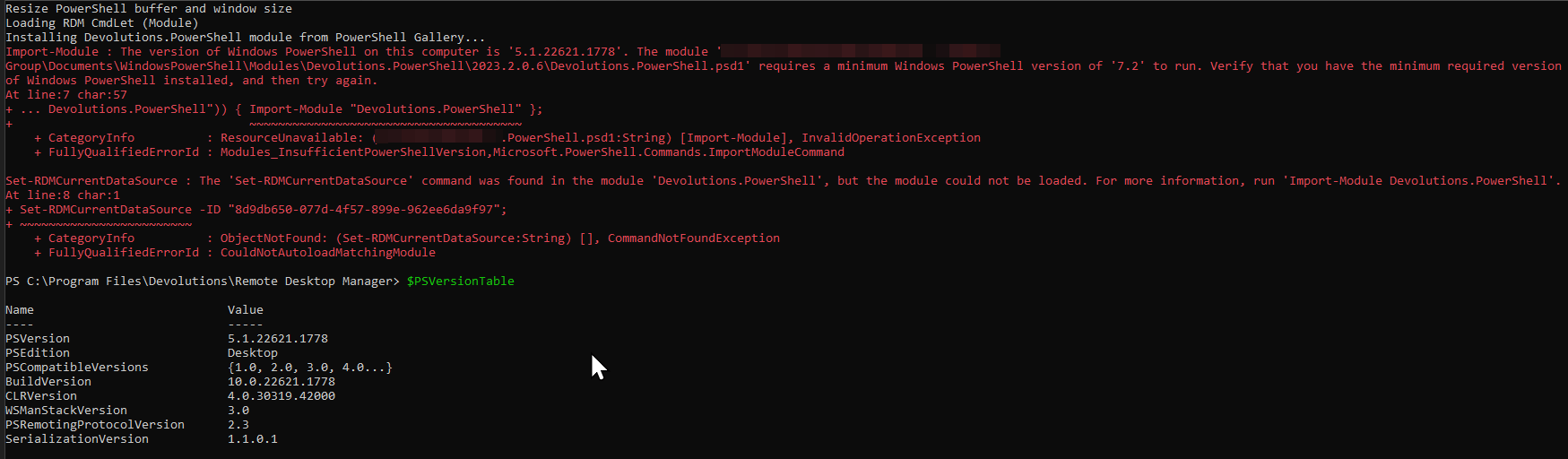
Tools -> PowerShell button opens PowerShell 5.1
Hi Richard,
thanks for this!
Tools -> PowerShell button opens PowerShell 5.1
Hi,
the ribbon button Tools -> PowerShell opens a window and tries to install the Devolutions.PowerShell module from powershellgallery.com. This fails with an error that PowerShell 7.2 is required.
I have Powershell 7.3 installed on my machine and already installed the Devolutions.PowerShell module.
I could not find a setting in RDM to configure it to open PowerShell 7.x. Is there one I just didn't find? Or is this a issue/bug?
Thx
Detlef
PowerShell 7.0
Hi, support
are your engineers still looking into the possibility to port the module to PowerShell 7? Is there any news regarding implementation?
Would be great to get an update.
Thx
Detlef
Make PowerShell module compatible with PowerShell Core
Thanks for pointing me to the workaround. I'll try that later
Make PowerShell module compatible with PowerShell Core
MS is now only actively developing PowerShell Core (currently version 7.0.3). Though, the RDM module appears to be incompatible to it.
E.g. calling Get-RDMSession returns warnings and error:
PS> Get-RDMSession -Name VM1
WARNING: System.NullReferenceException: Object reference not set to an instance of an object.
   at Devolutions.RemoteDesktopManager.Managers.ConnectionManager.LoadConnections(BaseConnectionDataSource dataSource, ConnectionEngine currentEngine)
   at Devolutions.RemoteDesktopManager.Managers.ConnectionManager.RefreshConnections()
   at RemoteDesktopManager.PowerShellModule.BaseCommand.BeginProcessing()
Get-RDMSession: Cannot retrieve the dynamic parameters for the cmdlet. Object reference not set to an instance of an object.
I suggest you add this to the todo list...
Red Cross in navigation list
Hi Devolutions,
I wonder if this issue will ever get a real fix?
Yes, these workarounds do resolve the issue.
But in fact it's a long existing bug in the software that eventually should get fixed, so the issue can't happen anymore...
PowerShell: Open-RDMSession uncomfortable and slow
Hi,
experimenting with Open-RDMSession function, I learned, that it's not possible to pass on several IDs at once, like:
Open-RDMSession -ID b3055e30-841b-49e6-a244-02ab117f41ee, 0eccccf2-2ba8-4fe4-b5bb-41f4099d736b, 7ff666a9-f566-413b-a05f-fe9e093ce5c0
So, if I want to open several sessions, I need to call the function several times. Doing this, I found that, if called three times without pause, only the first one is opened. I had to also add a two second pause to get all three sessions opened. Example:
Get-VMWareVM | where Notes -Match Trusted | ForEach-Object { $ses = Get-RDMSession -Name $_.Name; Open-RDMSession -ID $ses.ID }
This doesn't work. Only the first session is opened, the next two are "lost"...
Get-VMWareVM | where Notes -Match Trusted | ForEach-Object { $ses = Get-RDMSession -Name $_.Name; Open-RDMSession -ID $ses.ID; Start-Sleep -Seconds 2 }
This does work, but is slow bacause of the necessary 2 seconds sleep.
I suggest to improve the function, so it (ideally) accepts a list of IDs. Also, it should work asynchronously. I.e. create processes to open each session, so the function call is fast regardless of how long actually opening a session takes.