Tools -> PowerShell button opens PowerShell 5.1

Hi,
the ribbon button Tools -> PowerShell opens a window and tries to install the Devolutions.PowerShell module from powershellgallery.com. This fails with an error that PowerShell 7.2 is required.
I have Powershell 7.3 installed on my machine and already installed the Devolutions.PowerShell module.
I could not find a setting in RDM to configure it to open PowerShell 7.x. Is there one I just didn't find? Or is this a issue/bug?
Thx
Detlef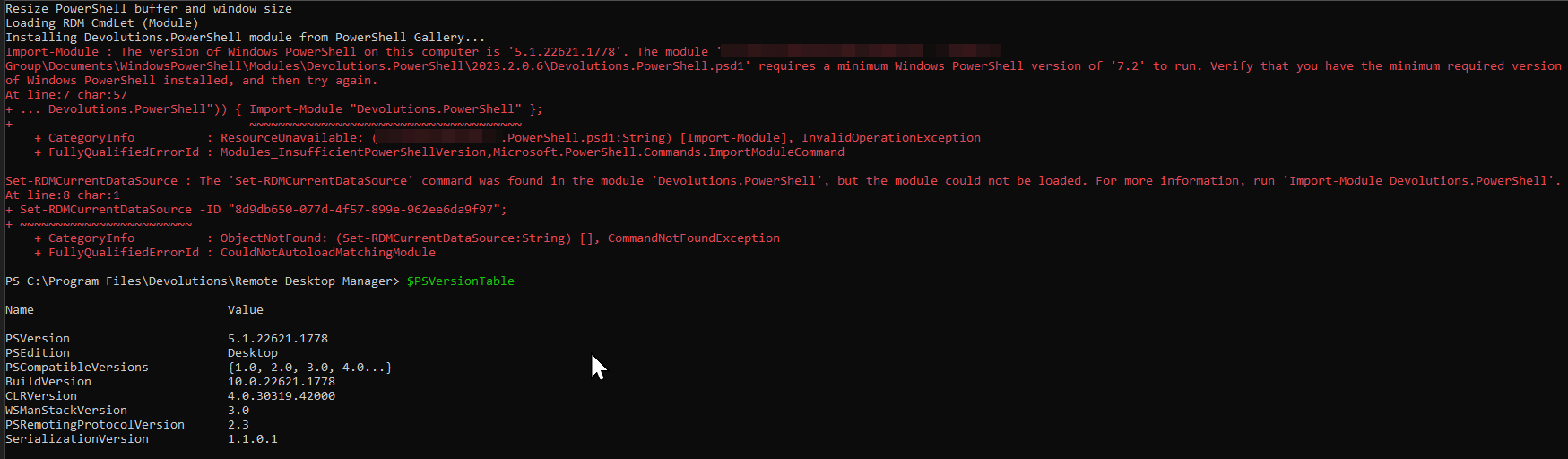
RemoteDesktopManager_lHNfdhfT68.png
All Comments (3)
Hello Detlef,
You can configure PS 7 to be used by going to File > Options > Types > Others - PowerShell version:
Best regards,
Richard Boisvert
1d6cb522-a3da-429e-9e7a-863a7c086407.png
Hi Richard,
thanks for this!
Hello,
For your information, we just created a KB with the information above: https://docs.devolutions.net/kb/devolutions-powershell/remote-desktop-manager/change-default-powershell-version/
Best regards,
Richard Boisvert