
stephen02
New SonicWall NetExtender 10.3.0 changed .exe (addon broken)
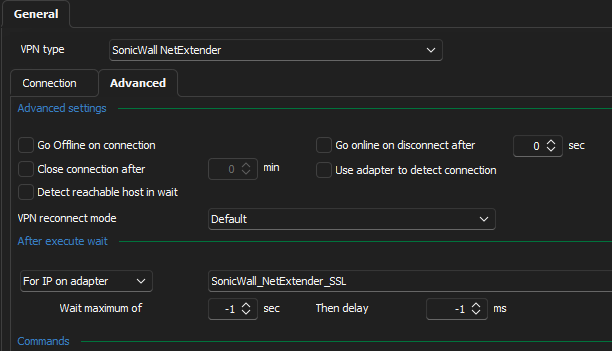
I can confirm that copying the file works - though in our case we also had to update the name of the name of the network adapter is looks for an IP on (previously it was "SonicWall NetExtender" and it's now "SonicWall_NetExtender_SSL":
Teams and screen share
We have the same issue - when sharing a screen in Microsoft Teams, any RDM session changes (logging into a new host, disconnecting from one etc.) causes the Teams screen share to freeze. This has been an issue in every version of RDM that we've had - up to and including the latest 2024.1.31.0. It's not a huge problem, as we can just stop and re-share the screen again, but it does get annoying.
Enhancements to Active Directory dashboard
The new Active Directory dashboard is turning out to be very useful, however I feel it could be enhanced still further, in particular we would love to see it support the following:
Multi-select of users/groups (for deletion, bulk property changes etc.)
Copying/cloning of user objects
It's already proving a great time-saver for our support team, and if the above were implemented it would be even better!
Active Directory Dashboard doesn't respect OU/Container DN setting
The fix for the AD Dashboard entry to respect the OU/Container setting is now available in the latest RDM 2023.2.22.
Let us know if that works on your end.
Sorry for the late response - yes, that sorted it - thanks!
Convert from database authentication to custom
We want to switch from using the "Database" type of authentication (along with Integrated Security) to the more secure "Custom" type. Is there any way to convert existing users from one to the other? (without losing the private vaults)
Active Directory Dashboard doesn't respect OU/Container DN setting
Oh, and one other thing I've noticed - the Active Directory Dashboard expects the credentials to be in the form DOMAIN\user.name, so if we have our credentials stored with the domain name and username in the separate fields, it doesn't work. I guess it should accept either approach?
You are correct either approach should work, I think that this issue may be fixed already in our next build which has not yet been released publicly. Please let me know if the next build still exhibits this issue.
We're now running 2023.2.22.0 and it the AD Dashboard still requires the credentials to be stored in the DOMAIN\user.name format. We're using a lookup to the user's private vault, in case that makes any difference.
Active Directory Dashboard doesn't respect OU/Container DN setting
Oh, and one other thing I've noticed - the Active Directory Dashboard expects the credentials to be in the form DOMAIN\user.name, so if we have our credentials stored with the domain name and username in the separate fields, it doesn't work. I guess it should accept either approach?
Active Directory Dashboard doesn't respect OU/Container DN setting
It would be great if the secure gateway (SSH Tunnel) would work with the Active Directory Dashboard session type too - it would mean we wouldn't have to give direct access to the domain controllers to our support team.
Active Directory Dashboard doesn't respect OU/Container DN setting
I might be misunderstanding how the setting is meant to work, but when I have an Active Directory Dashboard entry, and configure the "OU/Container DN" setting, the dashboard still opens at the root of the domain.
I'd like to have it set to open at a sub-OU so that we can let our team have access to manage user accounts, but not give them the whole directory tree to view.
We're running RDM version 2023.2.18.0 if that helps!
Get notified when important Information for RDM is published
Is there any update on this? - even a simple email mailing list for security alerts/new releases would be great.
Of course, I should have looked first - https://devolutions.net/security/advisories/ has exactly this!
Opening multiple sessions at once when using a password list prompts for each session
Our setup:
We have at least two accounts for our servers (one normal user, one administrator), and are storing the credentials either in a password list, or as two separate credentials, with similar names (eg: "Site - ServerName - Fred" and "Site - ServerName - Administrator", with the sessions set to look for "Site - ServerName").
When we open a single session, we are prompted to select a credential to use (either from the password list, or to pick from the two individual credential entries) - all fine so far.
When we select multiple sessions in one go, and attempt to open them all, we are prompted for which credential to use for each server in turn - even though they are all configured to look for the same credentials.
My question:
Is it possible to configure RDM so that, when opening multiple sessions at once (and they are all configured the same way for credentials) that it takes your first choice and uses that for all of the sessions?
SSH Gateway only working with IP addresses, not hostnames
I've set up an SSH gateway so that we can control access to our servers that have RDP enabled. The gateway is running on a Ubuntu 20.04 VM with all updates applied (fresh install).
When I log on to the VM directly and test, I can successfully resolve the FQDNs of our RDP servers (i.e. DC01.domainname.co.uk returns the expected IP address). However, if I use the FQDN when adding a host in RDM, it fails to connect. If I use the IP address it works fine.
Any suggestions?
Add prefix or suffix to entry names created by synchronizer
Yes, we have synchronizers for both our Production and UAT environments. Having prefixes (or suffixes) just makes it easier to visually confirm you're about to connect to the right server.
Add prefix or suffix to entry names created by synchronizer
We have several environments which have servers with the same name. It would be very helpful if there was an option in the synchronizer to add a custom suffix or prefix to the name of the session that gets created.
For example, we would add "Prod - " and "UAT - " to the entry names for our Production and User Acceptance Testing entries.
I currently achieve this by using a PowerShell script, but it's a bit clunky.
Run synchronizers via SSH Gateway
At present the SSH Gateway only supports RDP and HTTP sessions. It would be great if it could also be used to run an Active Directory sync against a domain controller behind the gateway. This would save a lot of time otherwise spent exporting lists of machines and then importing them.
Use Jump Host with Synchronizer
Do you have an example of how you configured it?
I've just tried configuring a normal Active Directory synchronizer, but with settings on the "VPN/SSH/Gateway" tab configured to use the Jump Host that has access to the UAT network.
When I run the sync a connection to the Jump Host is established, but it seems that the sync process is still run from my client machine, rather than through the Jump Host (I can tell, since the resulting RDP objects created match those in the Production system, and not those in the UAT one).
If the UAT and Production systems were guaranteed to always have matching sets of servers this wouldn't actually be a problem (since the RDP objects are created with the correct Jump Host settings), but there are usually a few systems in UAT that aren't yet created in the Production environment.
Thanks!
Use Jump Host with Synchronizer
It would be very useful (to us at least!) if it were possible to use a Jump Host with an Active Directory synchronizer.
I have a Jump Host configured to access a remote subnet that has the same set of IP addresses as another of our networks. This works fine for connecting to servers via RDP, however when I try to set up a synchronizer to use the same Jump Host it seems to ignore the host and sync against the other network.
The reason for the duplicate subnets is that we have a Production network and a UAT network configured for exactly the same network addresses.